

Overview
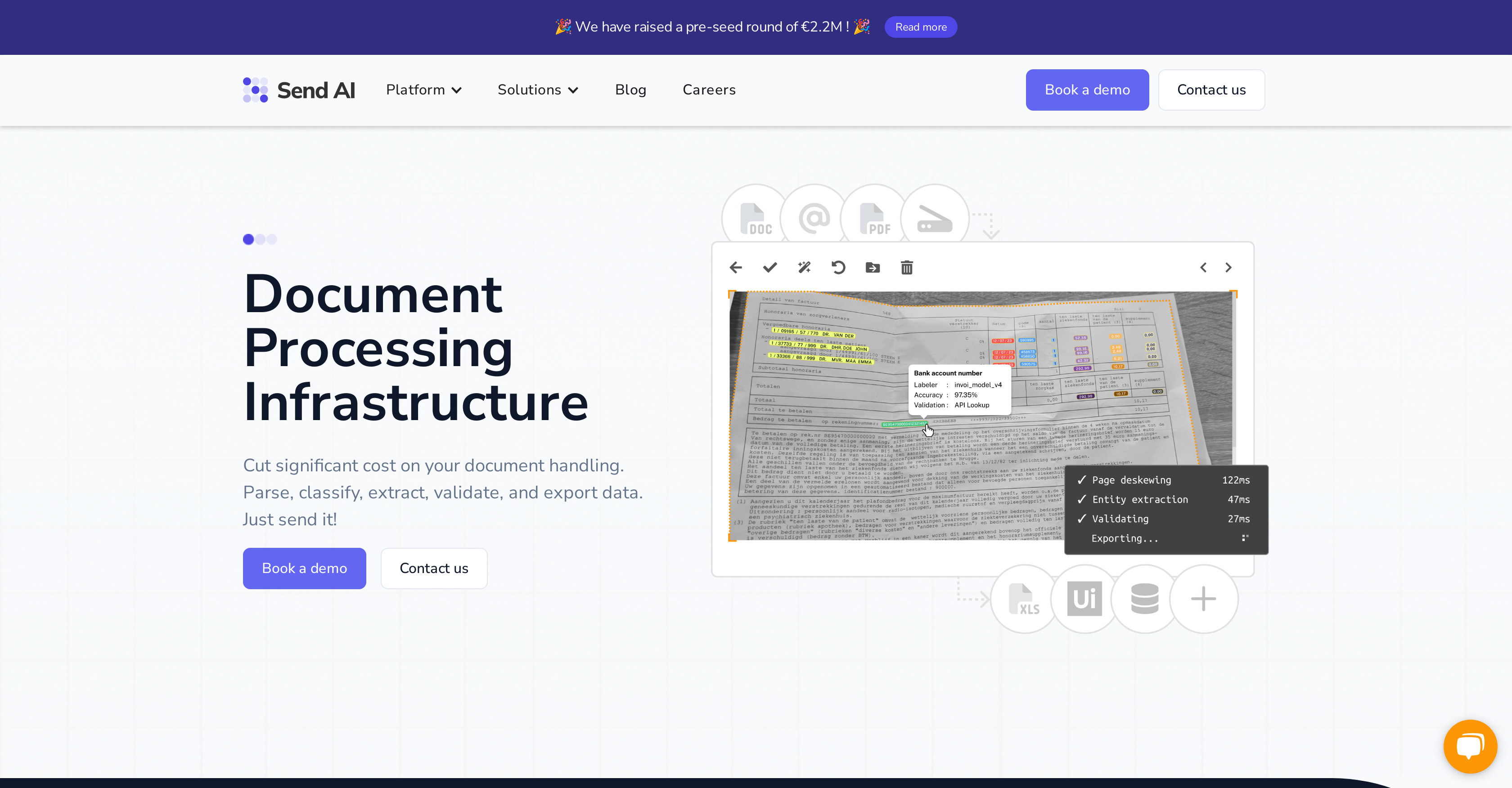
- Eliminate manual data entry entirely with custom AI models that automatically extract specific entities from your documents
- Ensure 99.99% export accuracy through custom validation logic and type checking that matches your exact data requirements
- Process scanned documents and images with OCR technology that converts them to structured, machine-readable text while preserving original layout
- Maintain complete data control through an intuitive interface that allows instant corrections and edits to exported information
- Continuously improve extraction accuracy as the system learns from your feedback and adjustments over time
- Secure sensitive document data with enterprise-grade encryption, single-tenant storage, and GDPR/ISO/SOC2 compliant infrastructure
- Train AI models specifically for your industry needs using minimal data samples, recognizing unique document types across insurance, retail, and logistics
- Export perfectly formatted data directly into your existing systems through secure API integrations that maintain workflow continuity
Pros & Cons
Pros
- Document processing automation
- Data parsing
- Data classification
- Data extraction
- Data validation
- Data export
- Custom validation logic
- Optical Character Recognition (OCR)
- Preserves original text structure
- High accuracy on small datasets
- Language model training
- Tailor-made language models
- Entity recognition in documents
- Export optimization
- Type Checking validation
- User-friendly interface for quick corrections
- Continuous improvement from user feedback
- Supports multiple sectors
- High data security standards
- Data encryption
- Single-tenant storage
- GDPR compliance
- ISO/SOC2 infrastructure
- Reduction in errors and costs
- Document type detection
- Custom logic validation
- Data enrichment
- Fast corrections on exports
- Scanner to text capabilities
- Auto improvements on feedback
- Data extraction mode
Cons
- Limited training set size
- Type checking might be restrictive
- Complex configuration required
- Training models might be time-consuming
- Heavy reliance on user feedback
- Model personalisation might limit scalability
- Limited integration options
- Specific document types not supported
- Manual corrections required
- Requires bespoke fine tuning
Reviews
Rate this tool
Loading reviews...
❓ Frequently Asked Questions
Send AI is a platform that provides a document processing infrastructure. It streamlines business workflow by automating document management tasks, including parsing, classifying, extracting, validating, and exporting data from documents. Users can train and configure their own AI models for information extraction and data export.
Send AI streamlines business workflows by allowing users to automate document management tasks. This includes scanning and converting documents into text using Optical Character Recognition (OCR), parsing and classifying documents, extracting pertinent information, validating the extracted information, and exporting the data directly into the user's own systems.
Yes, users can definitely train and configure their own AI models with Send AI. This functionality empowers users to extract specific information from documents tailored to their unique needs.
Data extraction from documents in Send AI works through the use of custom trained language models. The system parses and identifies key information, entities, from the documents based on the training provided to the AI model. It can extract data with high accuracy in no time.
To ensure the accuracy of data extraction, Send AI applies custom validation logic and a feature called Type Checking. This ensures that the extracted entities match the specific data types set by the user. The easy to use interface also allows for quick corrections and edits if needed.
Optical Character Recognition (OCR) is a technology that transforms scanned images or documents into machine-readable text. In Send AI, OCR is applied to convert images or scans into readable text, preserving the original structure of the document.
The custom language model in Send AI works by training on a small set of data. Users can tailor these models to their specific needs and use cases. Once turned on, entities will be extracted automatically from documents with high accuracy.
The model training feature in Send AI allows users to tailor language models to their particular needs. This allows for the recognition and extraction of specific entities from documents, essentially increasing efficiency and effectiveness for users dealing with particular types of data or information.
Send AI allows for the export of data across various types. The export process is optimised according to user preferences and comes with a validation feature called Type Checking to ensure that exported entities match the given data types.
Send AI provides an easy-to-use interface that lets users have control over their exported data. It offers options for quick corrections and edits to ensure the accuracy and appropriateness of the data.
Yes, Send AI is designed to learn from user feedback. This function allows the system to improve the accuracy and quality of data exports continuously.
Absolutely, Send AI can be used across a range of sectors such as Insurance, Retail, Transport & Logistics, and Government. It's adaptive to various industry use-cases due to its customisable AI models.
Data security standards are a priority in Send AI. It offers features like encryption and single-tenant storage, and the system's architecture is compliant with GDPR, and ISO/SOC2, ensuring that user's data is secure.
Encryption in Send AI ensures your data is secure while single-tenant storage ensures your data is stored separately from other users. GDPR compliance means that user data is handled according to European Union's data protection laws. The ISO/SOC2 infrastructure denotes that Send AI meets international standards on managing privacy and security risks.
Type Checking is a validation feature in Send AI. It ensures that entities extracted from documents match the specific data types as defined by the user, ensuring accurate data export.
Users can apply custom validation logic in Send AI to ensure 99.99% export accuracy. It tailors the extracted information to match their unique needs, helping structure and enrich the data to fit right into their systems.
Send AI’s document classification feature uses finetuned language models to detect document types and subsequently extract key information from the documents. This feature aids in organizing and managing large volumes of documents by grouping them based on their content or characteristics.
Send AI serves multiple sectors including Insurance, Retail, Transport & Logistics, and Government. For each sector, it can streamline document processing tasks, support vision and language model training for custom data extraction, reduce manual copy+paste work, and ensure user remains in control of their data while the system learns and improves based on feedback.
The data validation process in Send AI involves custom logic to validate the extracted predictions from documents before exporting. It ensures 99.99% export accuracy, allowing the data to fit seamlessly into user systems.
Send AI allows secure connection via APIs and supports integrations with user systems. The scale and nature of integrations are not specified explicitly, but the platform's design implies that implementing them would be a straightforward and quick process.
Pricing
Pricing model
No Pricing


