
TalkText
Write emails and documents 3.75x faster than typing with smart dictation that transforms natural speech into polished text
Listing not yet reviewed by our editors · How we check
Overview
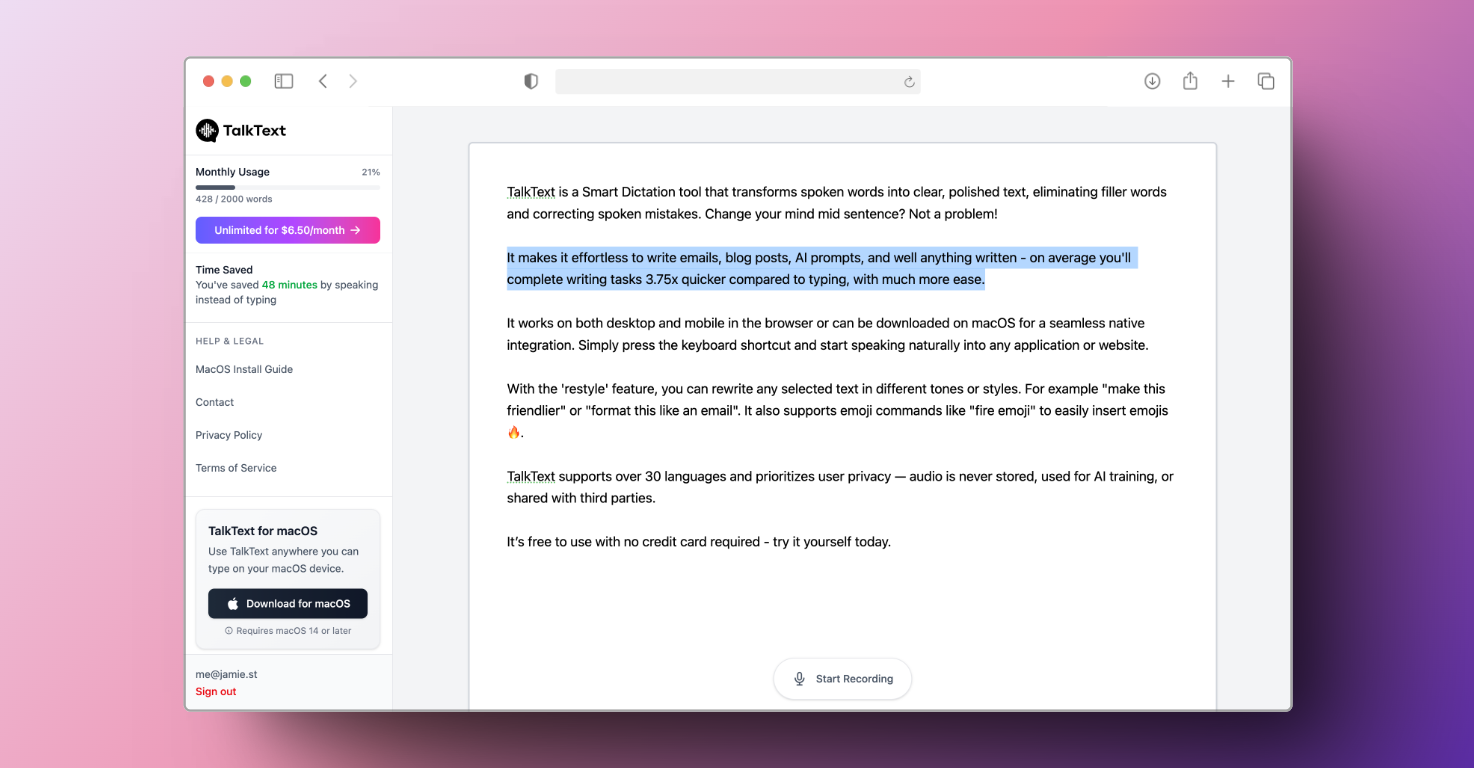
- Write emails and documents 3.75x faster than typing with smart dictation that transforms natural speech into polished text
- Eliminate filler words and spoken mistakes automatically with AI-powered transcription that cleans up your natural speech
- Rewrite any selected text in different tones or styles using the restyle feature for instant email formatting or friendlier messaging
- Insert emojis through voice commands like 'fire emoji' for expressive communication without switching to keyboard
- Dictate naturally across any application or website with seamless desktop and mobile browser integration
- Maintain complete privacy with audio that's never stored, used for AI training, or shared with third parties
- Create content in over 30 languages with accurate capitalization and punctuation applied automatically
Pros & Cons
From the listing; not yet checked by our editors.
Pros
- Works in the browser
- No download required
- Works on mobile
- Native macOS integration available
- Speech-to-Text Feature
- Improves Productivity
- Content Creation Assistance
- Supports 30 Languages
- Text Correction
- Text Rewriting
- Accurate Transcriptions
- Proper Capitalization and Punctuation
- Eliminates Speech Errors
- Protects User Privacy
- No Audio Storage
- Does Not Sell User Data
- Email and Blog Dictation
- Text Restyling Feature
- Free to Get Started
- 3.75x Faster Than Typing
- Outperforms Built-in macOS Dictation
- No Third-Party Data Selling
- No User Data for Training
- Removes Speech Fillers
- Real-time Audio Processing
- Polish Speech into Professional Text
- Restyle Any Text
- Multiple Use Cases
- Adapts According to Your Style
Cons
- Requires Internet connection
- No offline functionality
- Limited free usage (2000 words/month)
Alternatives to TalkText
Tools that share the most tags with TalkText.
- WebNovel AI
Transform initial concepts into fully structured web novels with guided story planning from theme definition to chapter completion
Freemium · from $50/month
$50/month
Not yet checked
- AI Book Writer
Generate complete manuscripts from concepts in under 30 minutes using multi-AI model support including OpenAI, Groq, and local engines
Paid · from $34.20
$34.20
Not yet checked
- Lovable Tales
Watch your child become the hero of every story with interactive character selection that puts them at the center of the adventure
Free
Not listed
Not yet checked
- AI Comic Factory
Transform text descriptions into complete comic panels instantly without any artistic ability required
Freemium · from $9.99/month
$9.99/month
Not yet checked
- RewriteBar
Eliminate app switching and write polished content instantly with AI text enhancement that works directly in any macOS application
Free trial · from $29
$29
Not yet checked
- SafeSpelling
Present perfectly polished documents by eliminating spelling and typographical errors with AI-powered analysis
Freemium · from $7.99/unit
$7.99/unit
Not yet checked
Reviews
Rate this tool
Loading reviews...
Frequently asked questions
What is TalkText?
Jamie Street 🛠️ 2 tools 🙏 21 karma wrote:TalkText is a Smart Dictation tool that transforms spoken words into clear, polished text, eliminating filler words and correcting spoken mistakes. It makes it effortless to write emails, blog posts, AI prompts, and well anything written. It works on both desktop and mobile in the browser or can be downloaded on macOS for a seamless native integration. With the 'restyle' feature, you can rewrite any selected text in different tones or styles.
What's the difference between TalkText and the built-in dictation in macOS?
TalkText brings several key improvements over the built-in dictation feature in macOS. Specifically, it offers more accurate transcriptions, applies corrections, ensures proper capitalization and punctuation, and eliminates speech fillers and errors. This allows a more natural and consistent dictation experience.
How does TalkText's 'Restyle' feature work?
TalkText's 'Restyle' feature is an intelligent tool that allows users to select any written text and instruct the software to rewrite it. It tailors the tonality of the content based on user instruction, providing versatility in expression and enhancing content creation.
How does TalkText improve my dictation?
TalkText improves dictation by employing AI to refine spoken words into high-quality written text. It removes common speech fillers and mistakes, ensuring the free flow of thoughts and ideas during dictation. Further, it applies corrections, capitalizes appropriately, and punctuates sentences correctly.
Does TalkText support other languages apart from English?
Yes, TalkText supports a multitude of languages beyond English. The software can cater for more than 30 languages, making it versatile for users around the globe.
Does TalkText value user privacy?
Yes, TalkText highly values user privacy. The software does not store audio, use user data to train AI models, or sell user data to third parties.
Does it store my audio data?
No, TalkText does not store any audio data from its users. The software processes audio in real-time during usage and it is never stored beyond the time needed for transcription.
Does TalkText use my data to train their AI models?
No, TalkText does not use any user data to train its AI models, providing an additional layer of data privacy for its users.