RewriteBarv2.18.0
Overview
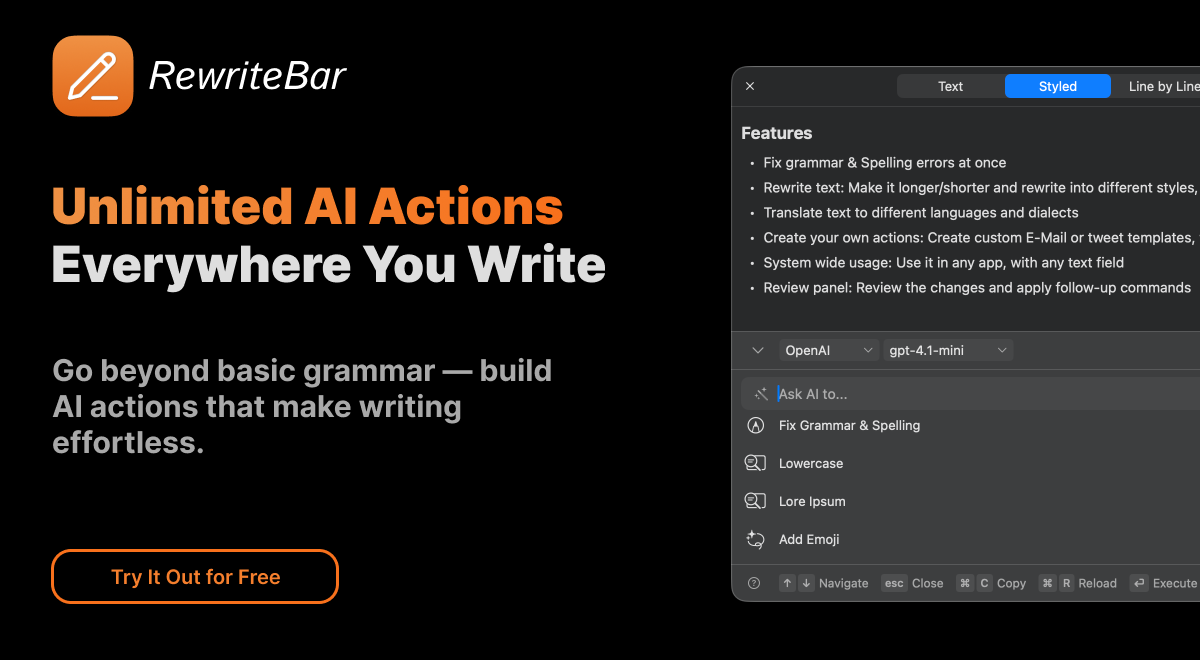
- Eliminate app switching and write polished content instantly with AI text enhancement that works directly in any macOS application
- Fix subtle grammar errors that traditional spell-checkers miss using advanced AI-powered grammar correction
- Adapt your writing tone instantly for different contexts with professional, casual, or formal rewriting options
- Translate text and code comments across 500+ languages without leaving your current application using built-in translation
- Create custom AI workflows for specific tasks like extracting action items or converting text formats with custom actions
- Work completely offline with local AI providers while maintaining full privacy and data control
- Compare original and rewritten versions side-by-side before applying changes with the Compare View feature
- Trigger AI actions instantly with custom keyboard shortcuts or Apple Shortcuts integration for rapid workflow automation
Pros & Cons
Pros
- Fixes grammar and spelling errors instantly
- Works offline with local models like Ollama or LM Studio
- Works across all macOS applications — Mail, Slack, Notion, VS Code, Figma, etc.
- Lightweight (≈20MB), optimized for Apple Silicon
- Custom AI actions and reusable templates for advanced workflows
- Adjusts tone and writing style automatically
- Supports 12+ AI providers (OpenAI, Anthropic, Gemini, Claude, Apple Intelligence, etc.)
- Seamlessly integrates with macOS using lightweight menubar design
- Translates text and code snippets across 500+ languages
- No need to copy-paste or switch apps
- Customizable keyboard shortcuts for every action
- Improves writing speed and overall productivity
- Compatible with Grammarly and other AI tools
- Includes Compare View for reviewing changes before applying
- Multilingual interface (15+ supported languages)
- Slack and Figma integration ready
- Fast performance — no UI slowdown
- Privacy-friendly: does not store user data
- Refund policy within 14 days
- Uses macOS accessibility permissions only when needed
- Simple pay-as-you-go or one-time license options
- No mandatory subscription
- Translates into multiple languages
- Flexible pricing plans + 25% TAFT launch discount
- Built by a solo macOS developer who uses it daily
Cons
- macOS only — not available for Windows or web yet
- Learning curve for creating custom AI actions (advanced users benefit most)
- No built-in voice or speech input support (text only)
- Requires macOS Ventura (13.0) or newer
- Needs macOS accessibility permissions to function across apps
- One-time license plan requires your own API key
Reviews
Rate this tool
Loading reviews...
❓ Frequently Asked Questions
Mathias Michel
🛠️ 1 tool
wrote:RewriteBar is a lightweight macOS menubar app that enhances your writing in any app using AI. Select text anywhere (Mail, Slack, Notion, etc.), choose an AI action, and instantly improve or translate your text — no context switching needed.
Mathias Michel
🛠️ 1 tool
wrote:Once installed, RewriteBar sits in your menubar. Highlight any text, open the menu (or use a keyboard shortcut), and pick an AI action — such as fix grammar, simplify language, translate, or rewrite tone.
The AI instantly returns a rewritten version that replaces or appears next to your original text.
Mathias Michel
🛠️ 1 tool
wrote:RewriteBar works in any macOS app — from Mail, Notes, and Slack to Xcode, VS Code, Notion, or Figma.
If you can select text, you can transmit it with RewriteBar.
Mathias Michel
🛠️ 1 tool
wrote:Yes! 🚀 RewriteBar can polish code comments, fix grammar in your documentation, and even translate snippets between programming languages or styles.
It’s perfect for developers who want to write cleaner, clearer code — without leaving their editor. 💡
Mathias Michel
🛠️ 1 tool
wrote:RewriteBar blends seamlessly into macOS. Once installed, it sits in your menubar and works in any app — no copy-pasting needed. Just select text, press a shortcut, and RewriteBar instantly improves it. ✨
Mathias Michel
🛠️ 1 tool
wrote:Yes — you can set your own keyboard shortcuts to trigger RewriteBar actions. It’s a quick way to fit the app perfectly into your workflow and boost productivity. ⚡️
Mathias Michel
🛠️ 1 tool
wrote:Yes — you can connect your own OpenAI API key to use RewriteBar with your preferred models and settings. It gives you full control over how your AI requests are handled. ⚙️
Mathias Michel
🛠️ 1 tool
wrote:Every purchase includes a personal license key, easy installation instructions, and one year of free updates and support. ✨
Mathias Michel
🛠️ 1 tool
wrote:RewriteBar runs on macOS Ventura (13.0) or later. Just install and you’re ready to go. ⚙️
Mathias Michel
🛠️ 1 tool
wrote:RewriteBar uses AI to adapt your writing tone based on context — for example, switching from casual to professional or friendly to formal. It helps your text sound just right. 💡
Mathias Michel
🛠️ 1 tool
wrote:Yes — RewriteBar supports fast translation of words, sentences, and even code snippets into over 500 languages. 🌐
Mathias Michel
🛠️ 1 tool
wrote:Yes — RewriteBar works perfectly in Figma and any other macOS app. Just select text and apply AI-powered actions right where you work. ✨
Mathias Michel
🛠️ 1 tool
wrote:No limits at all. RewriteBar runs smoothly across all macOS apps — from Slack and Mail to Notion, VS Code, or Safari. It stays lightweight and never slows you down. ⚡️
Mathias Michel
🛠️ 1 tool
wrote:RewriteBar saves time by letting you rewrite, translate, or fix text directly inside any macOS app — no switching or copy-pasting. You can even trigger custom actions with your own shortcuts. 🚀
Mathias Michel
🛠️ 1 tool
wrote:RewriteBar offers flexible pricing — from a free trial to monthly, yearly, or one-time licenses. You can even use your own API key for unlimited use. 💡
Mathias Michel
🛠️ 1 tool
wrote:Yes — there’s an exclusive 25% discount for your first purchase on There’s an AI for That. Just apply the TAAFT discount automatically at checkout. 💸
Mathias Michel
🛠️ 1 tool
wrote:Right after purchase, you’ll see your personal license key and step-by-step instructions to install the app. It only takes a minute to get started. ⚙️
Mathias Michel
🛠️ 1 tool
wrote:After buying, just download the app, enter your license key, and follow the short installation guide. You’ll be up and running in no time. 🚀
Mathias Michel
🛠️ 1 tool
wrote:Yes — RewriteBar can even translate code comments or strings into other languages while keeping your code intact. 🧠
Mathias Michel
🛠️ 1 tool
wrote:Yes — you can start with 100 free AI requests using GPT-4o-mini. No credit card required. ✨
Mathias Michel
🛠️ 1 tool
wrote:Your text is only sent to your selected AI provider for processing — never stored or analyzed by RewriteBar. You stay in full control of your data. 🔐
Mathias Michel
🛠️ 1 tool
wrote:Yes — RewriteBar can work offline if you connect it to local AI providers like Ollama or LM Studio. This lets you run AI actions privately on your Mac without an internet connection. 🔒
Mathias Michel
🛠️ 1 tool
wrote:Yes — RewriteBar supports 12+ AI providers including Anthropic, Gemini, Claude, OpenRouter, and Apple Intelligence. You can pick the one you prefer. ⚙️
Mathias Michel
🛠️ 1 tool
wrote:Custom actions let you create your own AI workflows — like rewriting Slack messages, extracting meeting action items, or converting “Sie” → “Du.” It’s power-user friendly but easy to use. ⚡️
Mathias Michel
🛠️ 1 tool
wrote:Yes — RewriteBar’s Compare View lets you review both your original and the AI-rewritten version before replacing it. 👀
Mathias Michel
🛠️ 1 tool
wrote:Yes — you can trigger RewriteBar actions directly via Apple Shortcuts or PopClip, perfect for quick automation. 🔗
Mathias Michel
🛠️ 1 tool
wrote:Yes — the app interface is localized into 15+ languages, including German, French, Spanish, and Japanese. 🗺️
Mathias Michel
🛠️ 1 tool
wrote:RewriteBar is built for writers, professionals, developers, and non-native English speakers who want to write faster and clearer in any macOS app. ✍️
Pricing
Pricing model
Free Trial
Paid options from
$29
Billing frequency
One-time
Refund policy
14 Days money back guarantee