

TriggerFlow
Automate legacy software and desktop apps that have no API: screen-based automation uses image matching, OCR, window checks, keyboard and mouse input to work through any Windows application or web portal the way a person does.
Listing not yet reviewed by our editors · How we check
Overview
- Automate legacy software and desktop apps that have no API: screen-based automation uses image matching, OCR, window checks, keyboard and mouse input to work through any Windows application or web portal the way a person does.
- Go from a task description to a working workflow without scripting: record actions, assemble steps in a visual editor, or ask ChatGPT or Codex to perform the task and save the result as a tested automation profile (beta).
- Run saved automations with zero AI usage costs: profiles built from standard actions execute locally on the PC with no AI calls.
- Deploy unattended Windows automation that behaves predictably: every workflow is tested on the real PC, then scheduled with stop rules and bounded retries to prevent runaway jobs.
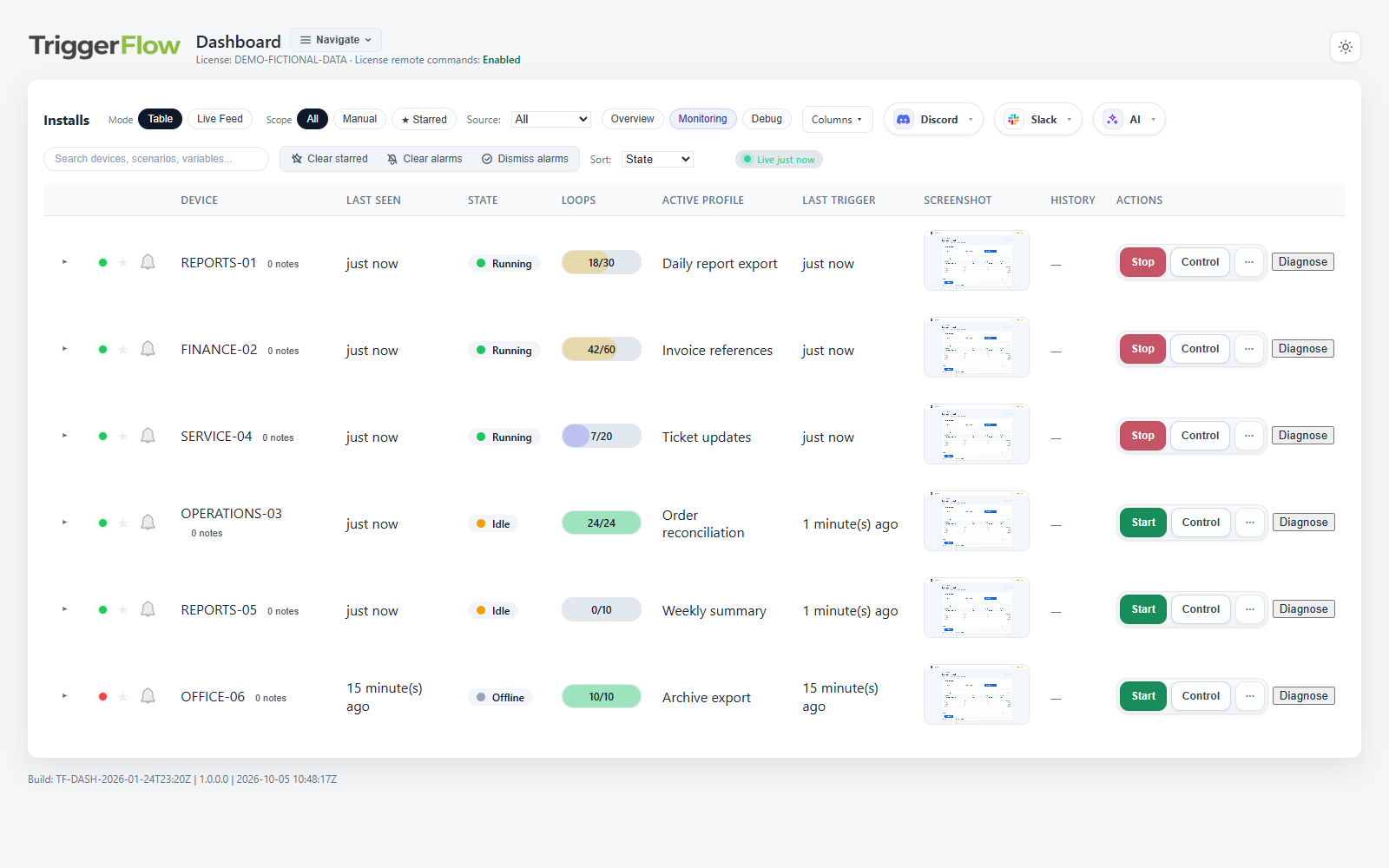
- Spot failures across every machine before clients report them: the fleet dashboard shows device state, live screenshots, last-seen times and run history, with instant email, Slack, Discord or webhook alerts.
- Fix stuck jobs without traveling on site: remote start, stop and full screen control let you troubleshoot any monitored PC directly from the dashboard.
- Keep client environments separated and billable: automation consultants and MSPs deploy to client PCs with a separate account and licence key per client, priced per device from £15/month.
- Lock down remote access to approved machines only: two-factor authentication, selective device control and signed updates protect every device in your fleet.
- Validate the fit on real workloads at no cost: a 14-day free trial with no card required lets you automate and monitor your own Windows PCs before committing.
Pros & Cons
From the listing; not yet checked by our editors.
Pros
- Windows app screen monitoring
- Automates desktop software
- Automates legacy software
- Works without APIs
- Remote operation capability
- Live overview of monitored machines
- Alerts and screenshots feature
- Enables remote problem-solving
- Offers signed updates
- Remote command features
- Compatible with ChatGPT
- Compatible with Codex
- Generate automation routines
- Save routines as profiles
- Workflow management
- Keeps run counts and histories
- Features two-factor authentication
- Selective device control
- Run workflows on schedule
- Monitors complete device fleet
- Remote start, stop control
- Device state tracking
- Recycling automation across machines
- ChatGPT workflow builder (Beta)
- Works with OCR
- Workflow testing before installation
- Revoke access option
- Scheduled workflow targeting
- Bounded retries option
- Step-in ability during execution
- Designed for Managed Service Providers
- Fleet monitoring feature
- Active workflows tracking
- Device screenshots viewing
- Works with legacy applications
- Data entry automation for non-API programs
- Screen viewer feature
- Individual device control feature
- User control granting separately
- Offers two-month free on annual billing
- Tiered pricing system
- Branded agent installers
- Workflow records setting
- Manual task execution via Screen viewer
- Remote problem fixing
- Supervised test pass requirement for installation
Cons
- Windows applications specific
- Requires remote operation
- Need for routine testing
- No explicit cloud compatibility
- Limited to ChatGPT, Codex
- Manual profile saving
- No cross-platform support
- Requires installation
- No application programming interface
- Expensive for small firms
Alternatives to TriggerFlow
Tools that share the most tags with TriggerFlow.
- Tendem
Eliminate the need to hire and manage freelancers for administrative work by using a hybrid system where AI handles execution and human experts provide oversight and validation.
Paid
Not listed
Not yet checked
- Levity
Eliminate manual data entry by automatically extracting critical information from emails and attachments directly into your Transportation Management System
Not listed
Not listed
Not yet checked
- Manus
Create personalized travel itineraries and custom handbooks instantly through comprehensive travel information integration
Freemium · from $16/month
$16/month
Not yet checked
- Raccoon AI
Launch production-ready web apps from a simple prompt, with full ownership of the code written in real-time and deployed in clicks.
Freemium · from $19/month
$19/month
Not yet checked
- Barie AI
Execute entire projects from a single prompt by breaking down complex tasks into parallel subtasks
Freemium · from $10/month
$10/month
Not yet checked
- Aident AI
Build reliable workflows without coding or technical help using natural language descriptions converted into working Playbooks
Freemium · from $12/month
$12/month
Not yet checked
Reviews
Rate this tool
Loading reviews...
Frequently asked questions
What is TriggerFlow?
TriggerFlow is an automation tool created specifically for Windows applications. It focuses on automating desktop and legacy software by analyzing Windows app screens. This solution is ideally suited to consultants, Managed Service Providers (MSPs), and IT teams as it provides a real-time overview of monitored machines, along with alerts and screenshots for remote troubleshooting.
How does TriggerFlow work?
TriggerFlow functions by monitoring Windows application screens and orchestrating automation processes. Users can interact with ChatGPT and Codex to describe a task and generate an automation routine. Once this routine is tested and verified on an actual PC, it can be saved as a profile and executed like standard workflows. Record keeping of run counts and history is also included in its operation.
What platforms does TriggerFlow support?
TriggerFlow supports Windows environments. The platform is designed specifically to automate tasks in Windows applications, whether they are desktop or legacy software.
Who is the target audience for TriggerFlow?
The target audience for TriggerFlow encompasses automation consultants, Managed Service Providers (MSPs) and IT teams. These user categories can leverage TriggerFlow to automate, monitor, and control Windows applications across various systems.
Can TriggerFlow monitor and control PCs remotely?
Yes, TriggerFlow can indeed monitor and control PCs remotely. It offers a comprehensive live overview of the monitored machines, complete with alerts and screenshots, which aids in remotely solving any problems that may occur.
How does TriggerFlow interact with Windows applications?
TriggerFlow interacts with Windows applications by monitoring their screens and orchestrating automation processes. This includes both desktop and legacy software. It's even possible for it to automate tasks in applications without an available API.
What type of tasks can TriggerFlow automate?
TriggerFlow can automate a variety of tasks within Windows applications. These can range from regular, repetitive tasks to more machine-specific routines. Also, tasks can be described to ChatGPT and Codex to generate automation routines.
What is the role of ChatGPT and Codex in TriggerFlow functionality?
ChatGPT and Codex are used to describe a task and generate an automation routine in the TriggerFlow setup. A routine can be described to these AI systems, which will then build an automated process to accomplish the task. Once this process is tested and verified, it can be saved as a profile and run as a standard workflow.