

Oopsie, by Zipy
Overview
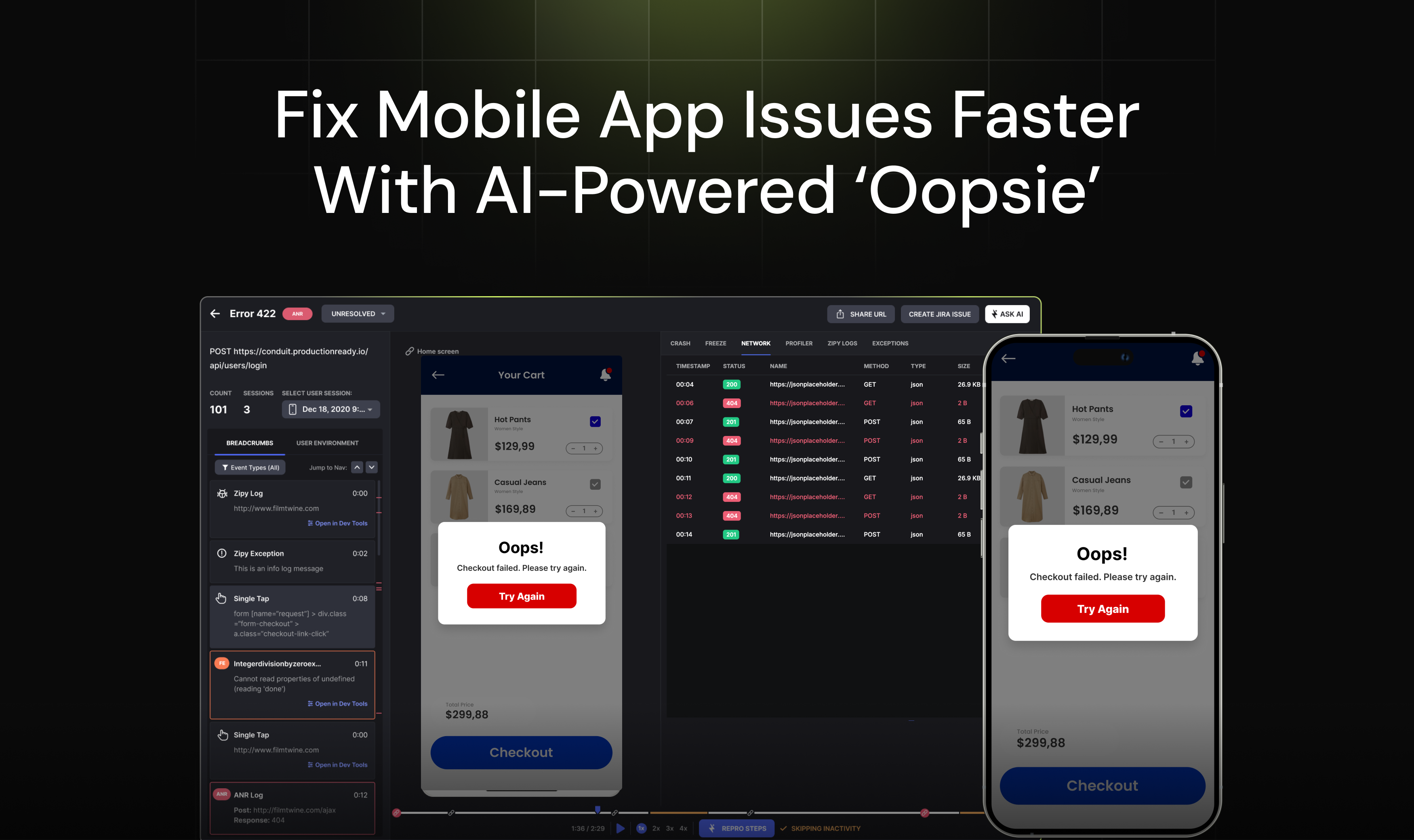
- See exactly what users experienced before crashes with AI-powered mobile session replays that capture every interaction
- Automatically detect and prioritize UI errors with Oopsie Bugs AI engine that surfaces critical usability problems
- Get instant error diagnostics with comprehensive logs, stack traces, and network activity history for swift resolution
- Replay user sessions directly from Firebase Crashlytics alerts to understand the full context behind each crash
- Receive real-time alerts on email or Slack when critical errors occur for immediate response
- Identify user behavior patterns with heatmaps and session tagging to improve engagement and reduce friction
Pros & Cons
Pros
- Supports Flutter and React Native
- Android and iOS compatible
- In-depth user behavior understanding
- User session replays
- Issue prioritization
- Firebase/Crashlytics integration
- Error monitoring
- User identification
- Advanced developer tools
- Heatmaps utility
- Network logs
- Console logs
- Stack traces
- Workflow integration
- Email alerts
- Slack alerts
- UI problems identification
- Usability problems identification
- Bug fixes expedited
- Detailed diagnostic analysis
- Mobile session replays
- Integration with Firebase
- Allows replay of user sessions
- Error reproduction steps generation
- Tracks key app performance metrics
- Generates automated repro steps
- Mobile app health monitoring
- Issue detection within apps
- Integration and compatibility with multiple operating systems and frameworks
- Optimized for mobile app debugging
- Unified customer experience platform
- Product analytics feature
- Integration with various management tools
- Segmentation features for user sessions
- Summarizes and recommends fixes for user issues
- Google Firebase for crash/anr tracking
- Listing and priorities UI errors
- Multi-framework compatibility
- Detects API Performance
- Integrates well with existing systems
Cons
- No support for Java/Kotlin
- Depends on Firebase/Crashlytics
- Not designed for web debugging
- Possible privacy issues with replay
- Limited integrations
- No real-time error monitoring
- No distinct mobile app
- Lacks versatile language compatibility
Reviews
Rate this tool
Loading reviews...
❓ Frequently Asked Questions
Zipy for Mobile supercharges the debugging process of mobile applications. It offers AI-powered insights, 'Oopsie' bugs, session replays, and actionable fixes. It specializes in catching errors like crashes and ANRs and aids in understanding user behavior. It currently supports the Flutter and React Native frameworks, applicable to both Android and iOS platforms, with a version for Java/Kotlin soon to be released.
Zipy for Mobile enhances debugging in numerous ways. It uses AI-powered session replays that allow a deeper understanding of user behavior and identification of issues occurring within the app. The AI engine 'Oopsie' identifies UI and usability issues faced by users and prioritizes them for resolution. It also offers comprehensive error logs for thorough diagnostic analysis.
Yes, Zipy for Mobile caters to both Android and iOS platforms, making it a versatile tool for mobile application debugging across varied operating systems.
Zipy for Mobile supports both Flutter and React Native frameworks, thus providing extensive coverage for most mobile development environments.
'Oopsie' within Zipy for Mobile is a powerful AI engine that identifies UI and usability problems encountered by app users. It systematically prioritizes these issues for resolution, assisting the developers in allocating their resources effectively.
'Oopsie', the AI engine in Zipy for Mobile, identifies and prioritizes UI and usability problems by analyzing user sessions. It eliminates the need for developers to manually sift through thousands of user sessions by highlighting the crucial issues faced by the customers.
Absolutely, Zipy for Mobile can integrate with Google's Firebase or Crashlytics, enhancing its ease of use and efficiency. This integration enables the ability to replay user sessions for issues detected by these platforms.
Zipy for Mobile includes numerous utility features such as network logs, console logs, and stack traces that aid developers in identifying, tracking, and rectifying any bugs or issues occurring within the app.
Yes, Zipy for Mobile provides effective error monitoring. It is capable of capturing errors, exceptions, crashes, and ANRs(APP Not Responding) in mobile apps, assisting in swift and effective bug resolution.
Zipy for Mobile allows you to streamline your workflow by integrating smoothly with your existing systems. This integration facilitates a better overall workflow without unnecessary disruptions.
Yes, Zipy for Mobile can send alerts via either email or Slack. It enables real-time monitoring and immediate response to errors and usability issues in your mobile application.
Replaying user sessions with Zipy for Mobile helps you understand your users' behavior and the issues they face while using the app. It provides insights into how users interact with your app, which pages or features they engage with, and where they encounter problems or leave the app. These insights can guide improvements to your app, enhancing user satisfaction and your app's overall performance.
Zipy for Mobile improves user behavior analysis by replaying user sessions, providing a clear picture of users' interactions with the application. The AI-powered tool observes exactly how users interact with the app and provides insights that can be leveraged to enhance user experience and engagement.
Yes, Zipy for Mobile is extremely useful for identifying UI and usability problems. The 'Oopsie' feature is specifically designed to target and prioritize these issues for resolution. It helps maintain a high standard of app quality by quickly addressing issues as they arise.
The heatmap feature in Zipy for Mobile allows for visual representation of areas that receive more interaction. This feature helps you understand which buttons, links, or other elements of your app are receiving the most clicks or touches. It enables you to identify which areas of your app are most engaging to users, and which areas may need improvements to drive more interaction.
Yes, Zipy for Mobile has a user identification feature. It can identify and tag users in each session with custom identifiers and segment them, promoting personalized analysis and a more enhanced understanding of different user behaviors.
Zipy for Mobile offers advanced developer tools including error monitoring, diagnostic analysis for mobile errors through comprehensive error logs, AI-powered 'Oopsie Bugs' along with their exact video snippets and associated technical errors to detailed diagnostics.
Zipy for Mobile aids in fixing bugs for mobile apps by providing detailed diagnostics for mobile errors and a monitoring tool. Capturing errors, crashes, exceptions, and ANRs (Application Not Responding), it provides comprehensive error logs to better understand and swiftly resolve the issues.
The Network Logs feature in Zipy for Mobile stores a history of all internet activity of the app. This feature simplifies the tracking of any network-related issues that might be causing problems or affecting the user experience.
The Stack Traces feature in Zipy for Mobile provides a report of the active stack frames at the point of an error. This gives the developer direct insight into the sequence of nested function calls leading up to the error, making it easier to trace the problem and fix it.
Pricing
Pricing model
Freemium
Paid options from
$39/month
Billing frequency
Monthly
Related Videos
Stop Watching. Start Fixing. AI-Powered Bug Detection with Zipy.
Zipy•35 views•Sep 29, 2025


