
Overview
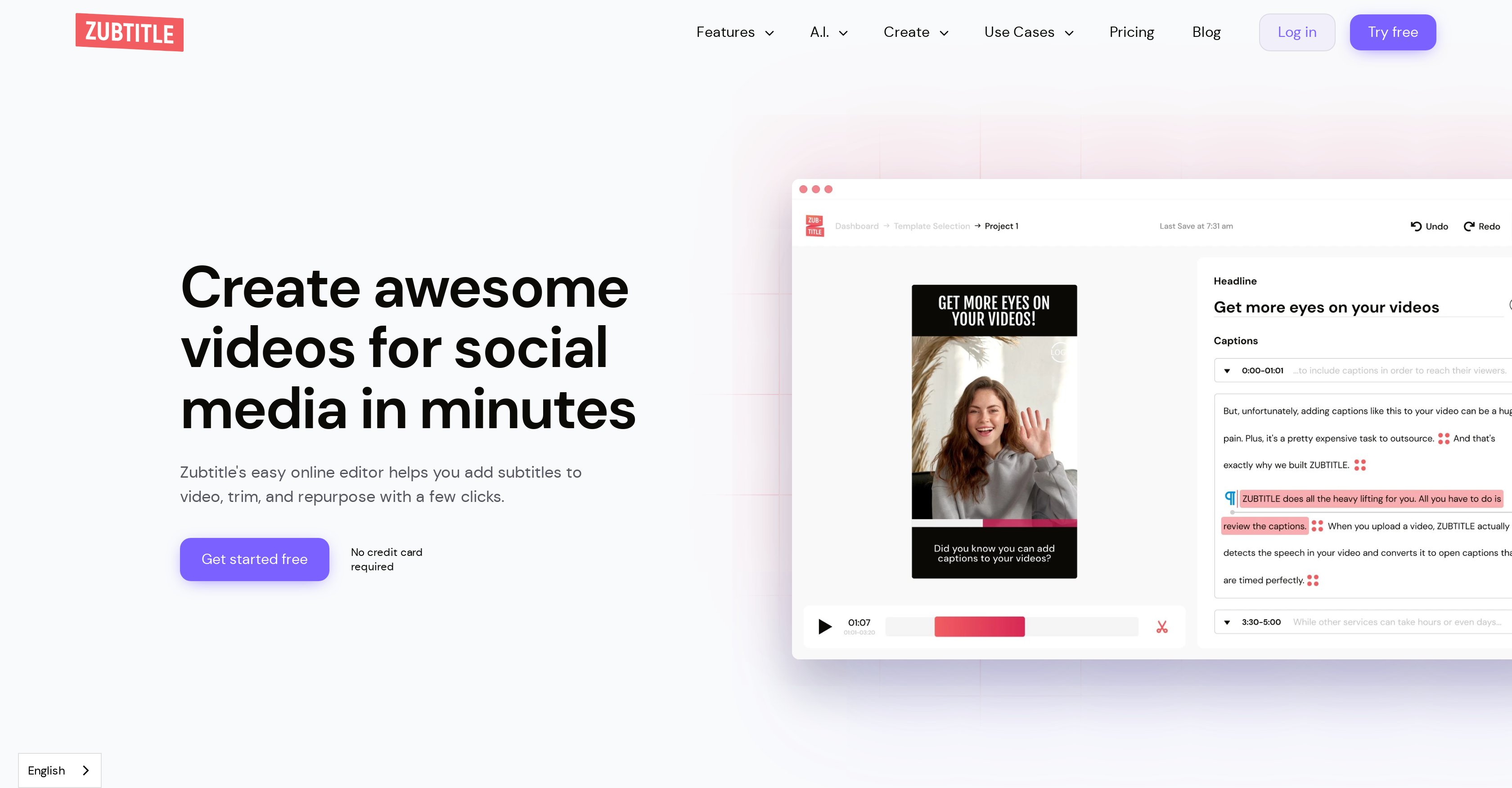
- Create accessible videos that capture attention with automatic AI transcription that generates accurate subtitles in minutes
- Maintain brand consistency across all content with customizable style templates that save your fonts and colors
- Boost viewer retention and watch time by adding animated progress bars that visually track video completion
- Repurpose video content efficiently by converting spoken words into optimized social media posts with auto-generated titles and hashtags
- Highlight your most engaging content with smart trimming tools that remove dull moments and resize videos for any platform
- Protect your video content and increase brand visibility using drag-and-drop custom logos and watermarks
- Capture audience attention immediately with engaging animated text captions that make content more dynamic
- Streamline your editing workflow by saving branded templates for consistent, professional-looking videos every time
Pros & Cons
Pros
- Automatic video captioning
- Video resizing and trimming
- Animation addition
- Style templates
- Support for specific fonts/colors
- Built-in Text Editor
- Headline insertion
- Caption animations
- Progress bars
- Custom logo integration
- Watermark integration
- Drag and drop function
- Converts videos to social posts
- Auto-generation of video titles
- Auto-generation of hashtags
- Auto-generation of descriptions
- Auto-generation of timestamps
- Usable across various social platforms
- Customizable visuals
- Efficiency in video editing
- Suited for diverse user groups
- Easy-to-use interface
- Video repurposing
- Text timing edit
- Suitable for diverse video types
- Easy online video editor
- Custom styling
- Resize and crop tools
- Progress animations
- Automatic transcription
- Optimizes videos for social media
- Supports aspect ratio changes
- Feature to add headlines
- Video repurposing tools
- .SRT file download support
- Mobile friendly
- Free trial available
- Supports .mp4, .mov, .m4v videos
- Supports H.264 codec
- Video length up to 20 mins
- Supports file size up to 1.0 GB
- Subtitle in foreign languages
Cons
- Limited video upload requirements
- No mention of voice-based editing
- May lack advanced editing features
- No offline version
- No 3D video editing support
- Limited to social media platforms
- File size limit
Reviews
Rate this tool
Loading reviews...
❓ Frequently Asked Questions
Zubtitle is an online video editing tool that uses artificial intelligence to add subtitles and various other enhancements to videos, making them more engaging and suitable for social media platforms. Apart from subtitling, the software comes with a range of features such as video resizing, trimming, adding animations, customizing style templates for visual appeal, and a built-in Text Editor for adding engaging headlines.
Zubtitle incorporates AI in various aspects of video editing. The AI is able to analyze and transcribe spoken content in the video, automatically generating subtitles which the user may edit and style according to their preference. The AI can also convert videos into text for social media posts, auto-generate video titles, hashtags, and descriptions. AI is used to make the process faster and seamless, enhancing the video's appeal for social media.
Yes, Zubtitle can add subtitles to your videos automatically. Zubtitle uses AI algorithms to transcribe the speech in the video and convert it into captions. The automatic transcription saves users a significant amount of time as compared to manual captioning.
Yes, with Zubtitle, users can customize their video visuals using style templates. These templates support brand-specific fonts and colors, allowing users to create and save their own templates for faster and more consistent editing in the future.
Zubtitle's built-in Text Editor is designed to aid in the creation of engaging headlines. This feature helps users quickly and easily enter and edit text directly onto their videos, helping grab audience attention and improve viewer engagement.
Yes, Zubtitle does provide support for animations in video captions. Users can add various forms of animated text to their captions, providing an additional element of visual interest and dynamic engagement for their video content.
Adding a custom logo or watermark in Zubtitle is straightforward thanks to their drag-and-drop editor. Users simply have to choose the logo or watermark they want to use, drag it to the appropriate area on the video, and drop it in place.
Yes, Zubtitle has the ability to convert videos into social media posts. Using its AI technology, the software transcribes the video content into text suitable for social media posts, helping boost social media engagement and reach.
Yes, Zubtitle comes with video resizing and trimming features. With these tools, users can control the aspect ratio of their videos to match different social platforms, and can selectively highlight the most attention-grabbing parts of their videos.
Yes, Zubtitle can auto-generate video titles, hashtags, descriptions, and timestamps. This feature makes use of AI to analyze the content of the video and produce titles, hashtags, and descriptions that are relevant, engaging, and optimized for search algorithms.
Yes, Zubtitle is suitable for all major social media platforms. It allows users to create and adjust videos for optimal display on platforms like Twitter, LinkedIn, Facebook, TikTok, and Instagram.
Zubtitle's interface is easy to use. It has been designed with simplicity and efficiency in mind, making video editing and repurposing accessible to various users including business owners, content creators, and agencies.
Yes, Zubtitle allows users to customize their visuals with brand-specific fonts and colors using style templates. This ability to apply and save custom styling options helps maintain brand consistency across all videos.
Yes, Zubtitle is ideal for content creators, business owners, and agencies. It offers an accessible and efficient platform for creating engaging, high-quality video content for social media, facilitating better engagement and reach.
While using Zubtitle, users can add various types of animations to their video captions. This includes different styles of animated text which can be added to the captions to make the video more engaging and visually appealing.
Zubtitle's progress bars feature serves to boost viewer retention. Progress bars give viewers a visual indication of how much of the video remains, encouraging them to continue watching and thus improving overall retention rates.
Zubtitle is highly efficient in video editing and repurposing, allowing users to transform and optimize their videos for social media in a matter of minutes. It combines various editing tools in an easy-to-use interface, offering automatic captioning, animations, progress bars, resizing, cropping, and many other enhancements.
Zubtitle facilitates video branding by allowing users to customize visuals using style templates that support brand-specific fonts and colors. Users can also integrate custom logos or watermarks onto their videos. These features help in consistent brand representation and increase brand visibility.
Yes, Zubtitle does come with a template customization feature. Users can use their brand's fonts and colors and save their own templates for consistent and quicker editing on future projects.
Yes, using Zubtitle's built-in Text Editor, users can add engaging headlines to their videos. This feature helps to capture viewers' attention and is a major factor in increasing the engagement rate of the video.
Pricing
Pricing model
Freemium
Paid options from
$19/month
Billing frequency
Monthly
Related Videos
Zubtitle Tutorial/Review (Step-By-Step Guide) | How to use Zubtitle
WB Explainer•221 views•Oct 30, 2023