
addto.me
Overview
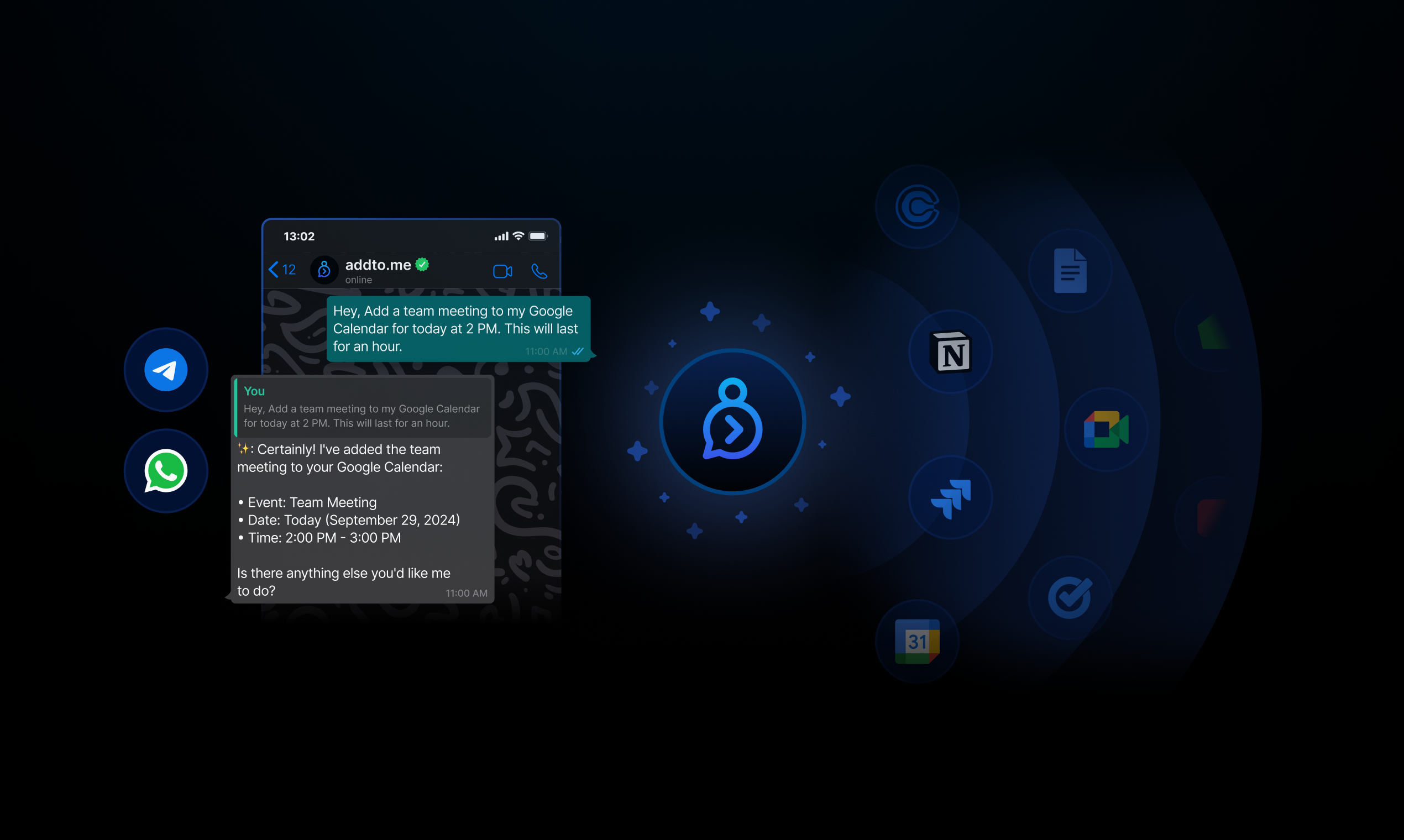
- Manage all your productivity tools from one chat interface without switching apps using unified AI control
- Create calendar events and schedule meetings instantly through voice or text commands using natural language processing
- Add tasks to Jira and create notes in Notion while staying in your messenger using seamless app integrations
- Share your Calendly link automatically during conversations to streamline meeting scheduling
- Handle multiple conversation threads simultaneously while maintaining context using dynamic reply features
- Operate completely hands-free by sending voice messages that transform into actionable tasks
Pros & Cons
Pros
- Works with WhatsApp and Telegram
- Multimessenger support
- Interface with productivity apps
- Commendable Time-saving feature
- Integration with Tasks and Notion
- Email, scheduling, note-taking within messenger
- Supports voice messages
- Hands-free operation
- Dynamic conversation threads
- Context-aware discussions
- Pricing tier system
- Connects multiple accounts
- Responses transform to actions
- Enhanced chat app productivity
- Supports context-aware discussions
- Smooth transitions in topics
- Various service levels
- Applicable to various messengers
- Modules based on pricing
- Productivity improvement
- Supercharged WhatsApp & Telegram
- Can talk to Apps
- Interacts with Calendar, Notion
- Can send emails
- Can schedule events
- Can take notes
- Variable modules and credits
- Free trial available
- Sends voice messages
- Voice clear than text
- Elevates productivity ecosystem
- Pick up from old conversations
- Thread creation on-the-fly
Cons
- Works only with chat apps
- Limited to WhatsApp and Telegram
- Requires multiple accounts for features
- Feature limitations in tiered pricing
- Limited application integrations
- Potential privacy concerns
- Possible message processing delay
- Dependent on messenger availability
- Lack of free tier
- Voice interaction dependency
Reviews
Rate this tool
Loading reviews...
❓ Frequently Asked Questions
Addto.me is an AI-powered digital assistant designed to streamline user productivity and enhance digital environments. It interfaces with various productivity applications including Notes, Calendars, and Emails directly from chat apps like WhatsApp and Telegram. The AI assistant can process messages and transform them into meaningful actions, streamlining tasks like sending emails, scheduling events, and taking notes directly from messengers. Additionally, it supports voice messages for a hands-free mode of interaction and has dynamic conversation threads for context-aware discussions.
Ahsan Azhar
🛠️ 1 tool
🙏 3 karma
wrote:Addto.me supports popular chat apps, such as WhatsApp and Telegram.
Ahsan Azhar
🛠️ 1 tool
🙏 3 karma
wrote:Addto.me uses AI to process the messages you send through your messenger application. The AI assistant then transforms these messages into meaningful actions (supported by the integrated productivity tools), effectively acting as a powerful digital assistant.
Ahsan Azhar
🛠️ 1 tool
🙏 3 karma
wrote:Yes, addto.me enables multi-messenger support, allowing users to connect multiple WhatsApp or Telegram accounts and utilize its features across all connected platforms.
Ahsan Azhar
🛠️ 1 tool
🙏 3 karma
wrote:Yes, addto.me integrates with productivity apps such as Tasks and Notion, allowing you to perform actions such as scheduling events, and taking notes directly from your messenger app.
Ahsan Azhar
🛠️ 1 tool
🙏 3 karma
wrote:Addto.me can help you schedule events by transforming your relevant text/voice commands into actions. For example, when you communicate the need for a new calendar entry, addto.me understands your instruction and creates the event accordingly.
Ahsan Azhar
🛠️ 1 tool
🙏 3 karma
wrote:Yes, You can connect your note taking apps such as Google Docs, Notion etc. to addto.me and start taking notes. You can command the assistant to take a note with the content and it can process this command and create a new note entry in your linked note-taking or productivity application.
Yes, addto.me supports voice messages, offering a hands-free mode of interaction by turning spoken instructions into actionable tasks.
Ahsan Azhar
🛠️ 1 tool
🙏 3 karma
wrote:Dynamic conversation threads in addto.me refer to the ability to create multiple conversation threads with the use of direct reply feature of the messaging app.
Only direct replies are taken as a thread. AI response for every message user sends comes back as a direct reply. User can send direct reply to any of the AI's reply to continue the thread. You can pickup from any place in the conversation (by replying to the AI's response) to create a new conversation, smoothly transition between different topics. This arrangement allows the AI to maintain context between responses and facilitate multiple threads of conversation at once.
Ahsan Azhar
🛠️ 1 tool
🙏 3 karma
wrote:'Modules' in addto.me refer to the supported productivity tool integrations, in addto.me, ranging from Google Tasks, Jira, Google Calendars, Notion, Google Docs, Calendly etc.
We are constantly expanding our list of supported modules and actions supported by them.
The 'credits' mentioned in addto.me's pricing refer to the usage capacity permitted for each pricing tier. Each action you take on the platform consumes a certain amount of credits. The amount of credits given varies depending on the package chosen.
Ahsan Azhar
🛠️ 1 tool
🙏 3 karma
wrote:Yes, addto.me offers a 14-day free trial with generous credits for users to test its features and benefits.
Ahsan Azhar
🛠️ 1 tool
🙏 3 karma
wrote:You can get started with addto.me by visiting the website and clicking on the 'Get Started' button.
Yes, you can use addto.me on both WhatsApp and Telegram. It's designed to work seamlessly with these popular messenger apps.
Pricing
Pricing model
Free Trial
Paid options from
$49/month
Billing frequency
Monthly
Refund policy
No Refunds