Overview
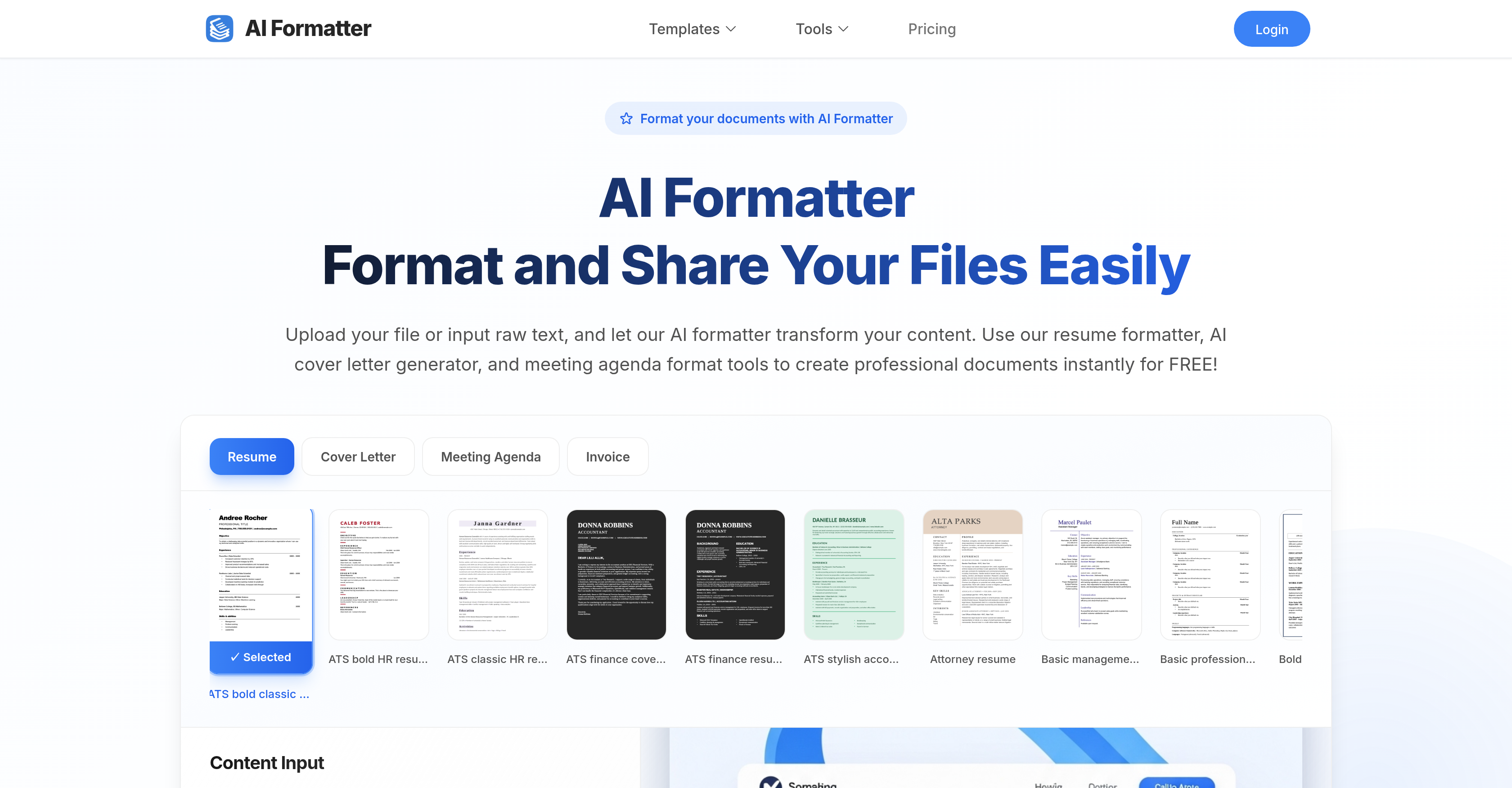
- Pass automated resume screening systems with ATS-optimized templates that ensure your application gets seen by recruiters
- Transform unstructured notes into professional meeting agendas and invoices while preserving your original content
- Customize every detail after AI formatting with an intuitive editor that lets you fine-tune documents before downloading
- Download in your preferred format including Word and PDF documents for immediate use in job applications and business communications
- Convert existing documents instantly by uploading PDF, DOC, or text files up to 10MB for rapid professional formatting
Pros & Cons
Pros
- Transforms raw text to formatted document
- Converts existing documents
- Various format creation features
- Resume formatter
- Cover letter generator
- Meeting agenda format tools
- Provides intuitive editor for adjustments
- Supports multiple download formats
- Supports variety of document types
- Understands context and structure
- Creates ATS-compatible resumes
- Large library of professional templates
- Online sharing of documents
- Invoice formatting
- Supports multiple file upload formats
- Automated document transformation
- Automated screening systems targeting
- Customizable templates
- Format choices for business docs
- Format choices for academic papers
- Data processing capability
- Content management feature
- Creates professionally framed docs
- Designed for resume optimization
- Professional writing aid
- Direct file upload for formatting
- Automated formatting capabilities
- Edit, share and download feature
- Offers free formatting
- Supports max 10MB file size
- Handles PDF, DOC, DOCX, TXT formats
- Access to Cover Letter Generator
- Provided Resume formatter
- Offers wide range of templates
- Instructive usage steps provided
- Cover letter personalization
- Meeting Agenda Formatting tool
- Invoice Generator included
- Curated collection of templates
- Modern design options
- Traditional design options
- Striking graphic header templates
- Multi-page format available
- Creative industry templates
- Medical industry optimized templates
- Resume writing checklist available
- Vintage design element templates
- Academic CV format available
- Legal profession focus templates
- Management and Leadership templates
- Bold accented contemporary designs
- Personalized branding appeal formats
Cons
- No real-time collaboration
- No mobile application
- No OCR support
- Limited file format support
- No versioning system
- No offline mode
- No built-in grammar checker
- No multi-language support
- No autosave feature
- No integration with other platforms
Reviews
Rate this tool
Loading reviews...
❓ Frequently Asked Questions
AI Formatter works by accepting raw text or an existing document from the user and automatically formatting it into a visually compelling, structured document using AI. It seamlessly converts the content to match the selected professional template. Maintaining the original information but adding professional formatting and structure, it ensures that the transformed content adequately meets each preset format's requirements.
AI Formatter can handle a wide spectrum of documents. These include but are not limited to resumes, cover letters, meeting agendas, and invoices. These documents can be created from scratch, or existing ones can be uploaded for transforming and optimizing.
AI Formatter possesses strong resume formatting capabilities. It transforms raw text or uploaded resumes into a professionally structured and ATS-compatible resume. The tool uses various professionally designed ATS-optimized templates to ensure each resume easily passes automated screening systems. As such, it helps users create resumes that can attract recruiters’ attention.
Yes, AI Formatter can assist in generating cover letters. It uses raw text input or an existing cover letter for transformation into a professionally structured document using AI. The cover letters generated by AI Formatter are designed to impress recruiters and will make a user's application stand out.
Yes, AI Formatter supports creating meeting agendas. It transforms your raw meeting notes into a professional meeting agenda format. The AI maintains your original content while adding structure and professionalism to transform your notes into an effective, standardized agenda.
After AI Formatter processes your document, you can make adjustments using the intuitive editor provided on the platform. The editor allows you to edit, customize, and fine-tune your document according to your preferences before finalizing it.
The processed documents from AI Formatter can be downloaded in several formats to suit the user's needs. These include Word and PDF formats, among others.
Yes, AI Formatter ensures ATS compatibility in your resumes. AI Formatter employs ATS-friendly resume templates to ensure your document easily passes automated screening systems. This optimization increases the chances of your resumes catching the attention of recruiters.
AI Formatter offers a large library of professional templates designed for varied functions. Available templates range from ATS-optimized resume templates to cover letter templates, and meeting agenda formats, each designed to pass automated screening systems and impress recruiters.
After your document is formatted, edited, and finalized in AI Formatter, you can directly share your documents from the platform to your preferred destinations.
Yes, AI Formatter does support invoice creation. You can either upload your data or input invoice details, and the AI-powered tool will transform them into professionally formatted, business-ready invoices.
AI Formatter aids in content transformation by converting raw text or unstructured documents into a professionally structured and formatted document. It uses AI to understand and maintain the context of the original content while applying the structure of the chosen professional template for an effective transformation.
AI Formatter supports recruiter targeting by transforming your resumes into ATS-optimized formats. By ensuring your resumes are structured to easily pass automated screening systems, AI Formatter increases your chances of attracting recruiters’ attention.
AI Formatter's cover letter generator works by taking raw text or an existing cover letter and utilizing AI to transform it into a professionally structured and formatted cover letter. The transformation process ensures that the final cover letter aligns with the chosen professional template, while still retaining the original content.
Yes, AI Formatter can optimize your resumes for job searches. The tool supports transformation of raw text or existing resumes into professionally structured and ATS-optimized resumes, greatly enhancing their attractiveness to recruiters and their ability to pass automated screening systems.
AI Formatter supports content management by accepting various file formats for processing, allowing the users to upload or input their content directly into the platform, and providing an intuitive editor tool for users. It helps manage and organize the users' data, offering seamless transformation into the selected templates.
Yes, after AI Formatter processes your document, you have the flexibility to edit and customize the content in your chosen template before finalizing and downloading. This customizable feature allows users to align the documents closely with their preferences and requirements.
AI Formatter processes the data you upload by applying its artificial intelligence capabilities to transform raw content into professionally formatted documents. It handles the content while maintaining context and structure, ensuring that the resultant document is professionally presented and in line with your chosen template.
Unless otherwise specified, AI Formatter supports the upload of documents in several formats including PDF, DOC, DOCX, TXT, up to a maximum of 10MB.
Yes, you can generate both PDF and Word documents using AI Formatter. After the AI processes and formats your content, you can then download your final document in these formats.
Pricing
Pricing model
Free Trial
Paid options from
$16.67/month
Billing frequency
Monthly
Refund policy
Users can request a full refund within 14 days of payment if no services were used.