
AI Motion Transfer by The Influencer AI
Overview
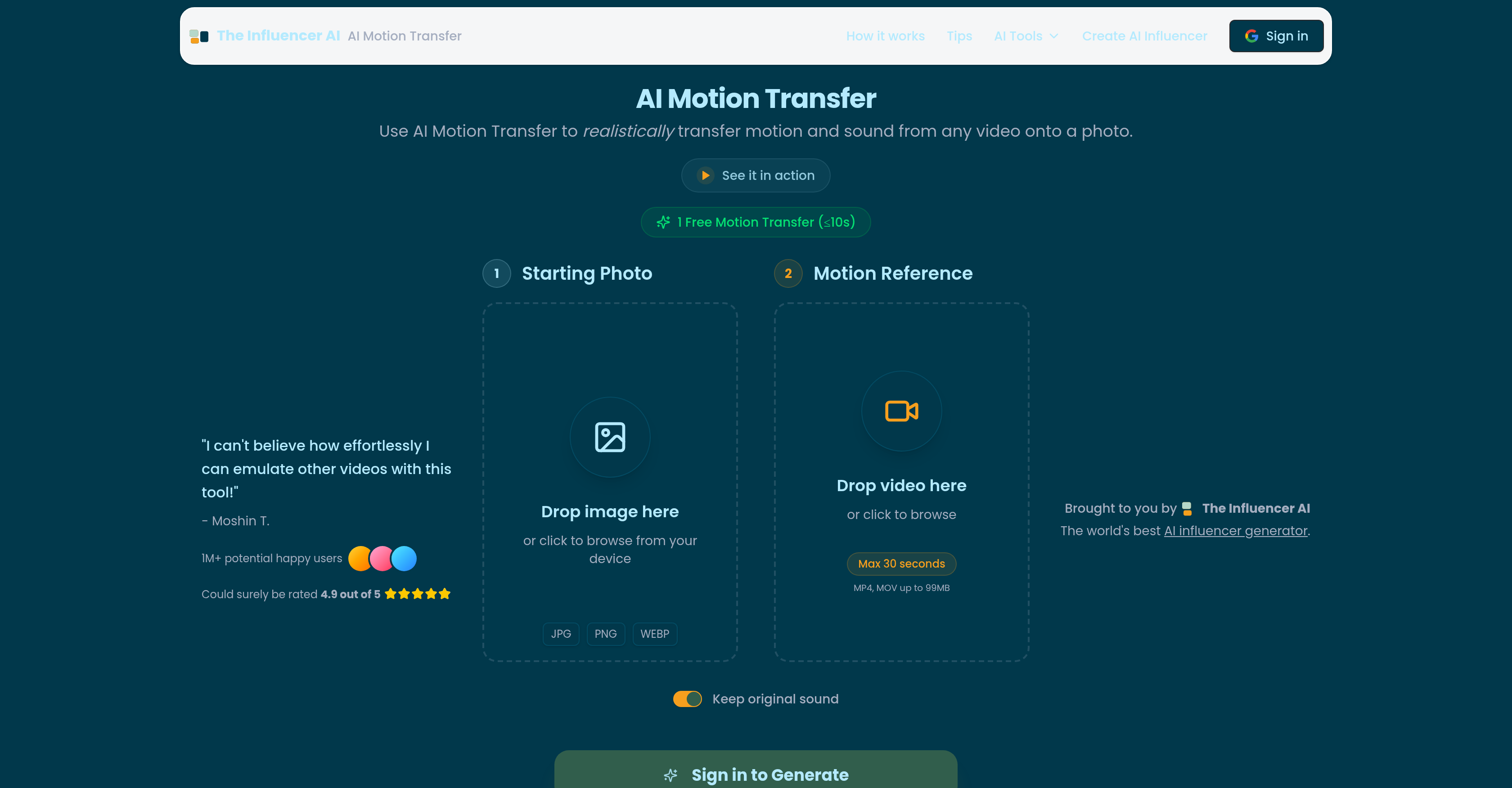
- Create viral social media content instantly by making any static photo mimic trending dance challenges or memes using motion extracted from a reference video
- Visualize film scenes faster and reduce production costs by animating storyboards or bringing static characters to life with transferred actor performances
- Transform static product shots into engaging video ads that capture attention by applying realistic human motion to showcase items in action
- Replace traditional creator-led UGC with scalable AI influencers that replicate authentic human movement for consistent, brand-safe social video content
- Showcase apparel fit and movement realistically by converting static e-commerce lookbooks into dynamic videos that demonstrate how clothes move on a person
- Generate complete animations with synchronized sound in minutes using machine learning that maps video motion patterns directly onto your uploaded photo
Pros & Cons
Pros
- Quick animation creation
- Generates viral content
- Supports storyboards animation
- Elevates marketing campaigns
- Enhances User-Generated Content
- Applies to Fashion and E-commerce
- Supports clear full-body photos
- Can handle steady camera movements
- Works best with clean backgrounds
- Compatible with well-lit media
- Creates dynamic product images
- Allows character animation
- Enables user creativity
- Fosters meme culture propagation
- Can animate dance challenges
- Supports various file formats
- Can retain original sound
- Provides guideline compliance
- Encourages realistic motion transfer
- Maintains high-quality outputs
- Transforms static to dynamic
- Facilitates content creation
- Enhances social media content
Cons
- Requires well-lit inputs
- Requires clear, uncluttered backgrounds
- Needs steady, fixed camera angle
- Limited to 30 seconds videos
- Video size limited to 99MB
- May struggle with complex backgrounds
- Doesn't animate partial images well
- Dependent on quality of reference video
- Result quality may vary
- Targeted mostly to influencers
Reviews
Rate this tool
Loading reviews...
❓ Frequently Asked Questions
AI Motion Transfer, developed by Influencer AI, is a revolutionary tool designed to animate static images by transferring motion from reference videos. Through its unique algorithm, it maps the motion from the chosen video onto the uploaded image, thereby creating a realistic animation in a short span of time.
To use AI Motion Transfer, first, a high-quality photo is uploaded. Next, a video with the desired motion is chosen. Finally, the AI extracts the motion from the video and superimposes it onto the still photo in order to create an animated video.
To create a high-quality output, AI Motion Transfer requires both the photo and video reference to be well-lit and captured against clear, uncluttered backgrounds. Additionally, the camera angle must be steady and fixed.
Yes, AI Motion Transfer can enhance advertising campaigns by transforming static product shots into dynamic, eye-catching videos. This application helps grab attention and enhance audience engagement.
In the fashion & E-commerce sector, AI Motion Transfer can be used to transform static lookbooks into dynamic videos that showcase real movement. This brings the depicted clothes to life, showing how they might fit and move on a real person.
Filmmakers can use AI Motion Transfer to animate storyboards and bring background characters to life. By mapping actor performances onto animated characters, filmmakers can visualize scenes quickly and effectively.
AI Motion Transfer can enhance social content by enabling any static photo to mimic trending dance challenges or memes instantly. This helps in creating viral content, thereby enhancing engagement and reach.
Yes, AI Motion Transfer is designed to work best with photos and videos shot against clear, uncluttered backgrounds. This enables the AI's algorithm to map and transfer motion more accurately.
AI Motion Transfer performs best with well-lit content. If both the reference photo and video are well-lit, it enables the AI to track and transfer motion more effectively.
Yes, filmmakers can use AI Motion Transfer to animate storyboards. By mapping actor performances onto these static frames, it becomes easier to visualize a scene's process and action.
Potential use-cases of AI Motion Transfer can be numerous and are only limited by user's imagination. They include creating viral social content, animating storyboards, bringing background characters in films to life, enhancing advertising campaigns, transforming static product shots into dynamic videos, replacing UGC with AI influencers who replicate realistic human motion, and evolving static lookbooks into dynamic videos in the Fashion & E-commerce sector.
AI Motion Transfer is connected with AI influencers as it can replace traditional User-Generated-Content (UGC) with AI influencers who replicate realistic human motion, creating authentic, scalable social videos.
Yes, with AI Motion Transfer, you can certainly make your static images dynamic. By extracting motion from a reference video and mapping this onto your photo, you can bring static images to life.
A static lookbook, in the context of AI Motion Transfer, refers to a series of photos showcasing fashion or product shots, which can be transformed into dynamic videos that showcase real movement, creating a more engaging and realistic depiction of the items.
Yes, AI Motion Transfer provides an option to replace traditional User-Generated-Content (UGC) with AI influencers who replicate realistic human motion, creating authentic, scalable social videos without having to manage creators.
AI Motion Transfer encourages creative exploration by providing an innovative tool that can be used in a multitude of ways, only limited by the user's imagination. It allows users to explore new possibilities in advertising, fashion, filmmaking, social content creation, and even more undiscovered realms.
AI Motion Transfer gives the best results when using clear, full-body photos, preferably front-facing or slightly angled poses, along with videos captured against clean, uncluttered backgrounds from steady, fixed camera angles. The lighting should also be good as shadows or dark areas can obscure details.
Yes, AI Motion Transfer has the capacity to replicate realistic human motion. It allows the replacement of traditional User-Generated-Content (UGC) with AI influencers who mimic genuine human movement.
Yes, AI Motion Transfer can transform a static product shot into a dynamic video through motion transfer. By extracting movement from a reference video and applying it onto a static product image, the tool creates a lively and appealing video.
AI Motion Transfer is highly efficient in terms of time requirements. It can animate photos by transferring motion from a reference video to create a realistic animation, and all this is achieved in minimal time unto a few minutes.
AI Motion Transfer works in a three-step process. Users start by uploading a photo. Next, they choose a video that contains the desired motion. The algorithm of AI Motion Transfer then maps the motion from the video onto the uploaded image, creating realistic animation quickly.
AI Motion Transfer supports a variety of file types. For the images, it supports JPEG, PNG, and WEBP file formats. For the video motion references, it supports MP4 and MOV file formats, with a maximum size of 99MB.
AI Motion Transfer has versatile use-cases across different sectors. Viral social content can be created by making static images mimic popular motions such as dance challenges or meme trends. Film makers can animate storyboards or bring inanimate characters to life. Advertisers can transform static product images into gripping dynamic videos. Fashion and ecommerce industries can convert static catalogue images into dynamic videos to demonstrate the fitness and movement of clothes on a real person. AI influencers can replicate human movement for authentic representation in social videos.
Yes, AI Motion Transfer can be extensively used for marketing purposes. Advertisers can transform static product shots or brand mascots into captivating dynamic videos that grab viewer attention. This can significantly enhance engagement and increase the effectiveness of marketing campaigns.
Yes, AI Motion Transfer can greatly enhance social media content. By enabling any static photo to mimic trending dance challenges or memes instantly, it can be used to create viral social content. Moreover, the tool can help replace traditional user-generated content with AI influencers replicating realistic human movement, adding an element of novelty and authenticity to social media posts.
Fashion & E-commerce industries can benefit immensely from AI Motion Transfer. They can transform static lookbooks, which simply display static product shots, into dynamic videos. These videos can showcase how apparel fits and moves on a real person, providing customers a far better idea of what they're purchasing, thereby driving sales.
AI Motion Transfer plays a crucial role in creating AI influencers. It can replace traditional user-generated content with AI influencers who replicate realistic human movement. This leads to the creation of authentic, scalable social videos without having to manage creators. The tool can be coupled with 'The Influencer AI' tool for consistent character animation.
The suitability of a photo or video for use with AI Motion Transfer highly depends on certain guidelines. Clear full-body photos and videos with clean backgrounds work best. Also, to capture the subject's movement more accurately, the video should have steady camera movement. Finally, both the reference photo and video must be well-lit.
Yes, there is a size and time limit for videos that can be used with AI Motion Transfer. The video file formats supported are MP4 and MOV, with a maximum size of 99MB and a maximum length of 30 seconds.
No, AI Motion Transfer does not work well with poorly lit photos or videos. For accurate motion tracking and transfer, it requires both the reference photo and video to be well-lit. Shadows or dark areas can obscure details, making it harder for the AI to tract and transfer motion accurately.
Yes, AI Motion Transfer does have the capability to replicate sound from the video references. This can greatly enhance the realism and dynamic quality of the resultant animations.
The Influencer AI and AI Motion Transfer are part of the same toolset offered by the same company. While The Influencer AI generates custom AI entities, AI Motion Transfer can animate these entities by extracting motion sequences from video references and replicating them onto the entities, creating realistic animated content.
Yes, AI Motion Transfer is indeed capable of creating animations in just a few minutes. This is due to its advanced machine learning algorithms which can accurately map motion from a video source onto a static image quickly and efficiently.
There is no significant difference between motion copy and motion transfer in the context of AI Motion Transfer. Both terms refer to the process of extracting motion patterns from a reference video and applying them to a static image to create lifelike animations.
Yes, AI Motion Transfer can be used to create viral content. By allowing static images to mimic popular motions such as trending dances or memes, it can produce content that has high potential to go viral on social media platforms.
To prep your video for AI Motion Transfer, follow these guidelines: use a reference video with a clean, clear and uncluttered background; avoid videos with shaky camera work or extreme zooms - a steady, fixed camera angle works best; ensure your video is well-lit as shadows or dark areas can obscure details and make it harder for AI to track and transfer motion accurately.
Some limitations of AI Motion Transfer include its need for well-lit material and clarity of motion in the reference video. Additionally, it may not perform as well when working with images or videos that are overly complex or cluttered. Reliance on steady, fixed camera angles might also limit the motion that can be extracted and applied.
A common misunderstanding about AI Motion Transfer is that it can work perfectly under any conditions. The truth is, it requires a well-lit photo and reference video, and works best with clear full-body photos, videos with clean backgrounds, and steady camera movements. Also, it doesn't create new content but emulates existing motion patterns onto static images.
Pricing
Pricing model
Free Trial
Paid options from
$19/unit
Billing frequency
Pay-as-you-go
Refund policy
No Refunds