

AIMusic Gen | Music to Prompt
Turn any reference track into a usable music prompt: audio-to-prompt analysis writes a prose description of genre, instrumentation, rhythm, arrangement, mood, and overall feel, ready to copy and adapt for Suno, Udio, or other text-based AI music generators.
Listing not yet reviewed by our editors · How we check
Overview
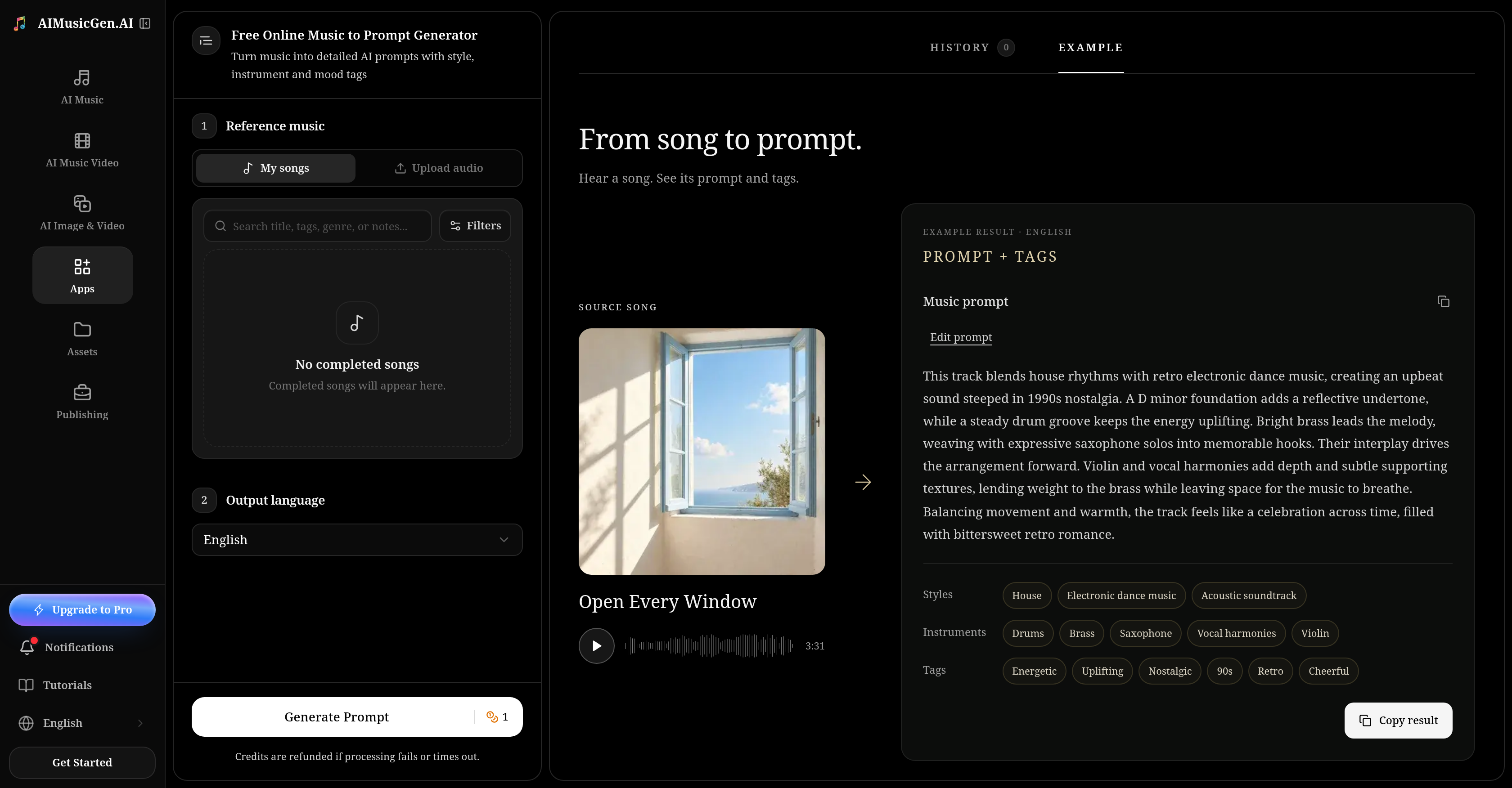
- Turn any reference track into a usable music prompt: audio-to-prompt analysis writes a prose description of genre, instrumentation, rhythm, arrangement, mood, and overall feel, ready to copy and adapt for Suno, Udio, or other text-based AI music generators.
- Grasp a song's sonic identity at a glance: results are organized into Styles, Instruments, and Tags, giving you concise music tags for genre, prominent sounds, energy, mood, and era alongside the full written brief.
- Work in your own language without extra steps or cost: choose from 35 output languages, including English, Chinese, Japanese, Korean, Spanish, French, German, Arabic, and Hindi, with translation of the description and every tag group included in a single credit.
- Analyze high-quality source audio as-is: upload MP3, WAV, FLAC, OGG, M4A, or AAC files up to 100 MB, or pick a completed track straight from My Songs without re-uploading.
- Refine and reuse every analysis on your terms: each music description lands in History, where you edit the generated prompt and copy the full result whenever you need it.
- Brief collaborators and capture ideas in words, not just audio: a connected written breakdown of the track's character replaces describing a sound from scratch when sharing references or logging creative direction.
- Test the music prompt generator risk-free: signed-in users run analyses with daily free credits, each analysis costs one credit, and credits are refunded automatically if processing fails or times out.
Pros & Cons
From the listing; not yet checked by our editors.
Pros
- 35 output languages
- Six audio upload formats
- 100 MB upload limit
- Select completed My Songs
- Analyze uploaded reference audio
- One source file per task
- Description plus three tag groups
- Separate Styles, Instruments, Tags
- Genre and instrumentation descriptions
- Rhythm and arrangement descriptions
- Mood and energy tagging
- Language applies to every section
- Translation included per task
- Output defaults to interface language
- Progress visible in History
- Completed results saved in History
- Edit generated prompt
- Copy full result together
- Daily free credits available
- Failed-task credits refunded
- Timeout credits refunded
- Adaptable prompts for other generators
- Copyable creative briefs for collaborators
Cons
- Analysis, not song generation
- One source file per task
- 100 MB upload ceiling
- No measured BPM, key, or chords
- No lyric transcription
- No MIDI or sheet music
- Cannot recover original prompts
- Cannot reproduce exact melodies
- No direct generator submission
- Translation uses the task credit
Alternatives to AIMusic Gen | Music to Prompt
Tools that share the most tags with AIMusic Gen | Music to Prompt.
- SongTools | Music to Prompt
Recreate the vibe of any reference track without struggling to describe it: upload a song and get an AI music prompt covering genre, mood, instrumentation, tempo, and production style.
Free trial · from $9/month
$9/month
Not yet checked
- SonicRebuild
Start a new track from a song you already love instead of a blank prompt box: paste a public YouTube song link and get a Suno-ready prompt pack built from that reference.
Free trial · from $1.50
$1.50
Not yet checked
- YinsoAI | Music Prompt
Skip writing music descriptions by hand: the audio-to-prompt analyzer turns a reference track or sample into a structured text prompt without you naming every sound you hear.
Freemium · from $4.99/month
$4.99/month
Not yet checked
Reviews
Rate this tool
Loading reviews...
Frequently asked questions
What does AIMusicGen.AI Music to Prompt do with an audio file?
Music to Prompt analyzes the recording and creates a written description of its musical character, plus Styles, Instruments, and Tags.
How do I upload a song to Music to Prompt?
Choose Upload audio, select a supported audio file, choose an output language, then click Generate Prompt. You can follow progress in History.
Can I select a completed song from My Songs in Music to Prompt?
Yes. Select a completed song from My Songs instead of uploading a file.
Which audio file formats does Music to Prompt accept?
MP3, WAV, FLAC, OGG, M4A, and AAC.
What is the maximum upload size for Music to Prompt?
100 MB per upload.
How many credits does one Music to Prompt analysis use?
One credit per analysis, including translation.
Can I try Music to Prompt for free with daily credits?
Yes. Signed-in users can use their available daily free credits.
What happens to my credit if Music to Prompt fails or times out?
The credit is refunded if processing fails or times out.