

AsideHQ
Keep confidential conversations private: bot-free call recording and on-device transcription keep call audio on your computer, and none of it is used to train AI models.
Listing not yet reviewed by our editors · How we check
Overview
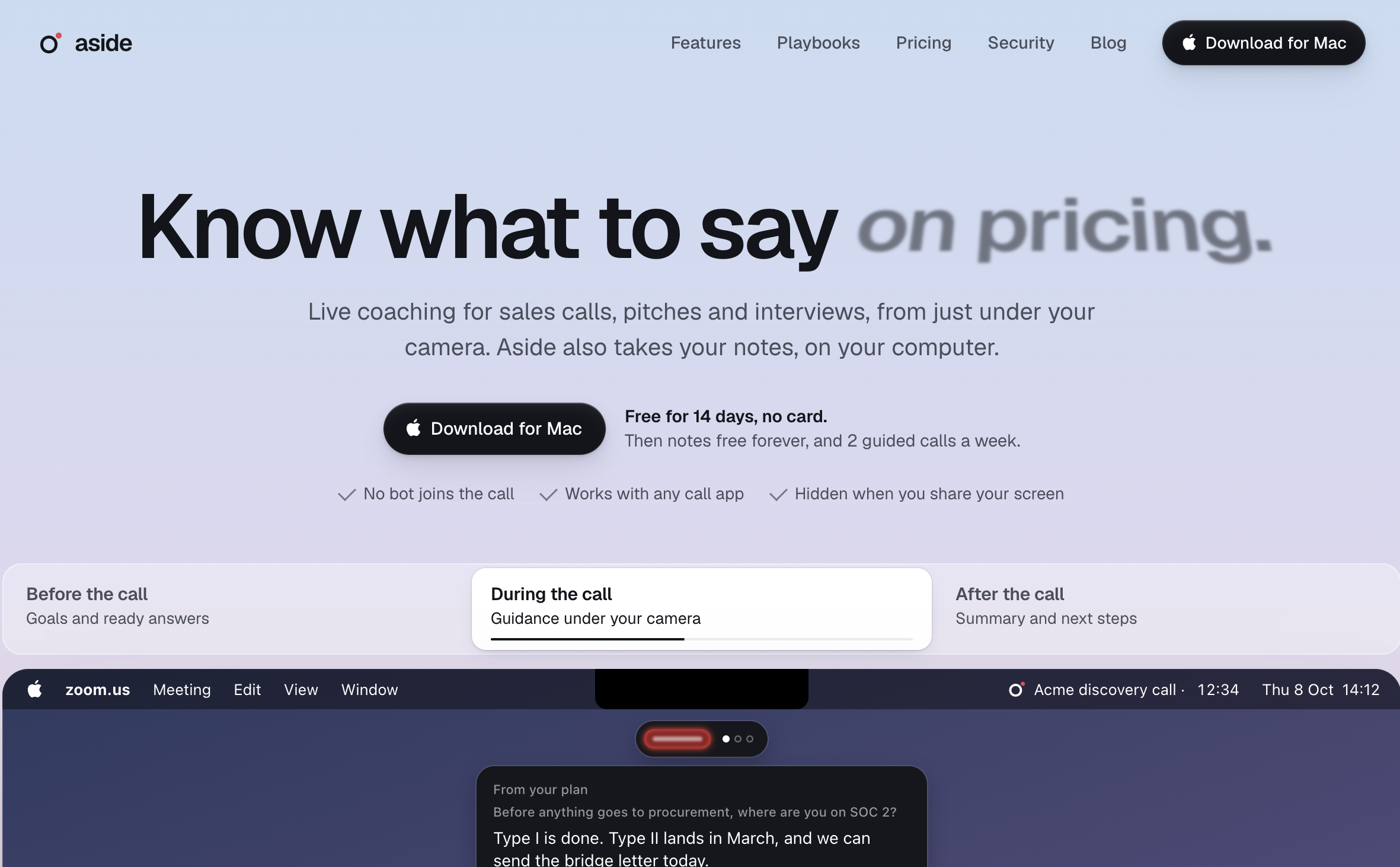
- Keep confidential conversations private: bot-free call recording and on-device transcription keep call audio on your computer, and none of it is used to train AI models.
- Keep eye contact while getting real-time talking points: live call coaching appears under your camera and suggests what to say next.
- Answer tough questions on the spot: ready answers to likely questions are built from your pre-set goals and shown at the top of your screen during the call.
- Leave every meeting with your objectives met: goals listed before the call are tracked live, so you see which are achieved and which still need attention.
- Use one meeting assistant across all your call apps: works with Zoom, Google Meet, Microsoft Teams, Slack huddles, FaceTime, and Webex on Mac and Windows.
- Stay fully present instead of typing: automatic meeting notes and transcription capture the important points while you focus on the conversation.
- Close the loop faster after each call: post-call summaries record objectives achieved, outline next steps, and draft follow-up emails automatically.
- Go into high-stakes calls with a proven structure: playbooks cover sales discovery, product demos, negotiation, investor pitches, customer interviews, and hiring interviews.
- Run meetings with international teams and clients: transcription supports English and 24 European languages.
- Build on past conversations when planning the next one: integration with Claude and ChatGPT lets them read your previous meeting notes and plan future meetings.
Pros & Cons
From the listing; not yet checked by our editors.
Pros
- Works on Mac and Windows
- Compatible with Zoom, Google Meet, Microsoft Teams
- Records calls without bot
- On-device transcription
- Auto generates meeting notes
- Guides with ready answers
- Provides real-time guidance
- Helps with meeting preparation
- Summarizes calls post-meeting
- Generates automatic follow-up emails
- Ensures privacy
- Tracks meeting objectives
- Live call coaching
- Provides goals pre-call
- Highlights ready answers
- Notes appear on-screen
- Seamless creation of follow-up emails
- Works in every call app
- Coaching during call
- Record keeping and note taking
- Highlights goals during call
- Suggests what to ask next
- Pre-call ready answers
- Offers playbooks for different scenarios
- Auto-composes follow-up emails
- Transcribes with speaker names
- Transcribes in English and 24 European languages
- No bot joins during call
- Records your microphone and computers sound
- Easy note-taking hotkey
- Audio stays on your computer
- Text syncs to your account
- Provides company comparisons
Cons
- No mobile support
- Language limit
- No open API
- Limited to predefined goals
- Requires manual action for notes
- Focused only on meeting context
- No third-party cloud support
- No simultaneous multi-platform use
- Dependence on stable Internet connection
Alternatives to AsideHQ
Tools that share the most tags with AsideHQ.
- ShadowDo
Eliminate manual note-taking with automatic transcripts and timestamped summaries generated from your conversations
Freemium · from $8/month
$8/month
Not yet checked
- Otter.ai
Never take meeting notes again with OtterPilot that auto-joins Zoom, Teams and Google Meet to capture everything automatically
Freemium · from $8.33/month
$8.33/month
Not yet checked
- MeetPulp
Eliminate manual note-taking with automated meeting transcriptions that capture every word accurately
Freemium · from $10.99/month
$10.99/month
Not yet checked
- Bubbles Notetaker
Never miss a meeting detail with automatic transcription and AI-generated summaries that highlight key decisions and action items
Freemium · from $12/month
$12/month
Not yet checked
- Avoma
Focus completely on conversations while AI generates detailed notes with speaker identification and topic detection
Freemium · from $19/month
$19/month
Not yet checked
- Agenda Hero
Transform any text description into perfectly formatted calendar events without manual entry using natural language processing
Free
Not listed
Not yet checked
Reviews
Rate this tool
Loading reviews...
Frequently asked questions
What platforms does Aside support?
Aside supports a range of platforms, including but not limited to Zoom, Google Meet, Microsoft Teams, Slack huddles, FaceTime, and Webex.
How does Aside improve productivity during virtual meetings?
Aside enhances productivity during virtual meetings in several ways. It provides on-device call transcription, generates meeting notes, and guides the call from under the user's camera, keeping meetings focused and on-track. It previews goals and ready answers before the call, assists in real-time during the call, and delivers a summary with next steps post-call. Additionally, it suggests potential answers to expected questions, thereby aiding in real-time performance.
Which API does Aside use to transcribe calls?
IDK
What suggestions does Aside provide during a virtual meeting?
During a virtual meeting, Aside provides real-time guidance. It suggests what to say next, helps maintain focus and tracks the call's progression. It offers prepared answers to potential questions based on pre-set goals, and all this information is displayed at the top of the screen for easy reference.
What kind of post-call feedback and summary does Aside offer?
Aside provides a detailed post-call summary including meeting notes, achieved objectives and an outline of the next steps. A seamless functionality also allows for the creation of follow-up emails, reducing the post-meeting workload.
Does Aside work with specific communication platforms?
Yes, Aside is designed to work with a variety of communication platforms like Zoom, Google Meet, and Microsoft Teams.
What is aside's approach to privacy, especially regarding call audio?
Aside puts a strong emphasis on privacy. It records calls without a bot and offers on-device transcription, which ensures the audio of the call stays on the participant's device. None of the call audio is used to train AI models, maintaining the privacy of the conversation.
How does Aside help with preparation for calls?
Aside helps with preparation for calls by listing your goals and ready answers before the call starts. It provides guidance based on these goals during the live call to keep meetings on track.