

Ayven
Get answers and decisions from the person who owns them, without spamming the whole team: Ayven reads assignees, issue status, and due dates, then sends a direct ask to the owner and uses a channel only when anyone can answer.
Listing not yet reviewed by our editors · How we check
Overview
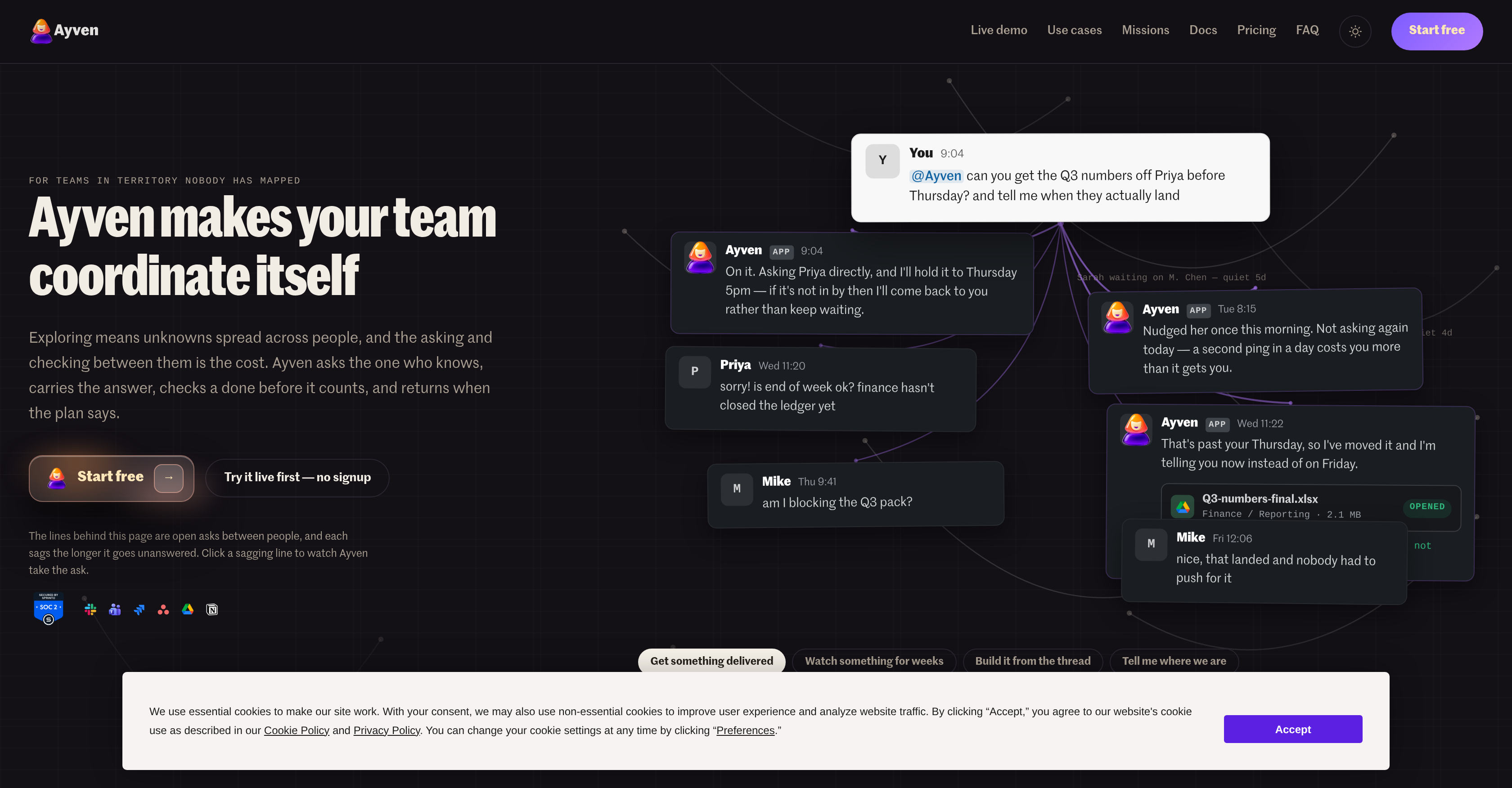
- Get answers and decisions from the person who owns them, without spamming the whole team: Ayven reads assignees, issue status, and due dates, then sends a direct ask to the owner and uses a channel only when anyone can answer.
- Spot slipping work before the deadline passes: Ayven monitors plans, conversations, documents, and tickets across Slack and Microsoft Teams to surface overdue tasks, unanswered questions, pending decisions, and ownership gaps.
- Send reminders that match the current record: Ayven re-reads live Google Drive, Notion, SharePoint, and GitHub sources immediately before every reminder or ticket, so nobody gets chased for work that is already done.
- Stop teams from working off conflicting records: Ayven flags mismatches, such as a launch checklist that disagrees with the task board, and notifies the relevant stakeholders so they resolve it.
- Walk into decisions with the evidence already gathered: Ayven checks market or internal information, such as competitor prices, and answers some questions itself before routing a decision to the owner.
- Keep work moving when someone goes quiet: Ayven records no reply as a status and takes the ask to another appropriate person instead of letting the question stall.
- Turn loose requests into owned work that reaches Done: Ayven drafts tickets in Jira, Asana, YouTrack, or GitHub with an owner and a deadline, files them after your approval, watches the board, and reports progress back to the requester.
- Clear blockers before they derail a schedule: Ayven comments on the ticket once a deadline passes, privately asks what is blocking progress, and escalates or proposes a handoff based on your escalation rules.
- Keep control of responsibility and records: messages run automatically, while ticket edits and reassignments wait for the owner's explicit confirmation, and data handling is backed by SOC 2 Type II certification.
- Run launch coordination and recurring updates for weeks or months: Ayven works in the background on deadline enforcement, cross-functional handoffs, and stakeholder updates whenever tracked work changes.
- Try it before you commit: a live demo needs no signup, and the free plan includes all integrations and 500 credits per month with no credit card required.
Pros & Cons
From the listing; not yet checked by our editors.
Pros
- Inspects live source context first
- Targets single decision holder
- Escalates after silent response
- Autoanswers using inspected data
- Detects crosssystem discrepancies
- Preapproves ticket creation
- Watches ticket to completion
- Proposes handoff when blocked
- Continuous background coordination
- Rereads sources before actions
- Supports Slack and Teams
- Integrates Google Drive, Notion
- Monitors Asana, Jira, YouTrack
- Reads GitHub issue state
- Provides evidence for decisions
- Flags checklist vs board mismatch
- SOC2 TypeII compliant
- Private blocker inquiries
- Records nextaction owner
- Requires explicit ticket reassignment approval
- Uses channel for open questions
- Autocomments on ticket updates
- Tracks deadlines precisely
- Escalates based on overdue status
- Handles multiweek missions
- Live demo without signup
- Reads live documents instantly
- Queries market data before asking
- Maintains audit trail of asks
- Supports crossfunctional handoffs
- Autogenerates ticket drafts
- Monitors multiple tools simultaneously
- Provides realtime status updates
- Adjusts reminders to latest data
- Detects ownership gaps automatically
- Routes asks to appropriate person
- Handles noreply as status
- Follows up per promised date
- Integrates SharePoint and Drive
- Works with code repositories
- Can read thread context
- Autofills ticket fields from source
- Ensures responsibility clarity
- Tracks progress until Done
- Offers decision routing logic
- Can read issue due dates
- Provides evidence links in messages
- Supports both DM and channel
Cons
- Explicit approval required for ticket edits
- Potential misidentification of owners
- High API call volume
- Limited to Slack/Teams integrations
- May generate ticket spam
- No native mobile app
- Cannot process nontextual data
- Escalation logic not userconfigurable
- Context reread introduces latency
- Broad document read raises privacy concerns
Alternatives to Ayven
Tools that share the most tags with Ayven.
- Coda AI
Replace scattered tools with one connected workspace that automatically syncs data across your entire operation using connected data
Freemium · from $10/month
$10/month
Not yet checked
- EVY - your AI co-creator
Transform spoken ideas into polished text instantly without typing, using the push-to-talk EVY-Key from within any application
Freemium · from $19/month
$19/month
Not yet checked
- Wild Moose
Identify incident root causes in seconds instead of hours by processing observability data through conversational AI trained specifically on your environment
Paid · from $800/month
$800/month
Not yet checked
- Team Journal
Never lose meeting context again with automatic transcription that converts discussions into searchable text
Freemium · from $11.20/month
$11.20/month
Not yet checked
- illumi
Eliminate switching between AI tools with unified access to ChatGPT, Claude, and custom models in one visual workspace
Free
Not listed
Not yet checked
- Imaranda
Save valuable time by minimizing back-and-forth discussions with a structured platform for modeling questions and answers
Not listed
Not listed
Not yet checked
Reviews
Rate this tool
Loading reviews...
Frequently asked questions
How does Ayven decide which person to ask for a decision?
Ayven inspects the current context in source tools—such as message threads, live files, code, issue status, assignees, and due dates—to identify the individual who is assigned, owns, or is otherwise responsible for the answer or decision, and directs the ask to that person.
Can Ayven work with both Slack and Microsoft Teams at the same time?
Yes, Ayven operates simultaneously in Slack and Microsoft Teams, monitoring and interacting in both platforms.
What integrations does Ayven support for ticketing systems like Jira and Asana?
Ayven integrates with Jira, Asana, YouTrack, and GitHub for ticketing; both Jira and Asana are fully supported.
Does Ayven automatically change ticket owners or wait for my approval?
Ayven never changes ticket owners or reassigns work without explicit user approval; any ticket change waits for your yes.
How does Ayven handle a situation when the person I asked doesn’t reply?
When the initial recipient does not reply, Ayven records the silence as a valid status and automatically escalates the ask to another appropriate person.
Can Ayven read the latest version of a Google Drive doc before sending a question?
Yes, before sending a question Ayven reads the live version of a Google Drive document to ensure it uses the most up‑to‑date information.
What happens if Ayven finds a mismatch between a checklist and a task board?
If Ayven detects a discrepancy between a checklist and a task board, it flags the mismatch and notifies the relevant stakeholders for resolution.
Is there a way to limit which channels Ayven can post in on Slack?
IDK