Overview
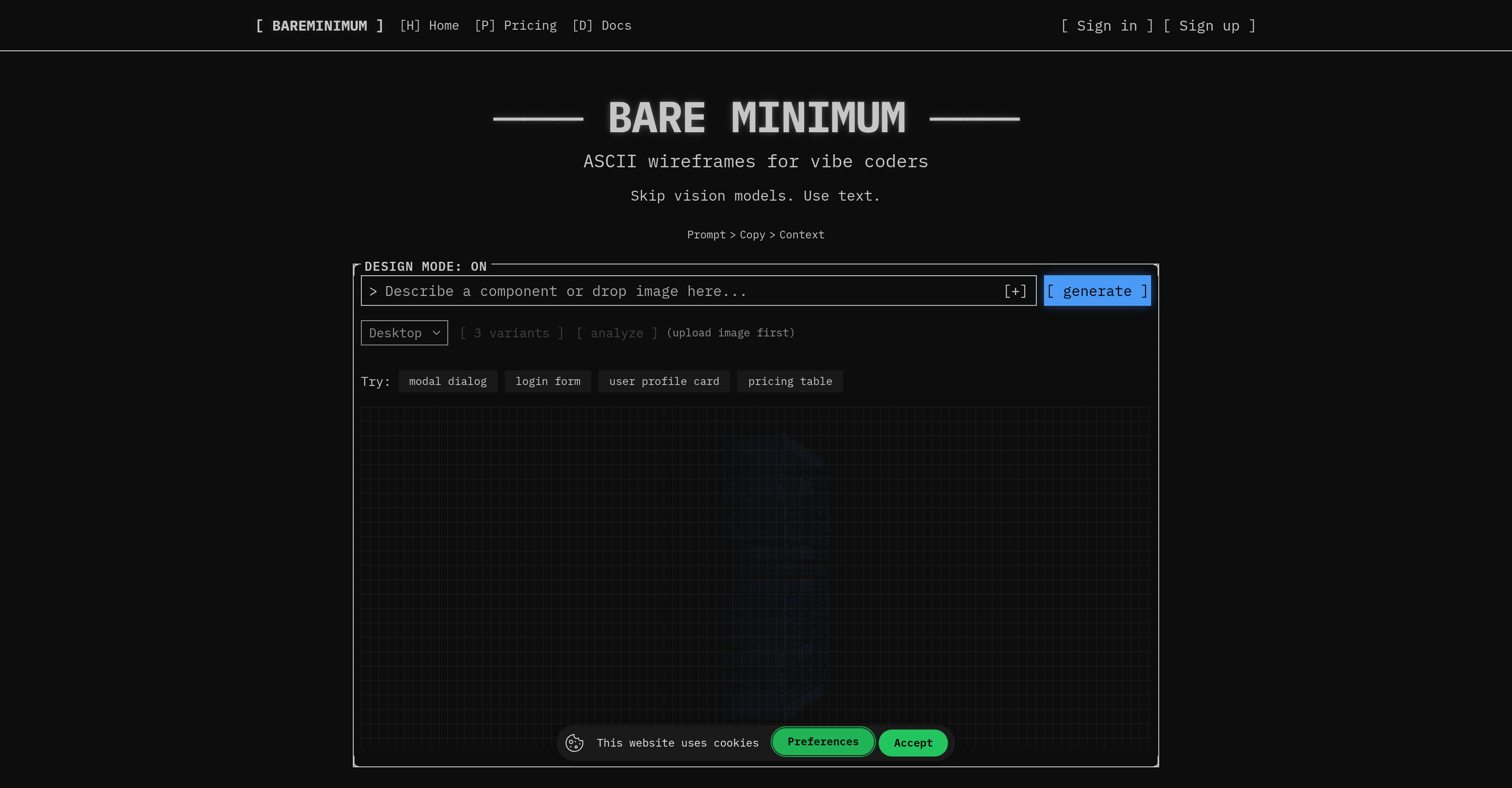
- Skip complex design tools and generate functional ASCII wireframes instantly from a simple text prompt, letting you visualize UI concepts without leaving your terminal.
- Turn any screenshot into an editable ASCII layout with the AI-powered analyze feature, perfect for reverse-engineering or auditing existing interfaces.
- Export your wireframe directly to production-ready React + shadcn/ui code, bridging the gap between ASCII concept and functional component.
- Arrange and refine elements intuitively on a drag-and-drop canvas, giving you full control over the final wireframe layout.
- Automate wireframe generation for your projects using the Developer API with support for Python, TypeScript, and cURL.
Pros & Cons
Pros
- ASCII wireframes generation
- Focus on TUI
- Text-based prompts input
- Screenshot analysis feature
- Drag-and-drop canvas
- Export in text
- Export in Markdown
- Export in PNG
- Design mode feature
- Image upload for analysis
- Modal dialogues creation
- Login form design capability
- User profile card design
- Pricing table design
- Vibe coders oriented
- Generation from prompts/screenshots
- Flexible outputs
- Mobile/Desktop variants
- UI issues analysis
- One-Click Export
- ASCII to React preview
- API for programmatic generation
- ASCII fixes suggestions
- Live component preview
- Export code to ship
- Support in Python
- Support in TypeScript
- Support in cURL
- Easy wireframe generation
- Automatic design system setup
- Generous free plan
- No design tool needed
Cons
- No collaborative features
- Lack of integration options
- No versioning or history
- Limited format exports
- No multi-platform support
- No color customization
- Limited user interface designs
- No live preview
- Lacks comprehensive tutorials
- No feedback or rating system
Reviews
Rate this tool
Loading reviews...
❓ Frequently Asked Questions
BareMinimum is an AI-powered tool designed to generate ASCII wireframes. It is intended primarily for developers, specifically targeting 'vibe coders' and focusing on creating terminal user interface (TUI) style wireframes.
BareMinimum generates ASCII wireframes based on either text-based prompts provided by the user or by analyzing screenshots. The AI uses this information to generate the layout and elements of the wireframe.
The 'design mode' in BareMinimum is a feature that allows users to visualize and interact with their wireframe design. This mode lets users see their wireframes in action and make changes interactively, further enhancing the user experience during the design process.
BareMinimum's text-based prompt feature works by allowing users to input specific prompts that can guide the AI in generating the desired wireframe layout. This means you just need to provide the system with a text description of what you want, and the AI will generate an ASCII wireframe accordingly.
The screenshot analysis feature in BareMinimum works by taking a screenshot that the user provides, analyzing it, and then generating an ASCII wireframe based on it. This way, users can create wireframes based on existing visuals.
With BareMinimum, users can create a variety of designs such as modal dialogues, login forms, user profile cards, and pricing tables. The flexibility of layout options caters to a wide range of user interface design needs.
Yes, users can customize their wireframes in BareMinimum. This can be done by uploading images in the 'analyze' feature, letting the user further personalise the layout of the wireframe.
The drag-and-drop canvas in BareMinimum provides an interactive environment for arranging elements as per user requirements. Users can easily position the elements to create the desired wireframe layout.
BareMinimum offers several export options for convenience. Users can export their creations in various formats including text, Markdown, or PNG. In addition, there is also an option to export in React + shadcn/ui format.
The 'analyze' feature in BareMinimum allows users to upload images for the AI to analyze and incorporate into the wireframe. This provides a personalised touch, creating a unique layer of customization in the wireframe creation process.
Yes, BareMinimum can convert ASCII to React. The tool also lets users preview the wireframe as live components and export shadcn/ui code.
Yes, BareMinimum offers a developer API for programmatic generation of the wireframes. It supports various languages including Python, TypeScript, and cURL, thus offering broad application possibilities.
Yes, BareMinimum provides an option for a UI audit. Users can upload a screenshot and the AI will identify layout issues. This enables users to improve the layout of their wireframes based on insights from the audit.
Yes, BareMinimum can provide before/after ASCII fixes. If the user uploads a screenshot and there are layout issues, the AI will generate a 'fixed' ASCII version that addresses the identified problem areas.
Yes, users can use BareMinimum to design a login form. This is one of the many layout options that BareMinimum offers. Users simply need to provide the prompt or upload a screenshot for the AI to generate the wireframe.
Creating a pricing table with BareMinimum is straightforward. Users can either provide a text-based prompt detailing the structure of the table, or upload a screenshot of an existing pricing table. The AI then creates an ASCII wireframe based on this input.
Yes, you can create a user profile card with BareMinimum. This task is easily achievable by providing a text-based prompt or an image which BareMinimum's AI will analyze to create the desired wireframe.
Yes, BareMinimum does support modal dialog design. Users merely need to provide the relevant details in a text-based prompt or upload an existing image of a modal dialog for the AI to generate the equivalent ASCII wireframe.
BareMinimum provides several formats for exporting wireframes. Based on the information available, users can export their creations in text, Markdown, and PNG formats. In addition, a format that supports React + shadcn/ui is also available.
Yes, users can upload images in BareMinimum. This feature, available through 'analyze', allows for the AI to base the creation of the wireframe on the content and layout of the uploaded image.
ASCII wireframes are skeletal layouts of a web page or app, created using ASCII characters. These wireframes provide a textual or graphic representation of an interface's basic structure.
BareMinimum leverages ASCII characters to generate wireframes based on textual input or from the analysis of uploaded screenshots.
BareMinimum is highly user-friendly. It features an intuitive drag-and-drop interface that allows users to easily arrange elements on a virtual canvas. Additionally, it supports wireframe exporting in various formats, enhancing its ease of use.
BareMinimum was primarily designed for software developers— specifically 'vibe coders'. It's an ideal tool for those who work frequently with terminal user interface style wireframes or prefer a minimalistic approach to layout design.
With BareMinimum, you can create a wide variety of wireframes. This includes modal dialogues, login forms, user profile cards, and pricing tables, among other interface layouts.
BareMinimum offers the flexibility to export your wireframe designs in text, Markdown, or PNG format. It also allows export to React along with the shadcn/ui code.
Yes, one of the features of BareMinimum is its ability to analyze uploaded images. By uploading an image, BareMinimum can identify any layout issues, and provide ASCII fixes to them.
'Vibe coders' is a term likely used to describe developers who prefer a more streamlined, code-centric approach to designing user interfaces. These developers might find traditional GUI-based design tools cumbersome, hence opting to work directly with ASCII wireframes, as enabled by BareMinimum.
In BareMinimum, the analyze feature works by scanning an uploaded image and interpreting it into an ASCII wireframe. It can detect layout issues within the screenshot and provide necessary fixes with ASCII representations.
Yes, you can upload images into BareMinimum. The AI tool is capable of interpreting the content of these images for wireframe creation or analysis purposes.
The design mode in BareMinimum likely refers to a function that facilitates the creative process. It may include a suite of features to aid in customizing wireframes, including element arrangement, exporting of designs, and more.
BareMinimum allows users to export their wireframes in several formats. These include plain text, Markdown, and PNG. Users also have the option to export their wireframes with React and shadcn/ui code.
Yes, with BareMinimum's drag-and-drop interface, you can arrange your wireframes on a virtual canvas to better fit your design requirements.
The primary benefit of using BareMinimum for wireframing is its simplicity and utility. It can skip complex design models, allowing you to utilise minimalistic ASCII art for wireframes. Plus, its flexibility to export the wireframes in diverse formats including PNG, React and Markdown makes it a valuable tool.
Yes, BareMinimum offers a Developer API for programmatic generation. You can automate wireframe creation using languages like Python, TypeScript, and cURL.
Some examples of layouts that can be created with BareMinimum include modal dialogues, login forms, user profile cards, and pricing tables.
Yes, BareMinimum supports drag-and-drop arrangement of elements. Its user interface incorporates a virtual canvas that allows users to conveniently arrange wireframe elements in their desired configuration.
Yes, with BareMinimum, you can design user profile cards. Simply provide a prompt or upload an image when creating wireframes, and BareMinimum can generate an ASCII representation of a user profile card.
Pricing
Pricing model
Freemium
Paid options from
$8/month
Billing frequency
Monthly