

BulkImg AI
Produce an entire catalog, ad set, or storyboard in one run: paste one prompt per line or upload a CSV with a prompt column, and every row renders through a single shared configuration, with up to 100 images per batch on higher plans.
Listing not yet reviewed by our editors · How we check
Overview
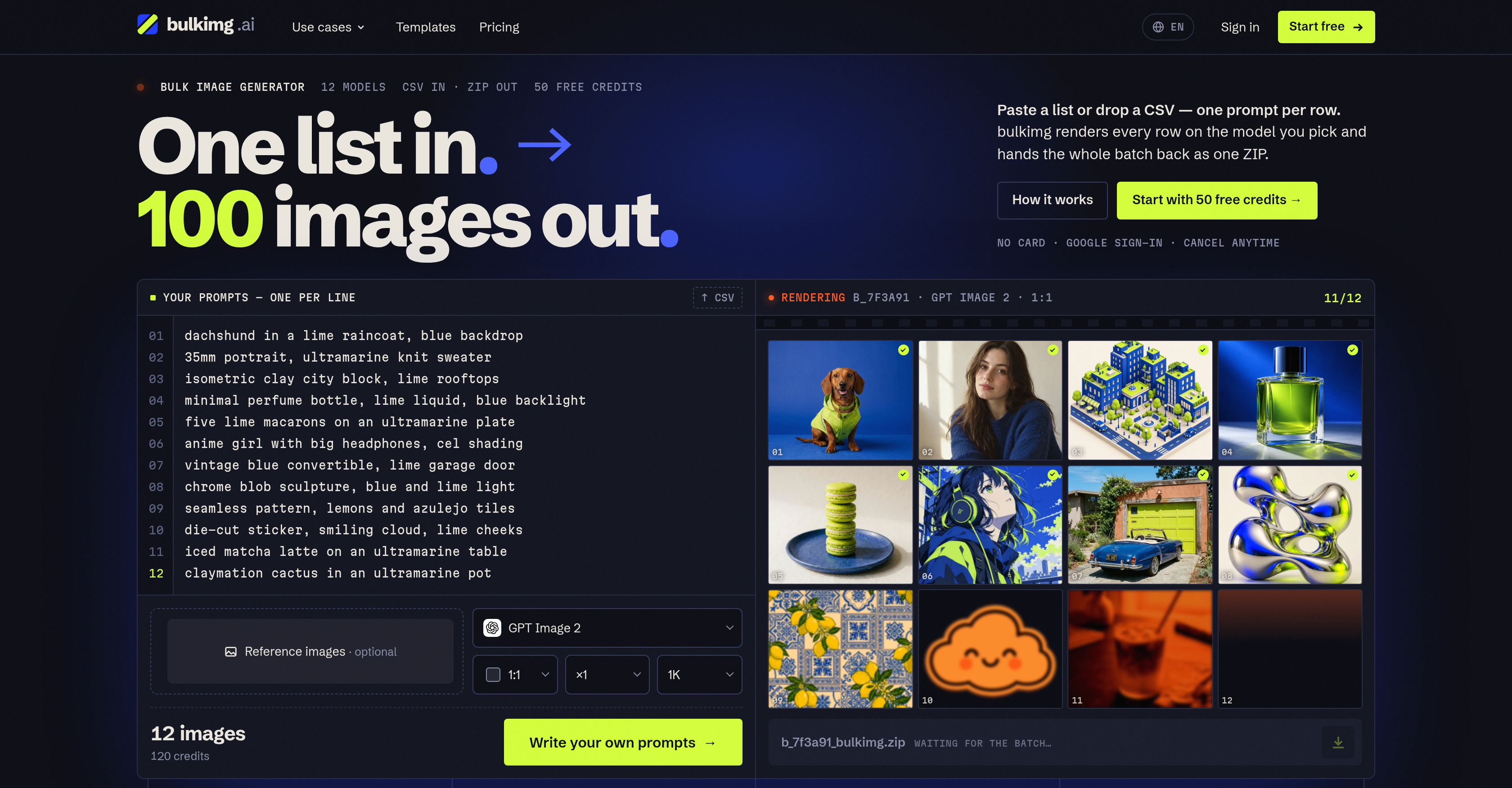
- Produce an entire catalog, ad set, or storyboard in one run: paste one prompt per line or upload a CSV with a prompt column, and every row renders through a single shared configuration, with up to 100 images per batch on higher plans.
- Keep the same product, character, or visual style across every image: attach one reference image and the selected model applies it to all rows, alongside shared style instructions repeated in each prompt.
- Match each job to the best image model without juggling subscriptions: switch between GPT Image, Nano Banana, Seedream, Flux, and Qwen Image from OpenAI, Google, ByteDance, Black Forest Labs, and Alibaba in one place.
- Know exactly what a batch costs before spending anything: the full credit total, calculated from model, resolution, and images per prompt, appears before processing starts.
- Never pay for broken renders or rebuild a batch from scratch: failed generations are refunded to your balance automatically, and a one-click retry re-queues only the missed rows while successful images stay untouched.
- Deliver and organize results without manual renaming: finished batches export as one ZIP archive with an index.csv manifest that maps every filename to its original prompt for review, client handoff, or downstream automation.
- Get platform-ready visuals on the first pass: preset square, landscape, portrait, and social-media aspect ratios (1:1, 16:9, 9:16, 4:5, 3:4) or a custom ratio, with 1K, 2K, or 4K output resolution.
- Compare creative options for every concept in the same batch: generate 1, 2, 4, or 10 variations per prompt for ad testing, avatar sets, or icon exploration.
- Launch recurring production jobs in minutes: templates pre-fill prompts, aspect ratios, and settings for use cases such as product photography, coloring-book pages, menu images, and educational flashcards.
- Track large jobs and reuse past work without losing files: monitor rows side by side as images land in your library, then preview, favorite, and re-download individual images or full batch ZIPs for at least 14 days.
- Use every image commercially without cleanup: outputs carry no watermarks and belong to you, subject only to the underlying model's license.
- Test bulk image generation at no cost: sign in with Google to claim 50 starter credits with no payment card, then scale with monthly or yearly plans or one-off credit top-ups that never expire.
- Work in your own language: the interface is available in English, German, Japanese, Korean, French, and Spanish.
Pros & Cons
From the listing; not yet checked by our editors.
Pros
- Failed images auto-refunded
- Up to 4K output
- GPT Image + Nano Banana in one place
- One list in, one ZIP out
- Max 100 images per batch
Cons
- No public API available
Alternatives to BulkImg AI
Tools that share the most tags with BulkImg AI.
- BulkGen
Scale visual content production from one prompt to thousands of unique images instantly using the 'Prompt × N' mode for concept variations.
Free trial · from $9.50/month
$9.50/month
Not yet checked
- Bulk Image Generator
Generate 100 professional AI images in just 15 seconds using Flux 1.1 batch processing technology
Paid · from $15/month
$15/month
Not yet checked
- BulkImagen
Generate fresh hero shots for every product overnight using a single bulk AI image generator run, powered by uploading a CSV file of prompts.
Freemium · from $5
$5
Not yet checked
- ImgBulk
Finish high-volume AI image generation and editing without repeating completed work, using batch processing that runs up to 200 tasks per batch once you set them up a single time.
Free trial · from $5/unit
$5/unit
Not yet checked
- SeamUI
Pay provider rates with zero token markup: bring your own API keys from OpenAI, Google, Black Forest Labs, xAI, Replicate, and Kie.ai, and each provider bills you directly.
Free trial · from $99
$99
Not yet checked
- EzRemove
Browser tool that removes the background from a photo and returns a transparent PNG.
Freemium
Not listed
Nov 24, 2026
Reviews
Rate this tool
Loading reviews...
Frequently asked questions
How do I upload a CSV of prompts to bulkimg?
On their website you upload a CSV by dragging the file onto the upload area or clicking the upload button. The file must contain a column named “prompt”; each row is treated as a separate prompt for the batch.
Can I use a reference image to keep a product look consistent across a batch?
Yes. bulkimg lets you attach a single reference image to a batch; the chosen model applies that reference to every row, ensuring the product or character retains the same visual treatment across all generated images.
What image models are available on bulkimg?
The platform offers twelve models: GPT Image 2, GPT Image 2.5 (OpenAI); Nano Banana Pro, Nano Banana 2, Nano Banana 2 Lite, Nano Banana 2.1 (Google); Seedream 4.5, Seedream 5.0 Pro, Seedream 5.0 Flash (ByteDance); Flux 2 Pro (Black Forest Labs); Qwen Image 3.0 Pro and Qwen Image 3.0 (Alibaba).
How does bulkimg calculate the credit cost before I start a batch?
Before a batch starts bulkimg multiplies the per‑image credit price (set by model, resolution and images‑per‑prompt) by the total number of images to be generated and shows the exact credit total in the UI.
What’s the maximum number of images I can generate in one bulkimg batch?
The maximum images per batch depend on the subscription tier: Free accounts up to 5 images, Solo up to 10, Crew up to 50, and Factory up to 100 images per batch.
Do failed renders on bulkimg get refunded automatically?
Failed renders are automatically refunded; the credits for any image that did not render are returned to your balance without any manual action.
How can I choose the aspect ratio and resolution for my bulkimg images?
Aspect ratios are selected from preset buttons (1:1, 16:9, 9:16, 4:5, 3:4) or a custom ratio, and resolution is chosen from 1K, 2K, or 4K options before you launch the batch.
What’s the difference between the Solo, Crew, and Factory plans on bulkimg?
Solo costs $19.90/month, provides 2,500 credits and allows batches of up to 10 images. Crew costs $39.90/month, gives 6,000 credits and batch size up to 50 images. Factory costs $99.90/month, supplies 18,000 credits and batch size up to 100 images. Higher tiers lower the effective cost per credit and include yearly plans with two months free.