Overview
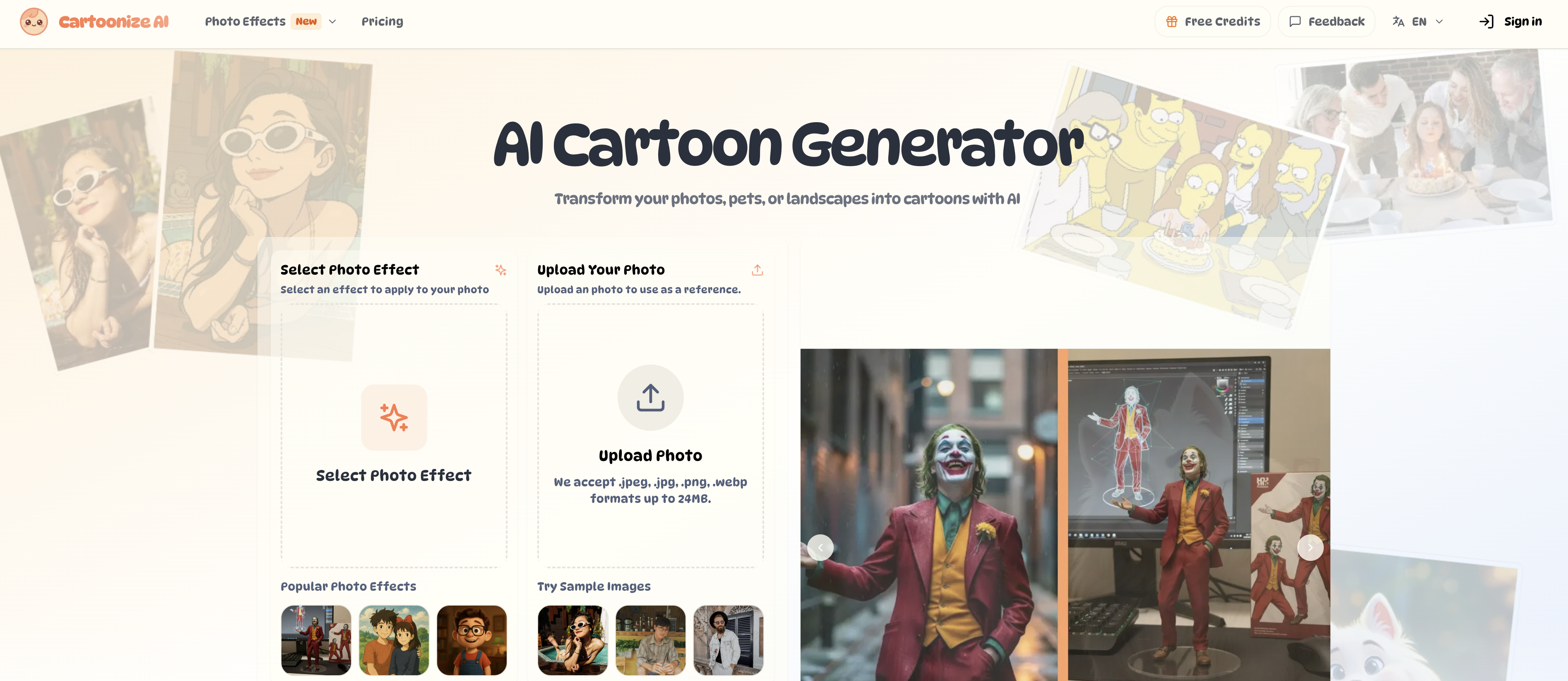
- Create professional cartoon art from any photo with AI that preserves your unique features and original composition
- Transform selfies, pets, and landscapes into specific styles like Studio Ghibli, Pixar, and anime with guided style prompts
- Download high-resolution 4K images perfect for commercial projects and professional marketing materials
- Generate multiple cartoon variations simultaneously in under 30 seconds for rapid content creation
- Control artistic output precisely by adjusting transformation strength, aspect ratio, and output count parameters
- Process multiple file formats including JPEG, PNG, and WEBP files up to 24MB without quality loss
Pros & Cons
Pros
- Web-based tool
- Various style options
- Preserves prominent photo features
- Adjustable settings
- Quick generation
- High-resolution output
- User-friendly interface
- Supports multiple formats
- Supports .jpeg, .jpg, .png, .webp
- Retains original image composition
- Customizable output count
- Efficient aspect ratio adjustment
- Supports landscape transformation
- Supports pet cartoonization
- Instant cartoon transformation
- Wide range of styles
- Descriptive transformations
- Can provide extra transformation details
- Processes images under 30 seconds
- Can convert to 3D Animation Style
- Supports Comic Book Style
- Converts to Japanese Anime
- Maintains original photo's mood
- Can transform into Pixel Art
- Supports transformations to Traditional Art
- Can convert to Format Printmaking
- Can convert to Vintage & Retro styles
- Mimics numerous popular Animation Studios' styles
- Can convert to Children's Book style
- Supports customizable aspect ratio
- Photos can be transformed into Games & Pixel
- Multilingual support
- Supports conversion to numerous Artistic Styles
- Preserves intelligent structure of image
- Can process multiple images simultaneously
- Supports up to 24MB files
- Professionally usable hi-resolution output
- Free credits for usage
- Feedback option available
- Comprehensive tutorial available on page
- Detailed FAQ section
- Unlimited creative possibilities
- Commercial usage rights for premium users
- No daily usage restrictions
Cons
- Limited file format support
- 24MB file size limit
- 40964096 pixel limit
- Processing time up to 60s
- Specific lighting needed
- High resolution for premium only
- Commercial rights for premium users
- No automatic batch processing
- Free version has limits
- Requires user input for best results
Reviews
Rate this tool
Loading reviews...
❓ Frequently Asked Questions
Cartoonize AI can process a maximum file size of 24MB.
The average time it takes Cartoonize AI to convert a photo ranges from 15 to 60 seconds, depending on the complexity of applied styles.
Free accounts on Cartoonize AI receive monthly credits, while premium plans offer higher limits with additional credit purchase options. Thus, the number of photos you can cartoonize depends on your account type.
Yes, Cartoonize AI can be used for commercial applications. Premium subscribers in particular receive full commercial rights for all generated images.
Cartoonize AI supports JPEG, JPG, PNG, and WEBP image formats.
Cartoonize AI best handles clear, well-lit images with defined subjects. These can include portraits, landscapes, and product photos.
Yes, users can control the transformation intensity in Cartoonize AI by adjusting the transformation strength and using specific prompts to guide style, colors, and mood.
Cartoonize AI offers a broad range of cartoon styles ranging from Action Figure, Studio Ghibli, Pixar Style, Aardman Studio, Pixar Style, Pixel Art, among others. It also provides styles belonging to various games, comics, cartoons, and different types of illustrations and designs.
Yes, users can describe the desired transformation in Cartoonize AI to guide the AI on style, colors, modifications, or artistic effects they want to apply.
Yes, Cartoonize AI gives users the flexibility to adjust settings such as transformation parameters like aspect ratio and output count.
The steps to turn a photo into a cartoon with Cartoonize AI are: 1. Upload your photo. 2. (Optional) Describe your changes. 3. Adjust settings 4. Generate and download your cartoonized image.
Cartoonize AI is designed to intelligently recognize and maintain the prominent features of a photo during the cartoonizing process, delivering results that truly resemble the original photo.
Yes, Cartoonize AI is capable of creating high-resolution cartoon images. Users can download high-resolution 4K images perfect for professional use.
The generation process in Cartoonize AI is quick, typically creating stunning cartoon variations in under 30 seconds.
Yes, Cartoonize AI has the capability to cartoonize any pet photo by intelligently recognizing the pet's features and personality, and transforming their photo into a delightful animated character.
Yes, you can use Cartoonize AI to convert a selfie into a cartoon. The tool maintains your unique features and expressions in your chosen artistic style.
Cartoonize AI uses a powerful AI engine that applies a variety of artistic transformations to a photo, effectively converting the photo into different art styles based on the user's specifications.
Yes, Cartoonize AI is suitable for both personal and commercial use. High-resolution output makes it an ideal choice for professional marketing campaigns, content creation, product mockups, and presentations.
Yes, in Cartoonize AI, users can control the output count by adjusting the transformation parameters in the settings.
The Studio Ghibli effect in Cartoonize AI is one of the cartoon styles that transforms a photo to mimic the distinctive art style found in Studio Ghibli's animated films.
Cartoonize AI is a web-based tool that utilizes artificial intelligence to transform photos into distinctive cartoons. It accepts a variety of images such as selfies, landscapes, and pet pictures, and transforms them into chosen artistic styles such as Action Figure, Studio Ghibli, Pixar Style, and more.
Cartoonize AI uses advanced artificial intelligence to analyze image structure and apply artistic transformations. It maintains the core composition and recognizable features of the original photo during the transformation process, resulting in cartoons that reflect the essence of the original image.
Cartoonize AI can process all types of photos - from selfies to landscapes, and even pet pictures. The AI can achieve the best results with clear, well-lit images with defined subjects.
Cartoonize AI can generate a wide array of cartoon styles. These range from Action Figure, Studio Ghibli, Pixar Style to more Japanese Anime, Marvel Comic, DC Comic, American Cartoon, 3D Animation Style, Anime & Manga and many others. It can also transform images into art styles such as Vintage Oil Painting, Anime Watercolor, and more.
'Prominent features' refer to key aspects of the photo that are uniquely distinctive and crucial to describing the subject of the image. When Cartoonize AI recognizes these features, it ensures they are maintained during the cartoonization process, preserving the original composition and resulting in a cartoon that closely resembles the original photo.
Users can control the transformation process in Cartoonize AI by adjusting transformation parameters such as the aspect ratio and output count. Users can also describe specific style preferences and desired modifications before the transformation process begins.
Cartoonize AI generates cartoon variations at a rapid pace. While exact processing times can range, most standard transformations are completed within 15 to 30 seconds. Complex styles can take up to 60 seconds, with multiple images being processed simultaneously for greater efficiency.
Photos transformed by Cartoonize AI maintain a high resolution, with the capacity to output high-quality 4K images. This makes the processed images suitable for a variety of applications, from digital viewing to print.
Yes, Cartoonize AI is suitable for commercial use. Premium subscribers to the software receive full commercial rights for all generated images. This allows users to implement the cartoonized images freely in marketing campaigns, social media, product mockups, and other business applications.
Cartoonize AI supports multiple photo formats, accepting .jpeg, .jpg, .png, and .webp files. The maximum file size it can process is up to 24MB.
During an image's transformation, Cartoonize AI's AI engine preserves the original image's core composition and recognizable elements. Despite the complex reimagining of the image into various art forms, it ensures that the fundamental structure and key features remain intact, delivering cartoonized images that reflect the essence of the original photo.
Yes, Cartoonize AI can transform landscape photos into fantasy backdrops. Whether it's turning a majestic mountain range into an epic fantasy scene or converting a serene beach sunset into a beautiful watercolor painting, Cartoonize AI is able to add an artistic touch while preserving the original composition.
Yes, Cartoonize AI can convert pet photos into cartoons. Its intelligent AI engine acknowledges the pet's features and personality, transforming them into delightful, animated characters in various styles.
Users can adjust the transformation parameters in Cartoonize AI according to their preference. This includes parameters like the image's aspect ratio and the output count, which allows the user to control how closely the result resembles the original image.
To transform a photo using Cartoonize AI, firstly, upload an image. Secondly, describe any desired changes optionally. Following that, adjust settings such as the aspect ratio and output count. Lastly, generate the transformation and download the newly created image.
Yes, Cartoonize AI boasts a user-friendly interface. It allows stunning cartoon transformations in four simple steps: image upload, optional description of desired alterations, fine-tuning of transformation parameters, and finally, generation and downloading of the new image.
Cartoonize AI ensures the preservation of the core composition of the original image through its advanced AI engine. While applying the complex artistic transformations, it maintains the image's core structure and recognizable features, ensuring that the cartoonized image closely resembles the original photo.
Describing any desired changes in Cartoonize AI is an optional step in the transformation process. Users can write a prompt indicating how they want to transform the image, specifying about style, colors, or any modifications or artistic effects they want to apply.
Yes, Cartoonize AI can transform a cityscape photo into a futuristic anime scene. It has the capacity to add a touch of artistic magic to any photo, converting bustling cityscapes into intricate, fantastical anime configurations while maintaining the mood and composition of the original image.
Cartoonize AI allows users to adjust the aspect ratio of the image during the transformation process. This means users can control the proportional relationship between the image's width and height, allowing for a greater level of customization when cartoonizing their photos.
Pricing
Pricing model
Free Trial
Paid options from
$7.99/month
Billing frequency
Monthly
Refund policy
Users can request a refund within 7 days if the service does not meet described standards.