

CartoVoxel
Overview
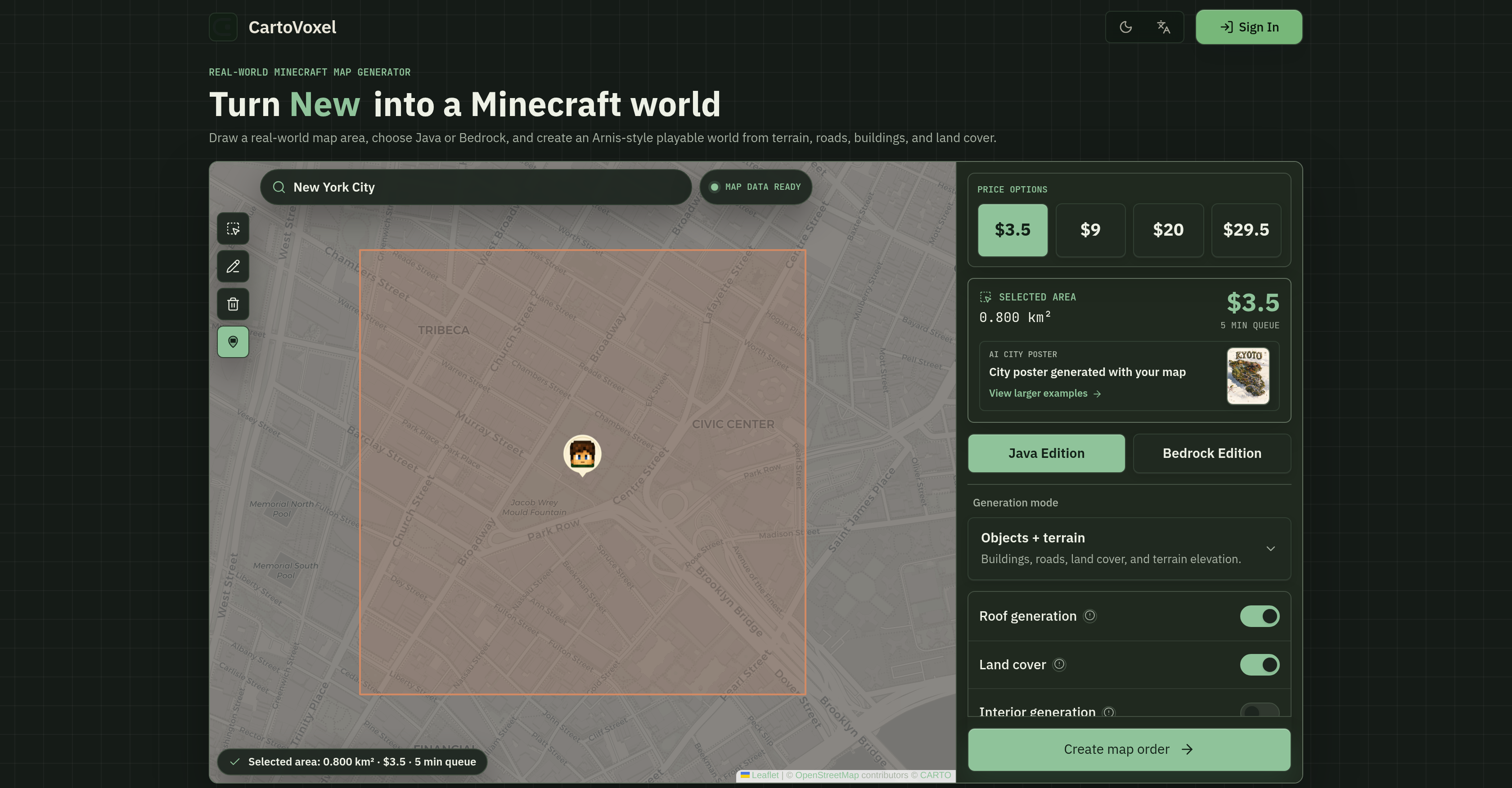
- Explore your neighborhood or favorite city in Minecraft by converting any real-world location into a playable map, using the interactive map to select the area.
- Save your PC's performance by letting cloud servers handle all complex rendering, so you never worry about slowdowns or resource drain.
- Get ready-to-play Minecraft world files delivered straight to your email, with no bulky software to download or install.
- Customize every generated world with authentic terrain, roads, and buildings extracted from real-world geographic data for high detail and authenticity.
- Share your creation instantly with a bonus AI-generated city poster featuring landmarks, perfect for social media, thumbnails, or project announcements.
- Know the exact cost and completion time before you commit, thanks to instant quotes and real-time queue tracking based on your selected area size.
- Build worlds for both Java and Bedrock editions in one tool, choosing your preferred game version during creation for full compatibility.
- Create maps of any scale, from a single school campus to an entire city block, for educational gaming or virtual travel experiences.
Pros & Cons
Pros
- Web-based tool
- Supports Java and Bedrock
- Customizable world elements
- Zero setup required
- Rendering via cloud
- Email delivery of files
- Dynamic transparent pricing
- Real-time queue status
- Interactive map for area selection
- Instant quote and queue time
- No downloads
- No heavy software
- Selectable real-world locations
- Available for low-end PCs
- Compatible for mobile and Mac
- Straightforward importing and playing
- Pricing scales based on selection
- Detailed map generation
- Real-time queue status
- Ability to convert landmarks
- Transparent pricing
- Variety in output selection
- Dynamic area estimate
- Pricing based on map size
- Compatible with both Java and Bedrock
- Preserves computer performance
- No need to install desktop applications
- Landscape specifications include terrain, roads, buildings
- Instant generation and download
- Real-world locations to Minecraft conversion
- Terrain, roads and buildings customization
- Instant quote and queue time
- Email delivery of Minecraft world files
- Preserves PC's performance
- Resources-saving cloud-based rendering
- Visual story for social sharing
- Convenient map order delivery
- Bonus promotional material
- Online map generation
- Optimized for creators
- Instant rendering time estimates
Cons
- Limited to Minecraft landscapes
- No offline mode
- Depending On Email Communication
- Cloud dependence
- No multi-language support
- Customizable options seem limited
- Rendering errors possible
- Lack render preview function
- No trial version
- No integrated poster printing
Reviews
Rate this tool
Loading reviews...
❓ Frequently Asked Questions
CartoVoxel is a web-based tool designed to effortlessly create Minecraft worlds based on real-world map data. It allows users to transform any real-world geographic location such as a city, school, or landmark into a Minecraft landscape.
CartoVoxel uses real-world map data to generate Minecraft worlds. Users select a real-world area on a map, choose a game edition (Java or Bedrock), and customize world elements like terrain, roads, buildings, and land cover. The tool then generates the Minecraft world based on these inputs.
Yes, CartoVoxel supports both Java and Bedrock versions of Minecraft. The user simply selects their desired game edition during the world creation process.
CartoVoxel provides users with options to customize different elements of their Minecraft world. These elements include but are not limited to terrain, roads, buildings, and land cover. Users can tweak these elements as desired during the world creation process.
No, there is no setup or installation required to use CartoVoxel. Users can perform all tasks in their browser, from area selection to formatting and queuing. There is no need to install bulky desktop applications.
CartoVoxel handles complex rendering via cloud-based servers. This significantly enhances user convenience and optimizes computer performance by reducing the computational load on the user's machine.
Upon completion of the world creation process, CartoVoxel delivers the Minecraft world files directly to the user's inbox. Users can then download and extract these files, enabling them to start playing immediately in their new Minecraft world.
The shareable AI city poster generated by CartoVoxel features a miniature world of the selected city with landmarks and other relevant details. It provides users with a visual narrative of their Minecraft world and can be used for social media, thumbnails, and project announcements.
Yes, CartoVoxel can indeed be used for educational gaming and virtual travel. By transforming real-world locations into playable Minecraft worlds, it provides a unique platform for digital exploration and educational gameplay, applying real-world geography in a virtual context.
CartoVoxel operates on a dynamic, transparent pricing model. The cost and estimated queue time are instantly calculated based on the size of the selected real-world area for transformation into a Minecraft world. This way, users are aware of the cost before they commit to generating the world.
Yes, users can track the status of their world creation in real-time on CartoVoxel. The tool provides accurate rendering time estimates to the users before they start the world generation process, allowing them to know exactly when their world will be ready.
CartoVoxel enhances computer performance sustainability by handling complex rendering in the cloud. This approach offloads the computational burden from the user's computer onto cloud servers, preserving their machine's performance and avoiding any potential slowdowns.
Users have the option to select between two game editions on CartoVoxel - Java Edition and Bedrock Edition.
On CartoVoxel, users draw a real-world map area by highlighting the desired geographic area on the interactive map. This highlighted area is accurately converted into a Minecraft landscape.
CartoVoxel simulates roads, buildings, and land cover by extracting these attributes from real-world map data. The tool then incorporates these elements into the user-specified Minecraft world.
Yes, terrain customization is possible on CartoVoxel. CartoVoxel lets users make adjustments to the terrain during the world creation process, allowing for a highly personalized Minecraft world experience.
The entire process of creating a world on CartoVoxel occurs in a browser, eliminating the need for software installation. Users select a real-world area on a map, choose a game edition, customize the world's elements, and begin the generation process. All steps, including the complex rendering, are performed via cloud-based servers, with world files delivered directly to the user's inbox for download.
CartoVoxel caters for any map order involving the transformation of real-world locations into playable Minecraft worlds. Users can select from a variety of world sizes, from a single school campus to an entire city block.
The visual narrative on CartoVoxel is the shareable AI city poster that it generates for every map order. This poster features a miniature world of the selected area with landmarks and other relevant details, providing the users with a visually engaging representation of their Minecraft world.
CartoVoxel ensures a user-friendly experience through its streamlined web-based process, clear pricing, and real-time tracking features. The tool performs complex cloud-based rendering, allowing for efficient use of computer resources, and delivers Minecraft world files directly to the user's inbox, ensuring a hassle-free process.
Yes, CartoVoxel can convert any real-world geographic location into a Minecraft landscape. Users can turn their city, school, or favorite landmark into a playable Minecraft map by selecting the desired area on the tool's interactive map.
CartoVoxel supports both Java and Bedrock versions of Minecraft by allowing users to choose their preferred game edition when creating a world. The tool can generate world files compatible with either Java or Bedrock Minecraft editions, offering a versatile experience to different user groups.
Yes, you are provided with several customization options in CartoVoxel. You can modify the world's elements like terrain, roads, buildings, and land cover to match your desired Minecraft landscape, ensuring the created world possesses detailed features that resonate with the original real-world location.
In CartoVoxel, the rendering process is performed remotely in the cloud. Users don't need to worry about their PC's performance or resource usage, as complex rendering tasks are handled by CartoVoxel's cloud-based servers. The tool is designed to enhance user convenience and maintain computer performance sustainability.
With CartoVoxel, you receive the generated Minecraft world files directly in your email. Once the rendering is complete, the ready-to-play world files are sent to you, allowing an immediate start to gameplay after a simple downloading and extraction process.
The AI City Poster, provided with every map order in CartoVoxel, is a visual representation of the generated Minecraft world. It features the selected city's miniature world, landmarks, and relevant details, serving as a creative, shareable poster that adds a visual narrative to the user's Minecraft experience.
CartoVoxel's pricing policy is transparent and dynamic. The costs are calculated instantly based on the selected area, offering fair pricing. Users have acces to the quote before confirming their order, ensuring they know exactly how much they are paying and what for.
Yes, CartoVoxel provides real-time queue status. It gives users accurate rendering time estimates before they commit to a map, offering an enhanced and seamless experience.
Yes, with CartoVoxel, you can create playable maps using real-world geographic data. The tool allows you to convert an actual map area into a Minecraft world, making the game more exciting and realistic.
Yes, CartoVoxel allows you to customize features like terrain, roads, and buildings in the generated maps. These options bring a higher level of detail and authenticity, closely resembling the real-world location selected.
No, CartoVoxel's rendering process will not affect the resources on your PC. The tool performs the complex rendering tasks remotely in the cloud, easing the load on your PC's performance.
After creating a world with CartoVoxel, you receive the generated Minecraft world files directly in your email. The files are ready for gameplay right after the straightforward downloading and extraction process.
Yes, with every world created in CartoVoxel, you receive a bonus AI-generated city poster. This showcases the city map you created in a visually appealing style, perfect for sharing along with your created world.
Yes, CartoVoxel provides instant quotes and rendering time estimates. This allows you to see the cost and estimated completion time before you commit, enhancing the user experience with transparency and predictability.
Absolutely, CartoVoxel can turn your school campus, your city, or even your favorite landmark into a Minecraft map. The tool allows you to select any real-world geographic area and transforms it into an immersive Minecraft landscape.
Yes, with CartoVoxel, you don't need to download heavy software. The entire process, from map selection to rendering happens online. Upon completion, you receive your world files directly in your email, negating the need for any on-device software.
Yes, CartoVoxel sends the finalized world directly to your email. Once the tool completes the rendering process, it sends you a link to download the Minecraft world files, ready for import and immediate play.
Yes, CartoVoxel provides fair pricing based on the size of the map you want to create. The dynamic engine calculates costs and queue times instantly based on your selected area ensuring you only pay for what you frame.
Pricing
Pricing model
Paid
Paid options from
$3.50
Billing frequency
One-time