Overview
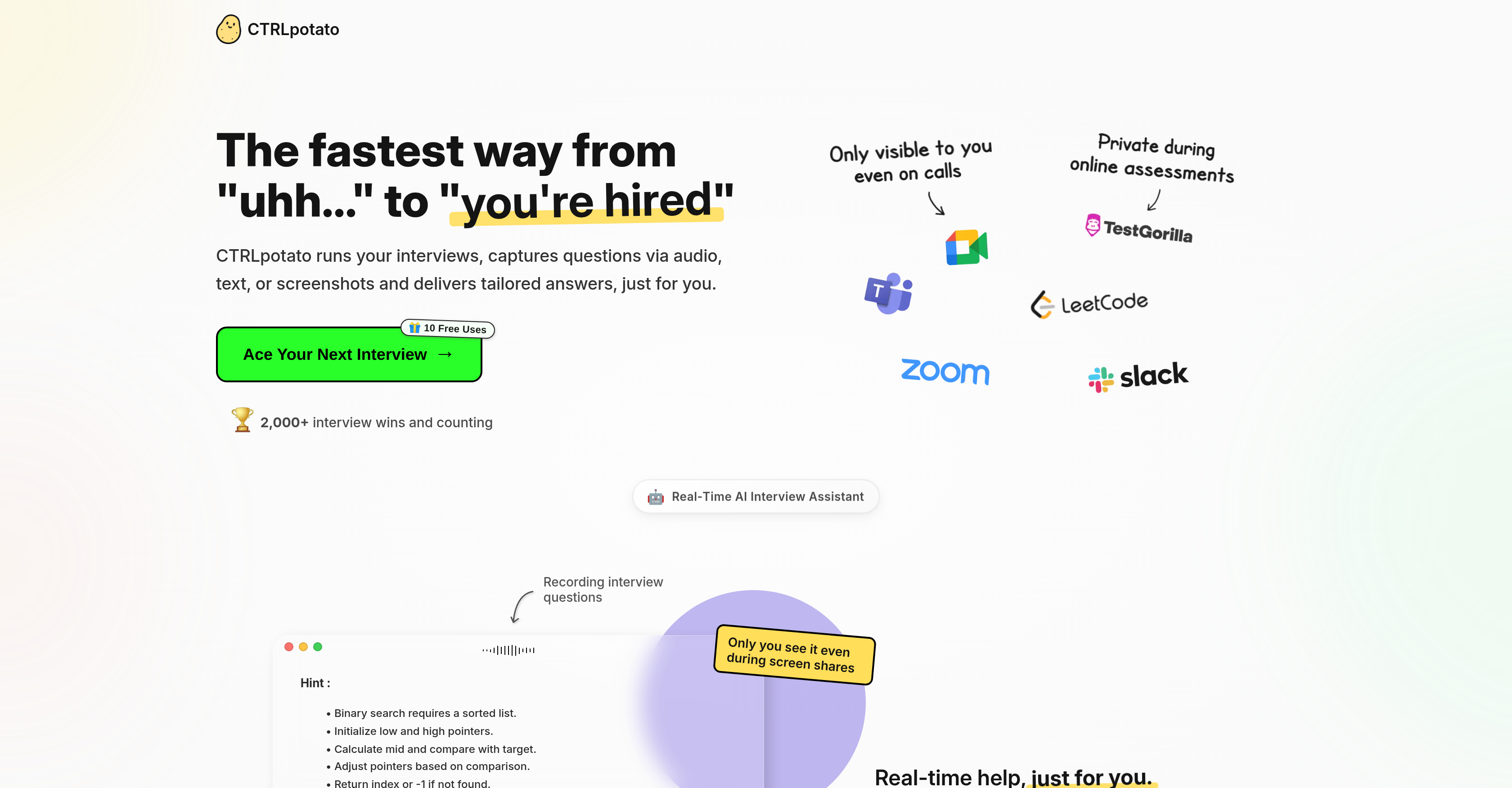
- Deliver confident responses in live interviews with instant answers from top AI models in 2-3 seconds
- Handle complex, multi-part questions seamlessly by combining audio, screenshots, and text in one context buffer
- Maintain complete privacy during screen shares with off-screen operation that leaves no visual traces
- Access answers discreetly on your phone via mobile mirroring during full-screen assessments
- Get personalized responses that match your experience and tone by uploading your resume for context
- Switch between GPT-5, Claude, and Gemini models on the fly for optimal answer quality
- Receive detailed code explanations with language-aware coding mode and line-by-line comments
- Capture questions instantly with one-key shortcuts for audio transcription, screenshots, or text selection
Pros & Cons
Pros
- Real-time help during interviews and tests
- Combines audio, screenshots, and text into one answer
- Instant human-sounding responses (not copy-paste bot speak)
- Off-screen by design; safe for screen-share
- Phone mirroring via secure browser (no app)
- Context buffer for multi-part questions
- Coding mode: language-aware, regen, complexity notes
- Switch between top models on the fly
- Customizable keyboard shortcuts (one-key capture)
- Works on Zoom/Teams/Meet, HackerRank/TestGorilla and many more
- Stealth features minimize OS/process visibility
- Answers in ~2–3 seconds
- Resume & document context for tailored outputs
- macOS & Windows support
- First 10 uses free
- Invisible in Task Manager
- Generates code answers
- Safe against screen shares
- Invisible in task manager
- Not detected on screen shares
- Live answers on mobile
- Handles proctored tests
- Safe for live coding rounds
- Unobtrusive answer delivery
Cons
- No Linux support
- Free tier limited to 10 uses
- Risk of over-reliance; not a prep substitute
- Needs initial permissions setup (mic, screenshots)
- Potential ethical considerations
- Works best with clear audio; noisy calls reduce accuracy
Reviews
Rate this tool
Loading reviews...
❓ Frequently Asked Questions
CTRLpotato captures interview questions through diverse means which encompass audio, text, and screenshots.
CTRLpotato ensures user privacy by maintaining a private and off-screen operation throughout its usage, staying out of the way and not showing up in screen shares or leaving any visual traces on users' desktops.
To enhance privacy, CTRLpotato offers features like mobile mirroring and off-screen operation, while also ensuring invisibility during screen shares. The tool does not appear in task managers and activity monitors either.
Yes, CTRLpotato offers users the ability to switch between different AI models.
CTRLpotato handles multi-part questions or context by using a context buffer. The context buffer accumulates audio, screenshots, and text snippets and then sends it in one go, ensuring a comprehensive answer considering all relevant information.
CTRLpotato's context buffer is a digital clipboard-like feature. It gathers all inputs such as audio, screenshots, and text snippets then sends it as one input with one key press to provide a unified, comprehensive response.
Yes, CTRLpotato is designed to be compatible with both MacOS and Windows platforms.
CTRLpotato remains invisible during screen shares by maintaining off-screen operations and not leaving any visual traces on the desktop. It doesn't appear in task managers or activity monitors, ensuring it stays out of sight during screen shares.
CTRLpotato ensures its responses sound authentic by adjusting them based on the user's specific experience and tone. This includes providing hints and full answers structured for the user's natural adaptation.
CTRLpotato adjusts its responses based on the user's specific experiences and tones by allowing users to upload their resumes, enabling the AI to tailor responses to suit the user's unique cadence, language, and professional background.
The mobile mirroring feature in CTRLpotato works by hiding the desktop app with one shortcut. Users can scan a QR code to open a live answer stream on their phones, providing maximum privacy especially during full screen assessments or screen-sharing calls.
Yes, CTRLpotato can accept multiple forms of input at once, including audio, text, or screenshots.
CTRLpotato assists in real-time during interviews by capturing questions in multiple formats then providing instant, tailored answers which can include a blend of detailed information, hints, and full answers depending on the user's requirements.
CTRLpotato improves your knowledge during interviews by providing a safety net of information. The tool gives users access to instant responses enabling them to engage in the interview more effectively and with increased confidence.
Yes, CTRLpotato can capture questions through screenshots along with audio and text inputs.
CTRLpotato is described as a real-time AI interview assistant due to its ability to instantly capture interview questions via multiple formats and deliver tailored responses, aiding users in real-time during interviews.
CTRLpotato keeps users focused during interviews by ensuring the tool stays private and off-screen. This way, users can receive assistance without any distractions or privacy breaches.
CTRLpotato's off-screen operation refers to its working dynamically in the background without appearing on the user's desktop or interfering with other on-screen activities. This feature ensures users are not distracted while using the tool, and it remains invisible even during screen sharing.
In terms of text interpretation, CTRLpotato captures any highlighted text from users' screens, adds it to the context, and responds with an aligned, relevant answer.
Yes, CTRLpotato does have an audio interpretation feature which allows the AI to transcribe questions from interviews or calls in real-time, to which it then provides instant tailored responses.
CTRLpotato is a real-time, artificial intelligence powered tool designed to provide assistance during interviews. It captures interview questions through audio, text, or screenshots and delivers instant, tailored answers. It operates privately and off-screen, which ensures user privacy and reduces distractions. Additionally, it offers features like mobile mirroring and options to switch between AI models, as well as a context buffer for handling multi-part questions.
CTRLpotato captures interview questions through multiple means such as audio, text, and screenshots. It processes these inputs in real-time to provide instant tailored answers, ensuring a more effective response during interviews.
Yes, CTRLpotato can handle multi-part questions. It uses a context buffer to gather different parts of complex questions and considers all relevant information when generating an exhaustive answer.
CTRLpotato maintains user privacy in several ways. First, it operates privately and off-screen, which means that it does not leave any visual traces on the desktop and does not show up in screen shares. Second, CTRLpotato provides a mobile mirroring feature, allowing users to see the desktop application's answers on their phone screen for maximum privacy. And lastly, it's undetectable in task managers and activity monitor.
CTRLpotato offers unique features like audio, text, and screenshot processing for capturing interview questions. It offers a context buffer for handling complex, multi-part questions. It also houses top-tier AI models for response generation, offers mobile mirroring for the utmost privacy, operates invisibly, and supports MacOS and Windows platforms. CTRLpotato also helps in coding interviews by providing detailed code explanations.
Yes, with CTRLpotato, it's possible to switch between different AI models. This allows for flexibility in choosing an AI model most suited to the user's needs and more effective performance during interviews.
Yes, CTRLpotato assists in coding interviews as well. In addition to providing instant responses to conventional interview questions, the tool also offers hints and in-depth code explanations. This support can significantly help users in dealing with coding questions during interviews.
Yes, CTRLpotato can be used on both MacOS and Windows platforms. It is designed to cater to users on different operating systems without compromising functionality.
No, CTRLpotato cannot be detected during screen shares. Its designed to maintain user privacy by staying off-screen and invisible even during screen shares, leaving no visual traces on the desktop.
Yes, CTRLpotato supports mobile mirroring, a feature that allows users to mirror the desktop application's answers on their phone screen. This ensures maximum privacy, particularly during screen shares.
Yes, CTRLpotato can handle multiple forms of input simultaneously. This means users can leverage audio, text, and screenshots together in the same question scenario. The tool can process all these inputs at once, ensuring comprehensive coverage and accurate answers.
CTRLpotato ensures authenticity in its responses by adjusting them based on the user's specific experience and tone. This helps in making the responses sound more authentic and personalized to the user.
CTRLpotato's context buffer is used for handling multi-part questions. It serves as a digital storage that gathers all relevant parts of the question - audio, text, screenshots - and combines them during answer generation. This ensures that the given answer considers all pertinent information and is accurate and comprehensive.
Yes, CTRLpotato is highly effective for interview preparation. By providing real-time, tailored responses, and taking into account a user's specific experience and tone, it helps users prepare for a variety of interview questions effectively. It also handles code-related interview questions, providing detailed guidance and explanations.
CTRLpotato process screenshots as inputs by capturing any part or full screen with a quick shortcut. They are then added to the context buffer and used together with any audio or text inputs to generate detailed answers.
Yes, CTRLpotato is designed to provide real-time assistance during interviews. It captures and processes interview questions instantly to deliver tailored answers, helping users respond effectively during live interviews.
CTRLpotato tailors its responses to the user by using their specific experience and tone. This allows the AI tool to generate answers that not only respond accurately to the questions but also sound authentic and reflective of the user's personal style and background.
Yes, CTRLpotato provides detailed code explanations. It can assist during coding interviews by providing detailed guidance in the form of hints and comprehensive explanations of coding questions and problems.
Yes, CTRLpotato can assist with interview-specific text processing. Document type, whether it's error logs or job descriptions, feeds into the AI’s understanding of the context of the interview, thus providing more accurate and tailored responses.
Yes, CTRLpotato assists with audio processing in interviews. Users can record live audio, transcribe questions, and the tool will process this audio input in real-time to generate relevant, helpful answers.
Pricing
Pricing model
Freemium
Paid options from
$29/month
Billing frequency
Monthly
Refund policy
No Refunds