

Descript
Edit video and audio as easily as editing a document with intuitive text-based editing that works like docs and slides
Listing not yet reviewed by our editors · How we check
Overview
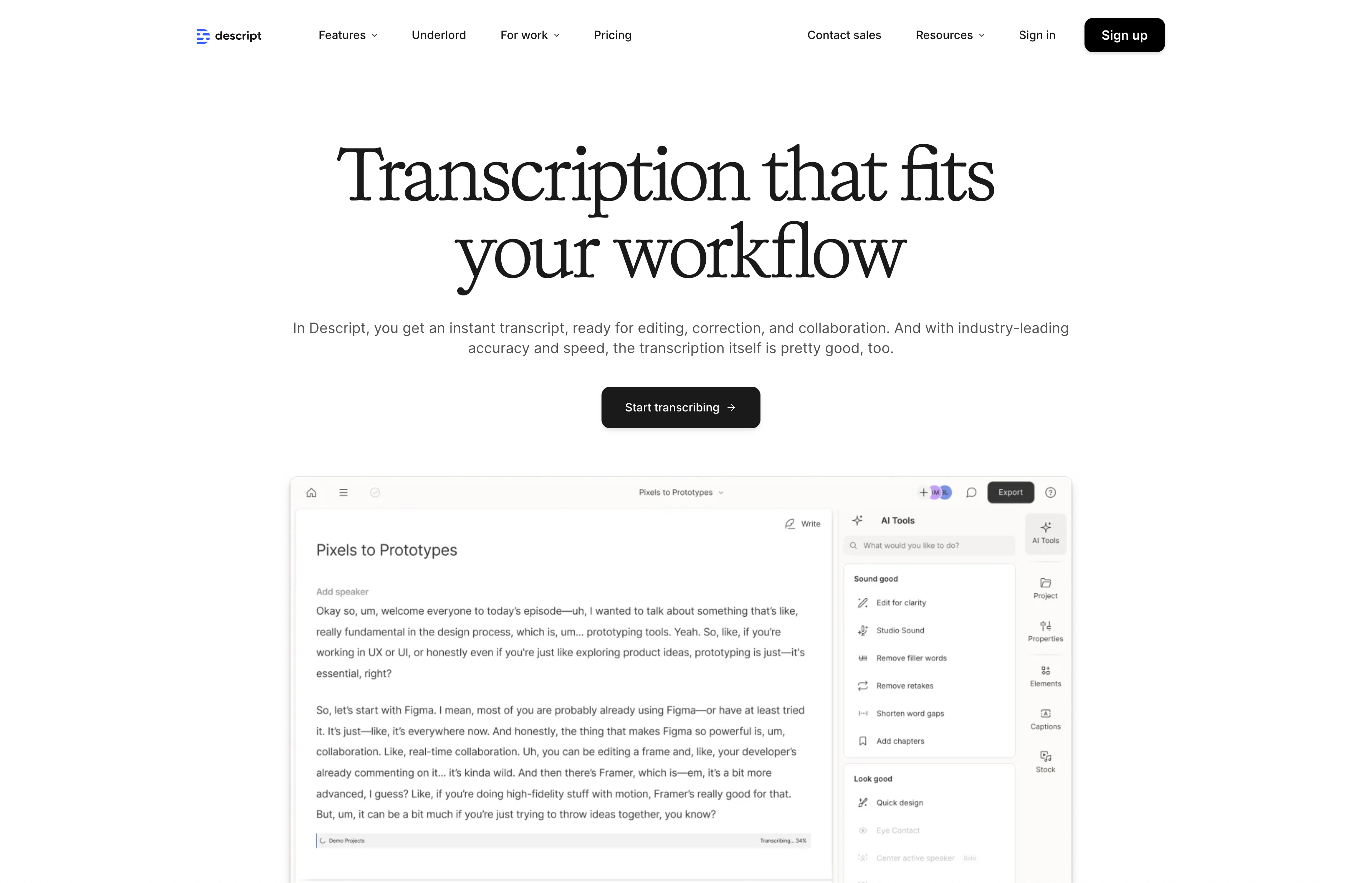
- Edit video and audio as easily as editing a document with intuitive text-based editing that works like docs and slides
- Transform rough recordings into polished content instantly using AI that automatically removes filler words and retakes
- Achieve perfect transcripts with industry-leading accuracy and White Glove service delivering 99% accuracy within 24 hours
- Expand your audience globally with one-click subtitles and transcription support across 22 different languages
- Record professional podcasts remotely with studio-quality multitrack audio editing and remote recording capabilities
- Create compelling content faster using AI-powered clip selection and the Underlord editing assistant for creative guidance
- Produce videos with enhanced production value using AI Eye Contact, AI Green Screen, and realistic voice cloning
- Collaborate seamlessly with team members through live collaboration features and secure cloud storage with full version history
Pros & Cons
From the listing; not yet checked by our editors.
Pros
- Near-instant transcription turnaround
- Inexpensive transcription service
- Automatic speaker labels
- 22 supported languages
- Secure cloud storage
- Full version history
- Collaboration from anywhere
- Free plan available
- White Glove 99% accuracy service
- Editing capabilities
- Workflow management
- Storytelling assistance
- Video editing support
- Automatic transcription
- Error correction for transcription
- Simplified video editing
- Multitrack audio editing
- Remote recording support
- One-click subtitles
- Screen recording
- Translation services
- Audio enhancements (clarity, quality)
- Confidential data handling
- Automatic multicam support
- Video Regeneration
- Studio sound feature
- Remove filler words and retakes
- Automatic speaker identification
- Podcast creation support
- Captions extending content reach
- Realistic voice clone creation
- Green screen feature
- Eye contact adjustment
- Create video clips and descriptions
- Create YouTube show notes
- Supports marketing and promotions
- Enterprise collaboration
- Sales and Learning development capabilities
- Automatic transcription correction
- Community for creators
- Supports marketing, sales, learning functions
- Remote and local screen recording
- High privacy standards
- Affiliate program availability
- Single tool for video creation
Cons
- Only 22 languages supported
- Dependent on internet connectivity
- Limited free plan
- Potential cloud privacy issues
- No offline mode
- Transcription error correction needed
- Multicam feature coming soon
- Possibly confusing for beginners
- Voice clone ethical concerns
Alternatives to Descript
Tools that share the most tags with Descript.
- Soundwise.ai
Get instant transcriptions without signing up or paying, enabled by a completely free and unlimited-use web tool
Freemium · from $10/month
$10/month
Not yet checked
- AssemblyAI
Achieve up to 23% more accurate call transcription with AI models trained on 12.5M hours of multilingual audio data
Freemium
Not listed
Not yet checked
- Apptek
Convert audio to precise text transcripts across dozens of languages and dialects using neural network speech recognition
Not listed
Not listed
Not yet checked
- Zeemo
Create accurate video captions instantly with AI-powered generation that achieves over 98% accuracy
Free trial
Not listed
Not yet checked
- Voicetype AI
Write emails and documents entirely hands-free using advanced voice dictation that captures your natural speaking style
Free trial · from $13.59/month
$13.59/month
Not yet checked
- Speechy
Instantly create organized to-do lists and action items by speaking instead of typing, eliminating manual note-taking during meetings and brainstorming sessions
Freemium · from $9/month
$9/month
Not yet checked
Related Videos

Descript For Beginners 2025 | Everything You NEED To KNOW!
Vince Opra · Mar 1, 2025
Complete Descript Tutorial 2025: Zero to Expert
Metics Media · Mar 12, 2025

How to EDIT Videos 10x FASTER Using AI (Descript Overview)
Learn Online Video · Apr 30, 2025

Learn Descript in 15 Minutes [Full Tutorial]
Joey /// VP Land · Feb 13, 2023
The Ultimate Guide to Descript’s Teleprompter
Descript Made Easy · Jun 16, 2025
Reviews
Rate this tool
Loading reviews...
Frequently asked questions
What is Descript?
Descript is an industry-leading AI tool that provides services for transcription, podcasting, video editing, screen recording and more. It is designed to transform and simplify the process of audio and video transcription, by offering near-instant transcriptions with high accuracy levels. Descript also provides other features such as automatic speaker identification, collaboration, search functionality, a built-in AI editing assistant called Underlord and the ability to handle multitrack audio editing.
How accurate is Descript's transcription service?
Descript’s transcription service boasts industry-leading accuracy. Moreover, it provides an exclusive White Glove service that promises up to 99% accuracy delivered within an average time of 24 hours.
What is Speaker Detective in Descript?
Speaker Detective is a feature in Descript that employs artificial intelligence to add speaker labels in seconds. This feature helps in distinguishing who is speaking in a recording, thus aiding in accuracy of transcription and overall understanding of the content.
In which languages is Descript available?
Descript is available in 22 languages, which includes English, Spanish, German, French, Italian, Portuguese, Romanian, Malay, Turkish, Polish, Dutch, Hungarian, Czech, Swedish, Croatian, Finnish, Danish, Norwegian, Slovak, Catalan, Lithuanian, Slovenian, and Latvian.
How is data stored and secured in Descript?
In Descript, user data is securely stored in the cloud with full version history. It uses world-class technologies and services to maintain privacy and keep all information secure, thus offering safe and secure storage for all user data.
Who can access my data in Descript?
The data in Descript can be accessed by the user and their collaborators as it securely stores data in the cloud, enabling instant access from anywhere.
How much does Descript cost?
Descript offers a free plan with no credit card required to get started. Its paid plans start at $12 per month. Moreover, it also provides a White Glove service, the price of which is $2.00 per minute.
What is Descript's White Glove service?
Descript's White Glove service is a premium service aimed to deliver transcriptions with up to 99% accuracy in an average of 24 hours. It is a professional offering for projects that demand perfection.