

EarDub
Watch foreign-language YouTube videos without reading subtitles: real-time AI dubbing starts each translated line exactly when the speaker starts talking.
Listing not yet reviewed by our editors · How we check
Overview
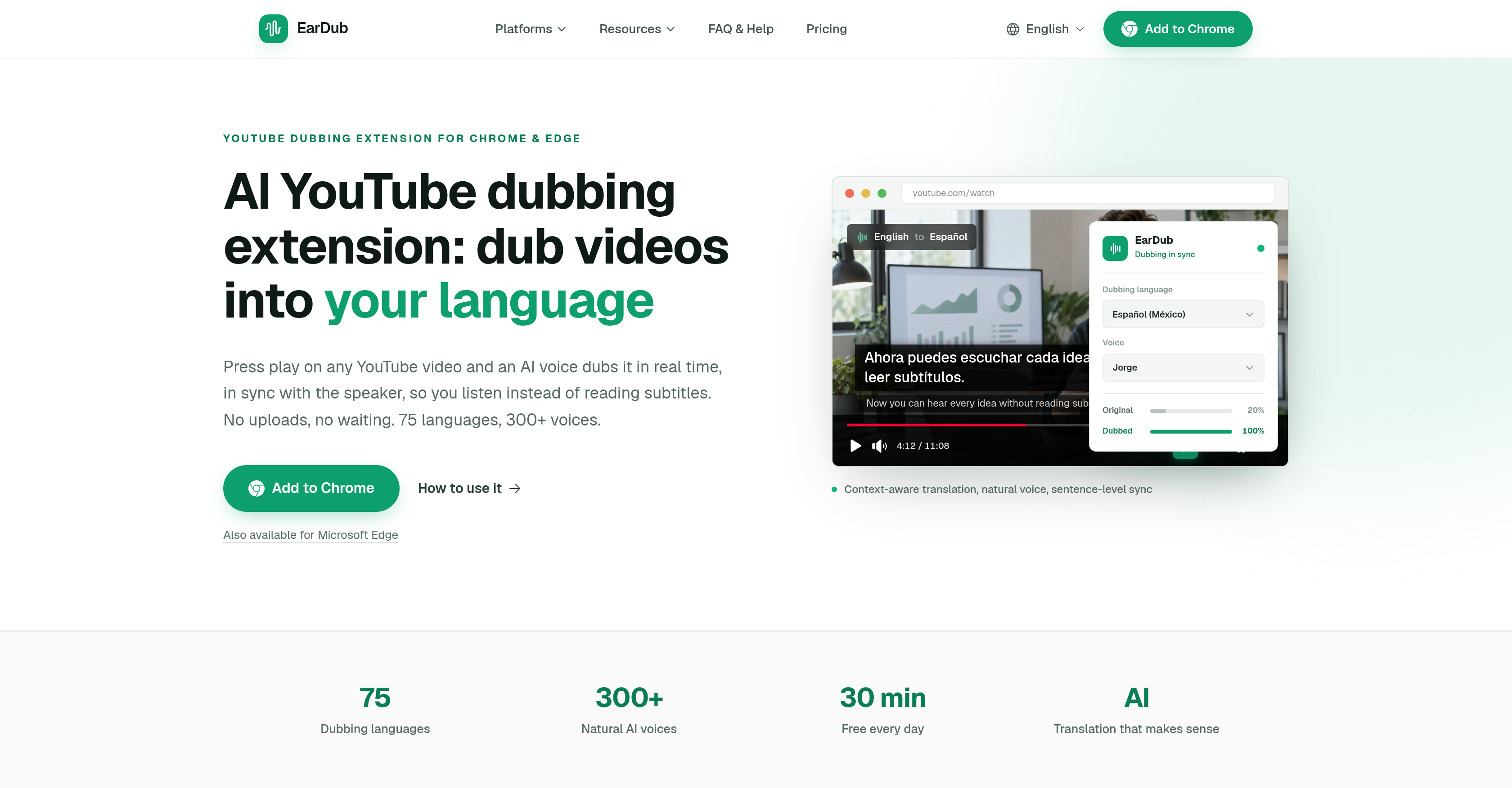
- Watch foreign-language YouTube videos without reading subtitles: real-time AI dubbing starts each translated line exactly when the speaker starts talking.
- Start listening the moment you press play: one click on the EarDub button in the video player begins dubbing, with no file uploads and no waiting for the whole video to process.
- Follow coding tutorials and tech talks with consistent terminology: context-aware AI translation joins captions into full sentences, so names and technical terms stay the same throughout the video.
- Hear a voice that fits the content: choose from 300+ natural male and female AI voices with regional accents across 75+ languages.
- Learn a language while you watch: bilingual subtitles, adjustable from 14 to 28 px, show the original text alongside your translation.
- Keep the speaker's original tone in the mix: separate volume controls for the original audio and the dubbed voice let you set the balance you want.
- Complete entire online courses hands-free: on Udemy and Coursera, dubbing carries into the next lecture automatically.
- Understand interviews and documentaries that have no captions: paid plans recognize speech directly and dub videos without subtitles on supported sites, while captioned and auto-captioned videos work on every plan, including the free plan.
- Control where translation runs: EarDub activates only when you turn it on and only on the video sites you allow.
Pros & Cons
From the listing; not yet checked by our editors.
Pros
- Real-time video translations
- Context-aware translations
- Works with YouTube
- Translates Udemy videos
- Translates Coursera videos
- Compatible with Chrome
- Compatible with Edge
- Subtitles to dubbed audio
- 75+ languages supported
- Speech recognition in absence of subtitles (paid plans)
- Bilingual subtitles
- User-controlled audio mix
- Includes regional accents
- User-controlled activation
- Video translation without subtitles (paid plans)
- Reads to you (not word-for-word)
- Sentence-level synchronization
- Supports courses behind a login
- Natural voice translation
- Recognizes speech in audio
- Choice of subtitle size
- Video content localization
Cons
- Dependent on video having audio
- No live stream dubbing
Alternatives to EarDub
Tools that share the most tags with EarDub.
- Checksub
Get captioned videos ready to publish in minutes. Auto-Subtitles generates and syncs subtitles to any video, and turns scripts into timed captions without manual timing.
Free trial · from $18/month
$18/month
Not yet checked
- LipDub AI
Fix a line, update an offer, or replace an entire script without reshooting, because EasyDub rewrites video dialogue from a few words to a full script and re-syncs the speaker's lips to the new audio.
Paid · from $149/month
$149/month
Not yet checked
- Dub AI
Reach viewers in new markets without reshooting a single frame: AI video translation and dubbing converts your content into more than 25 languages.
Freemium · from $5/month
$5/month
Not yet checked
- Speechify AI Dubbing
Cut localization budgets and timelines by replacing human translators and voice actors with automated video dubbing that transcribes, translates, and generates new voice tracks.
Freemium · from $19/month
$19/month
Not yet checked
- DubTab
Watch foreign-language videos the moment you find them: DubTab translates and dubs the tab that's already playing, with no video upload and no file processing.
Free trial · from $19/month
$19/month
Not yet checked
- Dubecos
Reach viewers in up to 35 languages from a single video: AI video dubbing converts your content into the languages your audience speaks.
Not listed
Not listed
Not yet checked
Reviews
Rate this tool
Loading reviews...
Frequently asked questions
Can EarDub work on websites other than YouTube?
Apart from YouTube, EarDub can dub videos from Udemy, Coursera and other permitted video sites that the user allows.
Does EarDub work with copy-protected videos?
No, EarDub does not work with copy-protected videos.
What's the subtlety in the translation process that EarDub follows?
EarDub practices context-aware translations which involves joining captions into complete sentences before translating, and verifying every translation to avoid word-for-word machine-like translations.
Is there a volume control feature for the dubbed audio in EarDub?
Indeed, users can control the audio mix in EarDub by adjusting the volumes of the original sound and the dubbed voice.
Can EarDub generate bilingual subtitles?
Yes, EarDub has the capacity to display bilingual subtitles from 14 to 28 px.
Can EarDub recognise speech in the absence of subtitles?
On paid plans, EarDub recognises speech in the absence of subtitles and performs translations.
How can I customize the AI voices in EarDub?
Users can choose from a variety of male and female AI voices in EarDub, even including regional accents.
Does EarDub only work on the sites that I allow?
Yes, EarDub activates only as per the users' instructions and on the sites they permit.