

EasilyAI
Reach viewers who instantly recognize their own accent: AI dubbing in 80+ languages offers Standard and Deluxe city- and region-level voice tiers, including nine Spanish accents, thirteen Arabic dialects, and Scottish, Welsh, Yorkshire, Geordie, Scouse and Cockney English.
Listing not yet reviewed by our editors · How we check
Overview
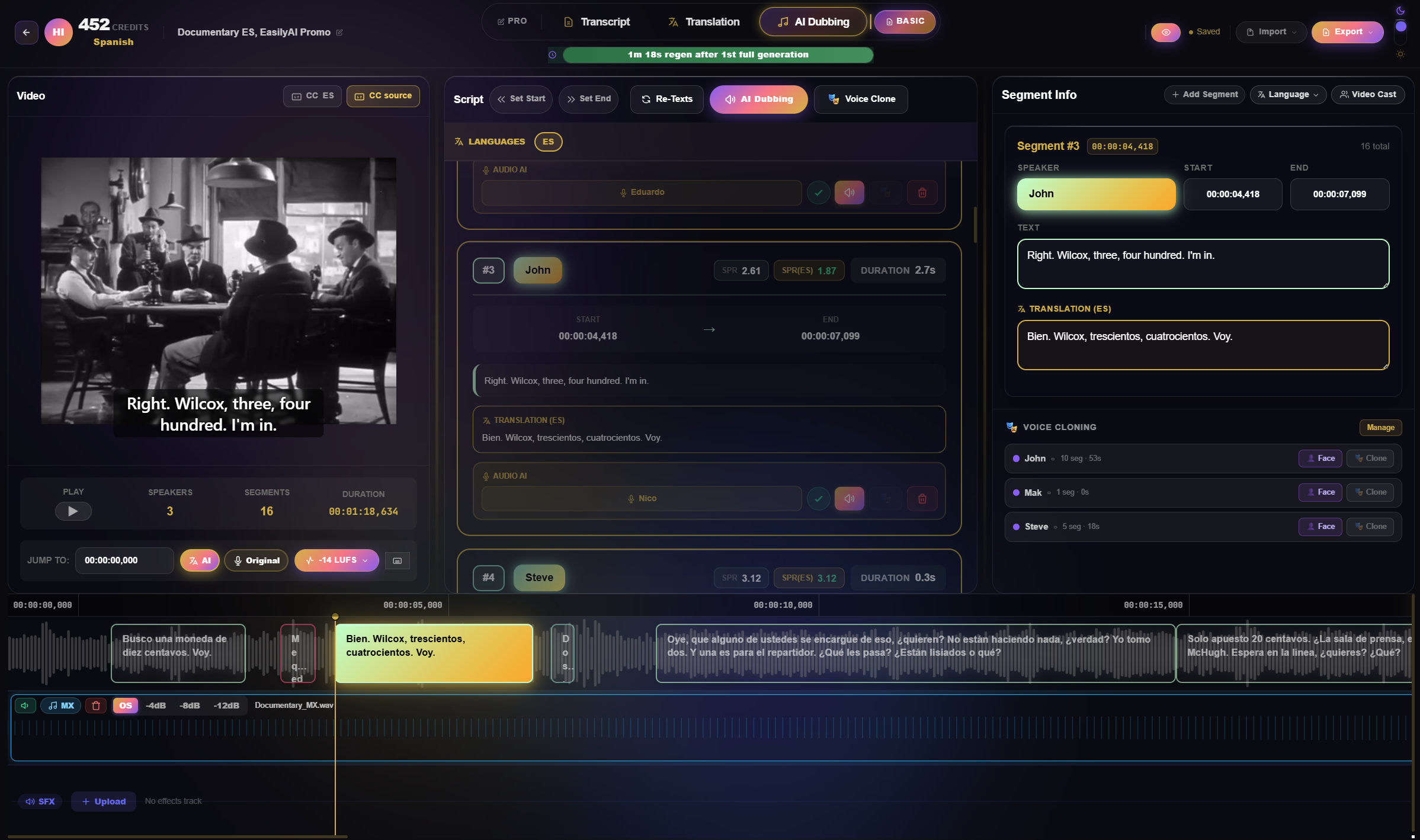
- Reach viewers who instantly recognize their own accent: AI dubbing in 80+ languages offers Standard and Deluxe city- and region-level voice tiers, including nine Spanish accents, thirteen Arabic dialects, and Scottish, Welsh, Yorkshire, Geordie, Scouse and Cockney English.
- Never pay twice for a transcription error: the video translation pipeline pauses for you to approve the transcript, speakers and timecodes before translation, then approve the translation before any credits go on audio.
- Cut dubbing costs from 25 to 10 credits per minute: import your own translated script as a CSV and it arrives on the timeline already segmented.
- Keep interviews, panels and podcast cross-talk natural: overlapping dialogue stays as separate lines with their own voices and timecodes, each fitted to its own duration so nothing gets clipped or runs over.
- Deliver broadcast-ready audio without reopening Pro Tools, Audition or Resolve: every export is mastered to integrated loudness in LUFS and true-peak limits for YouTube, Netflix, Apple TV+, Disney+, Paramount+, Amazon PV or cinema.
- Preserve your original score and sound design in every localized version: upload music and effects stems separately and they are mixed back into the dub.
- Publish captions that match the voice track exactly: SRT subtitles export from the same locked timeline as the dub, built to professional reading speed, line length and duration limits.
- Keep the same on-screen speaker in every language: voice cloning carries a speaker's own vocal character into each translated version.
- Localize feature films, documentaries and two-hour podcasts in one upload: no video length cap on any plan.
- Replace separate transcription, translation and dubbing subscriptions with one workflow: all three stages run on a single timeline out of one credit balance.
- Test real results before committing budget: credits start at $10 with no subscription, and monthly plans carry no annual contract.
Pros & Cons
From the listing; not yet checked by our editors.
Pros
- Supports 80+ languages
- Integrated voice cloning
- Standard and Deluxe voice tiers
- Context-aware translations
- Automated audio segmentation
- Automated timecode correction
- Automated matching of audio specifications
- Browser-based translation and dub previews
- One smart credit system
- Format-agnostic content upload
- Synchronized transcription-translation-dubbing timeline
- Customizable translation style
- Supports video transcription
- Supports video translation
- Transcription, translation, dubbing pipeline
- Supports multilingual content globalization
- Adaptive translation based on content type
- Integration of users' workflow
- Automated manual processes
- Preview without external tools
- Customization options for content style
- Mastering to LUFS spec automatically
- Mix audio exports externally
- Export audio by character
- Simultaneous team collaboration
- Translation speaks like a native
- Voice cloning seamless integration
- 1-minute regeneration for adjustments
- Upload M&E tracks
- Tiered system for voice quality
- Multiple content export formats
- Automated translation style adaptation
- Supports multiple content sources
- Credits flex across services
- Review approval system in-editor
- Speaker identification in transcription
- Integrated credit-based system
- Master timeline for all services
- Multiple voice dialects
- Voice Library with filters
- Voice cloning from 60-second sample
- Completion within two days
- Automatic rate drop for existing transcript or translation
- Notes tied to translation text
- Timestamped notes for reviewers
- Preset audio system for various platforms
- Guides for selecting accents
Cons
- Standard voice lacks premium quality
- No offline functionality
- Need for occasional manual corrections
- No free version mentioned
- Dependent on internet connection
- LUFS mastering not customizable
- Requires credit card for use
- Transcription accuracy varies by language
Alternatives to EasilyAI
Tools that share the most tags with EasilyAI.
- LipDub AI
Fix a line, update an offer, or replace an entire script without reshooting, because EasyDub rewrites video dialogue from a few words to a full script and re-syncs the speaker's lips to the new audio.
Paid · from $149/month
$149/month
Not yet checked
- Dub AI
Reach viewers in new markets without reshooting a single frame: AI video translation and dubbing converts your content into more than 25 languages.
Freemium · from $5/month
$5/month
Not yet checked
- Checksub
Get captioned videos ready to publish in minutes. Auto-Subtitles generates and syncs subtitles to any video, and turns scripts into timed captions without manual timing.
Free trial · from $18/month
$18/month
Not yet checked
- Speechify AI Dubbing
Cut localization budgets and timelines by replacing human translators and voice actors with automated video dubbing that transcribes, translates, and generates new voice tracks.
Freemium · from $19/month
$19/month
Not yet checked
- Dubecos
Reach viewers in up to 35 languages from a single video: AI video dubbing converts your content into the languages your audience speaks.
Not listed
Not listed
Not yet checked
- DubMog
Follow every sentence without waiting for the speaker to finish: real-time speech-to-speech translation recognizes speech as it is spoken and plays the voiced translation a few seconds behind.
Freemium · from $9.99/month
$9.99/month
Not yet checked
Reviews
Rate this tool
Loading reviews...
Frequently asked questions
What is EasilyAI?
Maicol Beltran 🛠️ 5 tools wrote:EasilyAI turns one video file into a finished release in another market. Transcription, translation and dubbing run as a single pass on one timeline, out of one credit balance. What sets it apart is accent depth: 80+ languages with a dedicated voice, each in two tiers — Standard for the accent most projects need, Deluxe for city and region level.
How many languages and accents does EasilyAI support?
Maicol Beltran 🛠️ 5 tools wrote:80+ languages carry a dedicated voice, and the accent breakdown is published rather than implied. Spanish has nine accents — Mexican, Colombian, Castilian, Argentine, Chilean, Peruvian, Venezuelan, US Spanish and Ecuadorian. Arabic has thirteen dialects. English includes Scottish, Welsh, Yorkshire, Geordie, Scouse and Cockney. A viewer can tell within seconds whether a dub was made for their country.
Do I need a monthly plan to use EasilyAI?
Maicol Beltran 🛠️ 5 tools wrote:No. Credits can be topped up from $10 with no subscription, which is enough to dub a short video and judge the result first. Plans start at $50 a month, are billed monthly, and carry no annual contract — the discounted rate is on the monthly plan, so cancelling does not cost you the better price.
Can I check the transcript and translation before paying to generate the audio?
Maicol Beltran 🛠️ 5 tools wrote:Yes, and it is the point of the pipeline. After transcription you review the segments — text, speakers, timecodes — and correct them while correcting them is free. Only then does translation run. The translation stops the same way, before any credits go on audio. Without those checkpoints an error in the transcript propagates into the voice and all three stages have to be paid for again.
What happens when two people talk at the same time?
Maicol Beltran 🛠️ 5 tools wrote:Overlapping speech stays overlapping. Two speakers talking over each other remain two separate lines with overlapping timecodes and their own voices, each held inside its own duration so a line is neither clipped short nor left running over the next. Interviews, panels, podcast cross-talk and crowd scenes survive the dub instead of being flattened into a queue.
Can I upload my own transcript or translation?
Maicol Beltran 🛠️ 5 tools wrote:Yes, and it lowers the cost. A translated script imports as a CSV and lands on the timeline already segmented, instead of being retyped line by line. Dubbing drops from 25 credits a minute to 10 when you supply the transcript and translation, because the platform charges less for the work you did yourself.
Does EasilyAI export subtitles?
Maicol Beltran 🛠️ 5 tools wrote:Every project exports an SRT alongside the audio, built to professional subtitling parameters — reading speed, line length and duration within the limits a subtitler works to — and timed against the same locked timeline as the dub. The captions agree with what the viewer is hearing, with no pass through a separate subtitle editor.
What happens to my music and sound effects?
Maicol Beltran 🛠️ 5 tools wrote:Upload the music and effects stems separately and the platform mixes them into the dub, so the score and sound design survive into the localized version instead of being replaced by a bare voice track.