
EzLayers
Skip hours of manual pen-tool clipping in Photoshop: automatic AI layer separation splits illustrations, photos, and UI mockups into isolated, editable layers in seconds.
Listing not yet reviewed by our editors · How we check
Overview
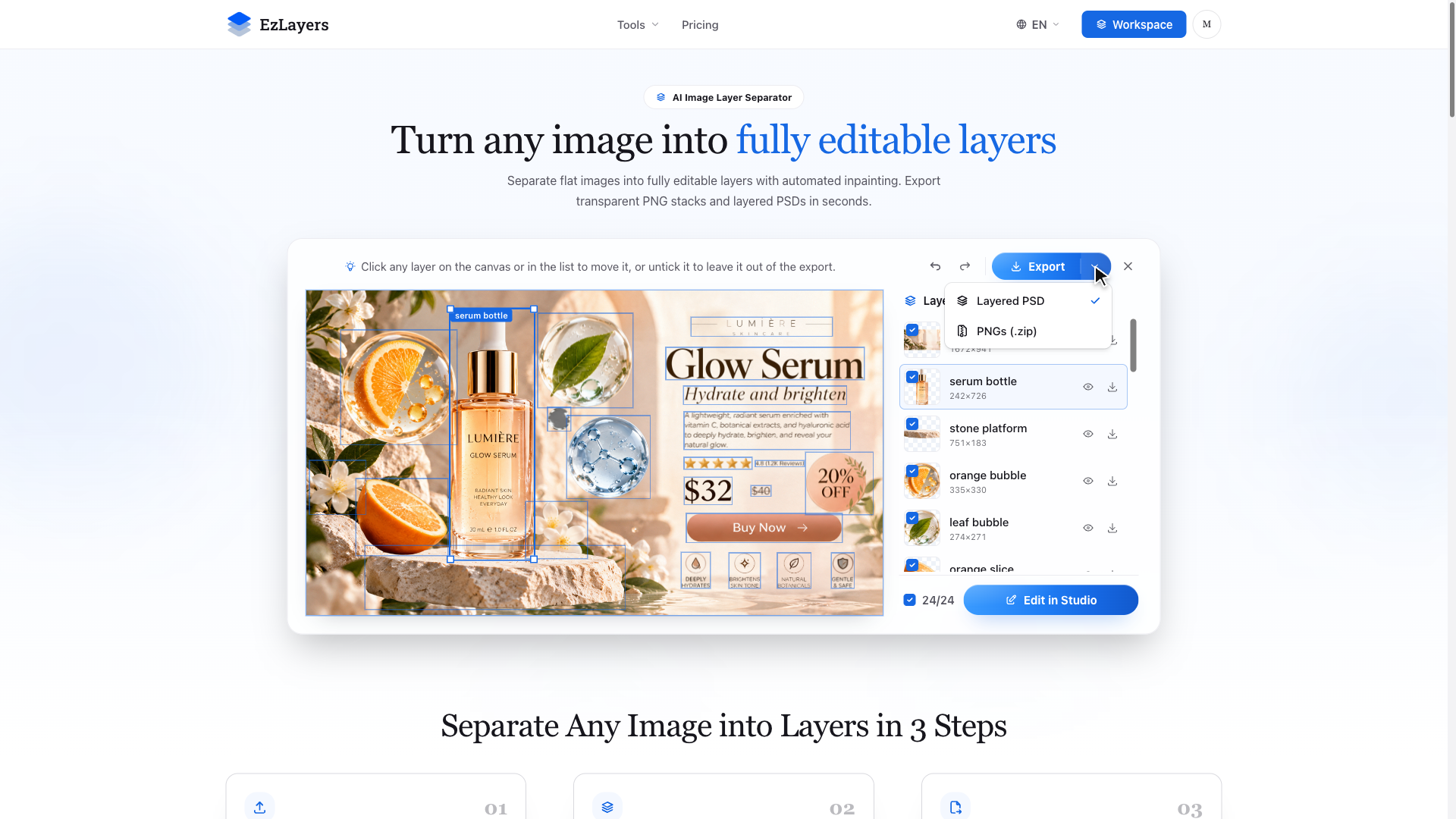
- Skip hours of manual pen-tool clipping in Photoshop: automatic AI layer separation splits illustrations, photos, and UI mockups into isolated, editable layers in seconds.
- Move or delete foreground subjects without leaving gaps: amodal background completion rebuilds occluded areas with the original textures, lighting, and natural transparency.
- Extract exactly the elements you need: prompt-guided semantic segmentation lets you target specific objects with text prompts, and automatic detection handles everything else.
- Drop results straight into your existing design workflow: structured multi-layer PSD export opens ready in Photoshop and Figma, or download transparent PNG stacks from any PNG, JPG, or WebP upload.
- Finish edits without switching apps: the online layer editor combines generative inpainting, prompt-based content changes, and pixel-level positioning and scaling.
- Localize visuals without redrawing artwork: the AI image and photo translator converts text in manga and comic raws, UI screenshots, and product images while keeping the design intact.
- Produce clean, reusable product imagery: AI background removal delivers transparent PNGs that e-commerce teams restyle and reposition element by element.
- Automate layer extraction at volume: a RESTful developer API brings image segmentation and PSD generation into your own apps and pipelines.
- Keep client and unreleased artwork confidential: enterprise-grade privacy protection secures every uploaded image.
- Start without upfront cost: freemium access with instant processing, plus paid plans sized to individual and team budgets.
Pros & Cons
From the listing; not yet checked by our editors.
Pros
- Automates image clipping
- Supports multiple file formats
- Exports transparent PNG stacks
- Exports layered PSDs
- Targeted segmentation through text prompts
- Online layer editor feature
- Inpaint and content modification
- Pixel-level fine-tuning
- Flexible pricing plans
- Detailed privacy policy
- Separates images into layers
- Reconstructs occluded backgrounds
- Maintains textures and lighting
- Accommodates different user needs
- Allows for positioning and scaling
- Recognizes multiple elements in image
- Processes 2D images
- Segmentation guidance using text prompts
- Suitable for various professions
- Can add layers in images
- Generates editable layers
- Handles multiple objects separately
- Standalone online editing tool
- Real-time demonstration of layering
- Facilitates inpainting of layers
- Export options for PNG, JPG, WebP
- FAQ section for user queries
- Optional text prompts
- Lossless output for quality preservation
- Visual layer management
- In-built alpha masks
- Supports batch uploads
- Selective layer count feature
- Precision selection in editing
- Priority GPU Queue for Pro users
- Top-priority GPU pipeline for Studio users
- Unlimited layer count & region editing
- Supports up to 50+ extreme layers
- Real trees for Photoshop, Figma
- Fast automated stacks, replaces manual work
- Multiple language support
Cons
- Limited file format support
- No 3D image support
- No batch uploads (Starter)
- No extreme layers (Starter, Pro)
- No iOS/Android App
- No offline usage
- No collaborative features
- Requires strong internet connection
- Complex pricing plans
- Limited free credits
Alternatives to EzLayers
Tools that share the most tags with EzLayers.
- Image2Layer
Edit any single element of a photo without affecting the rest by dissecting images into up to 10 individually editable layers.
Freemium · from $9/month
$9/month
Not yet checked
- Image to Layers AI
Turn any photo, product shot, portrait, or illustration into a complete layer stack in about sixty seconds instead of the hour-per-layer a manual mask demands, powered by AI image segmentation that processes the whole scene at once.
Free trial · from $9.90/unit
$9.90/unit
Not yet checked
- Unmerge
Rearrange a finished flyer, magazine cover, or product ad without rebuilding it: image layer separation splits a flat PNG, JPG, or WebP into up to 17 named raster layers, each with its own description, canvas position, and stacking order.
Free trial · from $2.90
$2.90
Not yet checked
- LayerGrab
Edit a finished poster, banner or product photo without rebuilding it from scratch: the AI image layer splitter turns one flat image into up to 16 named transparent PNG layers (text, products, graphics, characters) in about a minute.
Free trial · from $12/month
$12/month
Not yet checked
- ImageLayered
Get professional image layer separation without Photoshop skills: automatic selection pulls subjects, text, objects, and backgrounds into their own transparent RGBA layers.
Paid · from $24.90/month
$24.90/month
Not yet checked
Reviews
Rate this tool
Loading reviews...
Frequently asked questions
What file formats does EzLayers support?
EzLayers supports PNG, JPG, and WebP file formats.
How does EzLayers separate an image into editable layers?
EzLayers uses artificial intelligence to separate a two-dimensional image into its various elements, creating editable layers autonomously.
Can I modify the individual layers created by EzLayers?
Yes, users can modify the individual layers created by EzLayers. The service facilitates the isolation of separate picture elements for varied uses.
What features does the online layer editor of EzLayers offer?
The online layer editor of EzLayers offers AI-powered editing capabilities. It includes features such as inpainting, content modification through prompts, and pixel-level fine-tuning for effortless positioning and scaling.
Does EzLayers maintain the natural transparency and lighting of images?
Yes, EzLayers maintains the natural transparency and lighting of images. Its AI-powered toolset is designed to preserve the inherent qualities of the source image.
Can EzLayers reconstruct occluded backgrounds in images?
Yes, EzLayers can reconstruct occluded backgrounds. They use AI-powered algorithms to identify and recreate missing or hidden areas of the background, maintaining natural textures and lighting.
Does EzLayers support targeted segmentation with text prompts?
Yes, EzLayers does support targeted segmentation using text prompts. Users can steer the extraction process to focus on certain elements within the image.
What file formats can EzLayers render out?
EzLayers can render out transparent PNG stacks and layered PSDs. This flexibility allows for easy integration into a user's pre-existing workflows.