

Findsight
See exactly where authors agree and disagree on any topic: syntopical reading puts claims from thousands of non-fiction works side by side for direct comparison.
Listing not yet reviewed by our editors · How we check
Overview
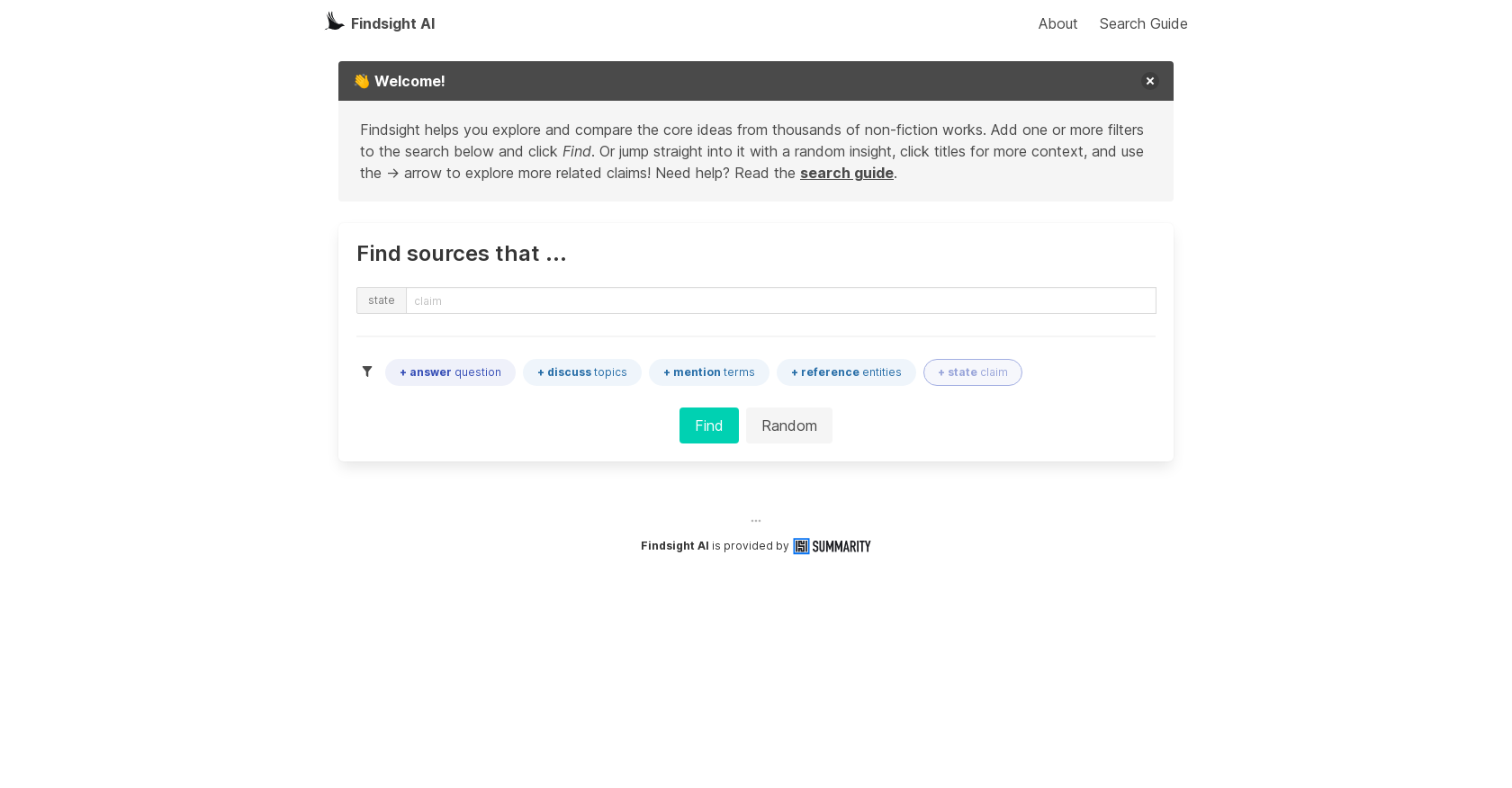
- See exactly where authors agree and disagree on any topic: syntopical reading puts claims from thousands of non-fiction works side by side for direct comparison.
- Back up your own argument with supporting citations in seconds: the STATE filter takes a claim you write and returns related claims from published sources.
- Get answers to research questions grounded in real evidence: the ANSWER filter surfaces claims that address your question, along with supporting context and data.
- Cut irrelevant results from ambiguous search terms: the REFERENCES filter suggests named entities and Wikipedia-linked concepts, so "running" the sport never mixes with running a business.
- Zero in on sources that actually focus on your subject: the DISCUSS filter targets topic tags linked to each source and listed under every result title.
- Control how broad or narrow your keyword search runs: MENTION filter text search supports prefix wildcards (*) and the OR operator to capture every word variant you need.
- Verify every insight at its origin before you quote it: each claim links back to the original book or article for deeper reading.
- Turn curiosity into a self-directed learning path: jump from claim to related claim across non-fiction research, or start from a Random claim to explore an unfamiliar subject.
Pros & Cons
From the listing; not yet checked by our editors.
Pros
- Specializes in non-fiction works
- Comparative analysis of sources
- Syntopical reading engine
- Personalized learning journeys
- Basic filters for refining
- Literal text identification
- Entity reference filter
- Tag specific DISCUSS filter
- Custom claims entry
- Citation assistance
- Question answering capability
- Contextual data provision
- Supports different search prefixes
- Named entities differentiation
- Provides links to original sources
- Topics linked to source
- Random browsing option
- Sharing results option
Cons
- Limited to non-fiction content
- Complex for beginner users
- Basic filters lack precision
- No mobile application
- Requires constant refining of results
- No multilingual support
- Limited user interface customization
- No offline usability
- Potentially selective source material
Alternatives to Findsight
Tools that share the most tags with Findsight.
- WordUp App
Learn vocabulary that matters most to your life and career with personalized examples from your favorite topics and industry terms
Freemium · from $20/month
$20/month
Not yet checked
- LingoLooper
Speak a new language without fear through judgment-free conversations with AI avatars that never ridicule mistakes
Freemium · from $8.99
$8.99
Not yet checked
- Clueso
Turn rough screen recordings into studio-quality product videos instantly with AI-powered video transformation
Free trial · from $120/month
$120/month
Not yet checked
- Guidde
Transform workflow recordings into professional video guides automatically with AI-generated step-by-step descriptions and voiceover
Freemium · from $16/month
$16/month
Not yet checked
- Talkit
Master authentic spoken expressions through AI-powered conversations in realistic 3D environments
Freemium · from $11.90/month
$11.90/month
Not yet checked
- SmallTalk2Me
Receive instant feedback on pronunciation and grammar errors through recorded speech analysis to correct mistakes immediately
Freemium · from $10/month
$10/month
Not yet checked
Reviews
Rate this tool
Loading reviews...
Frequently asked questions
What is Findsight AI?
Findsight AI is a search engine specifically designed to explore and compare core ideas from thousands of non-fiction works. This platform caters to the needs of individuals seeking to understand different perspectives on a particular topic from multiple sources. Its unique function is its ability to perform syntopical reading, enabling users to discover and compare claims from various authors and works.
How does Findsight AI work?
Findsight AI operates by enabling users to explore non-fiction content based on claims, which are the key points made by different sources. Users enter their search criteria and can apply various filters to refine the results. Available filters include BASIC filters like MENTION and REFERENCES, and AI-powered filters such as STATE and ANSWER. Claims identified by these filters can then be compared and explored further to create a more personalized learning journey.
What are the main features of Findsight AI?
The main features of Findsight AI include various search filters including MENTION, REFERENCES, DISCUSS, STATE, and ANSWER. It offers syntopical reading, which lets users discover and compare claims from different sources. Users can refine their search results based on literal text or named entities using the MENTION and REFERENCES filters respectively, target specific tags linked to a source through the DISCUSS filter, or use the advanced AI-powered STATE and ANSWER filters to search for related claims useful for citations or that answer a specific question.
How does the MENTION filter work in Findsight AI?
The MENTION filter in Findsight AI works similarly to a typical Google search, finding sources based on literal text input by the user. While it serves as a good starting point, it may lack precision and broadens the range of results. For example, searching for 'running' could yield results not only in relation to the sport but also about running a business or state-run systems.
Can you explain how the REFERENCES filter works in Findsight AI?
In Findsight AI, the REFERENCES filter refines search results by suggesting named entities or concepts referenced across sources that can be used to further refine results. Users can type a term and select suggestions that appear. Some suggestions link to Wikipedia, while others are named entities. For instance, typing 'running' could produce 'Skill running' as a named entity or 'Run (baseball)' as a linked entity with a Wikipedia icon.
What does the DISCUSS filter do in Findsight AI?
The DISCUSS filter in Findsight AI targets specific tags linked to a source. It functions similarly to the REFERENCES filter but focuses solely on specified topics associated with a given source. These topics appear right beneath each result's title as an expandable list, and may provide more refined and specific search results.
What is the difference between basic and AI-powered filters in Findsight AI?
In Findsight AI, basic filters - MENTION, REFERENCES, and DISCUSS - identify sources based on literal text, named entities or suggestions, and specific tags linked to a source respectively. On the other hand, AI-powered filters - STATE and ANSWER - allow users to enter their custom claims or questions. The STATE filter identifies related claims, while the ANSWER filter locates claims that address the input question with relevant context and data.
How do the STATE and ANSWER filters function in Findsight AI?
In Findsight AI, the STATE filter lets users enter a custom claim to find related claims, useful for citations. The ANSWER filter, on the other hand, identifies claims that directly address a question entered by the user and provides accompanying context and data to help answer it.