

Fontjoy
Instantly generate harmonious font combinations that share a common theme with pleasing contrast using deep learning algorithms
Listing not yet reviewed by our editors · How we check
Overview
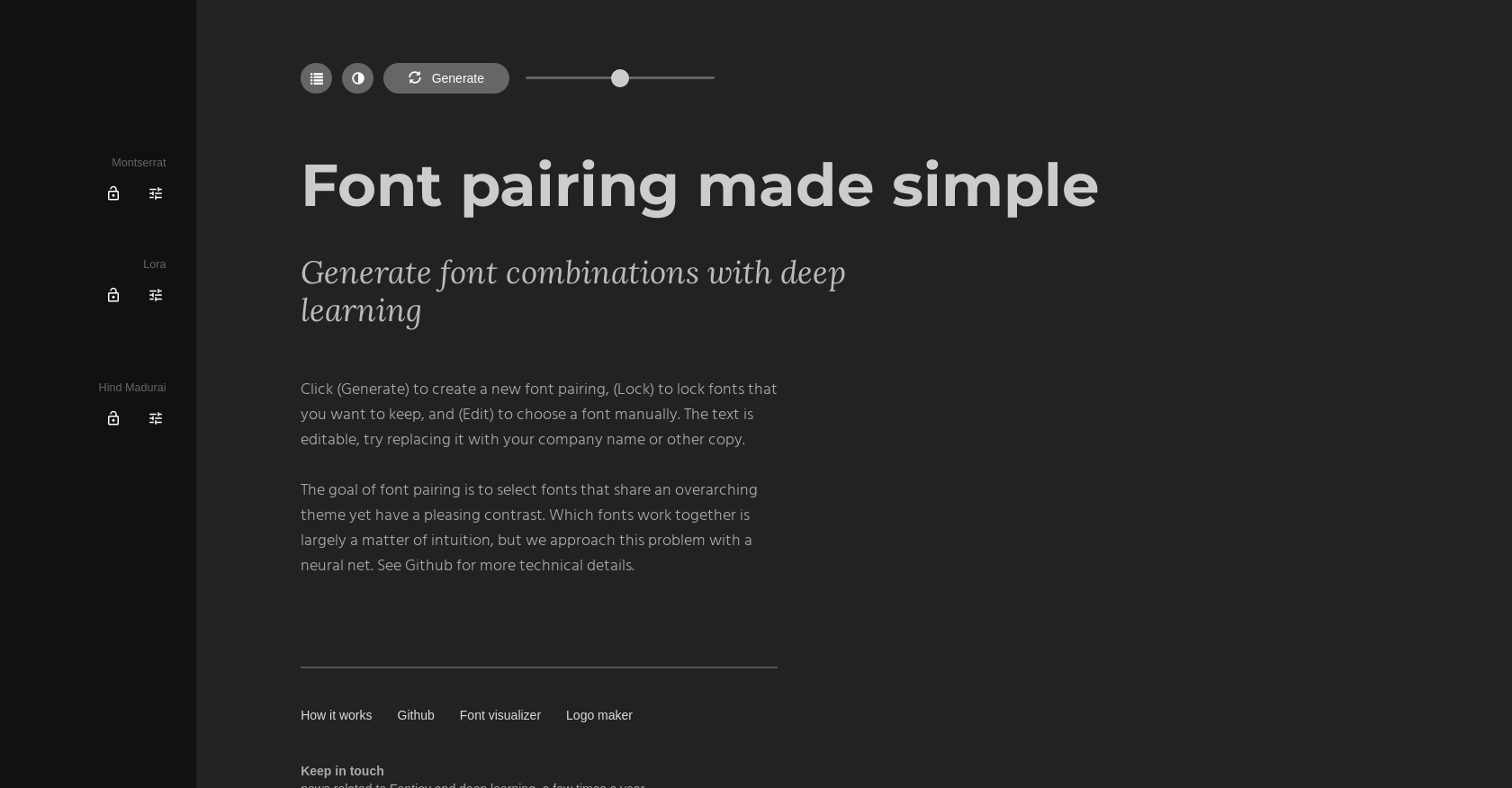
- Instantly generate harmonious font combinations that share a common theme with pleasing contrast using deep learning algorithms
- Lock specific fonts in place while exploring new pairing options, maintaining design consistency throughout your experimentation
- Replace default text with your company name or project copy to visualize exactly how fonts will appear in real-world applications
- Access a curated library of professional fonts including Open Sans, Montserrat, Roboto, and Merriweather for diverse pairing possibilities
- Manually edit and customize any font pairing through intuitive controls that give you complete creative control over the selection process
Pros & Cons
From the listing; not yet checked by our editors.
Pros
- Generates balanced contrast
- Deep learning font combinations
- Mix and match fonts
- Lock in desired fonts
- Edit font choices
- Neural net approach
- Accessible via Github
- Font pairing visualizer
- Multiple font variations
- Font namer feature
- Suitable for creative & technical
- Accurate and reliable results
- One-click font generation
- Wide font variety
- Customizable text editing
- Logo maker tool
- Optimized for design projects
- Intuitive font pairing
- Convenience of in-tool customization
- Fast and efficient
- Helps design decision making
- Wide-ranging typography options
- Fontjoy news updates
- Multi-styled fonts
- Multiple font weight options
- Font pairing made simple
Cons
- Limited font selection
- No live preview
- Lacks typography tools
- No option for hierarchy
- Lacking detailed descriptions
- No tweak parameters
Alternatives to Fontjoy
Tools that share the most tags with Fontjoy.
- Refont
Instantly generate unique typography for any project by simply inputting your text, eliminating the need for design skills or expensive software
Free
Not listed
Not yet checked
- What font is
Instantly identify any font from images you encounter with 90% accuracy using advanced AI recognition technology
Freemium · from $49.99/year
$49.99/year
Not yet checked
- MyFonts AI Search
Instantly discover fonts that match your creative vision with AI that understands descriptive language and visual concepts, powered by advanced search algorithms.
Free
Not listed
Not yet checked
- YoFont
Forecast outcomes before you commit budget or strategy: predictive analytics models historical data patterns to estimate future results for finance, marketing, and eCommerce planning.
Free trial · from $9/month
$9/month
Not yet checked
- FontVibe
Turn a few words into a finished design: lettering, lighting and background come together in one image for YouTube thumbnails, posters, invitations, shop signs, T-shirt prints and logos.
Freemium · from $3.99/unit
$3.99/unit
Not yet checked
- WebNovel AI
Transform initial concepts into fully structured web novels with guided story planning from theme definition to chapter completion
Freemium · from $50/month
$50/month
Not yet checked
Reviews
Rate this tool
Loading reviews...
Frequently asked questions
What is Fontjoy?
Fontjoy is an AI powered-tool developed to assist designers in the selection of the best font combinations for their respective projects. It uses deep learning to generate balanced contrast in font pairings, aiming to provide fonts that share a common theme while maintaining a pleasing contrast.
What is the main function of Fontjoy?
The primary function of Fontjoy is to streamline the process of font pairing for designers. It generates combinations of fonts that balance a common theme with pleasing contrast, providing a shortcut to the often time-consuming task of choosing compatible font pairings.
How can Fontjoy assist in font pairing?
Fontjoy can assist in font pairing by suggesting combinations of fonts that not only look good together but also balance well in terms of their contrast. This is achieved through an approach based on deep learning that takes into account the aesthetics of font combinations. Fontjoy's vast collection of font combinations allow users to explore multiple options quickly, supporting the selection of the most effective pairing for each project.
Can Fontjoy help with font customization?
Yes, Fontjoy does allow users to customize fonts. Designers have the flexibility to mix and match different fonts, edit font choices for their own customization, and lock in their desired fonts for consistent use across a project.
Which fonts can I find on Fontjoy?
Fontjoy has a broad range of font styles available for use. These include, but are not limited to, popular ones such as Open Sans, Montserrat, Roboto, PT Sans Narrow, Merriweather, Bitter, Lora, Hind Madurai, Oswald, and Source Sans Pro, among others.
Could Fontjoy help me find alternatives for a specific font?
While it is not explicitly stated whether Fontjoy helps find alternative fonts, it does offer a vast collection of font styles to choose from. This implies users can explore various options and potentially find alternatives that fit their design needs.
Is Fontjoy easy to navigate for non-technical users?
Yes. Fontjoy is designed to be user-friendly for both technical and creative users. Its interface is intuitive and straightforward, allowing non-technical users to navigate through the tool easily.
How does Fontjoy generate balanced contrast in font pairings?
Fontjoy uses its AI and deep learning capabilities to generate balanced contrast in font pairings. It studies various fonts and their characteristics, then offers pairings where the fonts share a common theme yet have a pleasing contrast.