
Overview
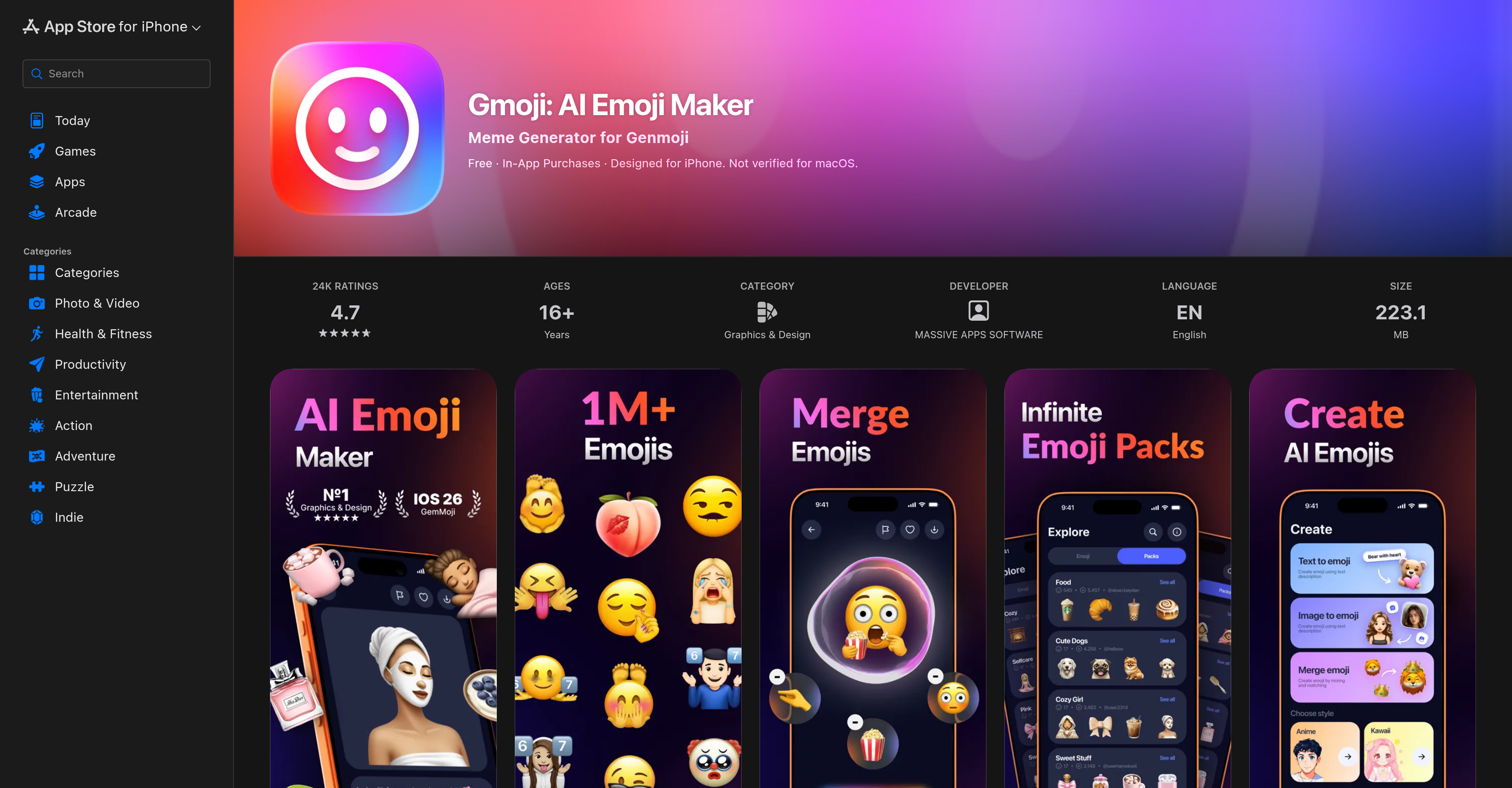
- Express yourself with emojis that look exactly like you or your friends using the YouMoji Packs feature for true appearance representation.
- Turn any typed phrase into a visual emoji instantly with the Text to Emoji feature for unique graphical reactions.
- Generate entirely new emoji designs by merging existing emojis with your personal photos using the Merge & Create tool.
- Build a personal library of custom emoticons for every mood and occasion, all stored in your My Emoji section for instant access.
- Share your custom emoji creations and meme expressions directly to social messaging apps like iMessage, WhatsApp, and Instagram.
Pros & Cons
Pros
- Personalized emojis creation
- Interactive platform
- Text to Emoji feature
- Merge & Create tool
- Instant photo to emoji
- Creation of YouMoji Packs
- In-app emoji storage
- Direct sharing to social media
- Themed Emoji Packs
- Custom emoticons
- Mood and sentiment expression
- Event-specific emojis
- Millions of curated Emojis
- Integrated Meme Maker
- Appearance representation
- Personal photos integration
Cons
- Not free
- Limited customization features
- Complex interface
- Requires unnecessary permissions
- No MacOS support
- Poor image resolution
- Limited social media integration
- Lacks exploring tools
- Laggy performance
- Limited emoji sets
Reviews
Rate this tool
Loading reviews...
❓ Frequently Asked Questions
Gmoji is an AI Emoji Maker mobile application developed by Massive Apps Software. The main function of the app is to enable users to create personalized emojis and meme expressions.
Gmoji customizes emojis by allowing users to merge their personal photos with established emoji sets. This creates unique, individualized emojis that can represent the users' personal expressions or sentiments.
The 'Text to Emoji' feature in Gmoji allows users to transform typed phrases into custom, visual emoji representations. This is an efficient and stylish way for users to convey common phrases or reactions in a visually appealing format.
The 'Merge & Create' tool on Gmoji works by giving users the ability to craft new emojis. Users can combine existing emojis or integrate their own personal photos into the creative process. The possibilities for new emoji creation are vast, limited only by the user's own imagination.
Yes, Gmoji has a feature that enables users to instantly turn their photos into emojis. It's an effective way to convert real-life images into fun, shareable graphics.
The 'YouMoji Packs' feature on Gmoji allows users to generate an array of personalized emojis that accurately represent their appearance, or even those of their friends. These packs offer a fun way to create a library of personalized emojis for various users.
On Gmoji, users can store all their created emojis in the section facilitated as 'My Emoji'. This provides easy access for users as they can retrieve and share their personalized emojis at any time.
Absolutely! Gmoji provides the functionality of sharing the created emojis directly onto various social media platforms. This includes popular platforms such as iMessage, WhatsApp, and Instagram.
Gmoji offers themed emoji packs for users to explore. These packs are designed for various occasions and moods, providing a perfect resource base to express different sentiments in a fun and creative way.
Gmoji enables personalized emoji creation by allowing users to combine their personal photos with established emoji sets. The 'Text to Emoji' and the 'Merge & Create' features also contribute to the customization process, offering an array of unique graphical representations.
Yes, Gmoji can be used on both iPhones and iPads. It is designed to be user-friendly across these devices, providing an interactive platform for creating unique emojis.
The Gmoji application size is approximately 223.1 MB. Despite its advanced features and functionalities, it does not require a lot of storage space, thus ensuring easy installation and use on mobile devices.
Gmoji has a meme generation capability that allows users to create individualized meme expressions. These meme-styled emojis can be used to express a host of reactions or sentiments in a humorous or attention-grabbing way.
Yes, Gmoji allows the use of personal photos. Users can integrate their photos to create customized emojis or blend them with existing emojis using the 'Merge & Create' feature.
Gmoji can bring a creative twist to communication on social platforms. By providing personalized and unique emojis, users can convey their thoughts, feelings, or reactions in a fun, visual way. This can be especially useful in social messaging where textual content may sometimes fail to express the user's intent fully.
Yes, Gmoji offers event-specific emojis in their themed emoji packs. Whether it's a holiday, special occasion, or mood-based event, users have a range of emojis to choose from for their social conversations.
The possibilities of emoticon personalization on Gmoji are vast. Features like 'Text to Emoji', 'Merge & Create', and the ability to incorporate personal photos into emojis allow users to create a multitude of unique emoji designs.
Gmoji can indeed express different moods and sentiments. From the standard happy, sad or surprised expressions, to more nuanced moods like joy, pondering, or frustration, the personalized emojis created on Gmoji can communicate pretty much any sentiment a user might want to express.
Indeed, Gmoji is designed to be used for social messaging and sharing of custom emoticons. By allowing direct sharing to platforms like iMessage, WhatsApp and Instagram, Gmoji fully facilitates lively and colorful conversation across social media.
In Gmoji, you can absolutely incorporate appearance representation in the emojis you create. The 'YouMoji Packs' feature allows you to make custom emojis that look just like you or your friends, creating a fun and personalized way to represent yourself in emoji form.
Pricing
Pricing model
Free Trial
Paid options from
$3.99/month
Billing frequency
Monthly