

JoyBook.ai
Turn family snapshots, pets, and memories into one-of-a-kind personalized coloring pages: upload a photo and get black-and-white line art that keeps the subject recognizable.
Listing not yet reviewed by our editors · How we check
Overview
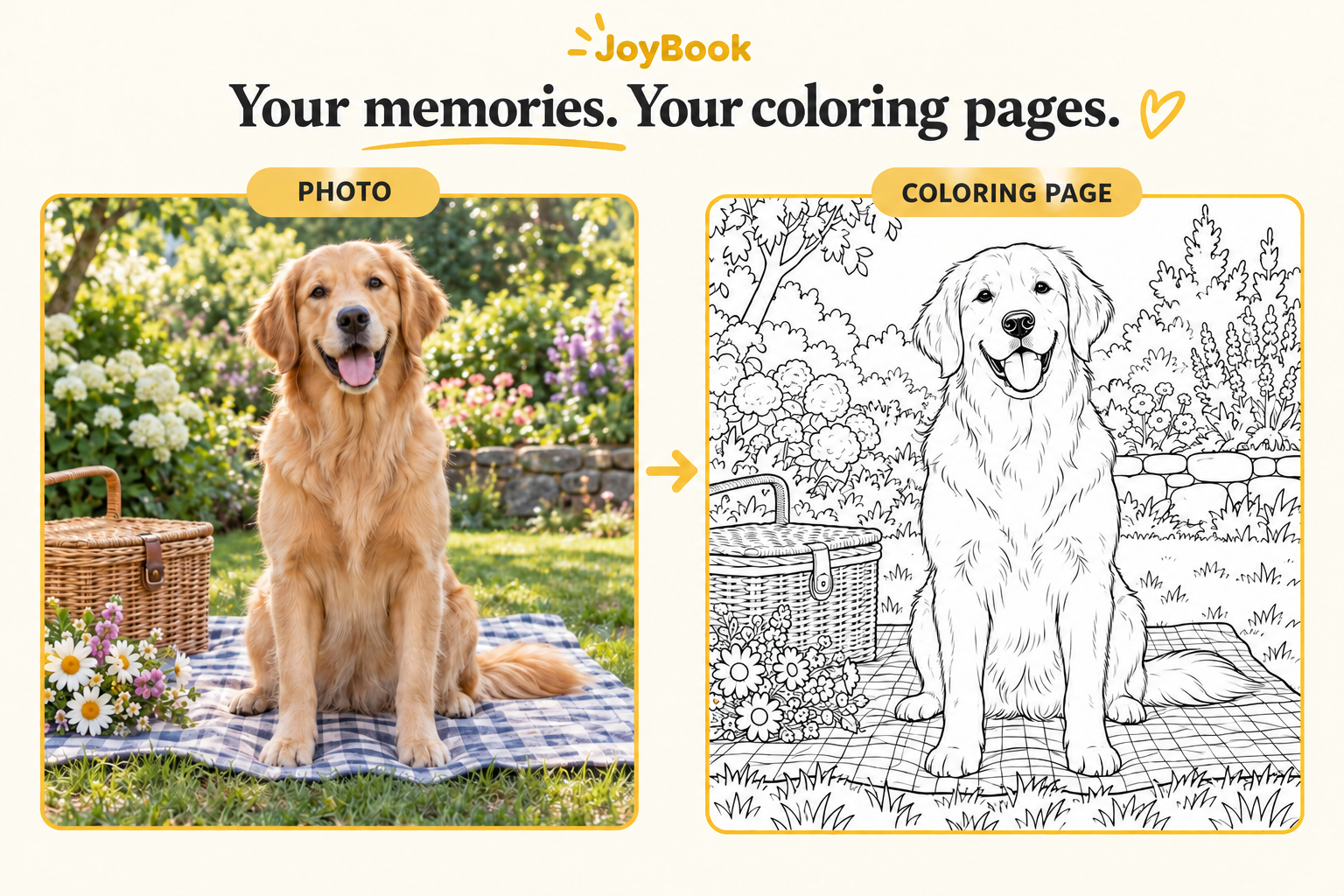
- Turn family snapshots, pets, and memories into one-of-a-kind personalized coloring pages: upload a photo and get black-and-white line art that keeps the subject recognizable.
- Bring any idea to the page with no drawing skills: describe a scene in one line or a detailed paragraph, and the text-to-coloring-page generator creates original outline art from your words.
- Match every page to the age and taste of the person coloring: pick from six illustration styles, including Cartoon, Anime, Kawaii, Minimalist, Intricate, and Default.
- Print pages that are easy to color: clean outlines and simplified backgrounds keep the main subject clear, delivered as printable PNG downloads.
- Fit your paper, frame, or screen layout: choose a page shape from 1:1, 3:4, 4:3, 9:16, and 16:9 aspect ratios.
- Build classroom printables and worksheets in minutes: generate simple educational illustrations that introduce new concepts through coloring activities.
- Grow a single theme into a complete coloring book: keep a consistent look across pages, plan the page sequence, and develop cover ideas for themed collections.
- Sell your coloring books with confidence: paid plans include commercial-use rights under the commercial license, watermark-free downloads, and private generations that keep your designs to yourself.
- Avoid wasted ink and paper: preview each coloring page before downloading and printing.
- Test the results before you commit: free credits let you generate coloring pages with a new account before you choose a paid plan.
Pros & Cons
From the listing; not yet checked by our editors.
Pros
- Supports commercial use on paid plans
- Includes private generations on paid plans
- Offers watermark-free downloads on paid plans
- Includes free credits to try
- Downloads printable PNG files
- Supports multiple page shapes
- Offers six illustration styles
- Creates coloring pages from photos or text
Cons
- Free downloads include a watermark
- Requires an internet connection
- Generation uses credits
- Requires an account to generate pages
Alternatives to JoyBook.ai
Tools that share the most tags with JoyBook.ai.
- ColorHippo
Transform any idea into unique coloring pages instantly using simple text descriptions with AI-powered generation
Freemium · from $9
$9
Not yet checked
- Best Coloring Pages
Create custom coloring pages instantly from any text description without artistic skills through Text to Coloring Page Generation
Free trial · from $9.99/month
$9.99/month
Not yet checked
- Color-anything
Instantly create coloring pages for any idea you imagine using AI interpretation of your specific requests
Free
Not listed
Not yet checked
- Coloring-Pages.app
Transform any photo into crisp line art ready for coloring using AI that extracts perfect outlines from cartoons, photos, and paintings
Free trial · from $9.90/month
$9.90/month
Not yet checked
- Palette
Bring old family photos to life with authentic colors using automatic AI colorization that works in seconds
Freemium · from $1.99/unit
$1.99/unit
Not yet checked
- Colorize
Bring family history to life by colorizing hundreds of black and white photos in minutes with bulk processing
Paid · from $12
$12
Not yet checked
Reviews
Rate this tool
Loading reviews...
Frequently asked questions
What is JoyBook AI Coloring Page Generator?
JoyBook AI Coloring Page Generator is an innovative tool that generates printable coloring pages from text prompts or photos. Users can either provide a scene description or upload a photo that the system then translates into 'line art' or sketches devoid of color. The line art is downloadable and can be printed out for coloring. This AI-powered system ensures that generated pages maintain recognisable subjects, have simplified backgrounds, and clean outlines suitable for coloring.
How does JoyBook convert photos or text prompts into coloring pages?
JoyBook transforms photos or text prompts into coloring pages via a process surfaced by AI technology. If a photo is provided, the system transforms the image into 'line art' or a sketch without color. In the case of text prompts, the generator reads the description and creates an outlined sketch based on the textual information. Once the line art is generated, users can download and print the image for coloring.
What are the six unique styles offered by JoyBook for coloring?
JoyBook offers six distinct coloring styles, providing users with plenty of options to customize their creations. The styles include 'default', 'cartoon', 'anime', 'kawaii', 'minimalist', and 'intricate', each carrying its unique traits and aesthetics to cater to various artistic preferences.
How can I remove watermarks from the coloring pages using JoyBook?
Watermark removal on coloring pages generated through JoyBook is a paid feature. Users who opt for the commercial usage plan can download and print the coloring pages without the watermarks.
How does JoyBook simplify backgrounds in the coloring pages?
JoyBook utilizes sophisticated AI technology to identify and simplify complex or distracting backgrounds in the images or scenes provided for coloring page generation. This feature allows the main subjects to stand out, making the coloring experience easier and more enjoyable.
Can I choose the aspect ratio of my coloring pages in JoyBook?
Yes, JoyBook provides an option for users to select the aspect ratio of their coloring pages. The available choices include 1:1, 3:4, 4:3, 9:16, and 16:9. This feature helps in achieving the perfect layout for each unique coloring page.
Can I use JoyBook for commercial purposes, such as creating coloring books for sale?
Yes, JoyBook can be used commercially to create coloring books for sale. There's an option for users to upgrade to a paid plan which permits commercial use. This plan also offers watermark removal, making the pages suitable for commercial printing and sale.
Can I use JoyBook to generate educational illustrations?
Absolutely. JoyBook has found usage in educational settings where teachers use it to generate illustrations for educational purposes. The simple, customizable, and recognizable sketches are effective for creating teaching materials and introducing students to different concepts via coloring activities.