
Coloring-Pages.app
Overview
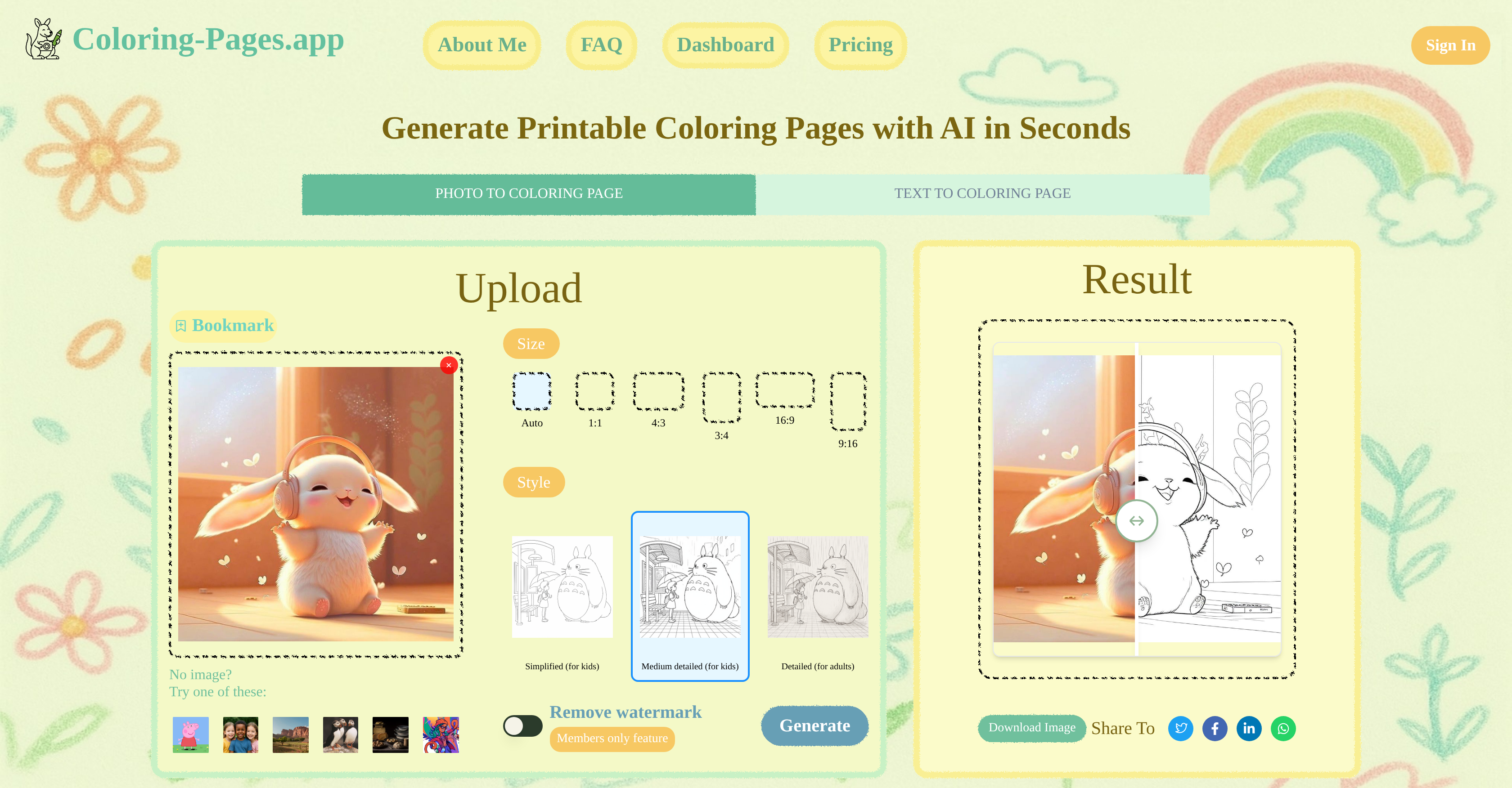
- Transform any photo into crisp line art ready for coloring using AI that extracts perfect outlines from cartoons, photos, and paintings
- Create original coloring pages from text descriptions without needing reference images or artistic skills
- Adjust line complexity from simple outlines for preschoolers to detailed drawings for adult coloring therapy
- Download printable coloring pages instantly in multiple formats and sizes for immediate use without registration
- Generate commercial-ready coloring book pages for your projects with full commercial usage rights
- Share your creations directly to social media platforms with one-click sharing functionality
Pros & Cons
Pros
- Generates printable coloring pages
- Accepts photo and text input
- Clean line art conversion
- Adjustable difficulty levels
- Handles various photo styles
- Preserves main image outlines
- Instantly downloadable pages
- Pages can be shared
- No sign-up required
- User-friendly interface
- Suitable for commercial use
- Multiple image aspect ratios
- Option to remove watermark
- Free core features
- Prompt-to-page creativity
- Supports multiple styles
- Fast generation speed
- Accurate detail extraction
Cons
- No mobile app
- Limited image formats supported
- Difficulty level may be inconsistent
- Line art may be inaccurate
- Watermark removal only for members
- May not handle complex images well
- No availability of pre-made templates
- May not correctly interpret text prompts
- No option for real-time editing
- Sample themes are limited
Reviews
Rate this tool
Loading reviews...
❓ Frequently Asked Questions
To generate a coloring page using Coloring-Pages.app, you need to either upload a photo or type a text prompt. After adjusting the settings to suit your needs - such as size and difficulty level - you click on 'Generate'. Coloring-Pages.app will then convert your photo or text into clean line art that's ready to download and color.
You can adjust the difficulty level on Coloring-Pages.app using the 'Style' option. This provides a variety of difficulty levels, from 'Simplified (for kids)', to 'Medium detailed (for kids)', to 'Detailed (for adults)'. Just select the option that suits your needs for the line art complexity.
Yes, you can use Coloring-Pages.app even if you don't have a photo. It has a feature where you can type a text prompt and it will convert that into a coloring page.
Coloring-Pages.app doesn't handle cartoons and realistic photos differently. Regardless of the style of the image - be it cartoon, realistic photo, oil painting, or hand-drawn sketch - the AI extracts the main outlines and converts it into crisp black-and-white coloring page.
You can upload a variety of image styles to Coloring-Pages.app, including cartoons, realistic photos, oil paintings and hand-drawn sketches. The AI is engineered to accurately extract the main outlines from any given image.
Coloring-Pages.app uses AI that is trained to accurately extract the main outlines from any given image. It then transforms these outlines into a crisp, black-and-white coloring page, ready for coloring.
You can share your coloring pages from Coloring-Pages.app on social media by either downloading the page as PNG/JPG and then posting it, or you can post directly to social media with just a single click, making sharing your creations easy and quick.
No, you don't need to sign up to use Coloring-Pages.app. It prioritizes user experience by providing instant access to its core features without requiring sign-ups.
Yes, Coloring-Pages.app allows for the usage of the generated coloring pages for commercial purposes in addition to personal use.
Yes, you can use your own text prompts on Coloring-Pages.app. Just type your prompt and the AI will convert it into an original coloring page.
You can generate a coloring page on Coloring-Pages.app in seconds. Its state-of-the-art generative model delivers crisp, high-quality line art quickly.
Yes, on Coloring-Pages.app you have the option to set the size of the coloring page. The options include Auto, 1:1, 4:3, 3:4, 16:9, and 9:16.
When you download your coloring page from Coloring-Pages.app, it gets saved as either a PNG or a JPG file.
Yes, Coloring-Pages.app supports both personal and commercial usage. You're free to use the generated coloring pages for your personal entertainment or incorporate them into commercial projects.
If you don't have a photo, Coloring-Pages.app offers options to generate a coloring page based on various categories including Cartoon, Portrait, Landscape, Animal, Still Life, and Artistic Illustration.
To use the text-to-coloring page feature on Coloring-Pages.app, all you have to do is type in your prompt in the specified box and hit 'Generate'. The AI will then convert your text into a unique coloring page.
Yes, you can use the generated coloring pages from Coloring-Pages.app in your digital art projects. The downloaded file can be easily integrated into various digital art workflows.
Yes, Coloring-Pages.app does have certain restrictions on the type of images that can be uploaded. It explicitly states not to upload illegal, violent, or pornographic images.
The generated coloring pages can be readily downloaded, so you can easily save them for future use. However, Coloring-Pages.app does not mention a feature for saving the images on the platform itself.
Removal of the watermark from the coloring pages on Coloring-Pages.app is a feature exclusive to its 'Members only' users.
Pricing
Pricing model
Free Trial
Paid options from
$9.90/month
Billing frequency
Monthly


