

Lume Pics
Get studio-quality product photos without booking a shoot or writing a single prompt — pick from 4,000+ human-designed scenes with lighting, surfaces, props and composition already set, and Lume places your product inside.
Listing not yet reviewed by our editors · How we check
Overview
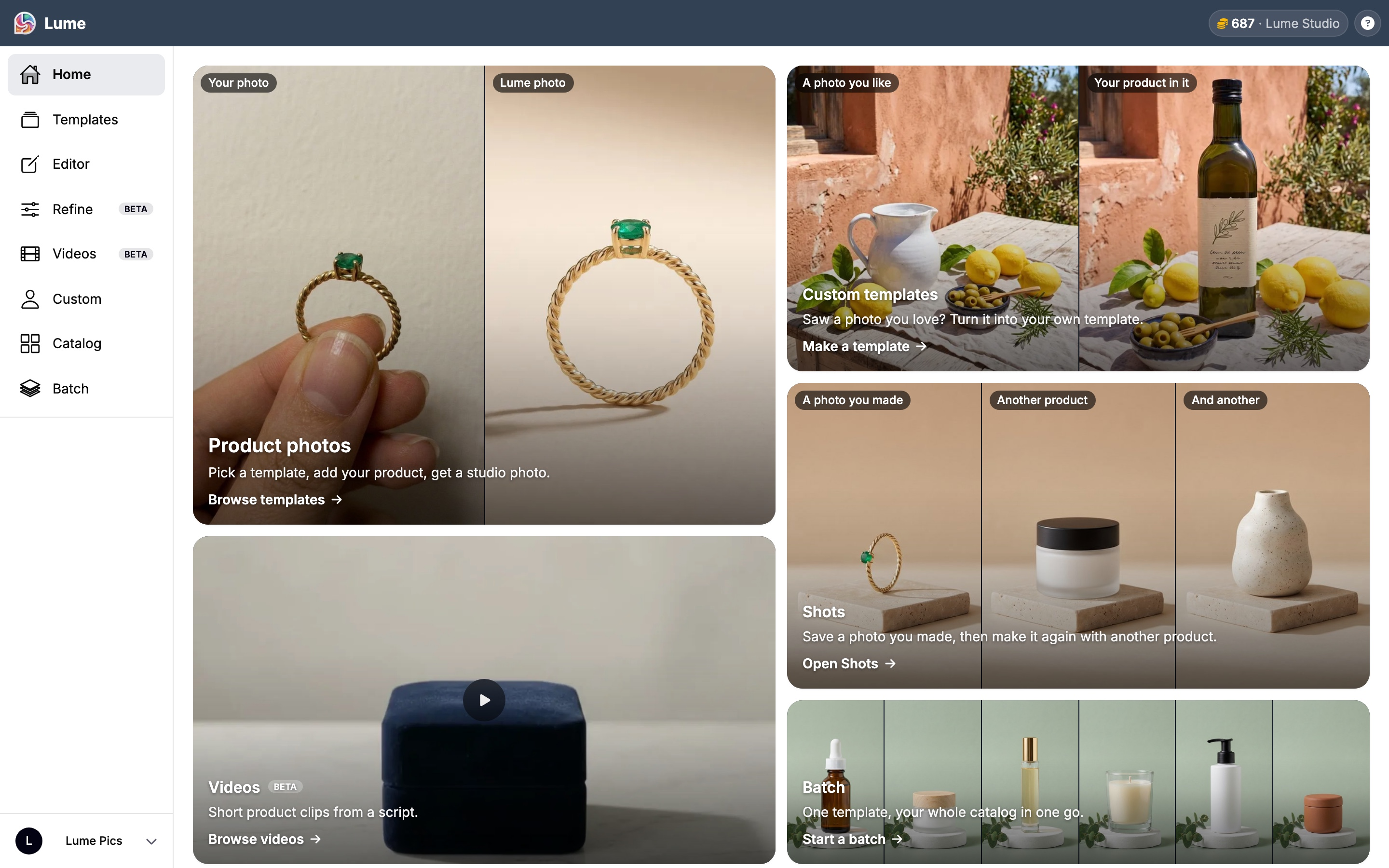
- Get studio-quality product photos without booking a shoot or writing a single prompt — pick from 4,000+ human-designed scenes with lighting, surfaces, props and composition already set, and Lume places your product inside.
- Show jewellery exactly as it looks in hand — rings, necklaces, earrings and bracelets keep their shape, metal finish and stones, so buyers see the real piece in every AI product image.
- Launch an entire collection with one cohesive visual identity — batch generation produces a whole catalog at once with consistent lighting, scale and angles across every product photo.
- Recreate the look of any product shot you admire as your own brand asset — Custom Templates rebuild a reference photo into a reusable template, and Template Shots drop a new product into a finished image you already like.
- Sell clothing on models without hiring models — flat-lay garments are placed onto people for fashion product photography that converts on storefronts and social feeds.
- Fix one detail instead of reshooting — Refine swaps backgrounds, erases objects, relights scenes, recolors products and expands the frame, saving every edit as a separate version you can return to.
- Publish listing-ready images on every channel without manual resizing — export in square, 4:5, 9:16 and 16:9 at 1K, 2K or 4K for Etsy, Amazon, Shopify, social posts and ads.
- Turn a still into scroll-stopping video content — Animate converts a finished product photo into a short clip with sound, up to 4K on higher tiers.
- Keep your budget safe from bad outputs — credit protection returns credits for any result you remove within 30 minutes on paid plans, and background removal stays free on every plan.
- Shoot, style and post from wherever you work — create product photos on the web, iOS, Android or directly inside Canva, starting free with starter credits and paid plans from $9 a month, all with commercial use included.
Pros & Cons
From the listing; not yet checked by our editors.
Pros
- 4,000+ product-photo templates
- Custom templates from any photo you love
- Template Shots reuse a finished photo
- Dedicated jewellery scene collections
- Credits back on removed results (paid plans)
- Seasonal and occasion collections
- Dedicated food scene collections
- Dedicated beauty scene collections
- Dedicated home decor collections
- Dedicated fashion collections
- Consistent lighting across catalog images
- Consistent scale across aspect ratios
- Consistent angles across catalog images
- Product-detail-preserving scene changes
- Focused edits in Refine
- One-change-at-a-time editing
- Edits saved as separate versions
- Object erasing without reshooting
- Background removal available separately
- Free daily background removals
- Relighting and product recoloring
- Frame expansion for generated images
- Photo-to-video with sound
- Wide and vertical video framing
- Video output up to 4K
- Social, catalog, and ad ratios
- Private custom templates
- Annual credits usable anytime
- Credit protections included in plans
- Commercial licensing on all plans
- Secure image storage included
- 2K and 4K downloads
- Image upscaling on higher plans
- Priority image processing on higher plans
- Plan-based private-template capacity
- Plan-based background-removal allowances
- High-volume annual photo allowances
- Sample product available to try
- Store and social-ready video formats
- No physical shoot setup required
Cons
- Video clips, not full videos
- Photo-to-video requires Pro
- Video resolution varies by plan
- Aspect ratios vary by tier
- Yearly photo caps per plan
- Free plan limited to square 1K images
- Private templates capped by tier
- Daily background-removal quotas
- Refine edits use credits beyond background removal
- UK weekday support hours only
Alternatives to Lume Pics
Tools that share the most tags with Lume Pics.
- Etsy Media Kit Generator - Image-To-Video.app
Launch professional product listings in minutes instead of days by generating a complete media kit from a single photo in 10-15 minutes
Free trial · from $8.25/month
$8.25/month
Not yet checked
- X-Design
Eliminate expensive photoshoots by generating realistic AI fashion models to showcase clothing products
Freemium · from $12.99/month
$12.99/month
Not yet checked
- Photo Studio by Square
Achieve professional-looking portraits with blemish removal, teeth whitening, and skin smoothing retouching tools
Freemium · from $8/unit
$8/unit
Not yet checked
- Flair
Transform product photos into professional branded content instantly using drag and drop interface
Freemium · from $10/month
$10/month
Not yet checked
- Product-visualizer
Launch professional product photoshoots in any setting without a studio by describing your desired scene, from a soccer field to a minimalist room.
Paid · from $24.99
$24.99
Not yet checked
- AI Canvas
Transform text into professional images in seconds using AI generation from simple prompts
Freemium · from $12/month
$12/month
Not yet checked
Related Articles
EzRemove AI Tool Review: Free Background Removal for eCommerce and Product Photography
WorldTools AI · May 26, 2026
Reviews
Rate this tool
Loading reviews...
Frequently asked questions
How do I upload a product photo to Lume and generate my first image?
Upload a product photo, then choose a background template or scene to generate an image. You can also try the workflow with a sample product.
Can I try Lume for free before choosing a subscription?
Yes. Lume offers a free option, including the ability to try it with an upload or sample product.
Which product categories and template collections does Lume support?
Lume supports jewelry, skincare and beauty, food and beverages, clothing and fashion, home goods, and fragrances, among other consumer products. Its template collections cover seasons, occasions, materials, settings, styles, and product categories.
How well does Lume preserve product details, colors, and textures?
Lume is designed to preserve product appearance, fine details, and textures while changing the scene. It also offers recoloring, but the site does not specify how accurately it preserves a product’s original colors in every generated image.
Can Lume create consistent images for an entire product catalog?
Yes. Lume aims to keep lighting, scale, and angles consistent across product images and aspect ratios for a cohesive catalog.
Can I choose specific backgrounds, props, and settings in Lume?
Yes. You can choose from template collections for different backgrounds and settings. Lume also supports lifestyle scenes styled with props; the site does not specify whether props can be selected independently of a template.
Can I edit a generated image in Lume without starting over?
Yes. Use Refine to make focused changes, such as swapping the background, erasing an object, or relighting the scene, without repeating the whole shoot.
How does Lume’s Refine workspace save edited image versions?
Each Refine result is saved as a new version, so edits are kept separately from the previous image.