
MacWhisper
6
📝 Overview
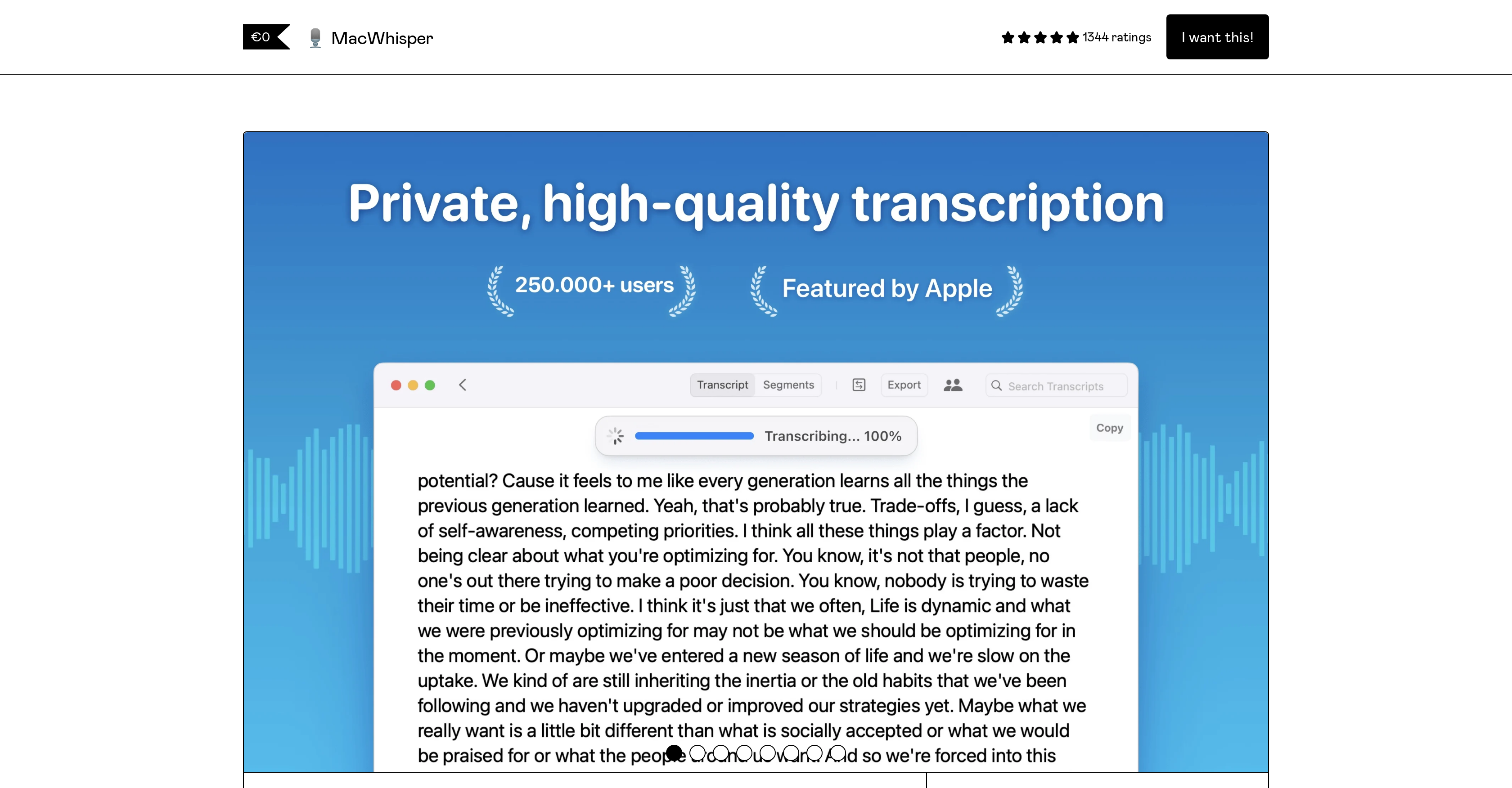
- Transcribe meetings and lectures instantly with drag-and-drop simplicity for MP3, WAV, M4A, and MP4 files
- Keep sensitive audio completely private with 100% offline processing that never sends data from your device
- Achieve industry-leading accuracy for complex content using the Pro version's Large Whisper model
- Edit transcripts efficiently with synchronized audio playback and segment editing tools in Reader Mode
- Translate transcripts automatically into other languages using integrated Whisper or DeepL translation
- Process multiple files simultaneously with batch transcription capabilities in the Pro version
- Export professional subtitles and transcripts in SRT, VTT, and CSV formats for various applications
- Transcribe system audio and podcasts with separate speaker tracks using advanced Pro features
⚖️ Pros & Cons
Pros
- Designed for Mac computers
- Drag and drop usability
- Transcribes variety of formats
- Supports over 100 languages
- Includes Reader Mode
- Advanced editor capabilities
- Search and highlight words
- Offers Large transcription model
- Variety of model options
- Language selection for accuracy
- Support for combining segments
- CSV export capability
- Monterey Support
- Translation of transcriptions
- Auto Updater feature
- Adds custom models
- Transcribes podcasts
- Free or paid versions
- Fast transcription time
- Exports .srt & .vtt subtitles
- Syncs audio playback to transcripts
- Copy entire or parts of transcript
- Supports Tiny, Base and Large models
- Auto detect language feature
Cons
- Only works on MacOS
- Extra cost for Pro version
- Large model takes longer
- No support for mobile devices
- Large files require paid version
- Advanced features coming soon
- Javascript required
- Limited to certain audio formats
- Multiple language support is slower
- English-only on Tiny model
❓ Frequently Asked Questions
MacWhisper is a state-of-the-art transcription technology developed by OpenAI. It is designed to transcribe audio files into text quickly and easily. It supports a range of audio file formats and can transcribe in over 100 languages. MacWhisper is intended for use on Mac computers.
MacWhisper works by transforming audio content into written text. Users just need to drag and drop their audio files into the MacWhisper interface, and the program will transcribe the audio into text. The transcription process occurs on the user's device, ensuring data privacy.
MacWhisper supports transcriptions in over 100 languages, including English, Chinese, German, Spanish, Russian, Korean, French, Japanese, Portuguese, Turkish, Polish, Catalan, and many more.
MacWhisper supports several audio and video file formats, including MP3, WAV, M4A, and MP4 videos.
MacWhisper and MacWhisper Pro differ mainly in the transcription model they use. The regular version of MacWhisper uses the Tiny (English only) and Base (100 languages) models, which are very accurate and fast. MacWhisper Pro, on the other hand, includes the Large model, offering industry-leading accuracy. However, the Large model takes a bit longer to generate transcriptions.
The accuracy of transcriptions in MacWhisper can be improved by selecting the specific language you want it to transcribe in. This optimization allows the AI to better understand and process the audio content.
Yes, MacWhisper can transcribe videos. The software supports MP4 video format for transcription.
The Reader Mode in MacWhisper is a feature that enables users to edit and delete segments from the transcript. This tool also allows users to highlight and search for specific words within the transcript.
MacWhisper offers several advanced features, which include combining segments into sentences, exporting transcriptions as CSV files, Monterey support, translating transcriptions, auto-updating the software, and the ability to transcribe podcasts. Users also have the option to add their own models for transcription.
To add your own models to MacWhisper, you would need to have access to the Pro version of the software. While the software promises this feature, specific details on the process of adding your own models aren't provided on their website.
Yes, MacWhisper can transcribe podcasts. This is achieved by combining single-track audio for each host. However, this feature is only available in the Pro version.
The 'Large model' in MacWhisper Pro is a more in-depth and comprehensive transcription model that offers industry-leading accuracy in transcriptions. However, it takes longer to generate transcriptions compared to the Base and Tiny models.
The Tiny and Base models in MacWhisper are different levels of transcription intensity. The Tiny model is for English language only, while the Base model supports over 100 languages. Both models offer swift and accurate transcriptions.
MacWhisper is available for free, or users can pay a small fee to get the Pro version. The Pro version costs a minimum of €8 due to a file size limit for free apps on Gumroad. Users can pay more than €8 if they wish.
With MacWhisper, the transcription process is simple and user-friendly. Users just need to drag and drop their audio files into the MacWhisper interface. The software will then transcribe the audio into text on the user's device in seconds.
MacWhisper produces text transcriptions in seconds, with a speed that is on average ~15x the length of the real-time audio.
There is a file size limit for MacWhisper on Gumroad because the platform has a 250MB file size limit for apps that are listed for free. As a result, the price for MacWhisper Pro is set at a minimum of €8, which allows the Large model to be included.
The 'Combine Segments into Sentences' feature in MacWhisper is a planned function that will allow users to merge segments from the transcription into more coherent sentences, enhancing the readability and understanding of the transcribed text.
MacWhisper does all transcription on your device, implying that no data leaves your machine during the process. Therefore, it doesn't necessarily require an internet connection to work.
MacWhisper allows users to export their transcriptions as .srt, .vtt subtitles, or CSV files. This offers flexibility in how users may want to utilize their transcripts.
Yes, MacWhisper can transcribe videos. The software supports MP4 video format for transcription.
The Reader Mode in MacWhisper is a feature that enables users to edit and delete segments from the transcript. This tool also allows users to highlight and search for specific words within the transcript.
MacWhisper offers several advanced features, which include combining segments into sentences, exporting transcriptions as CSV files, Monterey support, translating transcriptions, auto-updating the software, and the ability to transcribe podcasts. Users also have the option to add their own models for transcription.
To add your own models to MacWhisper, you would need to have access to the Pro version of the software. While the software promises this feature, specific details on the process of adding your own models aren't provided on their website.
Yes, MacWhisper can transcribe podcasts. This is achieved by combining single-track audio for each host. However, this feature is only available in the Pro version.
The 'Large model' in MacWhisper Pro is a more in-depth and comprehensive transcription model that offers industry-leading accuracy in transcriptions. However, it takes longer to generate transcriptions compared to the Base and Tiny models.
The Tiny and Base models in MacWhisper are different levels of transcription intensity. The Tiny model is for English language only, while the Base model supports over 100 languages. Both models offer swift and accurate transcriptions.
MacWhisper is available for free, or users can pay a small fee to get the Pro version. The Pro version costs a minimum of €8 due to a file size limit for free apps on Gumroad. Users can pay more than €8 if they wish.
With MacWhisper, the transcription process is simple and user-friendly. Users just need to drag and drop their audio files into the MacWhisper interface. The software will then transcribe the audio into text on the user's device in seconds.
MacWhisper produces text transcriptions in seconds, with a speed that is on average ~15x the length of the real-time audio.
There is a file size limit for MacWhisper on Gumroad because the platform has a 250MB file size limit for apps that are listed for free. As a result, the price for MacWhisper Pro is set at a minimum of €8, which allows the Large model to be included.
The 'Combine Segments into Sentences' feature in MacWhisper is a planned function that will allow users to merge segments from the transcription into more coherent sentences, enhancing the readability and understanding of the transcribed text.
MacWhisper does all transcription on your device, implying that no data leaves your machine during the process. Therefore, it doesn't necessarily require an internet connection to work.
MacWhisper allows users to export their transcriptions as .srt, .vtt subtitles, or CSV files. This offers flexibility in how users may want to utilize their transcripts.
💰 Pricing
Pricing model
Freemium
Paid options from
$31.56
Billing frequency
One-time
Refund policy
Refunds are available within 7 days of purchase if users are not satisfied.
📺 Related Videos
MacWhisper Dictation Tutorial (2025) | Never Manually Write an Email Again!
👤The Stuff•2.7K views•Mar 27, 2025
MacWhisper Tutorial 2025 — The Best Free AI Transcription App?
👤Tool Clash•1.0K views•Aug 21, 2025
MacWhisper - The best macOS app using OpenAI Whisper
👤Felipe Baez•48.0K views•Jan 23, 2023
MacWhisper… AMAZING ChatGPT/OpenAI Transcription App… FOR FREE! 🥰
👤Tyler McConnell•5.8K views•Mar 13, 2023
Top 3 AI Dictation Tools Compared - Whispr Flow vs SuperWhisper vs MacWhisper
👤Nic Conley•31.9K views•Feb 21, 2025
UniScribe vs MacWhisper: Which Transcription Tool Wins?
👤Dave Swift•4.0K views•May 30, 2025
Mac Dictation Apps to Effortlessly Type at the Speed of Thought
👤Ty Teaches Tech•21.5K views•Mar 12, 2025
Make near-perfect subtitles for free on your Mac with MacWhisper
👤A Better Computer•12.7K views•May 10, 2023
Free transcriptions on Mac with MacWhisper - Part 1
👤Macpreneur•843 views•Dec 6, 2023