

Menu Explain
Overview
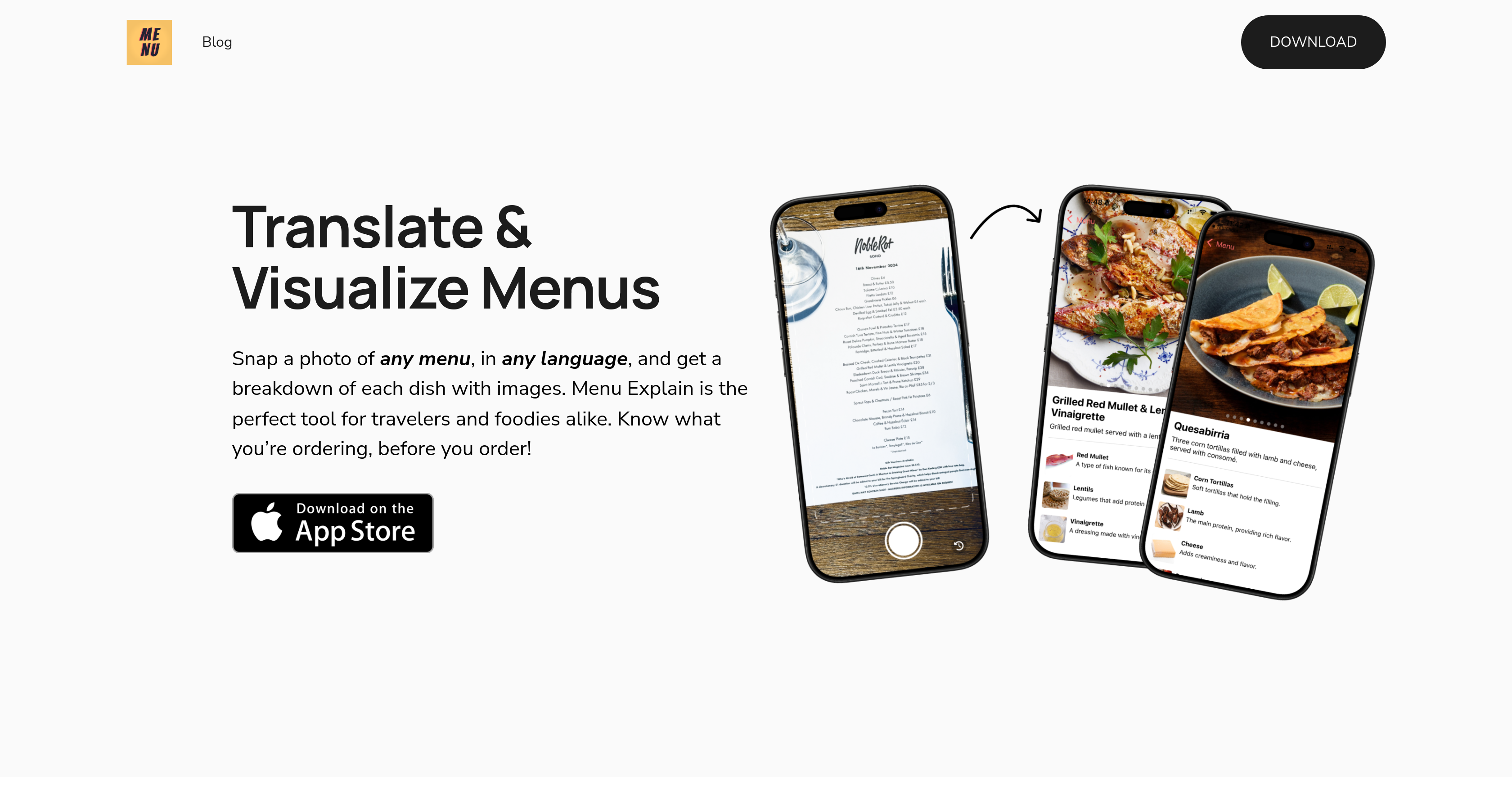
- Order exactly what you want with instant menu translations from any language using AI image recognition
- Discover unfamiliar dishes confidently with detailed descriptions and accompanying food images
- Recall your favorite meals and restaurants easily with the scan history feature that saves your previous menu translations
- Explore international cuisines without language barriers by simply photographing foreign language menus
- Understand diverse food cultures through comprehensive dish breakdowns that go beyond basic translation
Pros & Cons
Pros
- Translates any language
- Visualizes menu items
- Image recognition technology
- Breakdown of listed items
- Images for each item
- Enhances dining experiences
- Beneficial for travellers
- Scan History feature
- Hassle-free culinary explorations
- Understands diverse food cultures
- Menu decoding abilities
- Facilitates interface navigation
- Travel assistance tool
- Language barrier solution
- Offers culinary convenience
- Supports international cuisines
- Advanced photo processing
- Functional recall feature
- Portable digital menu
- Provides detailed descriptions
- Supports visual learning
- Interactive menu experience
- Improves user experience
- Food Tech integration
- Multilingual support
Cons
- Requires clear photo quality
- May misread handwriting
- Limited to text-based menus
- No offline functionality
- Depends on accurate translations
- Doesn't work in real-time
- May not recognize complex dishes
- Limited food image database
- No dietary preference settings
- No manual correction capability
Reviews
Rate this tool
Loading reviews...
❓ Frequently Asked Questions
Menu Explain functions by using artificial intelligence technology to translate and visualize menus. Users take a photo of the menu, which is then processed by the AI. The system then provides a comprehensive breakdown of each menu item, complete with descriptions and related images.
The primary features of Menu Explain include interactive translations, AI Image Recognition, multilingual support, a 'Scan History' feature allowing users to reference previously scanned menus, and an interface providing a breakdown of each dish with images and detailed explanations.
Yes, Menu Explain is designed to provide support for any language, making it versatile and valuable for a diverse range of users.
Indeed, Menu Explain is beneficial for travelers. With its multilingual support and instant translation of menus, it assists in navigating culinary landscapes in unfamiliar territories.
The 'Scan History' feature in Menu Explain allows users to return and reference menus they've scanned previously. This feature provides an easy way to recall past dining experiences or favorite dishes.
Menu Explain offers detailed and visual descriptions of each item on a menu. It provides an understanding of what each dish comprises, backed by supplementary images.
Yes, you can indeed use Menu Explain to explore international cuisines. With its translation feature, image recognition, and comprehensive breakdown of each dish, it enables a thorough exploration of diverse food cultures.
Menu Explain facilitates culinary convenience by instantly translating and visualizing menus at the snap of a picture. This encourages consumers to confidently explore and discover varied cuisines without fear of language barriers.
The AI technology in Menu Explain processes images through a sophisticated image recognition system. After the user takes a photo of a menu, the AI analyzes the text and delivers a complete breakdown of each listed item for comprehension.
Menu Explain enhances the dining experience by enabling users to understand exactly what they are ordering. By providing detailed descriptions and visuals of each dish, it reduces uncertainty and promotes an enriching dining experience.
The target audience for Menu Explain is significantly broad; it's especially useful for travelers and food enthusiasts navigating menus in other languages, but its inclusive language support makes it a valuable tool for anyone wishing to quell language barriers in dining environments.
Menu Explain utilizes forms of AI like image recognition and neural machine translation technologies to process, translate and provide a comprehensive breakdown of menu items.
Yes, Menu Explain provides corresponding images along with the translated descriptions of menu items. This includes a snapshot of the dish which gives users a visual representation of their prospective order.
Menu Explain handles menu decoding through its AI technology. After a user takes a photo of the menu, the technology deciphers the text and provides a translated breakdown of each dish.
Certainly, you can use Menu Explain to both visualize and translate menus. Beyond merely translating text, it offers images and comprehensive descriptions of each dish, adding a visual element to the exploration.
While Menu Explain provides a breakdown of each menu item with images and detailed explanations, it should not be mistaken for an interactive or digital menu system. It’s a tool for translating and understanding existing hard-copy menus.
Indeed, Menu Explain is particularly useful for understanding diverse food cultures with its comprehensive translation and visualization capabilities of menus from any language.
Menu Explain assists with travel by helping travelers understand foreign menus. Its instant translation and image recognition technology enable users to appreciate and enjoy local cuisines, without any language barriers.
Menu Explain paramountly facilitates culinary exploration by breaking down the language barriers that often come with trying new, international cuisines. By providing translations, images, and expansive dish descriptions, it allows users to freely explore unknown culinary territories.
Yes, Menu Explain operates through the users taking a photo of the menu. The AI then processes this image and provides a comprehensive understanding of the menu.
Pricing
Pricing model
Freemium
Paid options from
$0.99/month
Billing frequency
Monthly