

MixSongs
Make karaoke tracks and instrumental versions in about a minute: a dedicated vocal-only AI model removes vocals from any song before the instrumental is split.
Listing not yet reviewed by our editors · How we check
Overview
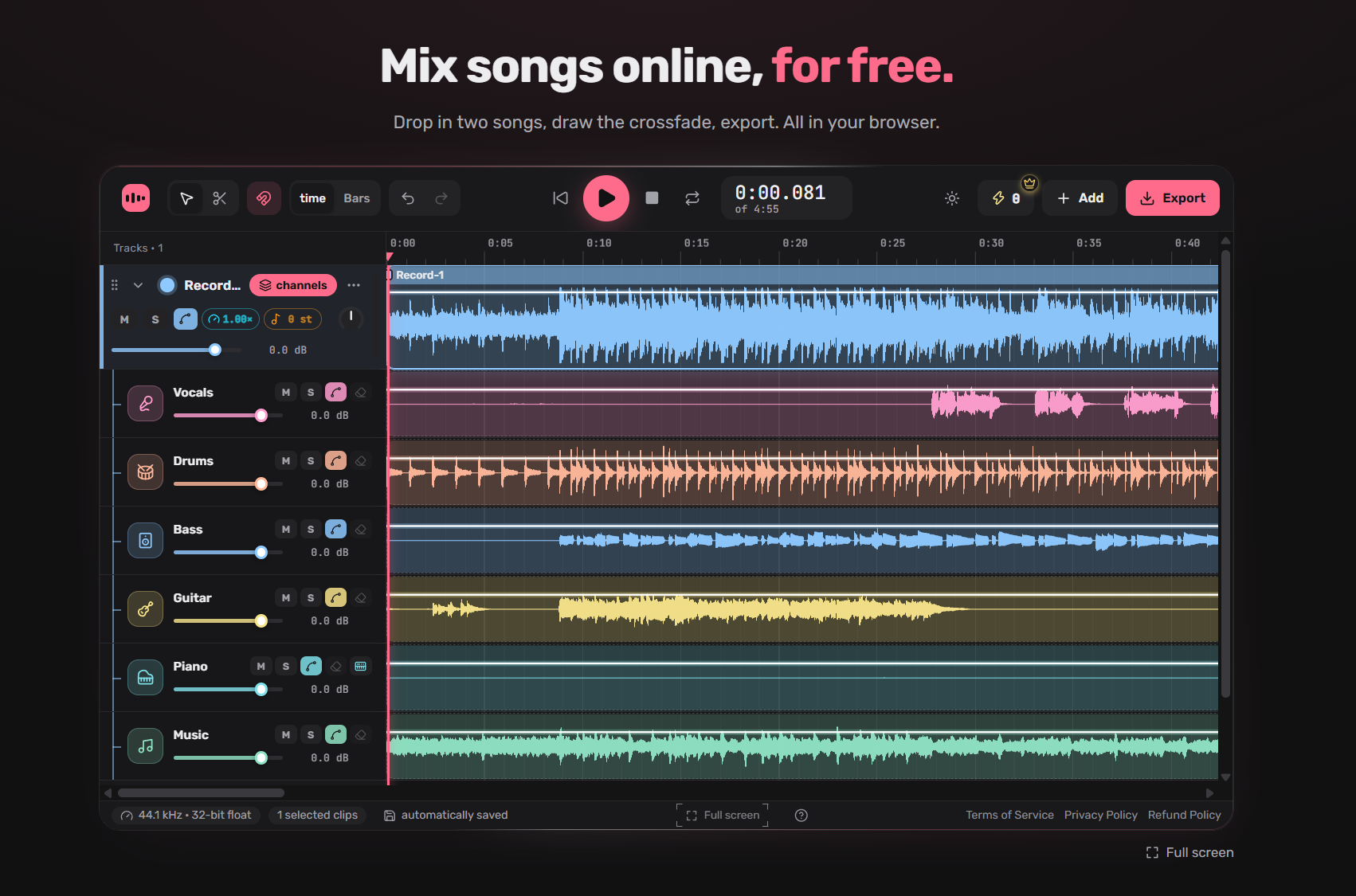
- Make karaoke tracks and instrumental versions in about a minute: a dedicated vocal-only AI model removes vocals from any song before the instrumental is split.
- Get cleaner stems with fewer artefacts: every moment of the song is separated 4 times through overlapping windows and blended, where many online stem splitters stop at 2.
- Learn any part by ear: isolate a guitar riff, piano line, bassline or drum pattern as its own track using separate drums, bass, guitar, piano and music stems.
- Keep every detail of the original recording: stems come as lossless 24-bit FLAC files that add back up to the full song.
- Go from separation to editing with no extra steps: stems open directly as lanes in your multitrack project, ready to mute, solo, fade and change key.
- Build remixes and mashups that fit together: adjust tempo, key, speed and pitch, then crossfade, trim, split, duplicate and merge tracks with custom volume curves.
- Hear changes as you make them: edit audio while it plays for a faster mixing workflow.
- Keep your music private: mixing and exporting run in your browser, and no song is uploaded except for optional AI stem separation.
- Start mixing songs instantly: no sign-up, no download, and your first stem split is free.
- Work with the files you already have: import MP3, WAV, FLAC, M4A, OGG and AIFF.
- Export mixes without distortion: built-in clip protection, offline rendering and an export format recommended from your source quality protect every mix.
- Choose the output quality you need: export free MP3 at 128 or 192 kbps, or unlock higher-bitrate and lossless export with premium add-ons.
Pros & Cons
From the listing; not yet checked by our editors.
Pros
- Offline rendering
- Browser-based mixing
- User-defined volume curves
- Advanced track trimming
- Speed and pitch adjustment
- Supports multiple formats
- Free and premium export options
- Quality-focused export
- No upload needed
- Easy to use
- Quick mixing of two files
- On-the-fly track editing
- Integrated FAQ section
- No signup or download
- Detailed control of tracks
- Offers crossfade
- Tempo and key changes
- Prevent audio clipping
- Premium add-ons available
- Duplicate track elements
- Privacy preserving
- Provides audio education articles
- Flexible bitrate options
- Explains audio quality aspects
Cons
- Limited free export formats
- Requires premium for lossless exports
- Limited to browser use
- No cloud storage for projects
- No track record or industry recognition
Alternatives to MixSongs
Tools that share the most tags with MixSongs.
- Singify AI Vocal Remover
Create studio-quality karaoke tracks instantly by removing vocals from any song with advanced 8-stem separation
Freemium · from $8.99/month
$8.99/month
Not yet checked
- X-Minus
Transform any song into a karaoke track instantly with our dedicated vocal removal that separates vocals from music elements cleanly
Free
Not listed
Not yet checked
- Vocal Remover by Media.io
Create instant karaoke tracks from any song by removing vocals with AI separation
Freemium · from $9.99/month
$9.99/month
Not yet checked
- Vocalremover
Instantly create karaoke backing tracks from any song with AI-powered vocal removal
Free
Not listed
Not yet checked
- Audiocleaner | Vocal Remover Free
Create studio-quality karaoke tracks instantly by removing vocals from any song with AI separation
Freemium · from $9.90/month
$9.90/month
Not yet checked
- Coolo.ai
Instantly create studio-quality karaoke tracks by separating vocals from background music with AI-powered vocal removal
Free trial · from $5.70/month
$5.70/month
Not yet checked
Reviews
Rate this tool
Loading reviews...
Frequently asked questions
What is MixSongs?
MixSongs is an online tool designed for mixing and merging songs seamlessly. It offers an interface that mimics traditional audio software, providing detailed control of every track and transition. Accessible via a web browser, it eliminates the need for sign up or downloads.
What are the core features of MixSongs?
Core features of MixSongs include the ability to crossfade, trim and merge tracks, adjusting volume curves as defined by the user. It allows users to split, trim and duplicate track elements, adjust speed and pitch, change tempo and key, and offers protection against clipping. The tool also includes an AI-powered stem splitter for advanced needs.
What formats can be imported into MixSongs?
MixSongs supports importing of songs in several formats: MP3, WAV, FLAC, M4A, OGG, and AIFF.
What export options does MixSongs provide?
MixSongs allows exporting in MP3 format at 128 or 192 kbps for free. Users opting for premium add-ons have access to higher bitrate and lossless export options.
What is the significance of the AI-powered stem splitter in MixSongs?
The significance of the AI-powered stem splitter in MixSongs lies in its ability to distinctly isolate various musical elements like vocals, drums, and bass into separate tracks. This advanced feature proves helpful for more complex or professional mixing needs.
How does MixSongs maintain audio quality when mixing tracks?
MixSongs maintains audio quality during the mixing process by recommending the best export format corresponding to your source tracks and then rendering the mixes offline.
How does MixSongs protect against clipping?
MixSongs offers built-in clip protection to protect against clipping. This feature ensures that the audio quality is maintained by preventing any unwanted distortion in the sound caused by loud signal transients.
What are the premium add-ons provided by MixSongs?
Premium add-ons offered by MixSongs enable higher bitrate and lossless export options for the users. These additional features provide better sound quality outputs as compared to the standard export options.