
Audiocleaner | Vocal Remover Free
Overview
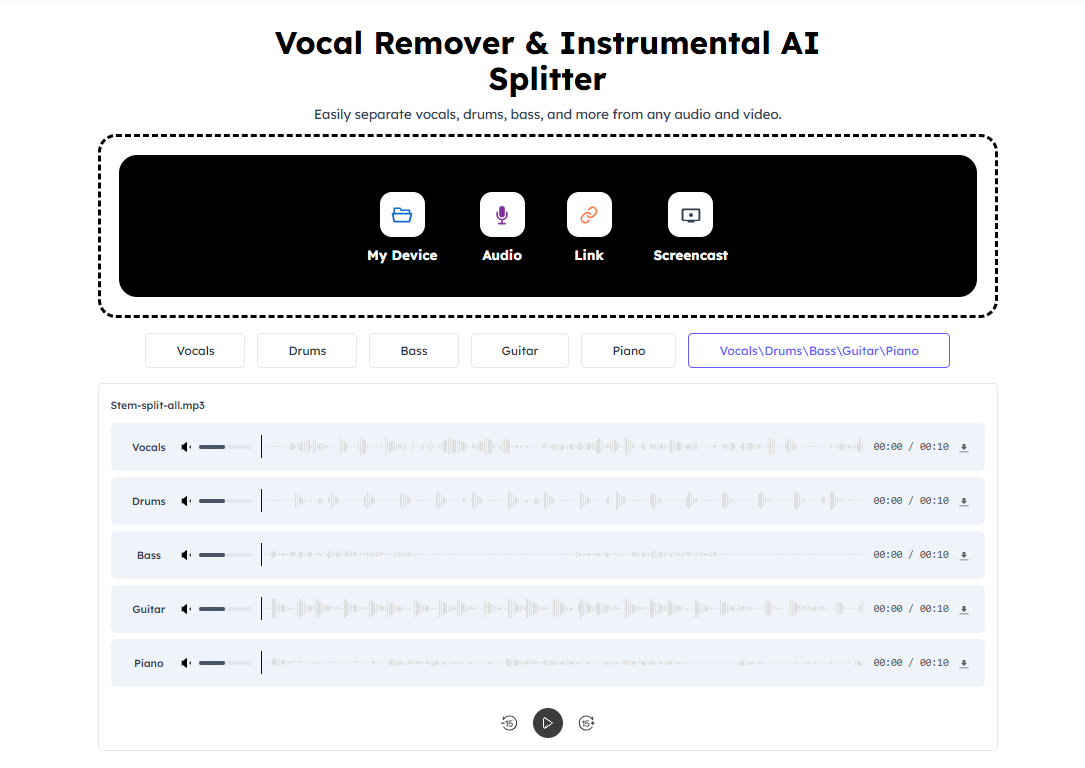
- Create studio-quality karaoke tracks instantly by removing vocals from any song with AI separation
- Produce crystal-clear acapella versions for vocal training and cover songs through vocal extraction
- Remove background noise, breath sounds, and mouth noises for professional podcast audio quality
- Eliminate echo and reverb from recordings using advanced audio cleanup technology
- Extract specific instruments like drums, guitar, bass, or piano to create custom music mixes
- Generate unique AI mashups by combining different song tracks automatically
- Remove music from video content while keeping dialogue and sound effects intact
- Convert text to natural-sounding speech audio with high-quality voice synthesis
- Modulate your voice with different effects or clone voices for creative projects
- Transform audio into animated avatars that move and react to your voice input
Pros & Cons
Pros
- Remove vocals from songs and videos
- High-quality karaoke creation
- Acapella track creation
- Creates instrumental tracks
- Removes background audio
- extract stems
- Removes music from video
- Enhances audio quality
- Assists in vocal training
- Can create DJ remixes and mashups
- Suitable for music education
- No downloads required
- No sign-ups needed
- Supports multiple formats
- User-friendly interface
- Fast and reliable
- Supports multiple languages
- Removes specific instruments from songs
- Supports acapella extraction
- Vocal training assistance
- No installation necessary
- Ad-free operation
- Removes vocals instantly
- Audio enhancer
Cons
- No offline usage
- No integrated media player
- No smartphone app
- No community support
- No option for other adjustment
Reviews
Rate this tool
Loading reviews...
❓ Frequently Asked Questions
AI Vocal Remover is an online tool that uses advanced AI technology to separate vocals from instruments in songs. It creates high-quality karaoke, acapella, or instrumental tracks in a convenient, efficient manner. The tool also performs various audio editing tasks, such as removal of background audio, breath sounds, mouth sounds, echo, reverb, and specific musical instruments.
AI Vocal Remover analyzes the uploaded track, then uses its advanced AI technology to efficiently separate the vocals from the instrumentals. The high-quality output is then ready for download and further use.
AI Vocal Remover serves a range of user needs from creating karaoke tracks, DJ remixes & mashups, instrumental music production, customized background music for videos, to cover songs & vocal training. It also assists in podcast making, audio translating, text-to-speech conversion, audio trimming, and voice cloning.
AI Vocal Remover offers audio editing features highly beneficial for podcast making. It can trim audio, remove background noise, unwanted breath sounds, mouth sounds, and essentially enhance audio quality.
AI Vocal Remover provides an AI Audio Translator feature, enabling users to convert speech in one language to another language in audio format.
AI Vocal Remover contributes to audio editing by offering features to remove background audio, breath sounds, mouth sounds, silence, echo, reverb, and specific instruments like drums, guitar, bass, and piano from songs.
Yes, AI Vocal Remover does work on video content. It can remove music from video content, resulting in a video with dialogues, sounds, and noises, but without the music.
AI Vocal Remover offers voice changing and voice cloning features. The voice changing feature allows users to modulate their voices with different effects, while the voice cloning feature replicates the voice of the user.
AI Vocal Remover creates karaoke tracks by extracting the vocals from the original song, leaving high-quality instrumental music. Users simply need to upload their chosen track, and the AI will handle the rest.
AI Vocal Remover creates instrumental tracks by separating the vocals from the instrumental sounds in any given song. After uploading their track, the AI analyzes and extracts the vocals, and users can then download the instrumental version.
AI Vocal Remover assists in vocal training by creating acapella and instrumental tracks. The vocalists can sing along these tracks, allowing them for effective practice and skill development.
AI Vocal Remover can remove specific instruments like drums, guitar, bass, and piano from songs. This enables users to create unique mixes, minus the instruments they choose to omit.
AI Vocal Remover supports text-to-speech conversion. Users can input their desired text and the tool will convert it into high-quality speech audio.
Yes, AI Vocal Remover can generate AI mashups. It allows users to combine different song tracks to produce a unique musical piece.
AI Vocal Remover has the capacity to remove breath and mouth sounds from an audio. This function supports users in producing cleaner, distraction-free audio tracks.
AI Vocal Remover contains effective features for echo and reverb removal from any given audio piece, enhancing the quality and clarity of the sound.
AI Vocal Remover enhances audio by removing background audio, breath sounds, mouth sounds, silence, echo, reverb, specific instruments to deliver a cleaner output. This function bolsters the overall audio quality making it more crisp and enjoyable.
AI Vocal Remover enables audio to animation conversion. It transforms the audio inputs into corresponding animations. This feature allows users to create animated avatars or characters that move or react according to the input audio.
AI Vocal Remover assists in the making of cover songs by separating vocals and providing clean instrumental tracks. Users can then sing over these tracks to practice or record their own versions of the songs.
Yes, AI Vocal Remover is freely available online. It does not require any downloads or sign-ups to use. Users can separate vocals from instrumentals instantly without any restrictions.
Pricing
Pricing model
Freemium
Paid options from
$9.90/month
Billing frequency
Monthly
Refund policy
No Refunds