PhotoRestore.ai
Overview
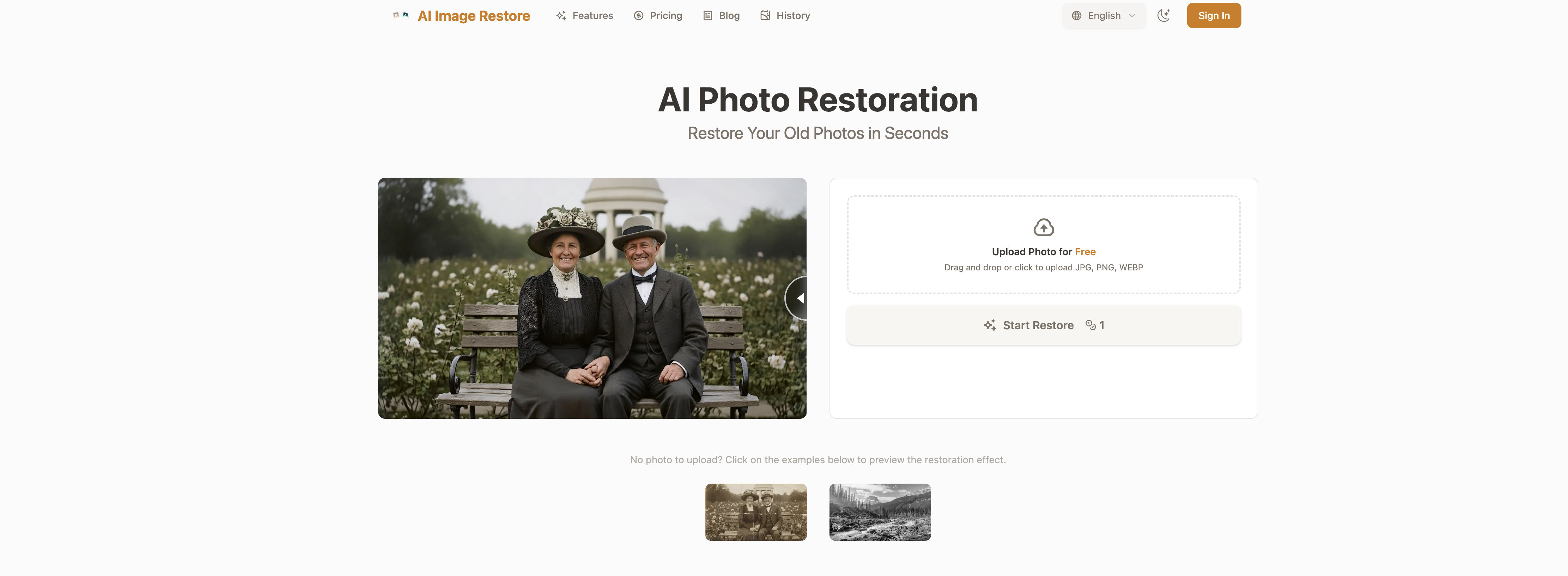
- Revive precious memories by seamlessly repairing severe damage like tears, creases, and stains with context-aware AI filling that leaves no trace of repair.
- Breathe life into black and white photos with historically accurate color reconstruction based on era, lighting, and texture.
- Recover sharp, detailed facial features in old portraits using deep facial reconstruction AI trained on millions of faces.
- Get professional-grade enhancements that improve clarity, resolution, and color balance beyond the photo's original state.
- Maintain complete privacy with automatic deletion of all uploaded and restored photos after 24 hours and full user control over image data.
- Process most restorations in 30-60 seconds with a simple three-step workflow, far faster than traditional manual methods.
- Apply precise adjustments for professional results using manual control over all restoration algorithms in Professional Mode.
- Start restoring immediately with a free trial and choose a flexible plan using a straightforward credit system for one-time or subscription use.
Pros & Cons
Pros
- Restores, unblurs and colorizes photos
- Repairs damages with context-aware filling
- Identifies and repairs various issues
- Reconstructs historically accurate colors
- Supports JPG, PNG, WEBP
- Three-step process: upload, process, download
- Enhances photos clarity, resolution, color balance
- Offers deep facial reconstruction
- Intelligent color restore feature
- High privacy and security measures
- Images auto-deleted after 24 hours
- Flexible pricing plans
- Free trial available
- Fills missing patterns and textures
- Repairs issues like tears, creases
- Restores mold and coffee stains
- Excellent for individuals and professionals
- User control over image deletion
- Securely encrypts uploaded photos
- Mends underlying photo issues
- Analyzes era, lighting for colorization
- Contains 'one-click' restoration feature
- No-sign-up required
- Offers monthly subscriptions plans
- Proficient in sharpens facial details
- Learning algorithm trained on millions of faces
- Automatically fixes scratches, sharpens details
- Boosts lifelike skin tones, lighting
- Picture auto-orientation feature
- Auto-crops irrelevant backgrounds
- Runs all restore engines simultaneously
- Unlocks professional-mode with subscription
- Pro-grade- engines for free trial
- Watermark-free 4K downloads with pro
- Restores damages rather than guessing
- Automatic diagnose of photos state
- Result preview before download
- 10MB maximum upload size
- Delivers overall perfect restoration
- Professional mode offers manual controls
- Intended for regular restore needs
Cons
- No batch processing
- Limited file format support
- Limited to 10MB upload
- Free version with watermarks
- Auto deletion after 24 hours
- Requires secure internet connection
- Subscription model could be pricey
- Dependent on server load
- Lack of manual control
- Not suitable for heavily damaged photos
Reviews
Rate this tool
Loading reviews...
❓ Frequently Asked Questions
PhotoRestore.ai can restore a variety of photos, including old, faded or damaged photos. It's capable of repairing a range of issues including tears, creases, mold, and coffee stains.
Yes, PhotoRestore.ai is capable of colorizing black and white images by reconstructing historically accurate colors based on the era, lighting, and physical texture of the image.
PhotoRestore.ai works by intelligently analyzing photo details to repair damages and restore the original look. It performs 'context-aware' filling to restore missing patterns and textures. The process begins with a simple upload, after which the AI processes the photo, and finally allows it to be downloaded.
PhotoRestore.ai supports various file formats including JPG, PNG, and WEBP.
PhotoRestore.ai enhances the clarity and resolution of photographs through its advanced AI processes. It performs an efficient analysis of the image to refine and improve the details, textures, and color balance.
By 'deep facial reconstruction', PhotoRestore.ai refers to the use of advanced AI processes to restore and enhance facial features in old or damaged photos. It's able to refine and reconstruct important facial features, providing clearer and sharper images.
PhotoRestore.ai takes robust measures to ensure privacy and security of your uploaded photos. All photos are encrypted, processed securely, and automatically deleted after 24 hours.
PhotoRestore.ai offers a flexible range of pricing plans, including One-Time Purchase, Monthly Subscription and Monthly Subscription Pro, depending on user needs. Each plan offers a different amount of restoration credits per month.
You can trial the services of PhotoRestore.ai through its free trial offering. This allows users to restore a limited number of photos with watermarks to experience the restoration features.
PhotoRestore.ai is suitable for both personal and professional use. It caters to individuals who want to restore personal family photos and to professionals who require regular restore needs.
Yes, PhotoRestore.ai's restoration process is typically faster than traditional methods. Most photos are processed within 30 to 60 seconds, although the actual time may vary depending on the complexity of the damage and server load.
'Context-aware' filling in PhotoRestore.ai works by intelligently analyzing surrounding pixels of a damaged part in an image to restore missing patterns and textures. It seamlessly repairs the photo, leaving no trace of repair.
For colorizing black and white images, PhotoRestore.ai analyzes the era, lighting, and physical texture of the image to reconstruct historically accurate colors.
PhotoRestore.ai deals with severe damages like tears, creases, mold, and coffee stains by performing an 'context-aware' filling process which intelligently analyzes and restores missing patterns and textures.
Apart from restoration, PhotoRestore.ai also provides enhancement services which improve clarity, resolution, and color balance in a photograph. Enhancement goes a step further by making the photo look even better than its original state.
PhotoRestore.ai specializes in restoring old, faded or damaged photos, but it should be just as effective with more modern photos that have suffered damage or want enhancement.
Your data and personal information is highly secured with PhotoRestore.ai. All uploaded photos are encrypted, processed securely, and automatically deleted after 24 hours.
The color restore feature of PhotoRestore.ai is reliable and accurate. It uses an intelligent process to reconstruct historically accurate colors based on the era, lighting, and physical texture of the image.
The turnaround time for a photo restoration on PhotoRestore.ai typically ranges from 30 to 60 seconds. The actual time may differ depending on the complexity of the damage and the server load.
The 'Professional Mode' of PhotoRestore.ai allows for manual control over all algorithms, giving you the ability to influence the extent of modifications made to your photo.
PhotoRestore.ai is an AI-based tool that is designed to restore, unblur, and colorize old, faded or damaged photos. It is specifically engineered to repair various damages including tears, creases, and mold by performing 'context-aware' filling, which reconstructs missing patterns and textures in the image. It also supports advanced features like deep facial reconstruction and intelligent color restoration, enhancing the overall quality of the photo.
PhotoRestore.ai works by intelligently analyzing the photo details to repair damages. It uses advanced AI models and algorithms to identify various forms of damage, such as tears, creases, and stains, and performs 'context-aware' filling to restore missing patterns and textures. The AI further applies its color restoration module to add color to black and white images and reconstruct historically accurate colors for a more lifelike appearance.
PhotoRestore.ai is capable of restoring a wide range of pictures. This includes old and damaged photos suffering from issues like tears, creases, stains, and blurriness. It can handle images that have faded over time, and it is also capable of colorizing black and white photographs.
Yes, PhotoRestore.ai supports various file formats including JPG, PNG, and WEBP. This provides flexibility and convenience to users, who can upload photos in these formats for restoration.
Yes, PhotoRestore.ai can indeed enhance the clarity, resolution, and color balance of photos. It not only restores the original look of the photos but also enhances them. The improvement in resolution, clarity, and color balance contributes to a higher quality image output after the restoration process.
'Context-aware' filling in PhotoRestore.ai is an advanced feature, wherein the AI analyzes surrounding pixels to restore missing patterns and textures without leaving a trace. This method enables seamless repair of issues including but not limited to tears, creases, mold, or coffee stains.
Yes, PhotoRestore.ai is capable of colorizing black and white images. The tool uses AI to reconstruct historically accurate colors based on the era, lighting, and physical texture of the photo. This isn't just a simple color add-on, it's a smart color restoration that enhances the photo's realism.
User's privacy and security are a high priority for PhotoRestore.ai. All uploaded photos are encrypted and processed securely. The original photos are automatically deleted after 24 hours. In addition, users are given full control to delete the restored images from their accounts at any time.
The PhotoRestore.ai pricing plan operates through a credit system offering multiple flexible options. The system includes both one-time purchases and subscription plans, allowing users to choose the one that best suits their needs. Each restoration process costs one credit.
Yes, there is a free trial available for PhotoRestore.ai. This permits users to restore a limited number of photos with watermarks to get a first-hand experience of the tool's capabilities without committing to a full payment.
Yes, PhotoRestore.ai can be used by professionals for regular restore needs. There are dedicated monthly subscription plans especially catered to regular users entitling them to a certain amount of restoration credits per month.
PhotoRestore.ai includes advanced features such as deep facial reconstruction and intelligent color restore. The platform's AI is capable of sharpening and bringing out details of facial features in old photos and restoring or reconstructing historically accurate colors, enhancing the overall outcome.
PhotoRestore.ai performs deep facial reconstruction by using its advanced AI, trained on millions of faces. The AI accurately sharpens and details facial features in old photos, bringing a clear and natural look to the faces in the image.
Yes, PhotoRestore.ai is capable of reconstructing historically accurate colors. It employs an advanced color restoration module that analyzes the era, lighting, and physical texture of the photo to produce colors that align with those of the original image's time period. This approach ensures a more lifelike result compared to basic color addition.
'Context-aware filling' employed by PhotoRestore.ai works by intelligently analyzing the surrounding pixels of the photo. It accurately detects and fills up missing patterns and textures, ensuring there's no trace of repair left behind. It is specifically used to handle damages such as tears, creases, mold, or coffee stains on the photos.
On PhotoRestore.ai, photos are stored only for a period of 24 hours. This applies to both original images and restored results. The images are then automatically and permanently deleted, honoring the privacy and security of users.
PhotoRestore.ai takes user control and data security very seriously. Users have full control to delete the restored images from their accounts at any time, and all uploaded photos are encrypted and processed securely. After processing, both the original and restored photos are automatically and permanently deleted within 24 hours.
Yes, PhotoRestore.ai offers a credit system for image restoration. It operates through a credit system where each restore process costs one credit. There are various pricing plans available, including both one-time purchase options and subscription plans, offering flexibility and better value to users.
Yes, PhotoRestore.ai is fully capable of unblurring images. It can intelligently repair and restore blurred or out-of-focus areas to improve the overall clarity of the image.
PhotoRestore.ai follows a simple three-step process to restore photos. The first step is to upload the photo, available in JPG, PNG, or WEBP format. The AI then performs restoration processing, fixing scratches, sharpening details, and colorizing the image. The final step is to preview the result and download the restored photo in high-definition.
Pricing
Pricing model
Pricing
Paid options from
N/A