

RENDERCAD
Overview
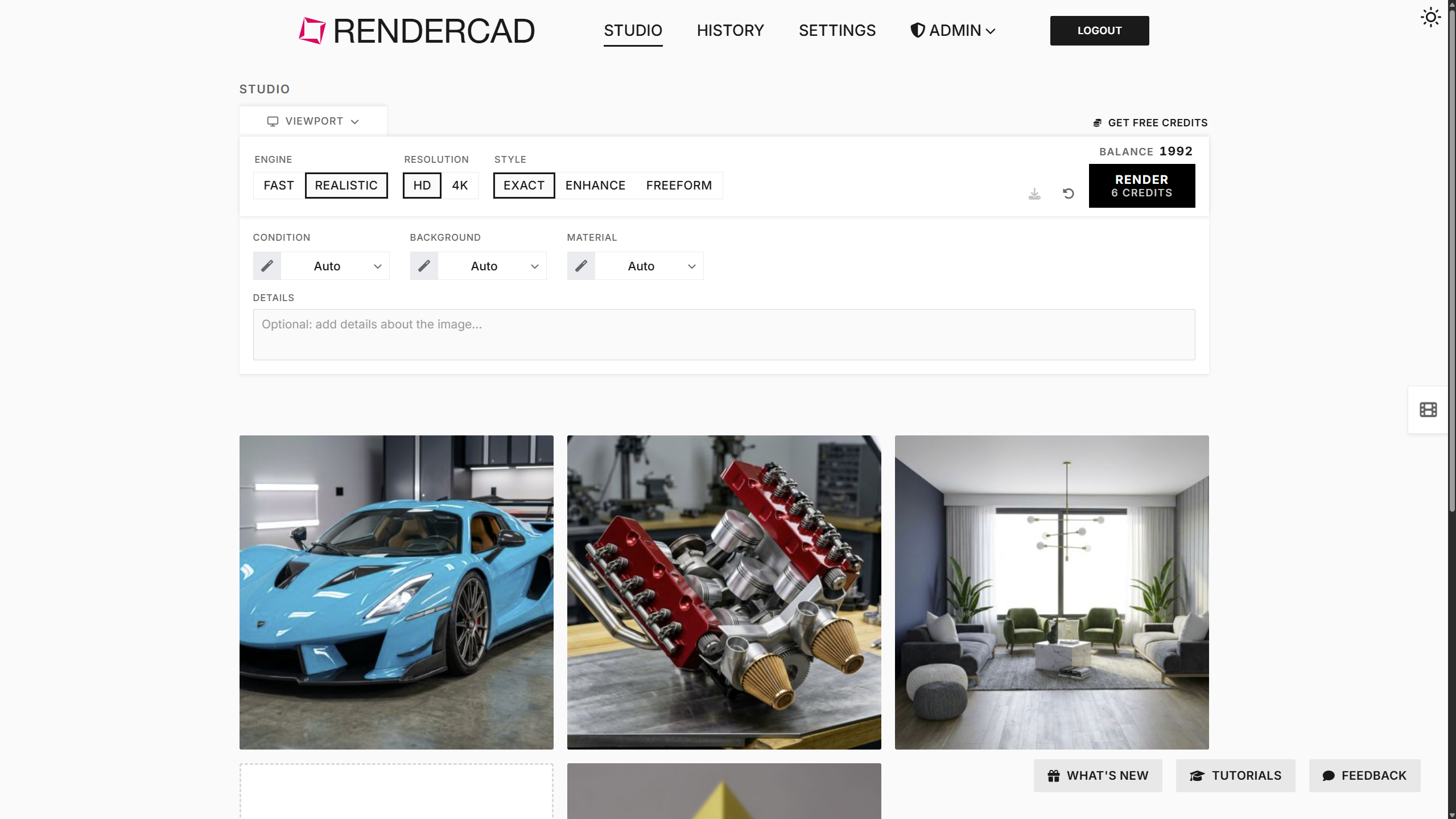
- Get photorealistic 4K renders from any CAD tool in 10–60 seconds by snipping your screen instead of uploading source files
- Maintain exact design intent across every render with a generative AI engine that respects your original geometry and details
- Render your entire e-commerce catalog simultaneously with bulk processing that queues thousands of images and lets you walk away
- Choose from 2600+ materials and 1300+ environments to match any product condition without manual lighting setup
- Add, change, or remove objects in any render with a simple brush stroke, no need to rebuild your model
- Keep your original CAD files secure by processing only image captures, never uploading source files
- Integrate AI rendering into your existing workflow with a dedicated API that connects to your systems and LLM agents
- Produce professional marketing videos in 1–5 minutes from the same screenshot, sketch, or photo you use for images
- Start rendering instantly with zero configuration across 800+ design tools including SolidWorks, Revit, and SketchUp
Pros & Cons
Pros
- Rapid product rendering
- Zero-configuration feature
- Compatible with 800+ tools
- Supports bulk processing simultaneously
- 2600+ materials selection
- 1300+ backgrounds selection
- Time-efficient
- Requires no file uploads
- Overlay Snipping Tool use
- Visual selection feature
- High-performance hardware independence
- Manipulate referenced objects easily
- Cloud-based
- Design data security
- API Integration option
- Handles CAD screenshots, photos, sketches
- No complex setups need
- Visual material selection
- Automatic lighting setups
- Allows custom material imports
- Materials matching feature
- Only image processed, no design files
- Visual background selection
- Supports 2D, 360 HDR, 3D scenes
- User-friendly interface
- Affordable subscription plans
- Optimized for e-commerce and marketing
- Material and background selection in single click
- 4K resolution support
- HD output
- Image processing ~10-60 seconds
- Video processing ~1-5 minutes
- No software installation required
- Detailed Specs provided
- Safe for IP security
- Users' testimonials available
- Mobile-friendly
- Functional with all CAD software
- Paid plans from $9/month
- No powerful hardware requirement
- Render videos feature
- Supports seamless looping for videos
- No file exports, plugins, GPU required
Cons
- Limited to screenshot processing
- Limited visual selection
- Does not generate 3D files
- Requires subscription for full benefits
- Privacy concerns with screenshot-only feature
- Requires internet connection
Reviews
Rate this tool
Loading reviews...
❓ Frequently Asked Questions
RENDERCAD
🛠️ 1 tool
wrote:RENDERCAD is a service powered by artificial intelligence and specialized in rapid product rendering. It transforms CAD screenshots, real-life photos, and hand drawings into photorealistic images and videos within a short timeframe, presenting an array of opportunities for professionals in architecture, engineering, and product design.
RENDERCAD
🛠️ 1 tool
wrote:RENDERCAD is capable of producing a photorealistic product render in approximately 10 to 60 seconds for images, and 1 to 5 minutes for videos.
RENDERCAD produces high-quality, photorealistic renderings. The output resolution can be either HD or 4K, making the visuals suitable for various professional uses.
RENDERCAD is compatible with over 800 design tools including prominent ones such as SolidWorks, Revit, SketchUp, Onshape, Blender, among others.
RENDERCAD is designed to be user-friendly with a zero-configuration feature. This allows users to start rendering immediately with no setup required, no prompts, and works with any CAD tool. It simplifies the rendering process by eliminating complex setups and configurations involved in traditional rendering.
For e-commerce sellers and marketing teams, RENDERCAD supports simultaneous bulk processing. This means a large number of images or products can be rendered at the same time, and they can essentially queue the entire catalog and walk away. This mass processing capacity vastly enhances efficiency and productivity.
RENDERCAD provides users with a selection of over 2600 materials and 1300 backgrounds. This vast array of options enables users to customize their renders according to specific requirements or preferences.
RENDERCAD's processing speed vastly outperforms traditional renderers. While conventional methods may take minutes to hours for an image, and hours to days for a video, RENDERCAD can render an image in approximately 10 to 60 seconds, and a video in 1 to 5 minutes.
RENDERCAD offers a nominal monthly subscription plan starting at $9/month. The subscriptions come in different tiers to accommodate different workload sizes.
RENDERCAD
🛠️ 1 tool
wrote:To generate renders, input images are transmitted to third-party AI compute providers. RENDERCAD does not use your input images or rendered outputs to train AI models or sell your content; provider retention and use are governed by their own terms and privacy policies.
The Overlay Snipping Tool used by RENDERCAD is a medium for capturing screenshots, real photos, or hand drawings, which are then processed by the AI. It does not require the upload of source CAD files.
Yes, RENDERCAD can create both images and videos. It is capable of transforming CAD screenshots, real photos, or hand drawings into photorealistic images and videos, expanding the range of visual presentations for design works.
Yes, RENDERCAD supports simultaneous bulk processing. This feature is particularly beneficial for e-commerce sellers and marketing teams wishing to process a large number of images or products simultaneously.
RENDERCAD differentiates from other CAD rendering tools by its ability to process design visuals from a wide array of sources including CAD platform, physical photo, or even a basic sketch within an exceptionally short timeframe. It's equipped with a zero-configuration feature, compatibility with over 800 design tools, and simultaneous bulk processing capabilities. Unlike traditional renderers, which require file uploads and complex setups, RENDERCAD simplifies the task with rapid AI rendering.
The RENDERCAD Overlay Snipping Tool functions by capturing screenshots, real photos, or hand drawings that are then processed into photorealistic images or videos. This tool does not necessitate the upload of source files, thus ensuring the security of your design data.
Yes, RENDERCAD can process basic sketches and physical photos along with CAD screenshots. Using the Overlay Snipping Tool, you can capture these images for processing into photorealistic visuals.
Yes, in RENDERCAD, users have the flexibility to choose from a vast library of over 2600 materials and 1300 backgrounds. This broad selection aids in achieving the desired aesthetics in the renderings.
The process of generating a render in RENDERCAD involves using the Overlay Snipping Tool to capture a CAD screenshot, real photo, or hand drawing. Users then choose their settings and cues the processing. The AI-powered service then rapidly generates a photorealistic image or video.
With RENDERCAD, users can expect high-quality, photorealistic renders. The output can be either HD or 4K resolution, offering clarity and detail in the resulting images and videos.
RENDERCAD is capable of rendering images and videos from any CAD platform. The service incorporates a wide array of over 800 design tools and works with any system that displays on your screen, broadening the horizons of design visual presentation.
RENDERCAD can generate photorealistic CAD renders in approximately 60 seconds.
RENDERCAD is compatible with over 800 design tools including SolidWorks, Revit, SketchUp, Onshape, Blender, and others.
The zero-configuration feature of RENDERCAD means the tool doesn't require a complicated setup or prompts. It is geared to provide professional services without any configuration hassles and works instantly upon use.
Yes, RENDERCAD handles bulk processing. This capability is particularly beneficial for e-commerce sellers and marketing teams who need to render large quantities of images.
RENDERCAD offers a range of over 2600 materials and 1300 backgrounds to choose from for rendering.
RENDERCAD offers several subscription plans with the starting price as low as $9 per month.
RENDERCAD ensures data security by using an Overlay Snipping Tool for processing. This means it only processes captured screenshots, real-life photos, or hand drawings and does not need users to upload the original source files, keeping the design data secure.
The Overlay Snipping Tool in RENDERCAD is used for security reasons, enabling the platform to render visuals without the source files having to leave the user's machine. Instead, it processes a screenshot, real photo, or hand drawing.
RENDERCAD operates on a cloud-based platform and does not require any specific high-performance hardware for installation. It works on any device with a web browser.
RENDERCAD exhibits versatility in product rendering through its ability to provide ultra photorealistic videos and images from any CAD system, real-life photo, or even a quick napkin sketch.
RENDERCAD deals with CAD tools integration in a very seamless and user-friendly manner. It supports over 800 design tools, and it solely requires users to provide a screenshot from their design tool of choice.
Yes, RENDERCAD is able to render real-life photos and sketches into photorealistic images or videos.
RENDERCAD's user-friendly interface is evident in its zero-configuration feature, visual selection of materials and backgrounds, the ease of adding, changing or removing referenced objects, and its feature to handle bulk processing.
RENDERCAD promises high-definition or even 4K resolution CAD renderings with a speed between 10-60 seconds for images and approximately 1-5 minutes for videos.
The role of generative AI in RENDERCAD is to keep the rendering engine up to date and finely tuned to make sure it strictly maintains the user's design intent.
RENDERCAD supports e-commerce image generation through its capability to handle bulk processing of images. This feature can be extremely beneficial for sellers who need to render product images in large quantities.
RENDERCAD comes with an API for users who seek to streamline their workflows by integrating the rendering tool into their existing systems.
RENDERCAD provides design data security by using an Overlay Snipping Tool that processes the captured screenshots, real photos, or hand drawings but doesn't require any file uploads, keeping the user's source files and design data secure.
RENDERCAD supports a streamlined workflow through its cloud-based platform, bulk processing feature, API integration, and its user-friendly interface with zero configuration requirements and a visual selection of materials and backgrounds.
Pricing
Pricing model
Paid
Paid options from
$9/month
Billing frequency
Monthly
Refund policy
No Refunds
Related Videos
RENDERCAD (Tutorial 1) Getting Started
RENDERCAD•35 views•Mar 20, 2026