Overview
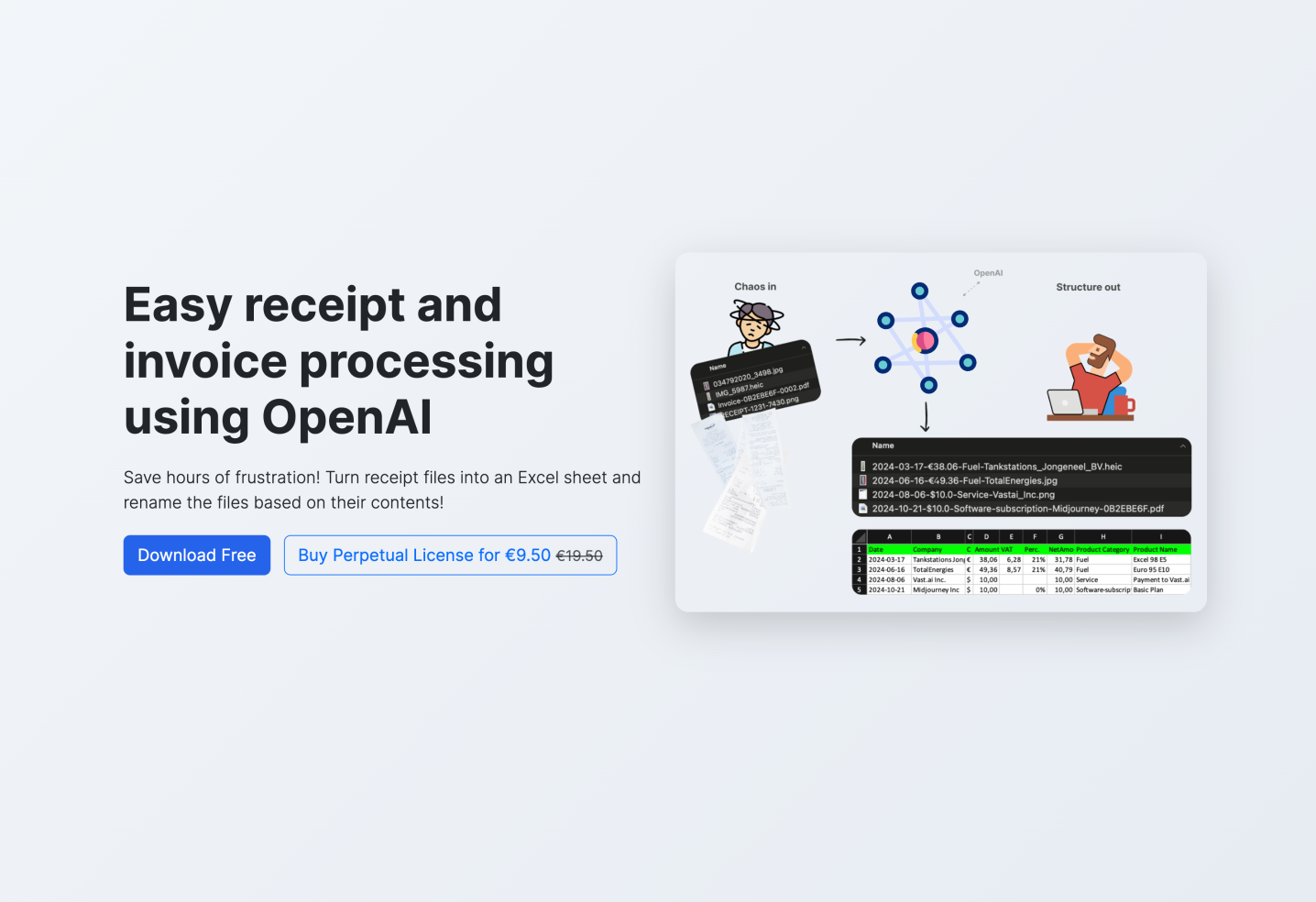
- Instantly find any receipt without searching through automated file renaming with date, amount, product type and company name
- Eliminate manual data entry with automatic Excel report generation containing all extracted receipt information
- Process entire folders of receipts at once through simultaneous batch processing of multiple files
- Maintain complete financial control with chronological organization that perfectly matches bank transactions and accounting records
- Only pay for what you process through pay-per-use pricing with no subscription fees required
- Keep sensitive financial data private with enhanced security that prevents OpenAI from using your images for model training
- Handle any receipt format effortlessly with support for JPG, PNG, HEIC and PDF files without conversion hassles
Pros & Cons
Pros
- Receipts to Excel conversion
- Automatic file renaming
- Supports JPEG, PNG, HEIC, PDF
- Supports multiple receipts processing
- Available for Windows and Mac
- Pay-per-use business model
- Automated image rotation
- Parallel receipt processing
- Enhanced data security measures
- Traces bank transactions
- Automates tedious data entry
- Time and effort efficiency
- Enhanced organization and cost control
- Automatic image conversion
- Files renamed for easy recognition
- Chronological sorting of files
- Detailed Excel report generation
- No additional subscription fees
- Tax preparation assistance
- Scalable for large volumes
- Transparency on cost after each run
- Efficient transfer by optimizing bandwidth
- User-friendly and intuitive interface
- Compliance with data security standards
- Automated file management
- Capabilities for tracking and analysis
- Encourages financial discipline
- Receipts downsized for efficient transfer
- Supports unlimited usage duration
- Reliable preparation for financial inquiries
- Convenient for audit purposes
- Enhances confidence and stress reduction
- Minimizes mental clutter
- Empowers user control over finances
- Optimized for quick receipt processing
- Prevents data misuse for model training
Cons
- Limited file types supported
- Pay-per-use model
- Slow processing at low-tier
- No built-in OCR capability
- Requires user's API key management
- No indicated offline operation
- Requires manual API key entry
- Limited scalability on lower tiers
Reviews
Rate this tool
Loading reviews...
❓ Frequently Asked Questions
ScanRelief is an AI-powered tool that utilizes OpenAI to simplify receipt management. It converts receipt files into Excel sheets and intelligently renames them with relevant information from the receipt. The renaming format starts with the date, followed by the amount, product type, and company name, offering chronological sorting of receipts and making them easily recognizable. By doing so, it provides a comprehensive overview, correlating receipts with bank transactions or accounting records.
ScanRelief supports various file formats, including JPEG, PNG, HEIC and PDF. This makes it versatile enough to handle diverse receipt images for effective conversion.
Yes, ScanRelief is designed to handle multiple receipts simultaneously. This feature significantly saves time and effort, making receipt management more efficient.
Yes, ScanRelief is available for both Mac and Windows users. This makes it a versatile tool that caters to a wide range of operating systems and user preferences.
No, ScanRelief does not operate on a subscription model. Instead, it operates on a pay-per-use model with OpenAI. Therefore, ScanRelief does not come with additional subscription fees, making it a cost-effective solution for receipt management.
In terms of data security, ScanRelief ensures that images and data sent to the OpenAI API are not used for model training. This approach significantly enhances user data protection and security.
The automated file renaming feature in ScanRelief works by scanning the receipt images and extracting key details such as date, amount, product type and company name. These details are then used to rename the files in a format that starts with the date (for chronological sorting), followed by the amount, product type and company name.
Yes, ScanRelief generates a regular Excel report with all receipt information. This feature eliminates manual sorting or exhaustive searches, providing users with an organized account report.
ScanRelief is cost-effective as it operates on a pay-per-use model with OpenAI, with no additional subscription fees. Users only pay for what they use, making it a reasonable and economical choice for managing receipts.
ScanRelief offers several benefits such as improved organization and cost control, enhanced performance with parallel receipt processing on the local computer and at OpenAI, automated image rotation and conversion for better convenience, efficient time and effort management by handling multiple receipts simultaneously, data security through OpenAI's data handling policies, and a comprehensive and easily traceable receipt report in Excel format.
ScanRelief ensures time and effort efficiency by allowing for simultaneous processing of multiple receipts. It also automates the task of renaming and sorting receipts, eliminating the need for manual processing.
ScanRelief ensures effective conversion by supporting various receipt image formats like JPEG, PNG, HEIC, and PDF. It uses OpenAI to scan and extract relevant information from these images, which is then used for renaming the file and for generating an Excel report.
ScanRelief extracts crucial information from the receipt like date, amount, product type, and the company name. This extracted information is used to rename the files intelligently and is also incorporated into the Excel report generated by ScanRelief.
Receipts are processed in parallel both on the user's local computer and at OpenAI. However, to ensure enhanced data security, images and data sent to OpenAI API are not used for model training.
ScanRelief uses the OpenAI API to analyze receipt images, extract key details, and rename the files. It also uses the API to process multiple receipts simultaneously on a pay-per-use basis.
In the pay-per-use model of ScanRelief, users are only charged for what they use with OpenAI. There are no additional subscription fees, making the tool cost-effective for receipt management.
ScanRelief helps with sorting receipts chronologically by renaming each file in a format that starts with the date, followed by the amount, product type and company name. This way, users get a perfect chronological overview of their receipts.
Yes, ScanRelief offers batch processing for receipts. With this feature, it can handle and process multiple receipts at once, saving users valuable time and effort.
Yes, chronological sorting is an automated feature in ScanRelief. All files are renamed in a format that starts with the date, thereby ensuring they sorted in chronological order.
ScanRelief helps to trace relationships with bank transactions or accounting records. This is achieved by intelligently renaming receipt files with key details, such as the date, amount, product type and company name, which are then matched with the respective bank or accounting records.
Pricing
Pricing model
Free Trial
Paid options from
$9.50
Billing frequency
One-time
Related Videos
Automate Receipts, Build Presentations in Minutes, and Detect AI Fakery
SmashGo•6 views•Nov 19, 2025