

Spiik
Know exactly who said what in every meeting or interview: speaker identification and word-level alignment with playback attribute each line of the transcript to the right person.
Listing not yet reviewed by our editors · How we check
Overview
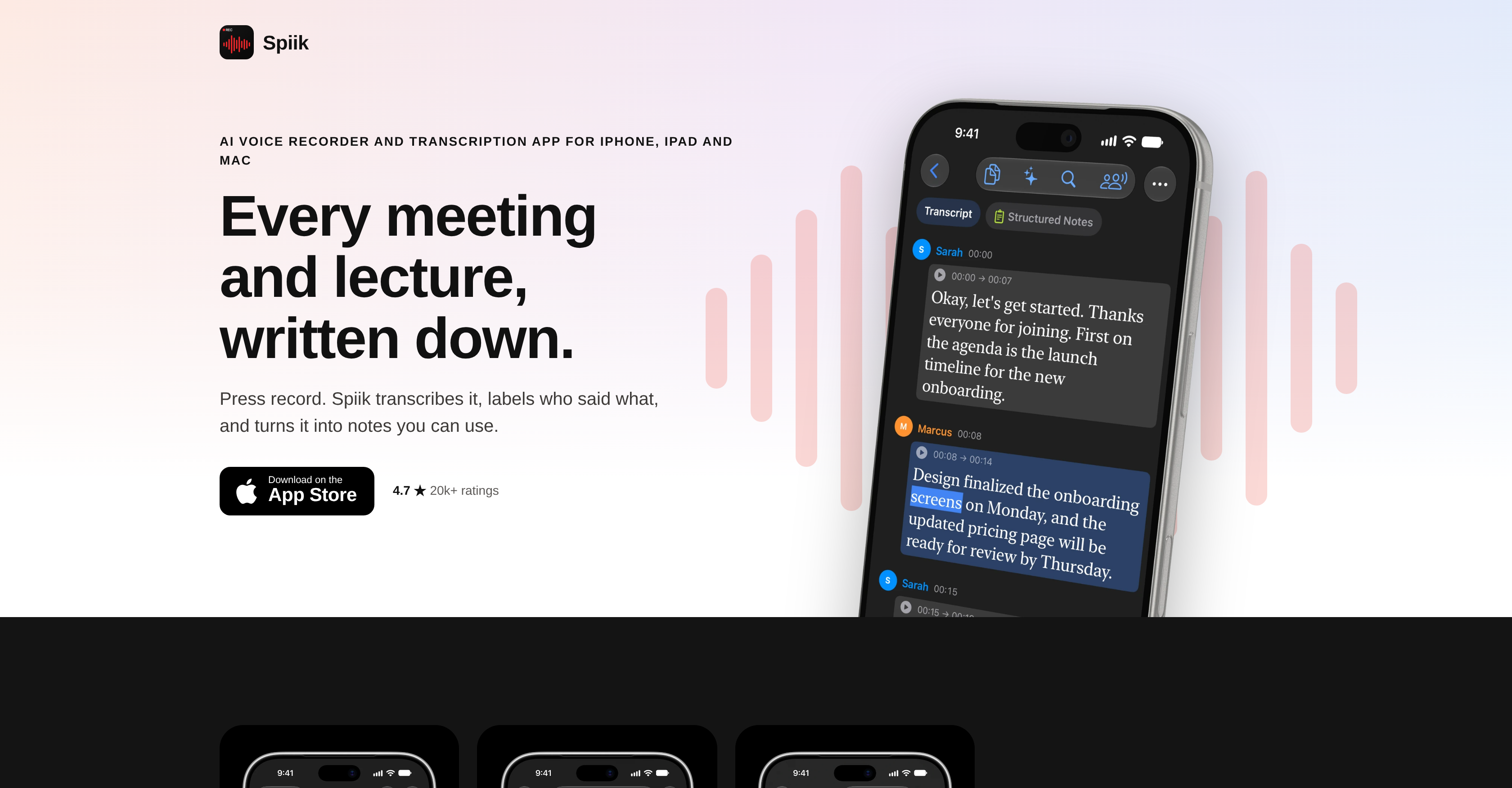
- Know exactly who said what in every meeting or interview: speaker identification and word-level alignment with playback attribute each line of the transcript to the right person.
- Jump straight to the moment that matters: tap any transcript line to replay that exact passage of audio instead of scrubbing through a long recording.
- Follow the conversation as it happens and still get a cleaner final record: live transcription shows speech while you record, then a higher-quality transcriber reprocesses the audio once recording ends.
- Confirm decisions, facts, and action items in seconds without replaying anything: AI chat answers your questions directly from the recording's transcript.
- Turn lectures into ready-to-use study materials: generate quizzes, flashcards, mind maps, and FAQs from recorded classes for exam prep and revision.
- Walk out of every meeting with a shareable recap: structured notes, summaries, bullet points, and highlights condense long discussions into meeting minutes, with tone and punctuation adjustment and paraphrasing for polished text.
- Capture conversations in the language they happen in: transcription and translation cover more than 100 languages for multilingual meetings, interviews, and lectures.
- Get value from recordings you already have: import audio and video from Files or Photos, YouTube links, PDFs, and recordings shared from Voice Memos or WhatsApp.
- Record full-length sessions without managing your phone: unlimited recording time, recording that continues while your iPhone is locked, and Live Activities on the Dynamic Island and Lock Screen with timer, pause, and stop controls.
- Find any past conversation fast: searchable recordings and folder organization turn your audio library into a searchable archive of spoken information.
- Pick up your notes on whichever device is in front of you: iCloud sync with Spiik Pro keeps recordings in step across iPhone, iPad, and Mac.
- Put transcripts to work outside the app: export as text, PDF, SRT, or VTT for documents and video subtitles, and share the original audio.
- Start recording at no cost: the app is free to download with unlimited recording, while Spiik Pro unlocks full transcripts and the AI note-taking tools.
Pros & Cons
From the listing; not yet checked by our editors.
Pros
- Live transcription during recording
- Higher-quality post-recording transcription
- Speaker identification in transcripts
- Words aligned with playback
- Tap transcript lines to replay
- Search recordings and transcripts
- Organize recordings with folders
- Ask questions about transcripts
- Check decisions without replaying
- Generate structured notes
- Create recording summaries
- Generate quizzes from recordings
- Create lecture flashcards
- Generate mind maps
- Create bullet points and highlights
- Generate FAQs and paraphrases
- Adjust text tone and punctuation
- Transcribe and translate 100+ languages
- Import audio and video files
- Import from Files or Photos
- Import YouTube links
- Import PDFs
- Receive Voice Memos recordings
- Receive WhatsApp recordings
- Recordings sync across Apple devices
- Live recording status on Lock Screen
- Dynamic Island recording controls
- Pause or stop from Lock Screen
- Recording without a time limit
- Export transcripts as text
- Export transcripts as PDF
- Export transcripts as SRT
- Export transcripts as VTT
- Share recorded audio
Cons
- Full transcripts require Spiik Pro
- iCloud sync requires Spiik Pro
- Live transcripts are reprocessed afterward
- Chat answers use the transcript
Alternatives to Spiik
Tools that share the most tags with Spiik.
- Soundwise.ai
Get instant transcriptions without signing up or paying, enabled by a completely free and unlimited-use web tool
Freemium · from $10/month
$10/month
Not yet checked
- AssemblyAI
Achieve up to 23% more accurate call transcription with AI models trained on 12.5M hours of multilingual audio data
Freemium
Not listed
Not yet checked
- Apptek
Convert audio to precise text transcripts across dozens of languages and dialects using neural network speech recognition
Not listed
Not listed
Not yet checked
- Zeemo
Create accurate video captions instantly with AI-powered generation that achieves over 98% accuracy
Free trial
Not listed
Not yet checked
- Voicetype AI
Write emails and documents entirely hands-free using advanced voice dictation that captures your natural speaking style
Free trial · from $13.59/month
$13.59/month
Not yet checked
- Speechy
Instantly create organized to-do lists and action items by speaking instead of typing, eliminating manual note-taking during meetings and brainstorming sessions
Freemium · from $9/month
$9/month
Not yet checked
Reviews
Rate this tool
Loading reviews...
Frequently asked questions
How accurate is Spiik’s transcription for meetings with multiple speakers?
Spiik identifies speakers, and user reviews describe its transcriptions as accurate, but no specific accuracy rate for meetings with multiple speakers is given.
Can Spiik identify speakers and show when each word was said?
Yes. Spiik identifies speakers and aligns words with playback, so you can see who said what and when.
Does Spiik display a live transcript while I’m recording?
Yes. Spiik displays live transcription while you record.
How does Spiik improve the transcript after a recording ends?
After recording, Spiik processes the audio again with a higher-quality transcriber.
Can I tap a line in a Spiik transcript to replay that part of the audio?
Yes. Tap a transcript line to replay the corresponding audio.
Can Spiik search across recordings and organize them into folders?
Yes. You can search recordings and organize them into folders.
Can Spiik answer questions about a recording without replaying it?
Yes. Spiik’s AI chat answers questions using the recording’s transcript, so you can check details without replaying the whole recording.
What kinds of notes and study materials can Spiik generate?
Spiik can generate structured notes, summaries, quizzes, flashcards, mind maps, bullet points, highlights, FAQs, and paraphrases. It can also adjust punctuation and tone.