

TAMI Studio by UI-licious
Overview
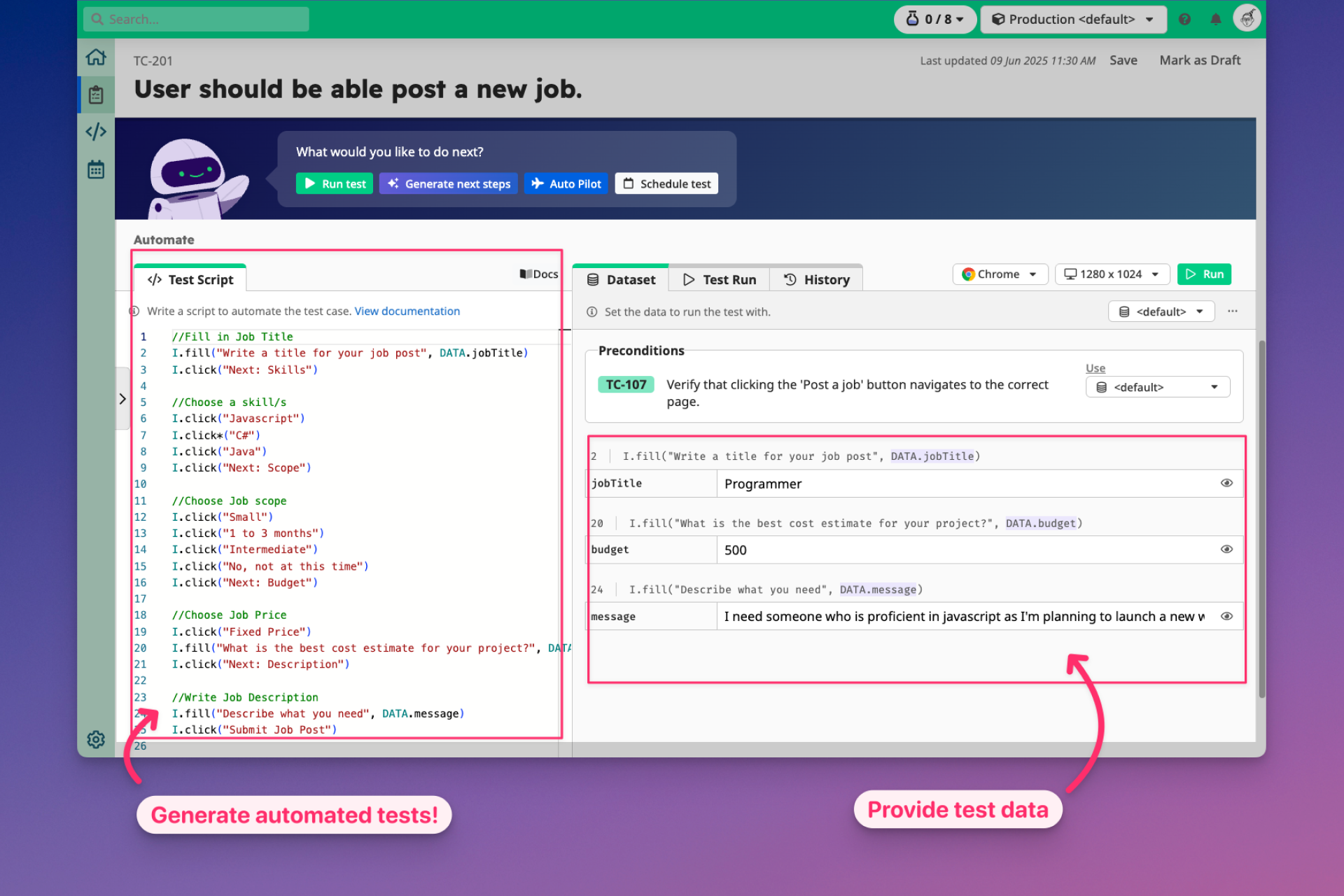
- Generate complete UI test scripts from screenshots and recordings with the Vision AI assistant, eliminating manual test authoring
- Fix broken tests automatically by analyzing failure logs and screenshots to suggest corrections for broken flows and element selectors
- Create detailed bug reports with annotated screenshots and step-by-step breakdowns to accelerate developer investigation and resolution
- Execute tests in parallel across all major browsers using the cloud testing grid for maximum test coverage and speed
- Collaborate on test cases and results in real-time with a fully cloud-based workspace that requires no installation
Pros & Cons
Pros
- Vision AI turns screenshots/recordings into structured test cases
- Low-code test framework reduces coding effort
- Parallel execution across multiple browsers
- AI-powered bug diagnosis and fix suggestions
- Cloud-based, no installation needed
- Centralized test case management with galleries and trackers
- Detailed bug report generation with logs and screenshots
- Integration with scheduling and notifications for team visibility
- Self-managed installation available for private networks
- Seamless collaboration with cloud-stored artifacts
Cons
- Requires public access for cloud-based tests (unless self-managed)
- Learning curve for teams new to low-code automation
- Self-managed option may need extra setup effort
- Dependent on accuracy of Vision AI interpretations
- Limited advanced features compared to full custom-coded frameworks
Reviews
Rate this tool
Loading reviews...
❓ Frequently Asked Questions
TAMI Studio is the next-generation automation platform, combining test case management with a more advanced Vision AI assistant. Web IDE remains available for existing users, but TAMI Studio is recommended for new teams.
No installation is required. TAMI Studio is fully cloud-based, with test cases, scripts, and artifacts stored online for seamless team collaboration.
Yes, but with limitations. For cloud testing, apps must be publicly accessible (via URL or IP). Tools like ngrok can provide temporary secure tunnels. For stricter setups, Uilicious offers a Self-Managed installation.
TAMI analyzes logs and screenshots from failed tests and suggests fixes for broken flows or element selectors, reducing manual troubleshooting.
Bug reports generated by TAMI include detailed logs, annotated screenshots, and step-by-step breakdowns for faster developer investigation.
TAMI Studio runs on the UI-licious Cloud Testing Grid, which supports all major browsers in parallel for maximum coverage.
Yes. TAMI Studio is cloud-native, enabling distributed teams to document, execute, and monitor tests together in real time.
Pricing
Pricing model
Freemium
Paid options from
$12/month
Billing frequency
Monthly