

UniScribe
Transform any audio or video recording into accurate text documents in under a minute using advanced AI transcription
Listing not yet reviewed by our editors · How we check
Overview
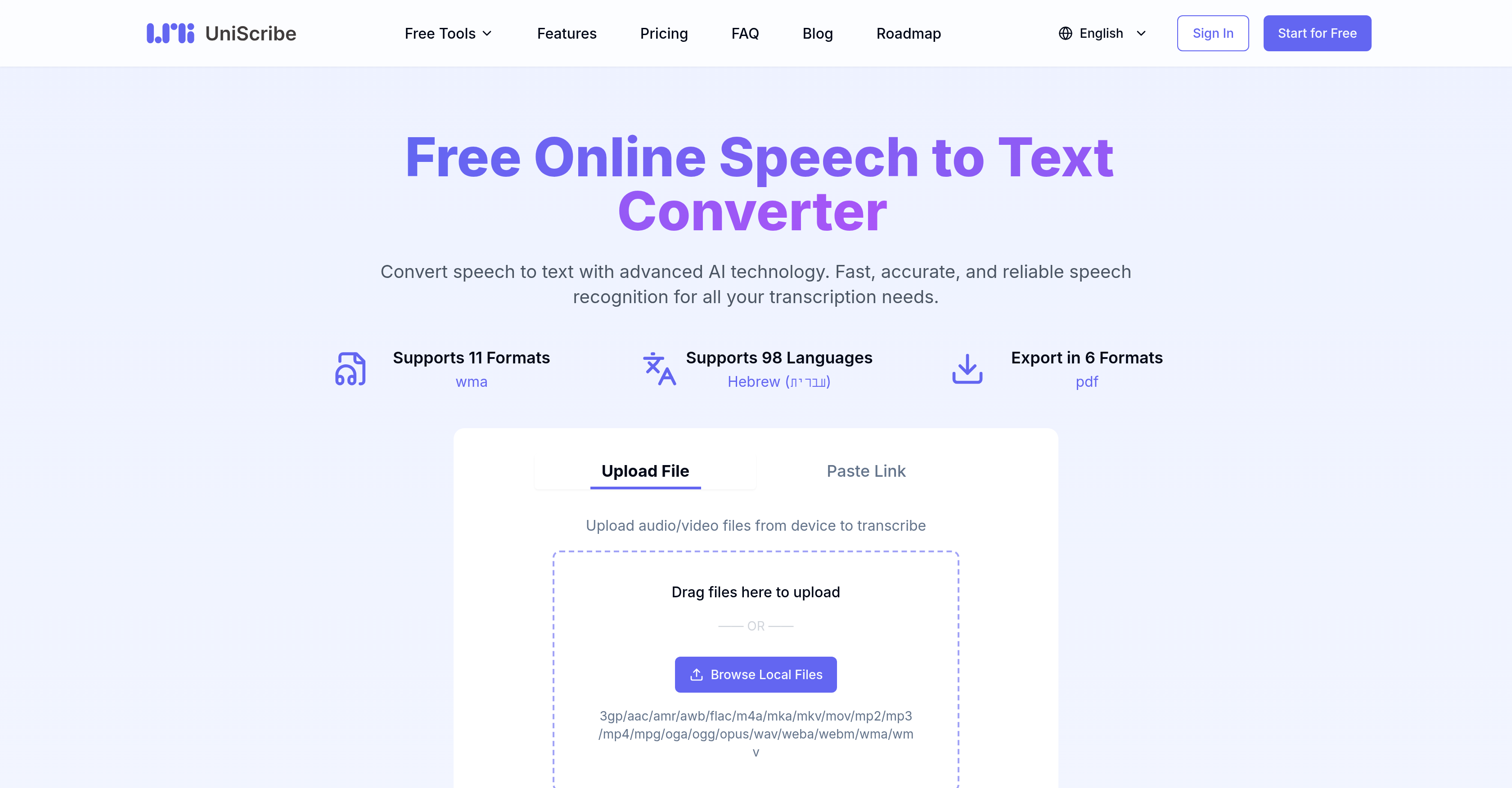
- Transform any audio or video recording into accurate text documents in under a minute using advanced AI transcription
- Extract key insights and automatic summaries from lengthy recordings to immediately grasp the most critical content
- Generate visual mind maps from your audio content to understand complex topics and relationships at a glance
- Transcribe content in 98 languages for global projects, interviews, and research without language barriers
- Export your transcripts in the exact format you need including PDF for documents, SRT for subtitles, and DOCX for editing
- Identify different speakers automatically in multi-person recordings for interviews, meetings, and panel discussions
- Process YouTube videos instantly by pasting the link without downloading files or complicated software
- Maintain complete data confidentiality with secure file processing that protects your sensitive recordings
- Integrate transcription into your own applications through API access for automated workflow solutions
- Handle high-volume transcription needs with ultra-fast processing speeds and no daily file limits
Pros & Cons
From the listing; not yet checked by our editors.
Pros
- Supports 98 languages
- Supports various file formats
- Swift and accurate transcription
- Youtube video transcription
- Transcripts export in multiple formats
- Automatic generation of short summaries
- Automatic generation of visual mind maps
- Automatic extraction of key insights
- Assured data security
- Offers confidentiality
- Option for direct file upload
- Can paste links for transcription
- Speaker identification feature
- API access
- Supports professional, academic and personal use
- Offers trial packages
- Offers volume-based packages
- Offers team packages
- Continuously updates with new features
Cons
- Not open source
- Limited free option
- Possibility of additional costs
- Possibly slow on large files
- Data retention only 30 days
- Limited file limit per day
- Dependent on internet connection
- Limited platform compatibility
- No offline capabilities
- Requires account for use
Alternatives to UniScribe
Tools that share the most tags with UniScribe.
- Soundwise.ai
Get instant transcriptions without signing up or paying, enabled by a completely free and unlimited-use web tool
Freemium · from $10/month
$10/month
Not yet checked
- AssemblyAI
Achieve up to 23% more accurate call transcription with AI models trained on 12.5M hours of multilingual audio data
Freemium
Not listed
Not yet checked
- Apptek
Convert audio to precise text transcripts across dozens of languages and dialects using neural network speech recognition
Not listed
Not listed
Not yet checked
- Zeemo
Create accurate video captions instantly with AI-powered generation that achieves over 98% accuracy
Free trial
Not listed
Not yet checked
- Voicetype AI
Write emails and documents entirely hands-free using advanced voice dictation that captures your natural speaking style
Free trial · from $13.59/month
$13.59/month
Not yet checked
- Speechy
Instantly create organized to-do lists and action items by speaking instead of typing, eliminating manual note-taking during meetings and brainstorming sessions
Freemium · from $9/month
$9/month
Not yet checked
Related Videos
Get Fast, Accurate Transcriptions in Minutes with UniScribe
AppSumo · Jun 2, 2025
Transcribe Audio & Video in Seconds with Uniscribe | Uniscribe AI Transcription Lifetime Deals
Best AI Lifetime Deals · Jun 17, 2025
UniScribe - Get information from audio&video 10x faster than usual
UniScribe · Nov 15, 2024
Uniscribe Review: AI-Powered Transcription & Subtitle Tool | AppSumo Deal
SaaS Briefing · Jul 26, 2025
UniScribe Lifetime Deal – Transform Audio & Video into Text Effortlessly in 2025
The SaaS Deals · Jun 3, 2025
Reviews
Rate this tool
Loading reviews...
Frequently asked questions
What is UniScribe?
UniScribe is an advanced online speech to text transcription tool that leverages AI technology to accurately transcribe audio and video content into text. This tool is highly beneficial in quickly transforming recordings into written documents for various professional, academic, and personal purposes.
How does UniScribe transcribe speech from audio and video files?
UniScribe transcribes speech from audio and video files using its proprietary AI technology. It converts spoken words into written text swiftly and accurately. It allows users to upload files directly or paste a link, thereby enabling an easy transcription process.
What formats can I export my UniScribe transcriptions in?
UniScribe allows users to export the transcribed text in various formats such as text files, PDF, docx, srt, csv, and vtt, accommodating different needs.
What languages does UniScribe support?
UniScribe supports transcription in almost 98 languages, making it a versatile tool for a global audience.
How does UniScribe secure my data?
UniScribe secures users' data by assuring confidentiality and depicting a commitment to data security. It ensures the content uploaded for transcription remains private and safe.
What are the key features of UniScribe?
Key features of UniScribe include advanced AI-driven transcription, multilanguage support, video and audio to text conversion, automatic summarization, key insights generation, visual mind maps, secure file conversion, and support for a multitude of file formats. It also offers functionality like speaker identification and API access.
How can I upload files to UniScribe for transcription?
Files can be uploaded to UniScribe by either selecting local files from the user's device or by pasting a relevant link, such as from a YouTube video.
Can I use UniScribe for YouTube video transcriptions?
Yes, you can use UniScribe for YouTube video transcriptions. The tool simplifies the process by allowing users to directly paste the link of the YouTube video for transcription.