
Vexa
Rejoin any conversation instantly after a distraction, with live meeting transcription and visual cues that let you catch up by reading instead of asking.
Listing not yet reviewed by our editors · How we check
Overview
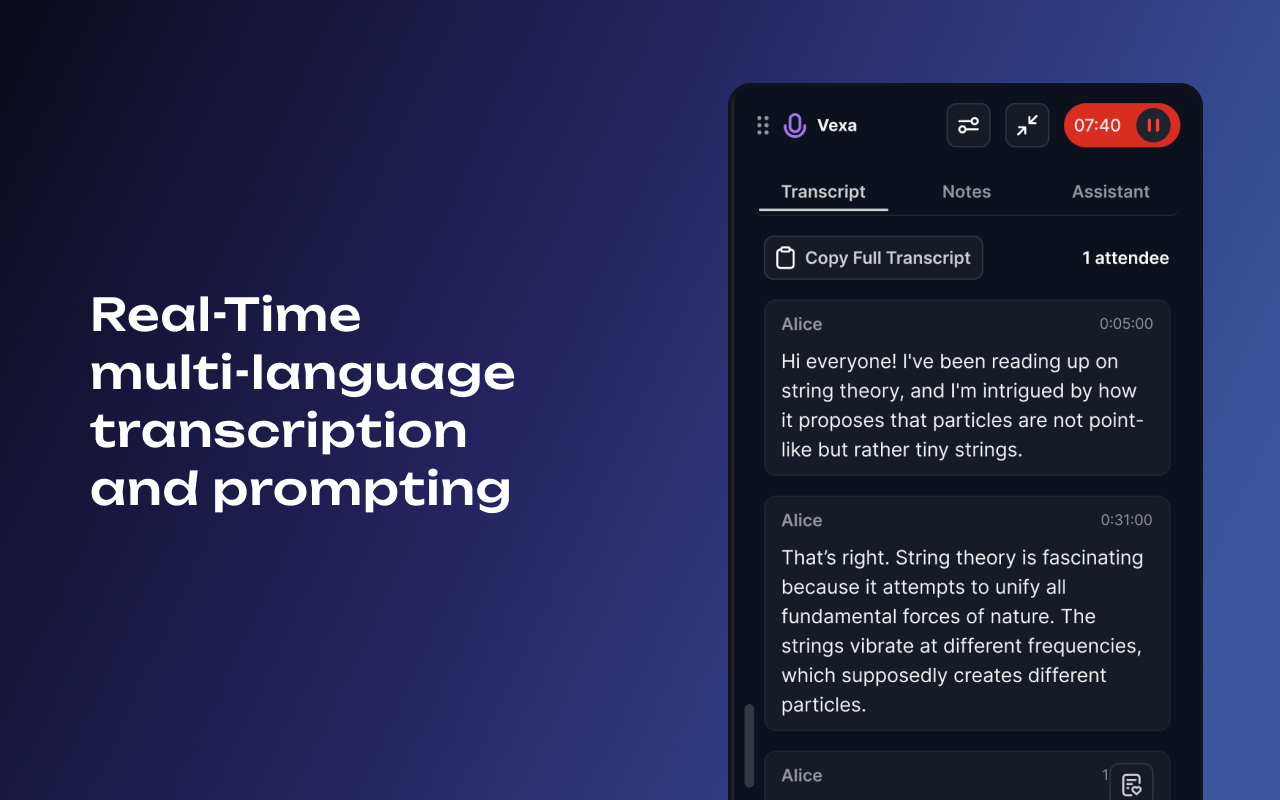
- Rejoin any conversation instantly after a distraction, with live meeting transcription and visual cues that let you catch up by reading instead of asking.
- Never miss a due date again, because time-sensitive information and deadlines are automatically highlighted in your transcripts and notes.
- Leave every meeting knowing exactly who owns what, as agreements, responsibilities, and deadlines are captured and turned into prioritized task lists.
- Speak up confidently in technical or unfamiliar discussions, with industry-specific jargon and terminology decoded in real time.
- Hold onto ideas without interrupting the speaker, using thought capture to note questions and feedback discreetly and raise them at the right moment.
- Settle every follow-up dispute, with voice recognition that attributes each contribution to the right speaker in the live transcript.
- Skip manual post-meeting admin, as key details from discussions become tasks directly in your CRM.
- Follow multilingual meetings with ease, using built-in translation for sentences and phrases spoken in languages you don't understand.
- Find past decisions and fact-check claims mid-call, with quick keyword searches across a growing meeting knowledge base.
- Keep the discussion going after the call ends, with a chat extension for asking questions and clarifying points outside live meetings.
- Run sensitive meetings without audio exposure, since Vexa stores only text transcripts, protected by end-to-end encryption, continuous monitoring, and regular third-party penetration testing.
- Start capturing Google Meet and Zoom calls in seconds through a Chrome extension, then scale to a central knowledge base and shared task management across your entire company.
- Stay focused through long meetings even with ADHD, through an environment built around highlighted key details and clear task prioritization.
Pros & Cons
From the listing; not yet checked by our editors.
Pros
- Real-time transcription
- Automatic highlighting of time-sensitive info
- Decodes industry-specific terms
- ADHD-friendly features
- Enhances focus and productivity
- Chat extension for offline meetings
- Voice recognition support
- Real-time query responses
- Data privacy and protection
- End-to-end encryption
- Regular penetration testing
- No recording, only transcription
- Summaries creation
- Tasks management in CRM
- Knowledge base builder
- Provides translation services
- Quick data searches
- Supports Google Meet and Zoom
- Integration into teams or companies
- Real-time meeting insights
- Improves project execution
- Captures agreements, deadlines, responsibilities
- Prioritized task lists
- Thought capture feature
- Robust monitoring
Cons
- Limited to Google Meet and Zoom
- Relies on Chrome extension
- Does not store recorded audio
- Not entirely free
- Requires continuous internet connection
- Limited access on free plan
- No offline functionality
- Lack of multi-language support
- Requires third-party CRM integration
- No inbuilt task management
Alternatives to Vexa
Tools that share the most tags with Vexa.
- ShadowDo
Eliminate manual note-taking with automatic transcripts and timestamped summaries generated from your conversations
Freemium · from $8/month
$8/month
Not yet checked
- Otter.ai
Never take meeting notes again with OtterPilot that auto-joins Zoom, Teams and Google Meet to capture everything automatically
Freemium · from $8.33/month
$8.33/month
Not yet checked
- MeetPulp
Eliminate manual note-taking with automated meeting transcriptions that capture every word accurately
Freemium · from $10.99/month
$10.99/month
Not yet checked
- Bubbles Notetaker
Never miss a meeting detail with automatic transcription and AI-generated summaries that highlight key decisions and action items
Freemium · from $12/month
$12/month
Not yet checked
- Avoma
Focus completely on conversations while AI generates detailed notes with speaker identification and topic detection
Freemium · from $19/month
$19/month
Not yet checked
- Agenda Hero
Transform any text description into perfectly formatted calendar events without manual entry using natural language processing
Free
Not listed
Not yet checked
Reviews
Rate this tool
Loading reviews...
Frequently asked questions
What is Vexa?
Vexa is a real-time AI Meeting Assistant, designed to facilitate the running of business meetings. It utilizes features such as live transcription, automatic highlighting of time-sensitive information, and prioritized task lists. Vexa provides a user-friendly environment for those with ADHD, assists in industry-language decoding, and ensures privacy with robust data protection features.
How does Vexa use GPT-4 assistant?
Vexa utilizes the GPT-4 assistant, which is a state-of-the-art AI model, to capture every detail of business meetings. This enables users to seamlessly rejoin conversations if they get distracted. The GPT-4 assistant records agreements, deadlines, and responsibilities for smooth project execution.
How does Vexa help in decoding industry-specific language?
Vexa assists in decoding industry-specific language by clarifying lingos and terminologies in real-time. This feature enhances users' confidence by enabling them to contribute seamlessly to any discussion, regardless of their prior knowledge of the used terminologies.
How does Vexa's live transcription work?
Vexa's live transcription feature works in real-time during meetings, converting speech into text. This feature includes visual cues for better reading comprehension. It aids in capturing crucial details during conversations and allows users to follow along visually even when they may find it challenging to process auditory information in real time.
What does Vexa's 'thought capture' feature do?
Vexa's 'thought capture' feature is a tool that manages interruptions by allowing users to record their thoughts discreetly during meetings. This feature helps users to contribute their ideas, questions or feedback at the appropriate time, thereby maintaining the flow of the meeting.
What does it mean when Vexa offers an ADHD-friendly environment?
An ADHD-friendly environment offered by Vexa means the platform provides features that improve focus and productivity for users with Attention Deficit Hyperactivity Disorder. It tackles issues typically faced by individuals with ADHD such as difficulty with time management and task prioritization, by identifying and highlighting key details during a discussion.
How does Vexa handle voice recognition?
Vexa's voice recognition feature aids in identifying users by their voice and transcribing their contributions in real-time during meetings. It helps in keeping track of who said what during the discussion and makes it easier to follow up on points raised.
What does Vexa's chat extension for offline meetings do?
The chat extension provided by Vexa for offline meetings allows users to engage in discussions and ask questions even when they are not in a live meeting. It facilitates continuous communication, making it easier to clarify points, make contributions, or follow up on tasks after the meeting.