

Vizbase
Produce photorealistic architectural renders on any machine, because Vizbase runs in the browser with no GPU, render engine or render-settings setup required.
Listing not yet reviewed by our editors · How we check
Overview
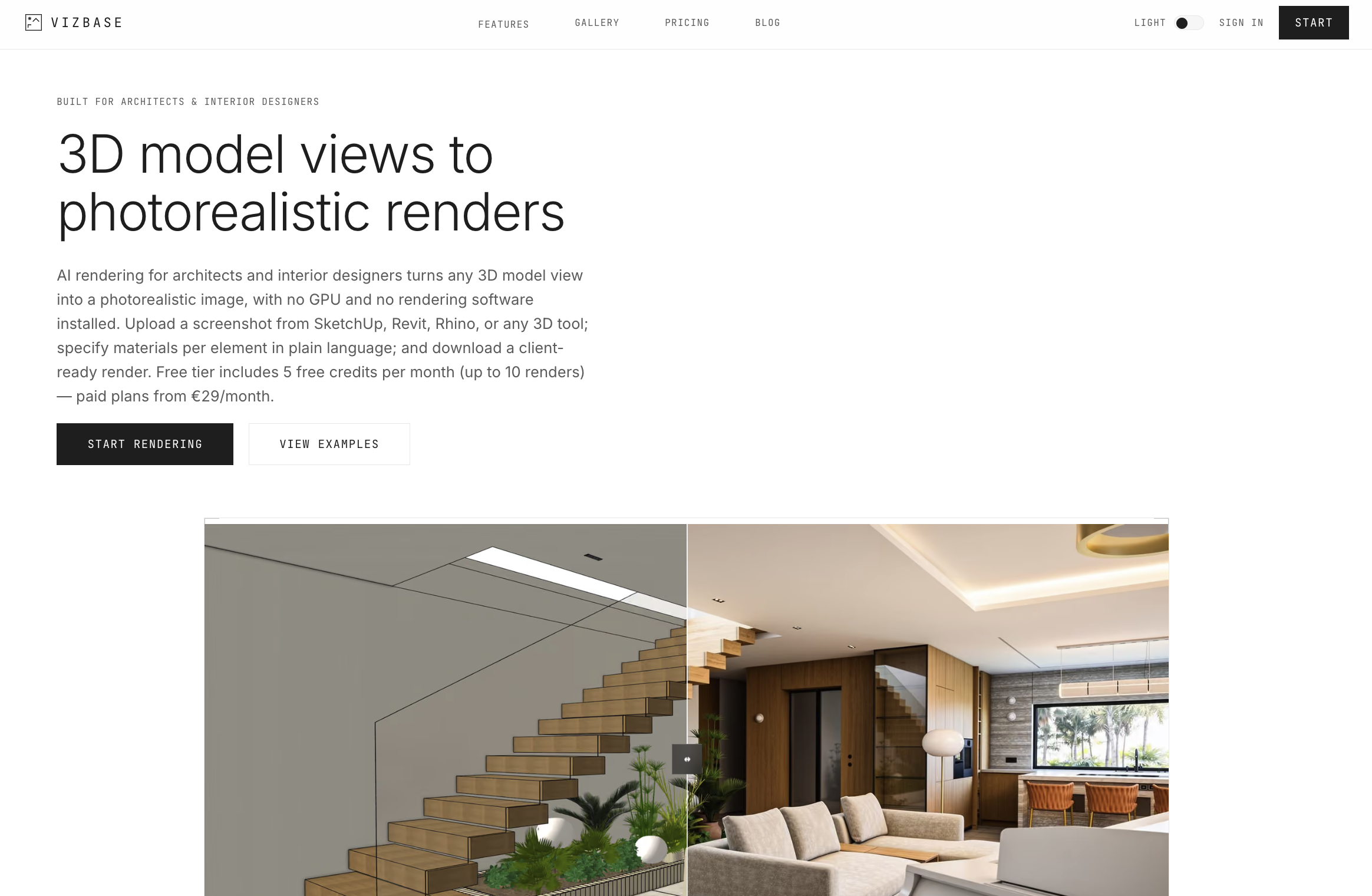
- Produce photorealistic architectural renders on any machine, because Vizbase runs in the browser with no GPU, render engine or render-settings setup required.
- Get the exact finishes you specified, because AI object detection identifies walls, floors, joinery, furniture and fixtures so you assign materials element by element in plain language, from a reference photo or from a library of more than 2,000 materials.
- Match the render's realism to the job, from Gen 2.0 for renders that stay closest to your source view to Gen 4.0 for photographic light and materials.
- Fix a single detail without re-rendering the whole scene, because Refine lets you mark an area of a finished render and describe the change.
- Deliver a consistent interior design visualization set, because Multiview carries an approved look across several camera angles of the same space.
- Render from your existing workflow, using views from SketchUp, Revit, Rhino or Blender, hand sketches as PNG, JPG or WebP files, or the native SketchUp plugin that renders straight from the model on Windows and macOS (SketchUp 2021 and newer).
- Use renders for large-format presentations and print, with exports up to 8K (7,680 pixels on the longest edge).
- Use every render in client and marketing work, because you own your renders with full commercial rights.
- Test the full rendering workflow on a live project at no cost, because the free plan includes 5 credits for up to 10 renders with no credit card, and paid plans scale for freelancers, small studios and larger design firms.
Pros & Cons
From the listing; not yet checked by our editors.
Pros
- Designed for architects
- Designed for interior designers
- Turns 3D models into renders
- Upload from SketchUp, Revit, Rhino, Blender
- Choose textures
- No GPU needed
- No additional software needed
- Object selection
- Inpainting functionality
- Material specification in simple language
- High resolution
- Free for commercial use
- Scalable pricing model
- Free service tier
- No render setup
- Smart auto-masking
- 4K, 6K, 8K exports
- Custom textures
- SketchUp plugin included
- PNG, JPG, WebP accepted
- Handle architecture and interior design
- Supports team collaboration
- Dedicated support for design firms
- Export up to 7,680px
- Supports freelancers, small studios, large firms
- Simple input formats
- Smart inpainting
- Can work with most 3D tools
- Range of pricing options
- Multiple render modes
- Textures are customizable
- Supports various use cases
- Mark area for changes
- Quick transformation process
- Objects specific modification
- Specify textures per element
- Client-ready renders
- Photorealistic rendering capabilities
- Use of plain language for materials
- Adjustable render modes
- Supports team seats
- Various subscription plans
- Easy to start rendering
- Transparent pricing
Cons
- Works from 2D views or sketches, not 3D model files
- SketchUp plugin needs a paid plan
- Limited free-tier credits
- Some renders need a Refine pass
- No manual light or camera settings
- Auto-masking can miss elements
- Credits-based pricing
Alternatives to Vizbase
Tools that share the most tags with Vizbase.
- Redraw
Generate photorealistic renders from simple sketches in seconds using the render-from-strokes feature
Paid · from $12.50/month
$12.50/month
Not yet checked
- Rendair
Eliminate quote calls and forms by getting instant pricing automatically generated from your uploaded floor plans
Paid · from $15/month
$15/month
Not yet checked
- ARCHITEChTURES
Reduce early-stage residential design time from months to mere hours with real-time generative AI that adapts to your geometry and design criteria
Freemium · from $43/month
$43/month
Not yet checked
- Augmenta
Complete building designs in hours instead of weeks through fully automated generative AI that produces code-compliant, constructible plans
Not listed
Not listed
Not yet checked
- Eler
Get client-ready photorealistic images in seconds instead of hours, using AI to instantly process your 3D SketchUp or GLB files
Freemium · from $8/unit
$8/unit
Not yet checked
- Maquete AI
Deliver client-ready, DSLR-quality interior renders in under 30 seconds by uploading your SketchUp or ArchiCAD prints and selecting a lighting preset
Free trial · from $8/month
$8/month
Not yet checked
Reviews
Rate this tool
Loading reviews...
Frequently asked questions
What is VizBase?
VizBase is an AI-powered rendering tool designed specifically for architects and interior designers, enabling them to transform 3D model views into photorealistic images without the need for a GPU or additional rendering software.
How does VizBase transform a 3D model view into a photorealistic image?
VizBase uses advanced AI algorithms to transform 3D model views into photorealistic images. Users upload a screenshot of their 3D models, specify materials for each element, and then generate a client-ready render.
Is GPU required to use VizBase?
No, a GPU isn't required to use VizBase. The platform's functionality doesn't require a GPU or any additional rendering software which makes it accessible for various machines and users.
Can VizBase work with 3D models from SketchUp, Revit, or Rhino?
Yes, VizBase is compatible with 3D models from SketchUp, Revit, and Rhino. After creating these models, users can upload a screenshot of them to VizBase.
How do users specify materials for each element in VizBase?
Within VizBase, users can specifically determine the materials for each element. This allowing them to ensure that every part of their design matches their vision and specifications. The elements can be described and specified in simple language.
What is the object selection feature in VizBase?
The object selection feature in VizBase allows users to select specific objects or areas within their 3D model for transformation, giving them the freedom to select elements to modify in their design.
How can I choose textures for the render in VizBase?
To choose textures for the render in VizBase, users proceed through the application's process where they can specify exact textures or interior elements for the render. This can be completed during the 'Choose Textures' stage.
Does VizBase require any setup for render settings?
No, VizBase does not require any setup for render settings. Its system is designed to function without additional configuration, making it user-friendly and efficient.