

ZoomMap
Keep the big picture in view while digging into details: expand or collapse your knowledge map layer by layer and move between overview and evidence without breaking the structure.
Listing not yet reviewed by our editors · How we check
Overview
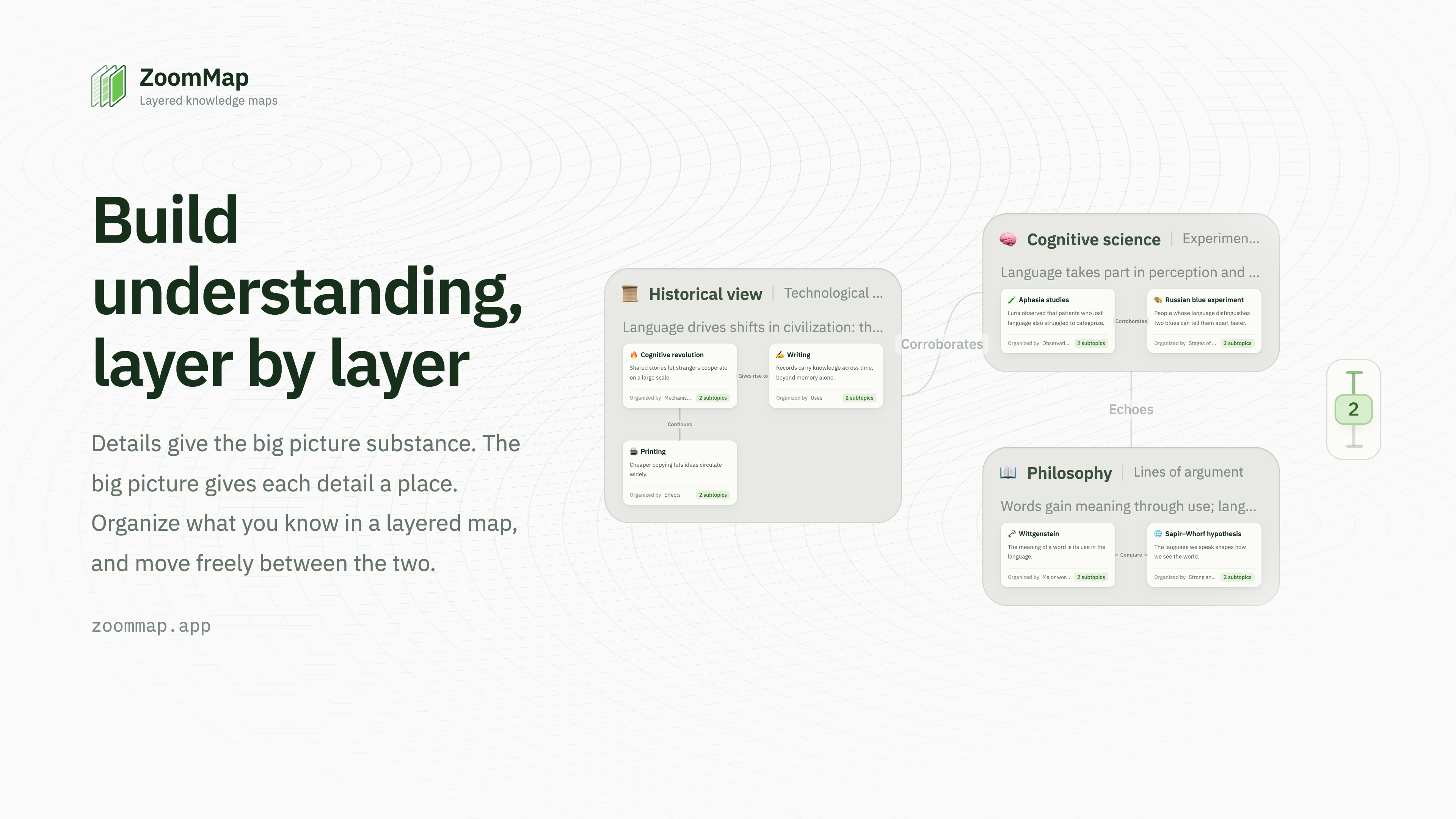
- Keep the big picture in view while digging into details: expand or collapse your knowledge map layer by layer and move between overview and evidence without breaking the structure.
- See exactly how ideas connect instead of reading a flat list of notes: place cards on an open canvas and link them to map the relationships between concepts.
- State each idea once and back it fully: every card holds a single conclusion, with its explanation, examples and evidence nested in the layer below.
- Verify any claim against its original source in seconds: cite imported PDFs, EPUBs, notes and web pages directly on your cards for a traceable, well-referenced knowledge base.
- Find the weak spots in your reasoning before you commit to it: the Agent asks questions, flags gaps and pulls relevant passages from your sources.
- Go from decision to finished map without manual busywork: once you settle on a conclusion, the Agent creates the cards, writes them and attaches the citations while the thinking stays yours.
- Pick up a research project weeks later exactly where you left off: the layered structure preserves your original line of reasoning for literature reviews, scientific research and philosophical analysis.
Pros & Cons
From the listing; not yet checked by our editors.
Pros
- Layered knowledge maps
- Big picture visualization
- Detail view
- Source linking
- Enhances readability and comprehension
- Applications in multiple disciplines
- Idea preservation in text
- Single-layer issue solving
- Easily navigable structure
- Flexible organization
- Unique mapping style
- Can revisit own notes
- Introduces new information effectively
- Historical view feature
- Cognitive science mapping
- Philosophical discourses
- Knowledge management
- Note organization
- Information mapping
- Organizing ideas
- Fosters comprehensive understanding
- Contextual note-linking
- Benefits knowledge organization
- Free navigation between layers
- Cards hold layers inside
- Open canvas for ideas
- Name relationships between ideas
- Switch layers without losing structure
- Enhances structuring and layering skills
- Knowledge source materials bridged
- Supports various file formats
- Cite your evidence
- Return-to-original-source feature
- Layers build upon each other
- Agent for assistance
- Guided thinking process
- Doubles as an e-reader
- Effective card creation
- Text writing assistance
- Rapid position adjustment
- Connection drawing assistance
- Overarching view maintenance
- Suitable for various reader depths
- Explains complex information easily
- Whole picture visualization
- Helps identify main ideas
- Links cards to related sources
- Card reorganization capability
Cons
- Requires internet connection
- Potentially overwhelming interface
- Over-reliance on source material
- No offline capabilities
- Dependent on map structure
- No indication of multi-user collaboration
- May have steep learning curve
- No explicit version control
- Requires detailed source categorization
- Limited formatting options
Alternatives to ZoomMap
Tools that share the most tags with ZoomMap.
- Map This
Grasp complex topics faster by converting dense PDF content into clear visual mind maps that reveal hierarchical structures
Free trial · from $4/month
$4/month
Not yet checked
- Edraw.AI
Automate complex data processing and analysis without technical expertise through an intuitive interface that simplifies AI deployment
Free trial · from $8.25/month
$8.25/month
Not yet checked
- Vdraw's AI Flowchart Generator
Convert complex blog posts and articles into clear visual summaries instantly using AI text processing
Not listed
Not listed
Not yet checked
- FlowCraft
Generate complete diagrams in seconds instead of hours using AI automation that eliminates manual dragging and dropping
Paid · from $5/month
$5/month
Not yet checked
- Dreamspace.art
Transform abstract ideas into clear visual diagrams using intuitive keyboard controls for seamless creation and editing
Not listed
Not listed
Not yet checked
- AI Diagram Generator
Transform text descriptions into professional diagrams instantly using AI automation
Not listed
Not listed
Not yet checked
Reviews
Rate this tool
Loading reviews...
Frequently asked questions
What is ZoomMap?
ZoomMap is a tool designed for creating layered knowledge maps. It provides a platform for users to organize their thoughts and ideas by alternation between a big-picture view and in-depth details. The structure ensures that notes are connected to their original sources, facilitating a holistic understanding of subjects.
How does ZoomMap organize ideas?
ZoomMap implements a strategy of layered information to organize ideas. This means that users can build layers of information onto each other, forming the broader perspective of their ideas. With an easily navigable layered structure, it allows users to revisit their own notes or introduce new information to others smoothly.
What is the special mapping style used by ZoomMap?
ZoomMap utilizes a unique mapping style referred to as layered mapping. In this form of mapping, information is built in layers onto each other, providing more substance to your broader ideas. This allows you to dig into intricate details without losing sight of the bigger picture.
Can ZoomMap help in maintaining an overarching view of a subject?
Yes, ZoomMap is crucial in maintaining an overarching view of a subject. It addresses the frequent challenge of losing the big picture when every detail sits on a single-layer. By enabling easy navigation between layers, it ensures that the broad view of the subject is preserved.
How does ZoomMap enhance readability and comprehension?
ZoomMap enhances readability and comprehension through its layered structure. The ability to alternate between a big-picture view and detailed notes allows users to easily digest information in chunks. In addition, the connection of notes to their original sources fosters deeper understanding of the subject.
How does ZoomMap assist in scientific research or philosophical discourses?
ZoomMap serves as a valuable tool in scientific research or philosophical discourses, among other applications. By enabling organization of complex ideas in a layered structure, it assists in tracing thought processes during research or discussions. It also facilitates the task of revisiting or introducing these ideas to others.
What is the significance of the layered structure in ZoomMap?
The layered structure in ZoomMap carries major significance. It facilitates the visualization of complex information in an easy-to-digest manner by categorizing ideas into layers. This structure also helps preserve the idea's structural context, addressing the textual format issue by providing a visual aid.
Does ZoomMap support source linking?
Yes, ZoomMap supports source linking. It facilitates the connection of notes to their original sources. This helps in maintaining a traceable knowledge base, accommodating the creation of a comprehensive understanding of chosen subjects.