

Overview
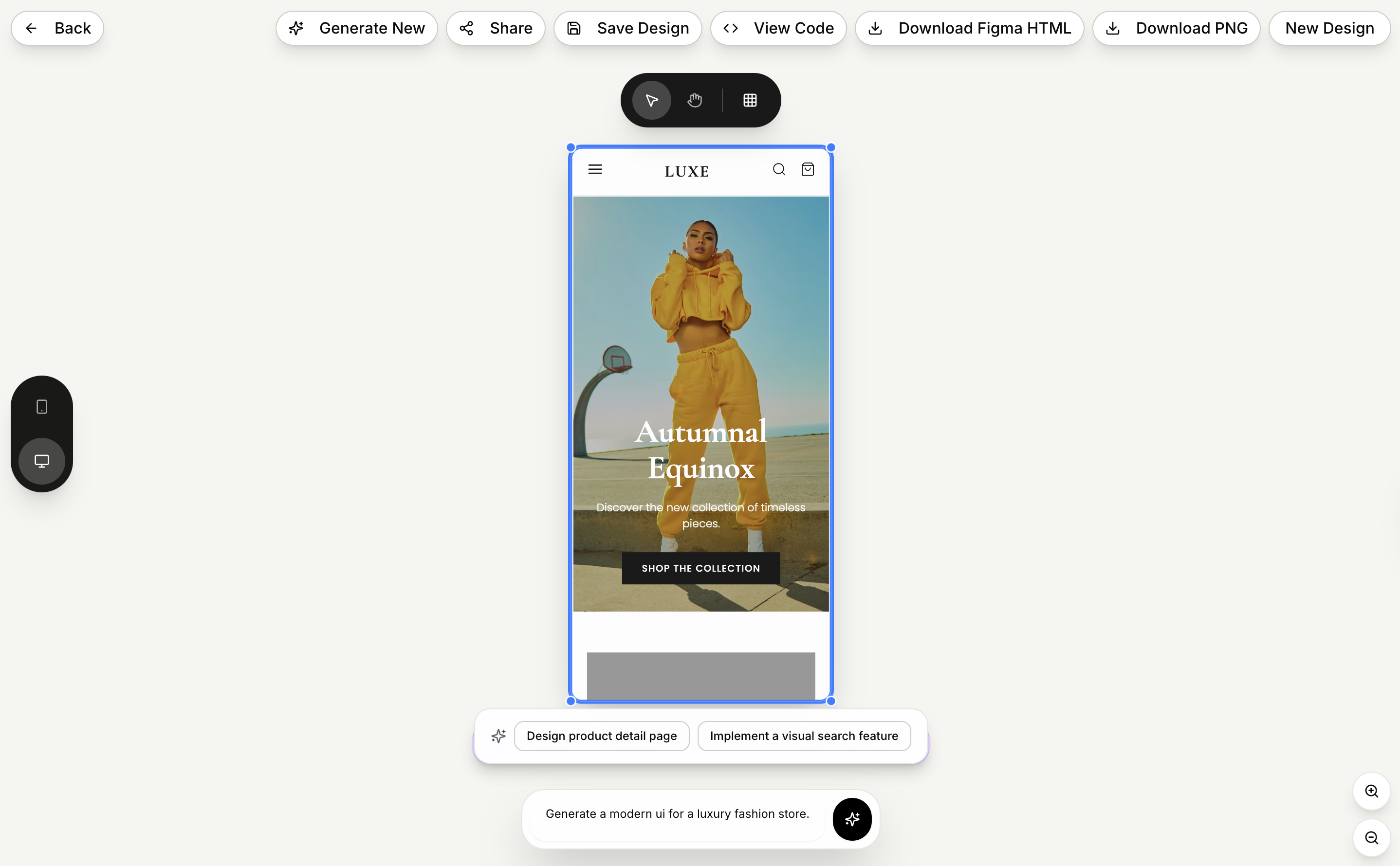
- Transform text descriptions into complete UI designs in seconds using natural language processing
- Export designs directly to Figma as fully editable layers with proper hierarchy and customizable components
- Receive production-ready HTML and CSS code that follows industry best practices and integrates seamlessly
- Generate contextual images and assets that automatically match your design requirements and specifications
- Create designs optimized for mobile, tablet, and desktop viewing with automatic responsive behavior
- Share designs with your team for collaborative iteration and export assets in multiple formats
Pros & Cons
Pros
- Custom interface automation
- Transforms prompts into specifications
- Natural language processing
- High-speed design generation
- Contextual images generation
- Assets match design requirements
- Production-ready HTML
- Production-ready CSS
- Automatically optimized responsiveness
- Team collaboration support
- Export assets in multiple formats
- Integration with Figma
- Editable Figma layers
- Automated mobile, tablet, desktop designs
- Semantic HTML
- Semantic CSS
- Free community Figma plugin
- Iterate designs faster
- Avoids lengthy design process
- Facilitates design handoff
- Clean code generation
- Iterative design process automation
- Advanced level of automation
- Specific design specifications
- Rudimentary prompt transformation
- Download designs as HTML
- Directly import into Figma
- Properly defined hierarchy
- Editable text in Figma
- Customizable components in Figma
- HTML to Design plugin
- Design export to PNG
- Code copy feature
- Automated image generation
- Design sharing
- Optimal responsive behavior
- Seamless export for workflows
- 10x faster design iteration
- Lightning-fast design completion
- 98% accuracy in design
- 1M+ designs created
- 50+ ready use components
- User-defined design description
- Secured design management
- Transparent pricing
- Pro plan for professionals
- Enterprise plan for large teams
- Custom integration support
- SLA guarantees
- White-label options
Cons
- Not open source
- No API integration
- No real-time collaborative features
- Figma exclusive for imports
- No free tier in pricing
- Dependent on 'HTML to Design' plugin
- No offline capabilities
- Limited language processing ability
- No cross-platform support
- SLA guarantees require custom pricing
Reviews
Rate this tool
Loading reviews...
❓ Frequently Asked Questions
1UI is an AI-powered user interface design generation platform that simplifies the design process. It boosts the creation of custom interfaces through automated processes tailored by the system. It also houses AI-driven tools that generate immaculate designs swiftly and precisely.
1UI's main functionality is to generate pixel-perfect user interface designs instantly using advanced AI-powered tools. It uses natural language processing to take user-defined designs and turn them into high-fidelity interfaces, complete with assets and elements that meet the specified design requirements.
Yes, 1UI is capable of generating HTML and CSS codes. The AI system generates contextual images and assets that match the design requirements, and provides users with ready-to-use HTML and CSS codes that follow industry-standard best practices.
Absolutely, 1UI supports team collaboration. Users can share their designs, iterate together, and export assets in various formats, making the workflow seamless and efficient.
Yes, you can export designs from 1UI to Figma. Designs can be exported as editable layers using a free community plugin, enabling easier handoff to design teams.
1UI enhances the design iteration process by generating comprehensive designs within seconds. It's significantly faster than traditional design tools, allowing for faster iteration and shorter total design times. This high speed and precision enable designers to experiment more and finalize designs quicker.
The AI Prompt Enhancer in 1UI is a feature that takes basic design prompts and elaborates them into detailed design specifications. It provides insights about layout, colors, typography, components, and interactions, thereby ensuring the final design is in line with the user's vision.
1UI is incredibly useful for UI design due to its AI-powered capabilities. It allows users to define their designs in natural language and produces high-quality, pixel-perfect interfaces instantly. It also generates ready-to-use HTML and CSS codes, and designs are optimized for mobile, tablet, and desktop devices.
Designs from 1UI can be exported in various formats, including PNG for images and HTML/CSS for codes. Additionally, designs can be exported to Figma as editable layers using a free community plugin.
Yes, 1UI allows customization of designs. With 1UI, you can comprehensively define what you want your design to look like, and the AI tools will generate an interface that matches your specifications.
Yes, 1UI is optimized for mobile, tablet, and desktop devices. Every design created by 1UI has responsive behavior to ensure optimal viewing and interaction across a wide range of devices.
1UI easily integrates with other design tools such as Figma. Users can export their designs to Figma as editable layers using a community plugin, providing a seamless handoff to design teams for further refinement.
To define designs in 1UI, you simply describe your vision in natural language. The AI understands context and design principles and accordingly generates your design, thereby making the process highly intuitive and user-friendly.
Indeed, you can share your 1UI designs with your team. 1UI supports team collaboration, allowing for sharing of designs, iteration, and exporting of assets in multiple formats for seamless workflows.
Yes, 1UI provides production-ready codes. It generates ready-to-use, clean, semantic HTML and CSS that follow best practices and are ready to integrate into your projects.
The automation feature in 1UI works by utilizing AI-powered tools to streamline the design creation process. These tools include components for image generation, layout composition, and code generation, which work together to produce comprehensive design outputs quickly and accurately.
The AI prompt enhancer in 1UI provides detailed insights about the various elements of the design. These insights cover areas such as layout, colors, typography, components, and interactions, ensuring the final design fully encapsulates the user's requirements.
1UI can generate a complete design in seconds. Its high-speed AI-powered tools turn design descriptions into comprehensive, pixel-perfect designs at an unprecedented speed.
1UI follows industry-standard best practices in generating designs and producing the accompanying HTML and CSS codes. This ensures that the designs and codes you get are not only top-quality but also ready for production.
Definitely, 1UI supports the generation of responsive design. Every design it creates is optimized for mobile, tablet, and desktop devices, thus exhibiting a perfect responsive behavior.
1UI uses its AI-powered tools to understand user inputs provided as natural language and instantly create pixel-perfect interfaces. It can recognize context and design principles to generate complete designs tailored to user preferences.
Yes, with 1UI, users can define their design preferences using natural language. The platform incorporates natural language processing to interpret design ideas described by users and generate appropriate designs instantly.
1UI automatically generates contextual images and assets that perfectly meet user design requirements. These images and assets are tailored to the specific characteristics of the design such as layout, color schemes, components, and interactions.
Yes, 1UI provides clean, semantic HTML and CSS codes which are optimized according to industry-standard best practices.
Yes, the code produced by 1UI is production-ready. It is designed to be cleanly integrated into development projects with minimal adjustments.
Yes, the designs created by 1UI are responsive for all devices. It ensures that every design is automatically optimized for mobile, tablet, and desktop formats, maintaining impeccable responsive behavior.
Yes, 1UI provides a collaborative environment where users can share their designs with their team. This functionality allows for better teamwork, joint iteration, and multiformat asset export for seamless workflows.
In terms of workflow management, 1UI streamlines the UI design process by providing automation for custom interface designs, enabling faster iteration and design sharing capabilities. By allowing for natural language input and automatic design generation, it significantly reduces the time spent on the design process.
Yes, 1UI offers a unique feature where designs can be exported to Figma as fully editable layers using a free community plugin named 'HTML to Design'.
AI prompt enhancer is a technology in 1UI that transforms simple user prompts into detailed, comprehensive design specifications. It enhances the input prompt by providing specific details about layout, colors, typography, components, and interactions.
Yes, 1UI provides in-depth insights about layout, colors, typography, components, and interactions. These insights are generated based on the user's basic design idea provided as input.
'HTML to Design' is a free community plugin in 1UI that allows users to download their designs as HTML files and import them directly into Figma. This feature facilitates design fine-tuning and editing inside Figma by converting imported HTML files into fully editable layers.
1UI's AI-driven tools parse the rudimentary prompts provided by users, understand their context and design principles, and translate them into specific design specifications such as layout, color schemes, typography, components, and interactions.
Yes, 1UI is capable of matching the generated images with the design requirements provided by users. It uses its AI-driven tools to create contextual images and assets that perfectly align with each design's specifications.
Yes, once the designs are exported from 1UI to Figma using the 'HTML to Design' plugin, they become fully editable layers with proper hierarchy, editable text, and customizable components. Thus allowing further refinement on Figma.
The 'HTML to Design' plugin in 1UI is used to export designs as HTML files and import them directly into Figma. This functionality allows for direct translation of designs into editable Figma layers which can be further refined by the design team.
With 1UI’s AI-driven tools and the speed of automated design generation, the design iteration process becomes significantly faster than traditional design tools. Users can generate complete designs in seconds rather than hours, iterating faster and shipping products at unprecedented speeds.
Designs in 1UI can be exported in several ways. They can be downloaded as PNG files, the HTML/CSS code can be copied, or they can be exported to Figma as editable layers using the free 'HTML to Design' plugin.
1UI utilizes its AI-driven tools to automatically optimize designs for desktop, tablet, and mobile formats. It maintains high responsive behavior making sure that designs flawlessly adapt to different screen sizes and orientations.
Pricing
Pricing model
Paid
Paid options from
$29/month
Billing frequency
Monthly
Refund policy
No Refunds
Related Videos
Revolutionize UI Design with 1UI.dev - AI-Powered, Infinite Creativity!
Techno Curio•84 views•Oct 19, 2025


