Overview
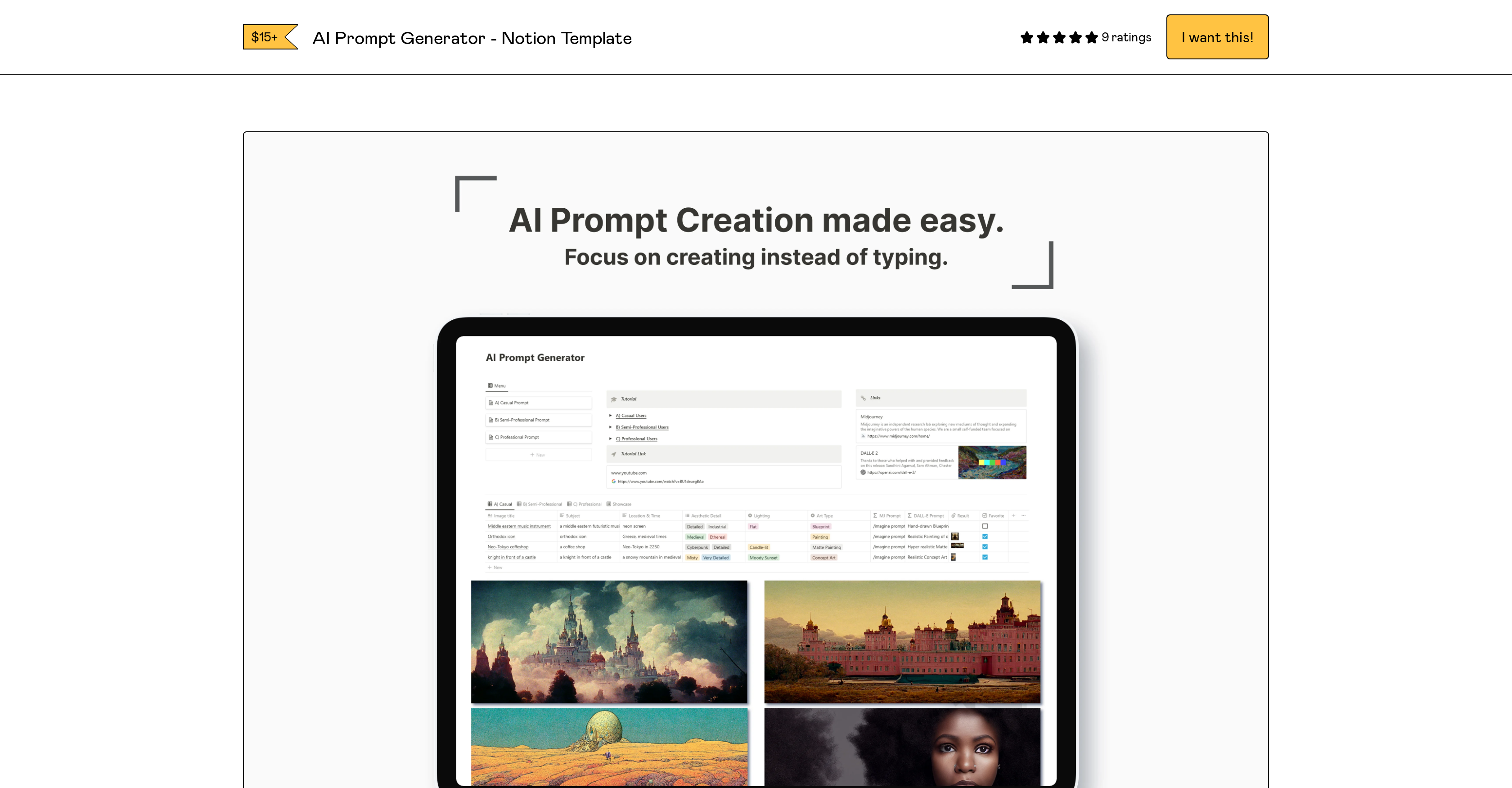
- Generate higher-quality AI images instantly with detailed, natural-sounding prompts crafted for Midjourney and DALL-E
- Eliminate manual typing in AI software by copying and pasting ready-to-use prompts directly from your Notion workspace
- Adapt prompt complexity to your exact needs with adjustable parameters ranging from casual to professional experience levels
- Save the template permanently to your Notion workspace with one click for immediate access to all future updates
- Follow along visually with the embedded YouTube tutorial that demonstrates the template in action
- Create effective prompts from day one regardless of prior experience with intuitive, structured formatting
Pros & Cons
Pros
- Step-by-step guide included
- Adjustable parameters
- Copy-paste feature
- Professional and casual user features
- Supports natural language prompts
- Video tutorial availability
- Email support
- Positive user reviews
- Lifetime updates
- Improves image results
- Affordable cost
- Discount for early adopters
- JavaScript compatibility
- Easy to add to toolkits
- Suitable for varied expertise
- User-friendly interface
- Duplication to Notion workspace
- Enables detailed prompts
- Regular and early bird rates
- Easily interfaced with Notion
- Experience level selection
- Notion workspace integration
- Confidence from positive ratings
- Facilitates specific image generation
- Template viewable in action
- Can address queries
- Real-time feedback support
- Specific results from prompts
- Attractive for new entrants
- Can craft top-notch prompts
- Instructions for downloading
- FAQs for additional help
- Enhances fluid image generation
- Enriches creative concentration
- Assured better image results
- Presents templates in action
- Links to tutorial video
- Email for queries
- Template duplication feature
- High star ratings
- Free updates commitment
Cons
- Requires JavaScript
- Only works with Notion
- No mobile app support
- No offline functionality
- No free version
- No multi-user collaboration
- No automatic saving feature
- Video tutorial not downloadable
- No localized versions available
- Too simplistic for advanced users
Reviews
Rate this tool
Loading reviews...
❓ Frequently Asked Questions
The AI Prompt Generator - Notion Template is a tool that guides users to create detailed and natural sounding prompts for AI image generation software. It provides adjustable parameters suited to various experience levels, eliminates the necessity for direct typing into AI software, features a video tutorial for extra guidance, and promises instant improvement in image results. The tool is valued at $15+15usd, without considering discounts.
The AI Prompt Generator - Notion Template is compatible with varying AI image generation software, including Midjourney and DALL-E. Its design makes it compatible with most AI image-to-text softwares.
The AI Prompt Generator - Notion Template assists the user in creating effective prompts by providing a structured format that allows for detailed and natural sounding prompts. This tool is adaptable to the user's experience level by offering adjustable parameters. It eliminates the need for the user to type anything directly into the AI software, instead, facilitating copying and pasting from Notion to the AI applications.
Yes, users can adjust the parameters in the AI Prompt Generator - Notion Template based on their level of experience. The tool offers various choices ranging from casual to professional. This flexibility allows for a more tailored user experience in creating prompts.
Yes, there is a tutorial available for the AI Prompt Generator - Notion Template. The tutorial is accessible via a YouTube link embedded in the product description. It offers a visual representation of how to use the template effectively.
The 'Duplicate' button on the AI Prompt Generator allows users to easily make a copy of the template and save it to their own Notion workspace. Users simply have to open the link and click the 'Duplicate' button on the top right corner.
For any queries or needs for assistance with the AI Prompt Generator - Notion Template, users can reach out to Fiction Productivity via email at [email protected] where they would receive the necessary help or feedback.
The AI Prompt Generator - Notion Template costs $15+15usd. But keep in mind that payment varies based on factors like the user’s willingness to pay more or any applicable discounts.
Early adopters of the AI Prompt Generator - Notion Template have an option to pay a discounted rate, as indicated in the product's pricing structure.
The AI Prompt Generator - Notion Template has garnered positive reviews among its users. Out of the 9 ratings, it has an impressive score of 4.6. These ratings can instill confidence in its prospects about the tool's usability and effectiveness.
Yes, the AI Prompt Generator - Notion Template is designed to suit users of all experience levels. The option to select the level of experience from casual to professional allows even those without any prior experience to use this tool effectively.
Yes, to use the AI Prompt Generator - Notion Template, JavaScript is needed. It should be enabled in the users' browser settings to facilitate purchasing and usage of this product.
To copy and paste prompts from the AI Prompt Generator - Notion Template to other AI softwares, users just need to select their desired prompts within the Notion template, copy them, and then paste them directly into their selected AI software. Direct typing into the AI software is not a necessity.
To purchase the AI Prompt Generator - Notion Template, users need to follow the secured Gumroad check-out link provided on their website. Please note that JavaScript must be enabled in the browser settings for the purchase process.
Yes, support is available for users who encounter any issues with the AI Prompt Generator - Notion Template. Users can reach out to Fiction Productivity via email for any questions or concerns. This ensures the user can receive timely help and responses.
After purchasing the AI Prompt Generator - Notion Template, customers can expect lifetime updates, as indicated in the product description. This means that the product will continuously be improved upon for the benefit of its users.
The AI Prompt Generator - Notion Template promises to deliver better image results instantly. While the templates can guide users to create more effective prompts for their AI image generation software, the overall quality of the final image result is also influenced by the effectiveness of the AI software itself.
No, when using the AI Prompt Generator - Notion Template, users don't need to type anything directly into the AI software. Prompts can be easily copied from the Notion template and pasted into the AI software with ease.
Yes, the AI Prompt Generator - Notion Template provides users with the ability to save the template to their Notion workspace for future use. This is done by clicking on the ‘Duplicate’ button on the top right corner.
Yes, users are encouraged to provide feedback on their experience with the AI Prompt Generator - Notion Template. This can be done by sending their thoughts to the contact email provided, which is [email protected].
Pricing
Pricing model
Freemium
Paid options from
$15
Billing frequency
One-time