AILab Tools
Overview
- Bring black and white photos to life with vibrant, realistic colors using AI photo colorization
- Remove any background instantly while keeping your subject perfectly intact with AI background removal
- Upscale images up to 400% without losing quality or sharpness using lossless image enlargement
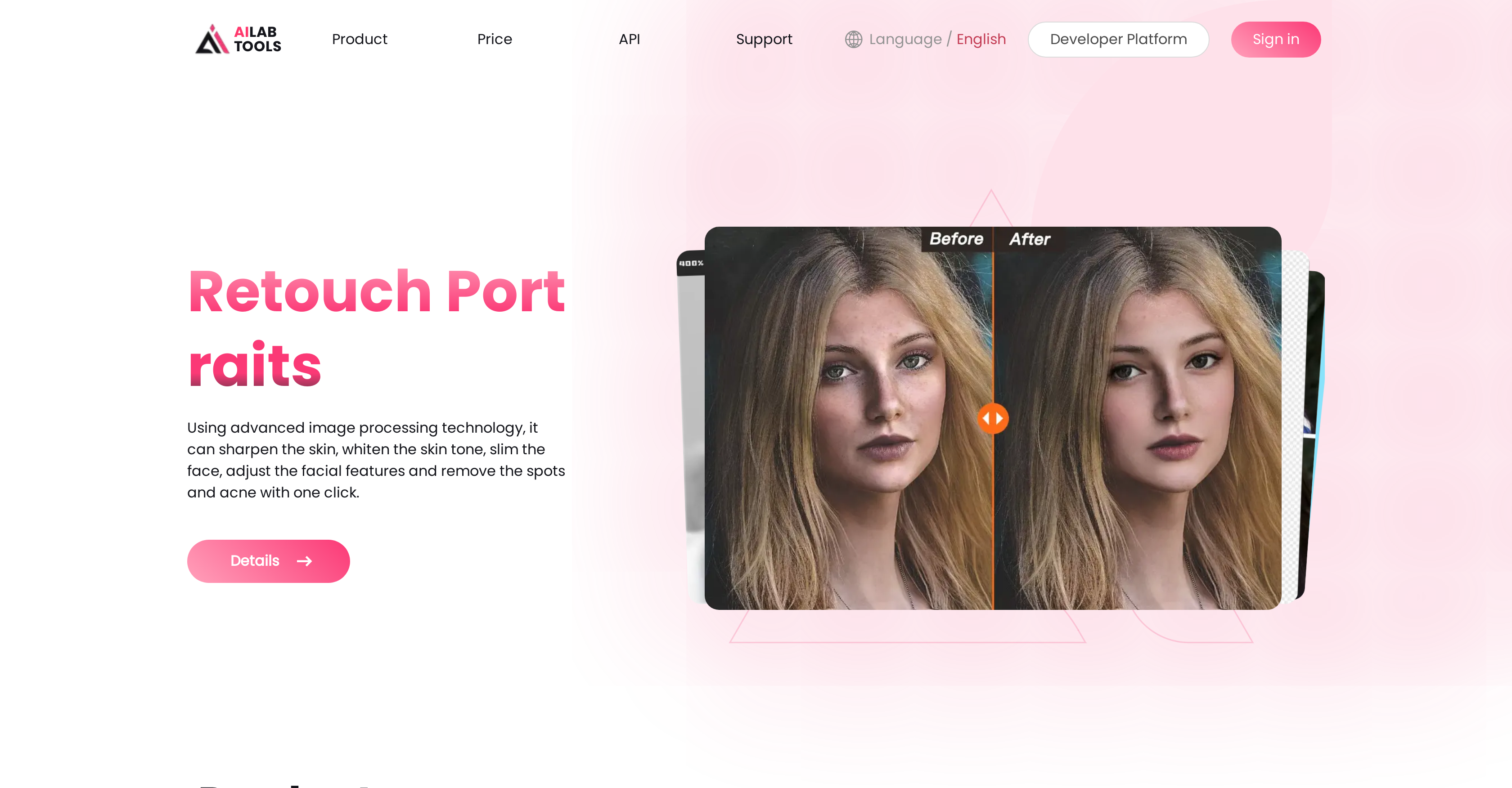
- Retouch portraits professionally with automatic skin smoothing, blemish removal, and facial feature adjustment
- Transform any photo into artistic paintings with multiple style options through photo to painting conversion
- Clear hazy or foggy images and restore natural clarity with advanced image dehazing
- Completely change facial attributes including age, gender, and expressions for creative effects
- Develop custom image processing applications by integrating AI capabilities through our API
Pros & Cons
Pros
- Black and white image colouring
- Sharpness enhancement
- Contrast enhancement
- Image enlargement
- Photo age modification
- Gender modification
- Portrait editing
- Hairstyle changer
- Facial expression changer
- Facial enhancement and blur
- Cartooning and painting effects
- Dehazing
- Restoring stretched images
- Erasure
- Photo retouching
- Background removal
- Head extraction
- Facial landmarks detection
- Skin disease detection
- Image upscaler
- Image erasure
- Photo to Painting
- Intelligent Composition
- Universal Background Removal
- Product background removal
- Costume background removal
- Human background removal
- Hairstyle Extraction
- Face slimming
- Retouch Portraits
- Face Blur
- Face Filters
- API available
- Image color enhancement
- Style Transfer
- Photo to 3d slow-motion
- Image Invisible Text Watermark
- Image exposure score
- Food background removal
- Image composition aesthetics score
- Powerful cartoon photo editor
- Smart Beauty
- Skin Beauty
Cons
- Inadequate free version
- Editing overdone, unnatural
- Limited hairstyle options
- Inconsistent in maintaining original features
- Potential security concerns for personal photos
- Limited language support
- Lack of advanced user features
Reviews
Rate this tool
Loading reviews...
❓ Frequently Asked Questions
AILab Tools' image enhancement process adjusts digital images making them more suitable for display or further image analysis. The features include making images sharper, enhancing colors, and increasing the contrast, resulting in a superior visual output.
The portrait editing features offered by AILab Tools include changing facial expressions, modifying hairstyles, adjusting age and gender, retouching portraits, blurring faces, and converting portraits into cartoons.
Yes, AILab Tools can colorize black and white images. The platform uses an artificial intelligence algorithm to recognize and fill black and white images with vibrant colors, turning them into vivid pieces of art.
The sharpness enhancement feature of AILab Tools improves the clarity of images by enhancing their sharpness and detail. This feature is most beneficial for photos that look slightly blurred or lack fine detail.
Yes, AILab Tools provides APIs. Developers can utilize these APIs to create their own image processing tools which utilize AILab Tools' features.
AILab Tools' image enlargement feature allows images to be upscaled to 200% to 400% without a loss of image quality. This is achieved through advanced artificial intelligence technology.
Yes, you can modify both age and gender in photos using AILab Tools. The platform allows for the adjustment of facial attributes to achieve special effects like gender swapping and age change.
Yes, AILab Tools offers background removal features. They utilize AI algorithms to automatically recognize the outline of the subject in the image and erase the background while leaving the foreground subject intact.
The image dehazing feature by AILab Tools uses an advanced AI algorithm to clear foggy or hazy images and restore their clear and realistic appearance.
Yes, AILab Tools' platform is suitable for both personal and professional use. It caters to the needs of content creators, developers, and marketers among others.
Yes, AILab Tools has a feature to restore stretched images. This allows you to correct and restore images that have been distorted or stretched out of proportion.
Yes, AILab Tools offers a feature that allows the conversion of photos into a painting-like appearance with multiple styles to choose from. This feature is called 'Photo to Painting'.
Yes, with AILab Tools' 'Retouch Portraits' feature, you can retouch and perfect your photos. The feature offers various operations like skin sharpening, skin tone lightening, face slimming, facial feature adjustment, and spot and acne removal.
Yes, AILab Tools provides facial enhancement and blur tools. These include AI-powered face slimming, AI Makeup, and the tool to blur facial features in the image.
AILab Tools' image erasure works by using AI algorithms to quickly remove objects, people, and text from photos, helping to clean up and enhance photos.
Yes, AILab Tools can be used to change facial expressions in images. The platform utilizes advanced image processing technology to edit human expressions, including laughing, pouting, unhappy, and smiling.
Yes, you can change the hairstyle in the image using AILab Tools. The platform uses a deep learning algorithm for operations such as adding bangs, changing hair length and increasing hair volume on the hairstyle of portraits.
Yes, AILab Tools has an image upscaling capability. It uses AI technology for lossless enlargement of images from 200% to 400%, which can be used in various applications, such as photo processing, e-commerce, and design.
The cost associated with using AILab Tools may vary depending on the features used. To get a detailed pricing plan, you need to check their Pricing page on the website.
Yes, you can use the API of AILab Tools to develop your image processing tools. Developers can integrate AILab Tools' AI-powered image editing and enhancement capabilities into their own applications, making the development process more efficient and effective.
Pricing
Pricing model
Paid
Paid options from
$4.99/unit
Billing frequency
Pay-as-you-go
Refund policy
Refunds are available within 14 days of the first subscription if users are unsatisfied, have not used AI solutions, and have not claimed this guarantee before.
Related Videos
Ailabtools Review 🤦♀️ Every Ailabtools Critcial Feature
Top Business Softwares•480 views•Nov 14, 2022