Claptools Free Youtube Transcriptor
Overview
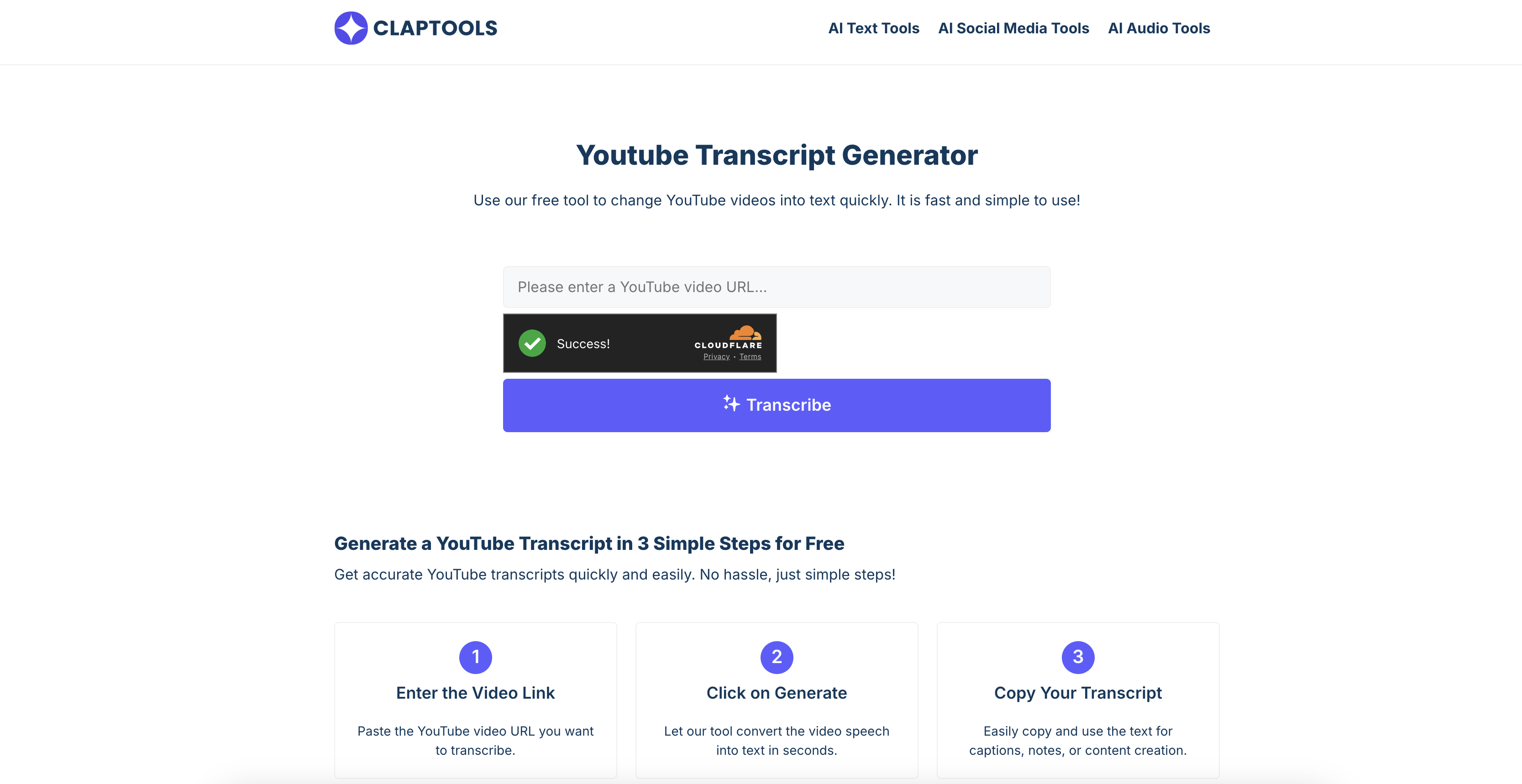
- Create perfect study notes from lecture videos in seconds by copying accurate, ready-to-use transcripts
- Repurpose video content into blog posts and social media captions quickly with instantly generated text
- Access video content without sound by reading along with synchronized transcripts and embedded video player
- Research topics faster by scanning text transcripts instead of rewatching entire videos
- Improve comprehension of complex topics by simultaneously watching the video and reading its transcript
- Generate video captions and subtitles automatically by extracting existing subtitles for higher accuracy
Pros & Cons
Pros
- Free service
- No login required
- High accuracy transcription
- Supports subtitle extraction
- Results in text format
- Fast transcription speed
- Simple URL input interface
- On-screen results
- Allows content copying
- Embedded video player
- Simultaneous reading and watching
- Versatile for students, professionals
- Helpful for hearing impaired
- Efficient for content creators
- Streamlines note-taking
- Aids in research
- Promotes accessibility
- Efficient content extraction
- Time-saver tool
- Facilitates video analysis
- Enhances comprehension
- Embedded player for studying
- Accuracy check functionality
- Useful for language learning
- Transcript translation option
- Useful for journalists
- Beneficial to business professionals
- Educational tool
- Useful for online webinars
- Facilitates study material preparation
- Supports content repurposing
- Transcript review function
- Instant transcript generator
- Clear transcript presentation
Cons
- No mobile application
- No offline access
- Only supports YouTube videos
- No data export options
- No batch processing
- No speech-to-text customization
- No multi-language support
- Limited to video transcription
- No advanced editing features
- Restriction on video size or duration
Reviews
Rate this tool
Loading reviews...
❓ Frequently Asked Questions
Claptools Free Youtube Transcriptor is a tool designed to convert spoken words from a YouTube video into readable text format. It extracts audio content within the video and transforms it into a written transcript, benefitting individuals who prefer reading over watching videos. This includes students for note-taking, professionals for content research, and individuals with hearing impairment. It's easy to use, requiring just the input of the video URL to process and generate the transcript on-screen. It can also extract video subtitles for higher accuracy transcription.
To extract transcripts using Claptools Free Youtube Transcriptor, you begin by entering the YouTube video URL you want to transcribe. Then, click on 'Generate' to let the tool convert the video speech into readable text. After the transcript has been processed, you can copy and use the text for captions, note-taking, or content creation.
Claptools begins the transcription process when a user enters the YouTube video link into the provided field. The system then processes the video, extracting speech and converting it into a clear and readable transcript. It works by analyzing the audio track of the video to identify words and sentences, thereby constructing an accurate transcript.
While the exact level of accuracy is not specified, Claptools Free Youtube Transcriptor works to ensure the transcript is as accurate as possible. It analyzes the audio from the video to identify words and sentences, and it can also extract subtitles directly from the video when available to further increase transcription accuracy.
Yes, Claptools Free Youtube Transcriptor can extract video subtitles, which aids in creating a highly accurate transcription.
The transcript produced by Claptools Free Youtube Transcriptor can be useful in a variety of ways. Once generated, it can be read directly on the page, copied, and used for personal reference, study notes, and content creation.
Anyone who uses YouTube videos for learning, research, or work purposes can benefit from Claptools Free Youtube Transcriptor. This includes students for note-taking on lectures and tutorials, teachers for creating accessible study materials, journalists and content creators for writing summaries or quoting interviews and business professionals for reviewing webinar or meeting discussions.
Yes, Claptools Free Youtube Transcriptor improves accessibility for individuals with hearing impairments. By converting spoken words in YouTube videos into text, it allows people who have difficulty hearing to fully access and understand the content.
To generate a YouTube transcript using Claptools, you need to paste the YouTube video URL you want to transcribe into the tool, then click on 'Generate'. The tool will process the video and convert the spoken words into clear, readable text. Finally, you can copy the generated transcript for your purpose.
Claptools Free Youtube Transcriptor can be a valuable asset in content creation. Transcripts can be used for creating captions, pulling quotes, or repurposing video content into blog articles, social media content, or other written formats.
The embedded video player in Claptools Free Youtube Transcriptor allows users to simultaneously watch the video and read its transcript. This assists users in better understanding the spoken content without having to switch between different windows. In the case of unclear phrases or words, they can easily replay the video while reading along.
Though the exact duration is not stated, Claptools Free Youtube Transcriptor is touted to be quick in its operations, converting video speech into text in a matter of seconds.
Yes, professionals conducting research can use Claptools Free Youtube Transcriptor to aid their studies by transcribing videos and extracting key points without having to repeatedly watch the whole video.
Claptools Free Youtube Transcriptor is helpful for students as it allows them to take notes from lecture videos and tutorials more efficiently. They can copy and paste the transcript for study purposes, highlighting key points as needed.
Yes, students can use transcripts generated by Claptools Free Youtube Transcriptor for study purposes. The tool provides a text version of lectures or educational videos which students can read at their own pace, highlight key points, or copy for later reference.
To ensure the highest accuracy, the Claptools Free Youtube Transcriptor analyzes the audio content of the video to identify words and sentences. It can also extract subtitles directly from the video, if they are available, for further improved accuracy of the transcriptions.
Pricing
Pricing model
Free
Paid options from
Free
Related Videos
How to Transcribe TikTok Videos for Free with Clap Tool #tips #shorts #shortstutorial
deeXcel•2.5K views•May 18, 2025