

Datalab.to
Feed downstream systems clean, production-ready data instead of messy files by converting PDFs, spreadsheets, and slides into structured markdown, HTML, and JSON.
Listing not yet reviewed by our editors · How we check
Overview
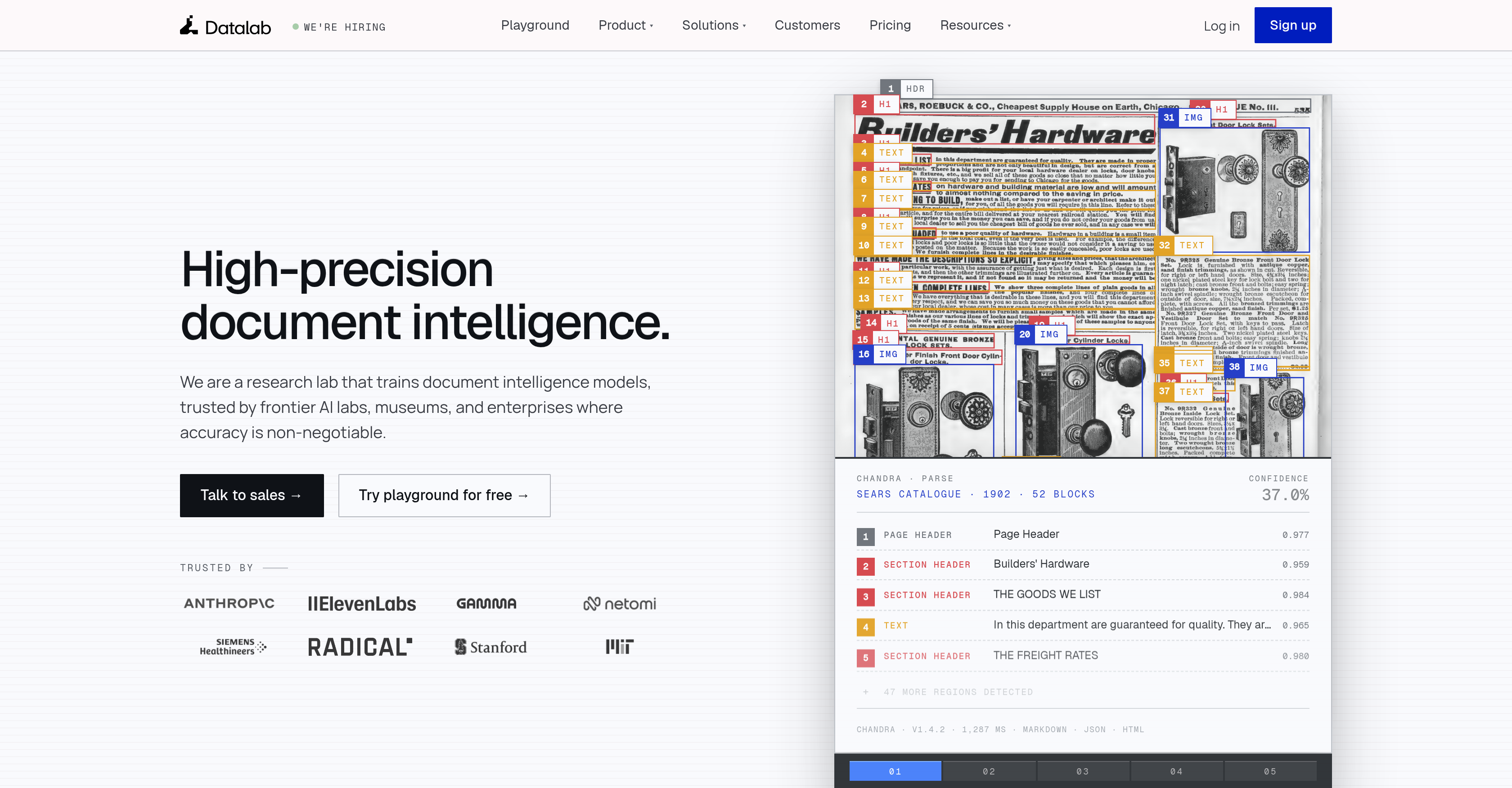
- Feed downstream systems clean, production-ready data instead of messy files by converting PDFs, spreadsheets, and slides into structured markdown, HTML, and JSON.
- Pull the exact fields your analysis needs without manual copy-paste through information extraction driven by pre-defined extraction schemas.
- Digitize scanned and printed pages into machine-readable text with the built-in Marker, Surya, and Chandra OCR engines.
- Stop splitting merged files by hand as combined-file handling detects natural document boundaries and separates each document automatically.
- Ship only data that meets your accuracy bar by scoring every output against pre-defined criteria or your own custom rubrics.
- Catch accuracy drops before they reach production through continuous model quality monitoring that flags regressions as they appear.
- Process entire archives on schedule rather than file by file with batch processing built for large page volumes.
- Cover hard-to-parse sources in one pipeline, from web crawls and scientific papers to multilingual and long documents, with segment identification across complex layouts.
- Meet strict data security and compliance requirements in finance, healthcare, and insurance by choosing managed cloud, VPC deployment, or a fully air-gapped on-premise setup where data never leaves your network.
- Build reliable AI training and research datasets from unstructured content through end-to-end document intelligence workflows that chain parsing, extraction, and evaluation on native models.
Pros & Cons
From the listing; not yet checked by our editors.
Pros
- High-precision document intelligence
- Transforms unstructured content to data
- Workflow automation
- Inclusive of quality evaluation
- Extracts varied file formats
- Detects natural file boundaries
- Continuous model quality monitoring
- Versatile use: finance, healthcare
- Handles combined files
- OCR engines included
- Flexible deployment modes
- Managed cloud setup
- VPC deployment
- On-premise setup
- Large volume page management
- Custom rubrics for quality
- Benchmarked processors
- Processes long documents
- Outputs in markdown, html, JSON
- Supports multilingual documents
- Optimized for high data accuracy
- Designed for critical data handling
- Built-in document parsing
- Key information extraction
- Outputs production-ready data
- Batch page processing
- Identifies document segments
- Handles web crawls, scientific papers
- Segment identification for combined files
- Flagging of model regressions
- Rigorous processor benchmarking
- Information extraction schemes
- Provides workflow composition
- Pipeline runtime monitoring
- Handles 100M pages a day
- Comprehensive API for workflows
- Trusted in mission-critical workflows
- Industry-agnostic: finance to healthcare
- Ease of integration
- Auditable results
- Outputs are citation-ready
- High-throughput OCR engines
- Open source model availability
- Fully air-gapped deployment option
- SOC 2 Type II compliance
- Supports math, charts, diagrams
- Custom deployment hardware support
- Full model weights for on-premise
Cons
- Lacks editing functionalities
- No real-time collaboration
- Doesn't support all languages
- Unclear pricing structure
- No mobile application
- Limited OCR engines
- Setup complexity
- No simultaneous document processing
- Limited document types
- No feature for revision tracking
Alternatives to Datalab.to
Tools that share the most tags with Datalab.to.
- AI Formatter.net
Pass automated resume screening systems with ATS-optimized templates that ensure your application gets seen by recruiters
Free trial · from $16.67/month
$16.67/month
Not yet checked
- Format Magic
Create professional-looking documents in seconds without design skills using AI-powered template selection
Freemium · from $4.95/month
$4.95/month
Not yet checked
- Scanned.to
Get perfectly formatted, editable Word documents from any scan or PDF, thanks to neural network OCR that preserves original layouts, fonts, and tables.
Free trial · from $5/unit
$5/unit
Not yet checked
- Unstract
Trust every extracted field before it reaches production: LLMEval runs two independent LLMs, one extracting and one validating, and returns confidence scores for each result.
Not listed
Not listed
Not yet checked
- Upstage Studio
Turn messy, complex documents into clean, validated data ready for downstream systems: AI agents parse, extract, and validate content for end-to-end intelligent document processing.
Freemium · from $20/month
$20/month
Not yet checked
- ParseCrate
Keep sensitive documents on infrastructure you control with a free, open-source, self-hosted document processing API that runs locally and processes local files offline once models are available.
Free
Not listed
Not yet checked
Reviews
Rate this tool
Loading reviews...
Frequently asked questions
What key features does Datalab offer?
Datalab offers several key features including automation of workflows such as document parsing, information extraction, segment identification, and output quality evaluation. It provides conversions for various file formats into structured markdown, HTML, and JSON. Datalab also offers continuous monitoring of model quality and regressions, effective management of combined files, batch management of large volumes of pages, and is equipped with OCR engines (Marker, Surya, Chandra). Moreover, it supports flexible deployment modes including managed cloud setup, Virtual Private Cloud (VPC) deployment, and fully air-gapped, on-premise setup.
How does Datalab manage unstructured content?
Datalab manages unstructured content by transforming it into precise, production-ready data. This is accomplished through a series of workflows powered by native models. These workflows include document parsing, information extraction, segment identification, and output quality evaluation
What type of documents can Datalab process?
Datalab can process various types of documents including web crawls, scientific papers, multilingual sources, and long documents. It can also effectively manage combined files, identifying their natural boundaries and separating them into individual documents.
Can Datalab work with PDFs, spreadsheets, and slides?
Yes, Datalab can work with PDFs, spreadsheets, and slides. These can be converted into structured formats such as markdown, HTML, and JSON.
What are the different deployment modes of Datalab?
Datalab offers flexible deployment modes including managed cloud setup, Virtual Private Cloud (VPC) deployment, and a fully air-gapped, on-premise setup. In the on-premise setup, data is not allowed to leave the user's network ensuring complete security and privacy.
What kind of automation processes does Datalab enable?
Datalab enables several automation processes including document parsing, information extraction, segment identification, and output quality evaluation. It allows for these tasks to be done in a series of workflows powered by its native models, enhancing efficiency and productivity.
Can Datalab monitor model quality and flag regressions?
Yes, Datalab can monitor model quality and flag regressions. It has the capability to continuously track improvements and immediately take note of any downward trends in model performance.
Which sectors can benefit from Datalab?
Datalab can be beneficial for a wide range of sectors. These include AI research labs, finance, healthcare, and insurance sectors. Datalab's abilities to parse a variety of documents, manage large volumes of pages and enable high-precision interpretation of data positions it as a valuable tool in these sectors.