

Gigachad AI
Answer matches without leaving the chat: the Gigachad AI keyboard generates multiple dating reply suggestions based on the current conversation, right inside Tinder, Hinge, and Bumble.
Listing not yet reviewed by our editors · How we check
Overview
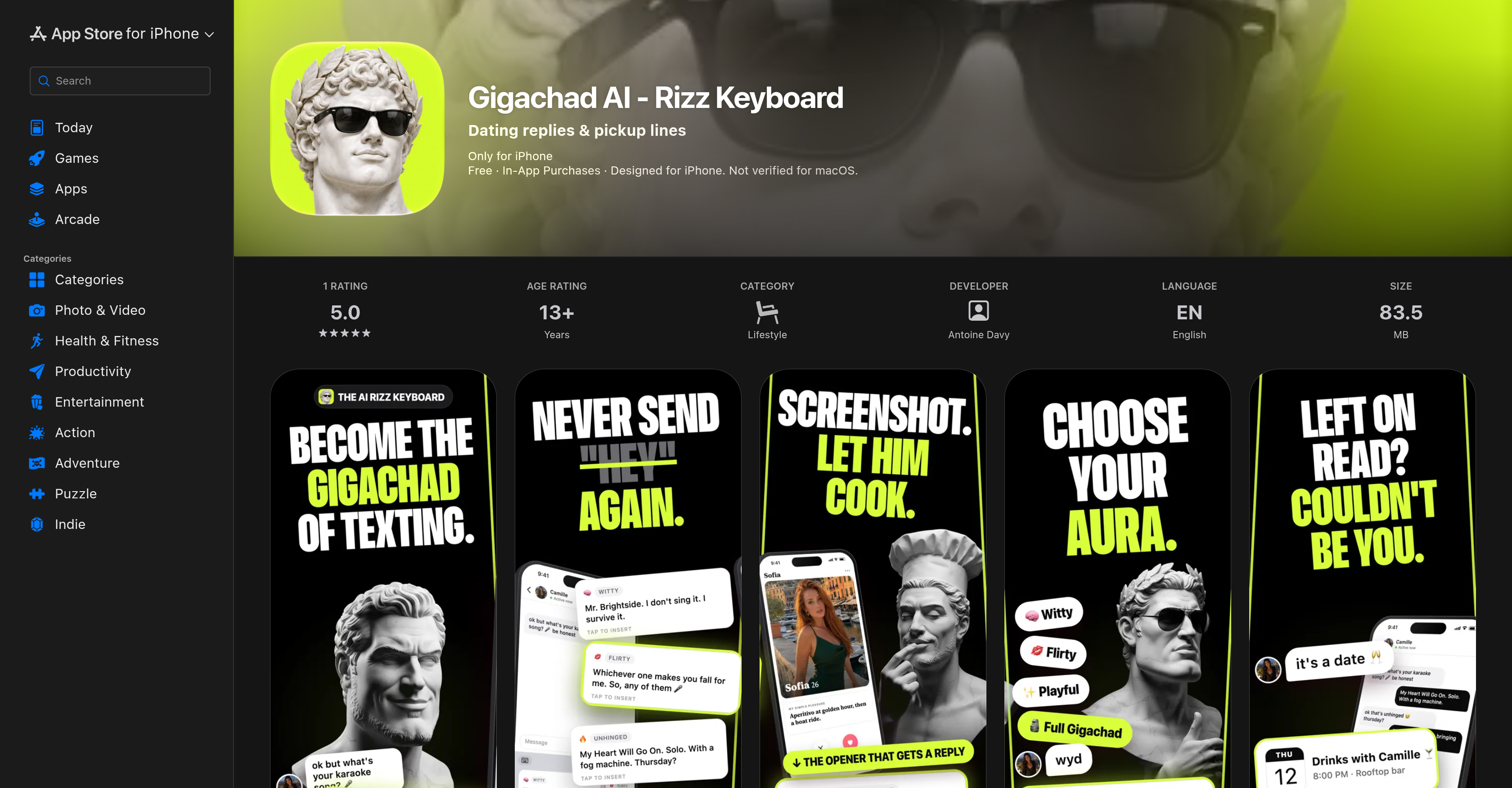
- Answer matches without leaving the chat: the Gigachad AI keyboard generates multiple dating reply suggestions based on the current conversation, right inside Tinder, Hinge, and Bumble.
- Set the exact vibe you want before you hit send: choose witty, flirty, playful, or fully unhinged tones to shape every AI-generated message and pickup line.
- Keep your replies sounding like you: suggestions are built to match your own voice, so conversations stay natural instead of scripted.
- Start strong with any profile or chat: upload a screenshot of a dating profile or conversation and get a tailored opener or response, even when text isn't reachable through the keyboard.
- Carry the same reply help into every app you type in: the keyboard works in any app with a text field, from dating platforms to messaging and social apps.
- Add expressive reactions without switching keyboards: the built-in emoji keyboard keeps Apple's familiar layout and adds a dedicated emoji key, skin-tone choices, and a frequently used section.
- Keep your conversations off the record: the developer states that keystrokes aren't logged and message text is discarded once your reply is generated.
- Try it free and scale up only when you need to: basic access costs nothing, while Gigachad Pro unlocks unlimited replies, all four tones, and photo-based replies on weekly, monthly, or yearly plans.
- Keep your Pro access when you reinstall or change devices: your subscription is tied to your Apple Account, and you can manage or cancel it in your account settings.
- Build a daily habit of starting conversations: activity streaks track each day you generate a reply, so your dating app momentum stays visible.
Pros & Cons
From the listing; not yet checked by our editors.
Pros
- Screenshot-based reply generation
- Multiple tone presets
- Apple-style emoji layout
- Skin-tone emoji picker
- Works in any text field
- Tinder, Hinge, Bumble support
- Unlimited replies with Pro
- Photo-based reply generation
- Activity streak tracking
- Subscription restored after reinstall
- Onboarding resumes after interruption
- Full keyboard visual polish
- One-tap reply insertion
- Context-aware suggestions
- Tone selection: witty, flirty, playful
- Reply from profile screenshot
- Emoji key next to 123
- Frequent emoji shortcuts
- Supports iPhone, iPad, Mac
- Optimized for Apple Silicon
- Requires iOS 17+
- Small 83.5MB footprint
- Free tier with purchases
- Weekly, monthly, yearly plans
- Auto-renewable via Apple
- Cancel anytime in settings
- Privacy: no keystroke logging
- Message content discarded postprocessing
- Identifiers used only for analytics
- Paywall never repeats after reinstall
- Performance improvements each update
- Bug fixes per release
- In-app purchase syncs devices
- Activity streak reflects real usage
- Onboarding persists across sessions
- New icon and branding
- Clean paywall design
- Full emoji skintone support
- VisionOS compatibility
- Mac M1+ requirement
- iOS 17+ only
- Lightweight and fast loading
- Contextual reply options
- Multiple reply choices per request
Cons
- iOS 17+ required
- English only interface
- No accessibility declarations
- Crossapp tracking identifiers collected
- Requires internet for replies
- Limited to Apple devices
- Large 83MB download
- Subscription autorenewal default
- Screenshot analysis only photo
- No offline generation
Alternatives to Gigachad AI
Tools that share the most tags with Gigachad AI.
- FlirteR
Never get stuck on what to text back: tap the sparkle button and get three AI reply suggestions for the message you're answering, right above your keys.
Not listed
Not listed
Not yet checked
- Wingman Rizz AI
Reply to matches and friends without leaving the chat: the Wingman AI keyboard works in iMessage, Instagram, WhatsApp, Snapchat, Hinge, Tinder, TikTok, and any app with a text field, so one reply workflow follows you everywhere with no separate integrations or chat histories.
Paid · from $6.99
$6.99
Not yet checked
- Cupidly: AI Dating Keyboard
Answer a match in seconds without leaving the chat: switch to the Cupidly keyboard, screenshot the conversation, and tap a ready-made dating reply or opener to send. Screenshots taken just before opening the keyboard load automatically.
Paid · from $4.99
$4.99
Not yet checked
Reviews
Rate this tool
Loading reviews...
Frequently asked questions
How does Gigachad AI generate replies from my chat?
Gigachad AI reads the text from the active conversation via its keyboard integration, sends the snippet to its on‑device AI model (or cloud service) which generates multiple reply suggestions, then discards the original text after the reply is created.
Can I use Gigachad AI on apps other than Tinder, Hinge, and Bumble?
Yes. While the listing calls out Tinder, Hinge, and Bumble, the keyboard works in any iOS or iPadOS app that provides a standard text field.
What tone options does Gigachad AI offer and how do they change the replies?
The app offers four tone presets: witty, flirty, playful, and fully unhinged (deliberately exaggerated). Selecting a tone changes the stylistic flavor of each generated reply to match that vibe.
Does Gigachad AI store my messages or keystrokes after generating a reply?
Gigachad AI does not log keystrokes or retain conversation text after a reply is generated. The developer states the content is processed only to create a reply and then discarded, although the App Store privacy sheet notes that identifiers and usage data may still be collected for analytics.
How does the screenshot feature work for creating openers or responses?
When you tap the screenshot button, the app captures an image of a chat or dating profile, extracts any visible text, and uses that context to generate an opening line or response using the same AI engine that powers keyboard replies.
Is there a reply limit with the free version of Gigachad AI?
The free tier limits the number of generated replies per day; only the Pro subscription removes that cap and provides unlimited replies.
What exactly is included in a Gigachad Pro subscription?
Gigachad Pro unlocks unlimited reply generation, access to all four tone options, and the ability to generate replies from photos or screenshots.
How much does the weekly, monthly, and yearly Gigachad Pro plan cost?
Weekly $6.99, Monthly $19.99, Yearly $79.99.