

Overview
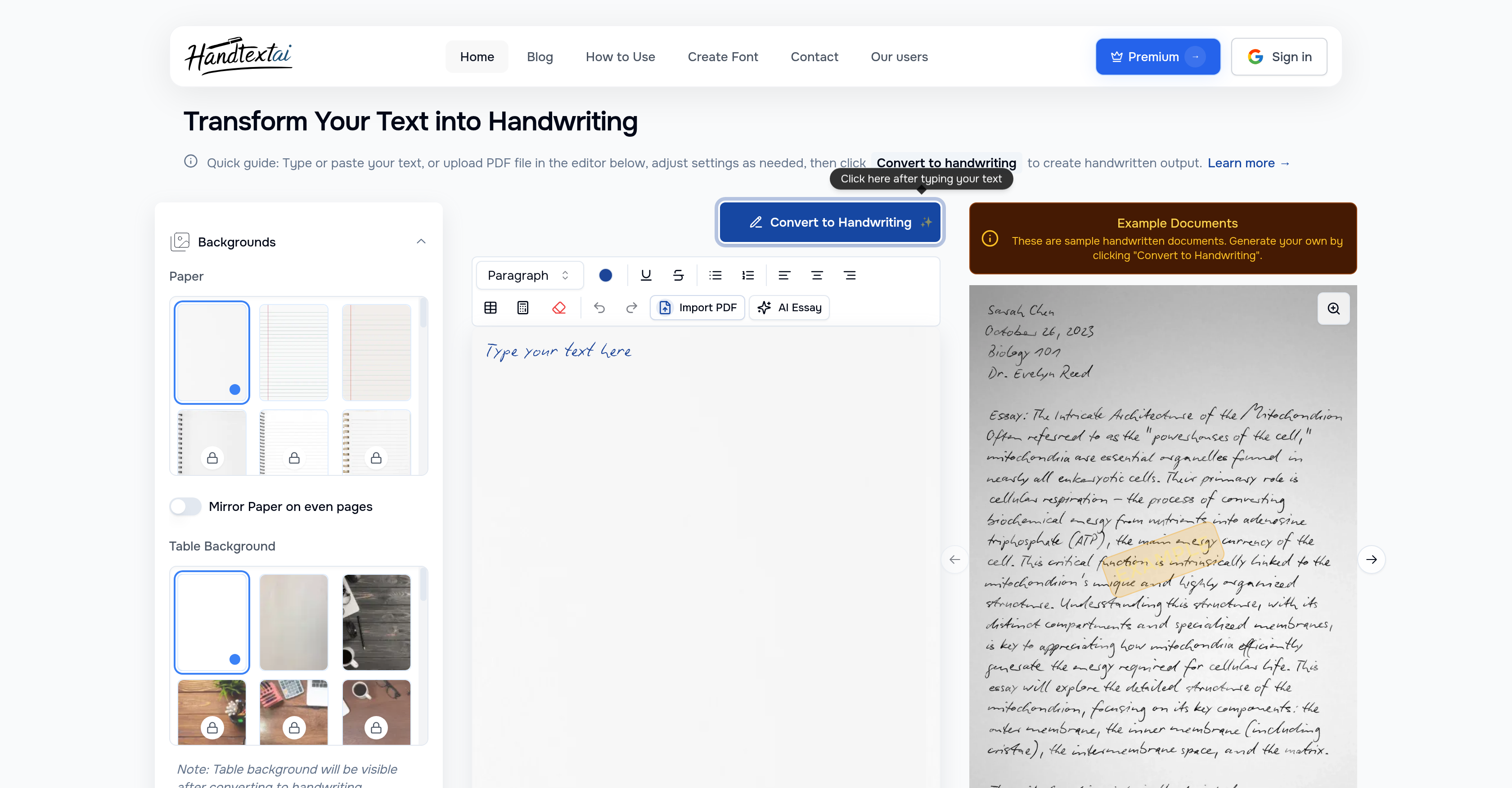
- Create authentic handwritten documents from digital files instantly by converting PDF and DOCX formats with realistic handwriting simulation
- Personalize every document with your actual handwriting style using the custom font upload feature for truly unique results
- Generate professional-looking assignments and letters with 90+ handwriting fonts and customizable cursive scripts for beautiful flowing text
- Enhance mathematical and scientific documents by handwriting complex equations and expressions directly into your notes
- Design complete multi-page documents with customized tables, handwritten shapes, and advanced visual effects like shadows and shading
- Fine-tune every detail of your handwritten output with precise control over letter spacing, size, and alignment for natural-looking results
- Export your creations in multiple formats including PDF and image files while choosing from various paper styles and textures
Pros & Cons
Pros
- Transforms text to handwriting
- Imports multiple document types
- Converts PDF, DOCX to handwriting
- 90 handwriting fonts
- Paper style selections
- Customizable effects
- Generates cursive handwriting
- Simulates natural handwriting variations
- Custom font upload
- Creates multiple page documents
- Adjustable letter spacing
- Customizable size and alignment
- Advanced visual effects
- Table inclusion and customization
- Handwrites math equations
- Includes handwritten shapes
- Outputs in PDF or image
- Creates authentic-looking print documents
- Custom handwriting upload
- Fine-tuned word processing
- Authentic handwriting aesthetics
Cons
- No offline access
- No mobile application
- No language translation support
- No real-time collaboration feature
- Limited document formats supported
- Potential authenticity issues
- No handwriting recognition
- No mentioned security protocols
- No iOS or Android support
- No free version mentioned
Reviews
Rate this tool
Loading reviews...
❓ Frequently Asked Questions
HandtextAI is a versatile, AI-powered tool that specializes in converting digital text into realistic handwritten notes. It simulates natural handwriting with genuine variations and transformations.
Students, educators, and professionals seeking to generate authentic-looking handwritten documents can significantly benefit from using HandtextAI.
In HandtextAI, users can import various types of documents, including files in PDF and DOCX formats.
Absolutely. HandtextAI provides an option where users can utilize their own handwriting by creating a custom font and uploading it.
HandtextAI offers a vast array of 90 handwriting fonts for users to choose from, providing a broad range of stylistic options.
Yes, it is possible to generate cursive handwriting with HandtextAI. The platform can transform text into a beautiful flowing script, improving the aesthetics of your documents.
HandtextAI possesses many advanced features. These include natural handwriting simulation with genuine variations, custom font upload capacity, multi-page document creation, letter spacing, size, and alignment fine-tuning, and the addition of advanced visual effects.
Using HandtextAI, one can add visual effects such as blur, shading, and shadows, improving the realism and visual appeal of their handwritten notes and documents.
In HandtextAI, tables can be included and customized to suit the users' needs, offering another layer of editing freedom.
Yes, HandtextAI provides the functionality to handwrite math equations and expressions. This feature helps create more comprehensive notes, especially for mathematical or scientific applications.
Yes, HandtextAI allows users to save their work either as a PDF or image file. The application, thus, provides great flexibility in terms of output format.
Absolutely. HandtextAI features a custom font upload option, allowing users to use their own handwriting by creating and uploading a custom font.
HandtextAI is capable of simulating natural handwritten text with actual variations, providing an authentic handwritten look.
HandtextAI offers a variety of different paper styles and textures, providing users the freedom to choose the one that best meets their needs and preferences.
HandtextAI allows users to fine-tune letter spacing, size, and alignment, ensuring that the output text closely replicates natural handwriting.
Yes, HandtextAI has the capability to generate multi-page documents, making it an effective tool for creating longer handwritten documents or notes.
HandtextAI allows users to enhance their documents with various handwritten shapes, granting yet another layer of customization and style to their notes or paragraphs.
The handwriting in HandtextAI has been designed to look extremely authentic. The application simulates natural handwritten text with genuine variations to achieve this faithful replication.
Yes, HandtextAI provides features that allow users to generate authentic-looking printed documents. This gives users the flexibility to create both handwritten and printed-looking documents within the same platform.
To use your own handwriting in HandtextAI, you need to create your own custom font and upload it on the platform. This allows you to use your unique handwriting style seamlessly within the application.
Pricing
Pricing model
Free Trial
Paid options from
$5.99/month
Billing frequency
Monthly
Related Videos
Convert Text to Handwriting Assignment using AI
HandtextAI•8.0K views•Feb 28, 2025


