
Image To Outline
Keep personal and client photos fully private: your photo-to-line-art conversion runs locally in the browser, so source images and edits never leave your device or reach a server.
Listing not yet reviewed by our editors · How we check
Overview
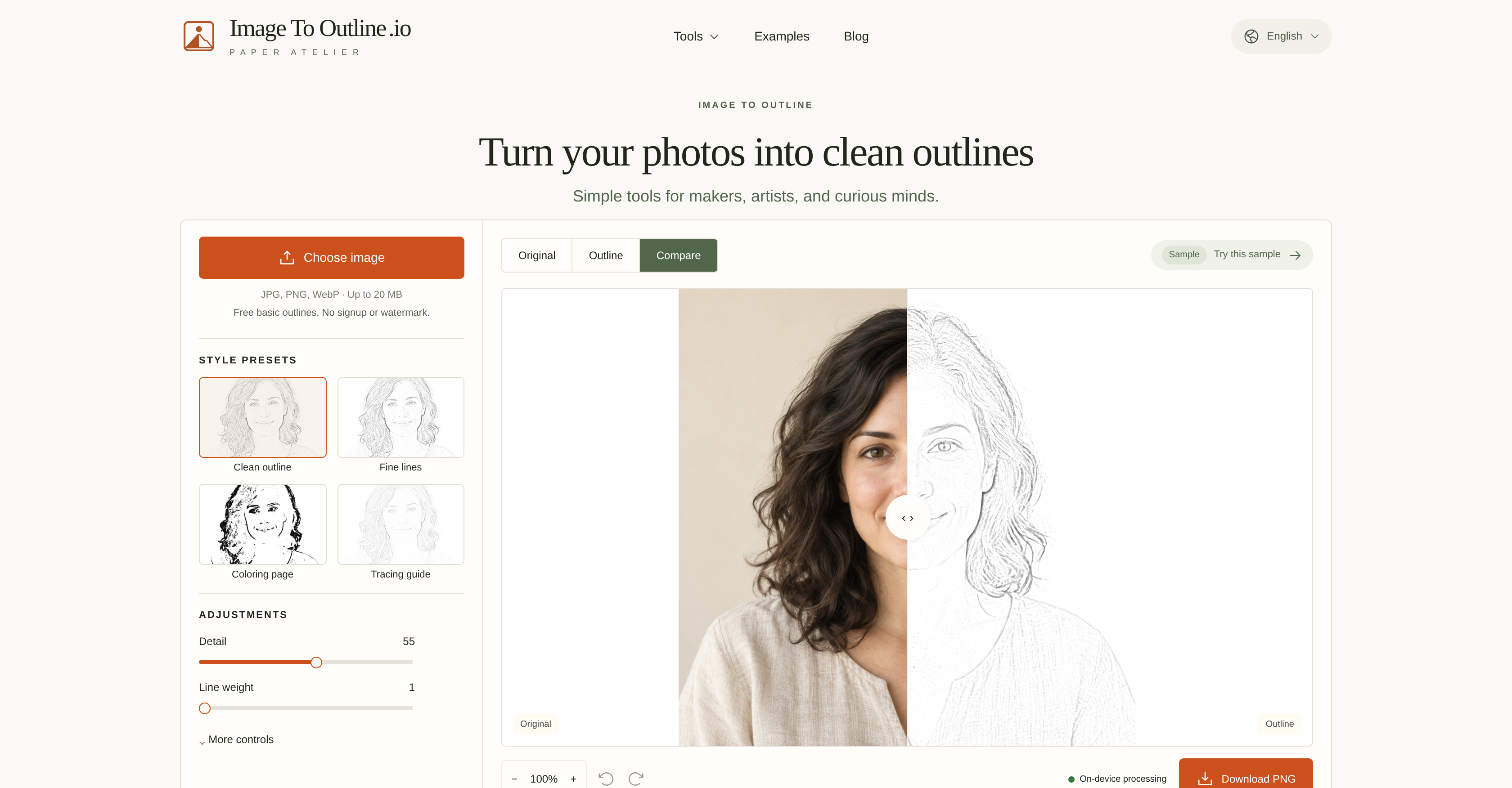
- Keep personal and client photos fully private: your photo-to-line-art conversion runs locally in the browser, so source images and edits never leave your device or reach a server.
- Create ready-to-color pages for kids, classrooms, and hobby projects: the Coloring page preset removes small details, strengthens edges, and opens up large white areas for easy coloring.
- Get drawing references you can follow with pen or pencil: the Tracing guide preset produces clearer continuous strokes, Clean outline gives simple high-contrast contours, and Fine lines keeps texture for richer line drawings.
- Match the outline style to your project without starting over: sliders for detail, line weight, outline color, and transparency let you adjust any preset after it's applied.
- Print without resizing or layout work: printable single-page PDFs come sized for A4 or US Letter, fitted to the page with 10 mm margins and a white background.
- Drop outlines straight into graphic designs and digital crafts: PNG downloads export with a transparent background by default, ready to layer over other artwork.
- Add sticker-style borders to cutout images: the Add Outline to PNG function wraps a colored stroke around visible pixels in transparent PNGs, with adjustable stroke width and padding.
- Deliver clean, distraction-free results from imperfect photos: crop and rotate before converting, compare original against outline with zoom, and erase stray lines and marks afterward.
- Convert images anytime, anywhere, at zero cost: no signup, no fees, no watermarks, support for JPG, PNG, and WebP files up to 20 MB, offline use once the page loads, and full support for phone browsers.
Pros & Cons
From the listing; not yet checked by our editors.
Pros
- Clientside processing, no upload
- Supports JPG, PNG, WebP
- Adjustable line weight slider
- Coloring page preset suppresses details
- Transparent PNG export with alpha
- Singlepage printable PDF A4/Letter
- Multilingual UI
- Eraser tool removes marks
- Originaloutline sidebyside view
- Zoom and rotate utilities
- Configurable PNG border stroke
- Preserves existing transparency
- No watermark, free download
- No signup required
- Handles up to 20MB images
- Crop before conversion
- Detail level control
- Line smoothing algorithm
- Edge detection with simplification
- Fine lines retain texture
- Color suppression for coloring pages
- Raster export, not vector
- Sample images for testing
- Works offline in browser
- PDF includes margin guidance
- Adjustable line transparency
- Supports multiple languages
- Border padding configurable
- PNG export retains dimensions
- PDF autofits to page
- Tracing guide preset
- Fast clientside conversion
- Privacypreserving local processing
- Works on any modern browser
- No external plugins needed
- Download PNG or PDF
- Image size limit awareness UI
- Rotate image before outline
- Eraser works on outline layer
- Customizable line color
- Customizable PDF background color
- Supports portrait and square crops
- Export maintains source DPI
- Adjustable border stroke width
- Batch sample images available
- Transparent background handling
- Coloring page creates larger white areas
- Fine line preset keeps texture
- Tracing guide emphasizes edges
Cons
- No SVG export support
- 20MB image size cap
- Singlepage PDF only
- No batch processing capability
- Rectangular border on opaque
- Lacks automated background removal
- No cloud project storage
- Limited preset finetuning options
- Requires modern browser features
- No undo after reload
Alternatives to Image To Outline
Tools that share the most tags with Image To Outline.
- AI Line Art
Turn any photo into clean, professional line art for logos, tattoos, or fashion sketches using AI that extracts precise outlines instantly.
Paid · from $9.99/month
$9.99/month
Not yet checked
- Line Drawing Converter
Produce print-ready line art for stickers and posters using the bold style that generates thick, standout strokes.
Free trial · from $5/month
$5/month
Not yet checked
- Formind
Turn any portrait, product, or pet photo into a clean line drawing instantly using AI-powered style conversion tailored to your chosen artistic direction.
Free trial · from $8.90/month
$8.90/month
Not yet checked
- EzRemove
Browser tool that removes the background from a photo and returns a transparent PNG.
Freemium
Not listed
Nov 24, 2026
- Playground AI
Transform text descriptions into photorealistic images and unique artwork instantly using AI-powered text prompts
Freemium · from $12/month
$12/month
Not yet checked
- daisy | LinkedInPro
Create professional headshots from everyday photos without expensive studio sessions using AI-powered photo transformation
Freemium · from $2.50
$2.50
Not yet checked
Reviews
Rate this tool
Loading reviews...
Frequently asked questions
What’s the maximum file size Image To Outline will accept?
Up to 20 MB per image.
Can I run Image To Outline on my phone’s browser or does it need a desktop?
It runs in any modern browser, so you can use it on a phone’s browser as well as on a desktop.
Does Image To Outline ever upload my photos to a server?
No. All image processing stays on the user’s device; photos are never uploaded to a server.
What’s the practical difference between the Clean outline and Fine lines presets in Image To Outline?
Clean outline produces a simple, high‑contrast contour with minimal detail, while Fine lines retains more texture and finer details for a richer line drawing.
How do I tweak the line weight after picking a preset in Image To Outline?
After selecting a preset, use the “Line weight” slider in the adjustments panel to increase or decrease the stroke thickness.
Can I change the outline color in Image To Outline, or is it always black?
Yes. The adjustments panel includes a color control that lets you change the outline color from the default black.
When I download a PNG from Image To Outline, is the background automatically transparent?
Yes. Downloaded PNGs have a transparent background by default.
How do I export a PDF with proper margins and fit‑to‑page settings from Image To Outline?
Choose the PDF download option; the generated PDF is sized for A4 or US Letter and automatically includes 10 mm margins and a white background, fitting the outline to the page as described in the printing guidance.