

Interview Coder
Overview
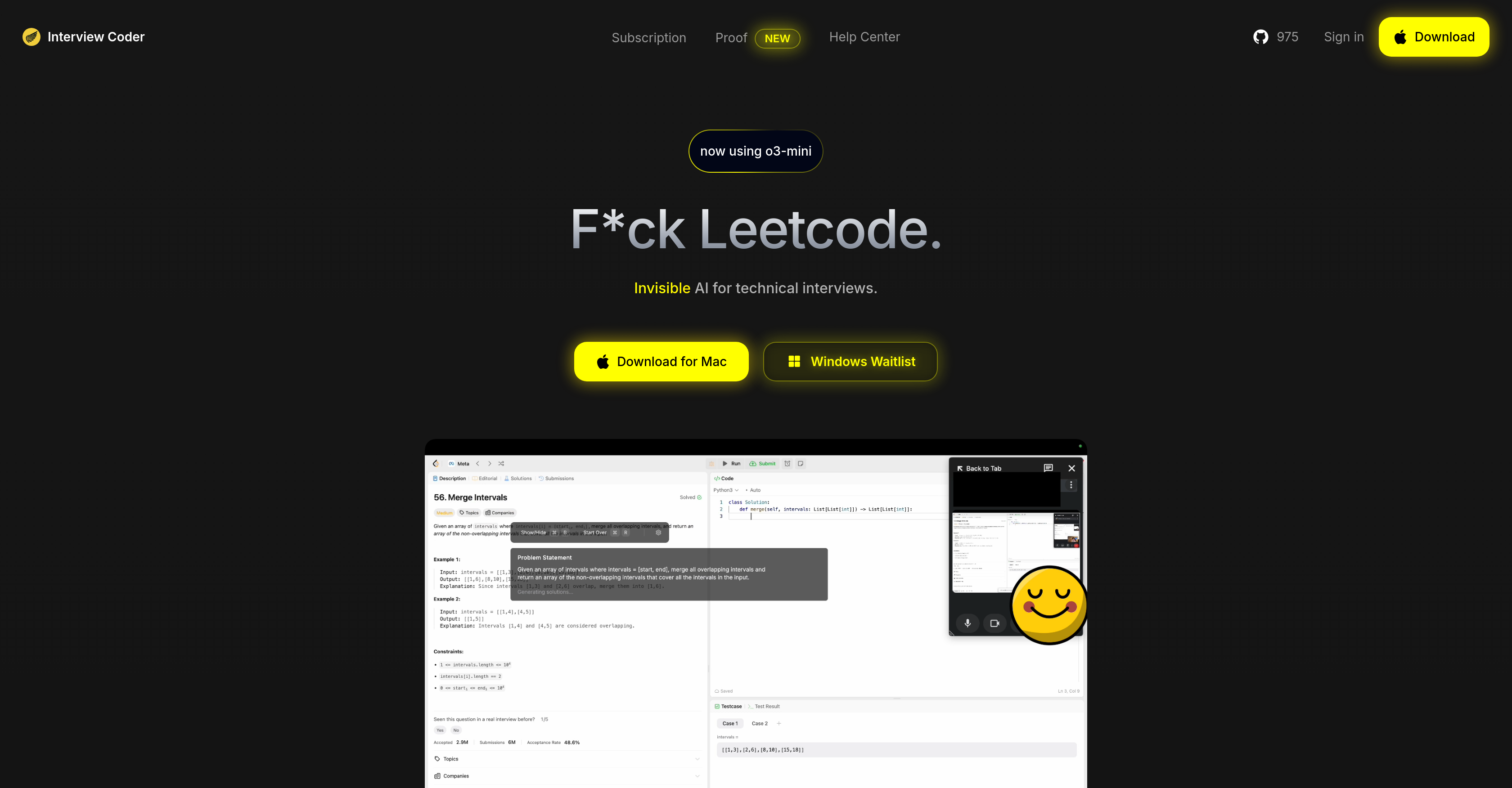
- Solve any Leetcode problem instantly by capturing screenshots with quick keyboard commands
- Debug and optimize your existing code with AI-powered before-and-after comparisons
- Master time and space complexity optimization through detailed solution explanations
- Work efficiently during interviews with dedicated Problem and Solution modes
- Maintain complete focus with an undetectable application that runs seamlessly in the background
Pros & Cons
Pros
- Desktop application
- Generates solutions to problems
- Provides detailed explanations
- Allows screenshot captures
- Equipped with key combinations
- Code debugging feature
- Code optimization feature
- Displays code comparisons
- Optimizes time complexity
- Optimizes space complexity
- Subscription-based service
- Controlled with keyboard commands
- Different mode commands
- Mac compatibility
- Windows version waitlist
- Undetectable design
- Supports multiple programming languages
- Problem mode feature
- Solution mode feature
- Works with captured screenshots
- Optimizes existing solutions
- Convenient window movement
- Reset function available
- Quit application command
- Offers user proof
- Easy to use interface
- Offers language complexity
- Generates initial solutions
- Easy to remember commands
- Ability to hide/show
- Facilitates code comparisons
- User support available
- O3-mini in use
- Captures up to 5 screenshots
- Accounts creation supported
- Instant access post-subscription
- Commands for window control
- Complete application reset
- Removes all functionalities on quit
- Maximized undetectability
- Supports all skill levels
- Offers bug support
- Offers Leetcode interviews assistance
- Help center available
- Detailed guides and support
- Short way offered
- Contact support available
- Refund policy available
- Cancellation policy available
- Downloadable software
Cons
- Desktop application only
- Mac exclusive, Windows waitlisted
- Subscription-based payment
- Capture solutions via screenshots
- Requires keyboard command familiarity
- Unclear detection prevention methods
- Limited optimization details
- Lack of mobile compatibility
- Unclear programming languages support
- Potential undetectability issues
Reviews
Rate this tool
Loading reviews...
❓ Frequently Asked Questions
Interview Coder is a subscription-based desktop application designed to aid users in acing technical Leetcode interviews. It incorporates AI functionality to generate solutions for given problems with detailed explanations, optimize existing code, and provide insights into optimizing time and space complexities.
Interview Coder uses AI functionality to automatically generate solutions to coding problems. Users capture screenshots of their problem, press a key combination, and the application generates comprehensive solutions evaluated and enhanced by the AI.
Key features of Interview Coder include the ability to generate AI-based solutions with explanations, debugging and optimization of user's code with before and after comparisons, control with keyboard commands, different operation modes such as Problem Mode and Solution Mode, and a subscription-based model. The software is undetectable and supports various programming languages.
Users can optimize their code using Interview Coder by taking extra screenshots of their code and pressing a designated key combination. The AI performs the debugging and optimization, providing a before-and-after comparison along with detailed explanations about the changes.
Users can capture screenshots in Interview Coder by pressing a key combination (⌘ + H). Up to 5 screenshots can be saved and displayed in the application.
Interview Coder offers two operation modes - Problem Mode and Solution Mode. In Problem Mode, users can capture screenshots of an interview problem and generate initial solutions. In Solution Mode, users can take screenshots of their code to receive optimization suggestions and debugging support.
In Interview Coder, users can toggle between Problem Mode and Solution Mode using specific keyboard commands. Problem Mode is activated by capturing screenshots of a problem, and Solution Mode is activated by taking screenshots of the user's code.
Interview Coder helps manage time and space complexities by not only producing solutions but also offering insights and suggestions on how to optimize these complexities. For instance, its AI can detect when a solution uses nested loops that result in a higher time complexity and suggest using a hash map instead to reduce time complexity to linear, at the cost of increased space complexity.
As of now, Interview Coder is only available for Mac. However, a Windows version is on the waitlist.
Interview Coder supports multiple programming languages although the specific languages are not explicitly mentioned on their website.
Interview Coder is designed to be undetectable, allowing users to utilize it during interviews without detection. However, the details of how its undetectability feature works are not mentioned on their website.
The monthly subscription cost for Interview Coder is $20.
Interview Coder is offered only as a desktop application since this allows users to conveniently capture screenshots, optimize their code, and interact with the software on the same platform where they conduct their coding interviews.
Yes, Interview Coder does provide comprehensive explanations for the solutions it generates. These explanations help the user understand how the solution addresses the issue and provides insights for optimizing time and space complexities.
Interview Coder aids in passing Leetcode interviews by offering a convenient tool for generating solutions to coding problems. Its AI functionality evaluates and enhances these solutions, providing detailed explanations and performance optimization suggestions.
Users can control Interview Coder functionalities with keyboard commands. There are designated commands available to switch between presentation modes, capture screenshots, generate solutions, debug and optimize codes, and navigate the application window.
For Problem Mode, users can use '⌘ + H' to capture screenshots of the problem, and '⌘ + ↵' to generate solutions. For Solution Mode, '⌘ + H' takes screenshots of the code, and '⌘ + ↵' debugs and optimizes the code. A range of other keyboard shortcuts are also available such as '⌘ + B' to hide/show the Interview Coder window and '⌘ + Q' to quit the application.
Interview Coder optimizes existing user's code by evaluating the initial solution, recognizing inefficient parts of the code, and rewriting these parts to increase efficiency. The application provides a comparison between the original and optimized code alongside a detailed explanation of the changes made.
Users can debug their codes with Interview Coder by taking additional screenshots of their code and pressing a designated key combination. The AI then evaluates the screenshots and provides optimized code with detailed descriptions of the adjustments made for debugging.
Interview Coder can significantly aid in acing technical interviews by generating solutions to technical problems, providing detailed explanations, and optimizing code for efficiency. It can significantly reduce time solving complex problems and optimize code for efficient performance.
Pricing
Pricing model
Paid
Paid options from
$20/month
Billing frequency
Monthly
Refund policy
Users can request a refund within 24 hours only if video evidence proves the software does not work on their computer. Issues like detection by screen-sharing or slowness are not refundable.
Related Videos
How to Use Interview Coder
Cluely•154.0K views•Feb 8, 2025
