

iScanner
Transform any paper into a crisp, professional PDF instantly with AI-powered automatic cropping, distortion correction, and background cleanup
Listing not yet reviewed by our editors · How we check
Overview
- Transform any paper into a crisp, professional PDF instantly with AI-powered automatic cropping, distortion correction, and background cleanup
- Convert scanned text into editable documents you can copy, paste, and search using OCR that recognizes 23 languages
- Sign contracts and annotate PDFs on the go with built-in e-signature integration, watermarking, and annotation tools
- Solve math problems and count objects in real-time using the dedicated math mode and AI-powered object counter
- Create 3D room plans and calculate surface areas for projects using the specialized area measurement mode
- Merge, split, reorder, and manage PDF pages with a full suite of document editing tools in your pocket
- Access and edit your scanned documents from any device, with files safely synced and backed up using free cloud storage
Pros & Cons
From the listing; not yet checked by our editors.
Pros
- Available on multiple platforms
- Auto cropping feature
- Distortion correction
- Smart filters for cleaning
- OCR capabilities
- Multilingual support
- Built-in math solver
- Object counting mode
- 3D planning and calculation
- E-signature integration
- Document editing suite
- PDF merging and splitting
- Page reordering
- Annotation and watermarking
- Add shapes or images
- Free cloud storage
- File management and sync
- Document backup features
- Inter-platform file access
- Auto document enhancement
- User-friendly interface
- Noise filter for scans
- Cross-platform sync
- High performance scanning
- Privacy and security
- Website file management
- Edit or hide text
- Insert images to scans
- Extract text live
- Add page numbers
- Convert other formats
- Merge and split PDFs
- All-in-1 Free Document Editor
- Mobile and desktop access
- File backup on cloud
- Wide language OCR support
- Mobile-first approach
- Improve quality of scans
- Scans into professional PDFs
- Automatic rectangular cropping
- Access files with ease
- Transform paper into digital
- US-based scanning platform
- Professional document transformation
- Area calculation tool
- OCR in 23 languages
- High app store ratings
- E-sign, merge, split PDFs
- Skew and curve correction
Cons
- Limited OCR languages
- No Linux support
- No Windows support
- Lacks fax functionality
- No offline access
- No multi-user account
- Limited cloud storage
Alternatives to iScanner
Tools that share the most tags with iScanner.
- Doxis AI
Eliminate manual data entry and reduce processing turnaround times with AI-powered OCR and automated data extraction from invoices, forms, and IDs.
Not listed
Not listed
Not yet checked
- Docsumo
Eliminate manual data entry and its errors by automating extraction from complex layouts like tables and forms with AI that achieves 99% accuracy
Not listed
Not listed
Not yet checked
- SwiftScan
Create premium quality scans of documents, receipts, and whiteboards from anywhere using your phone's camera with automatic cropping and color optimization.
Freemium · from $4.99/month
$4.99/month
Not yet checked
- PromptLoop
Transform messy text into structured data instantly using a simple spreadsheet formula that works like SUM or VLOOKUP
Freemium · from $49/month
$49/month
Not yet checked
- SheetyAI
Create complex spreadsheet formulas instantly by describing your problem in plain English, eliminating the need to memorize syntax
Free
Not listed
Not yet checked
- SheetGod
Create complex Excel formulas and Google Sheets functions instantly by typing plain English instructions instead of memorizing syntax
Freemium · from $8/month
$8/month
Not yet checked
Related Videos
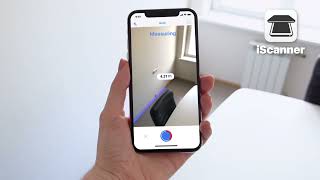
Using iScanner to quickly measure the area with an innovative feature improved by LiDAR!
BP Mobile · Aug 11, 2021
Reviews
Rate this tool
Loading reviews...
Frequently asked questions
What is iScanner?
iScanner is an AI-powered mobile application designed to scan documents and convert them into PDF format. It's available for both iPhone and Android platforms and provides users with a tool to transform any document into a digital format.
What are the key features of iScanner?
iScanner boasts multiple advanced features powered by AI technology. This includes automatic cropping, distortion correction, and smart filters for background noise clean-up. The app also provides optical character recognition (OCR) capabilities, with support for 23 different languages. Additional tools include a math mode for solving problems and equations, a count mode for counting items via the camera, an area mode for creating 3D plans and calculating surface areas, and E-signature integration. Document editing tools such as merging and splitting PDFs, reordering pages, annotation, watermarking, and adding shapes or images to scans are also available. Additionally, iScanner offers free cloud storage to manage, sync, and back up documents across different devices.
How does iScanner convert scans into editable text?
iScanner uses Optical Character Recognition (OCR) technology to convert scans into editable text. It's capable of recognizing text in 23 different languages.
What are the AI powered functions on iScanner?
The AI-powered functions of iScanner include automatic cropping, distortion correction, and smart filters for background noise clean-up. Additionally, the AI enables text recognition in different languages (OCR), counting objects via camera, creating 3D room plans, and solving mathematical problems or equations.
What kind of documents can iScanner scan?
iScanner can scan any document, converting it into a professional-looking digital format. These could include business documents, educational materials, administrative documents, or any other type of paper document.
What type of OCR capabilities does iScanner have?
iScanner has sophisticated OCR capabilities, able to recognize and convert text from scans into editable text. It supports text recognition in 23 different languages.
How does iScanner's document editing tools work?
iScanner provides an array of document editing tools such as merging and splitting PDFs, reordering pages within a document, annotating on documents, watermarking, and adding shapes or images to scans. These tools work by allowing users to manipulate elements within the scanned document according to their needs.
What is the purpose of the math mode on iScanner?
The math mode in iScanner is a useful tool for solving mathematical problems and equations. When in math mode, the application uses AI to recognize and solve mathematical equations, offering solutions directly in the app.